

背景
在開發工作中,會遇到一種場景,做完某一件事情以後,需要廣播一些消息或者通知,告訴其他的模塊進行一些事件處理,一般來説,可以一個一個發送請求去通知,但是有一種更好的方式,那就是事件監聽,事件監聽也是設計模式中 發佈-訂閲模式、觀察者模式的一種實現。
觀察者模式:簡單的來講就是你在做事情的時候身邊有人在盯着你,當你做的某一件事情是旁邊觀察的人感興趣的事情的時候,他會根據這個事情做一些其他的事,但是盯着你看的人必須要到你這裏來登記,否則你無法通知到他(或者説他沒有資格來盯着你做事情)。
對於 Spring 容器的一些事件,可以監聽並且觸發相應的方法。通常的方法有 2 種,ApplicationListener 接口和@EventListener 註解。
簡介
要想順利的創建監聽器,並起作用,這個過程中需要這樣幾個角色:
1、事件(event)可以封裝和傳遞監聽器中要處理的參數,如對象或字符串,並作為監聽器中監聽的目標。
2、監聽器(listener)具體根據事件發生的業務處理模塊,這裏可以接收處理事件中封裝的對象或字符串。
3、事件發佈者(publisher)事件發生的觸發者。
ApplicationListener 接口
ApplicationListener 接口的定義如下:
public interface ApplicationListener<E extends ApplicationEvent> extends EventListener {

/**
* Handle an application event.
* @param event the event to respond to
*/
void onApplicationEvent(E event);
}
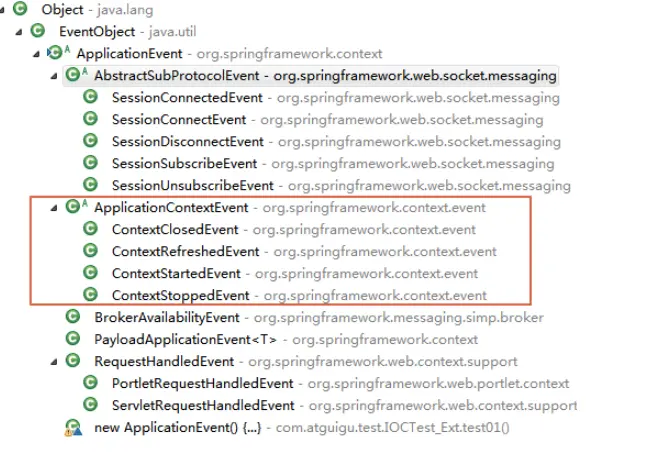
它是一個泛型接口,泛型的類型必須是 ApplicationEvent 及其子類,只要實現了這個接口,那麼當容器有相應的事件觸發時,就能觸發 onApplicationEvent 方法。ApplicationEvent 類的子類有很多,Spring 框架自帶的如下幾個。
簡單使用
使用方法很簡單,就是實現一個 ApplicationListener 接口,並且將加入到容器中就行。
@Component
public class MyApplicationListener implements ApplicationListener<ApplicationEvent> {

@Override
public void onApplicationEvent(ApplicationEvent event) {
  System.out.println("事件觸發:"+event.getClass().getName());
}
然後啓動自己的springboot項目:
@SpringBootApplication
public class ApplicationListenerDemoApplication {

    public static void main(String[] args) {
        SpringApplication.run(ApplicationListenerDemoApplication.class, args);
    }
}
可以看到控制枱輸出:
事件觸發:org.springframework.context.event.ContextRefreshedEvent
2021-01-24 22:09:20.113  INFO 9228 --- [           main] o.s.b.w.embedded.tomcat.TomcatWebServer  : Tomcat started on port(s): 8080 (http) with context path ''
事件觸發:org.springframework.boot.web.servlet.context.ServletWebServerInitializedEvent
2021-01-24 22:09:20.116  INFO 9228 --- [           main] c.n.ApplicationListenerDemoApplication   : Started ApplicationListenerDemoApplication in 1.221 seconds (JVM running for 1.903)
事件觸發:org.springframework.boot.context.event.ApplicationStartedEvent
事件觸發:org.springframework.boot.context.event.ApplicationReadyEvent
這樣就觸發了spring默認的一些事件。
自定義事件以及監聽
定義事件
首先,我們需要定義一個時間(MyTestEvent),需要繼承Spring的ApplicationEvent
public class MyTestEvent extends ApplicationEvent{
    /**
     *
     */
    private static final long serialVersionUID = 1L;

    private String msg ;

    public MyTestEvent(Object source,String msg) {
        super(source);
        this.msg = msg;
    }

    public String getMsg() {
        return msg;
    }

    public void setMsg(String msg) {
        this.msg = msg;
    }
}
定義監聽器
需要定義一下監聽器,自己定義的監聽器需要實現ApplicationListener,同時泛型參數要加上自己要監聽的事件Class名,在重寫的方法onApplicationEvent中,添加自己的業務處理:
@Component
public class MyNoAnnotationListener implements ApplicationListener<MyTestEvent> {

    @Override
    public void onApplicationEvent(MyTestEvent event) {
        System.out.println("非註解監聽器:" + event.getMsg());
    }

}
事件發佈
有了事件,有了事件監聽者,那麼什麼時候觸發這個事件呢?每次想讓監聽器收到事件通知的時候,就可以調用一下事件發佈的操作。首先在類裏自動注入了ApplicationEventPublisher,這個也就是我們的ApplicationCOntext,它實現了這個接口。
@Component
public class MyTestEventPubLisher {
    @Autowired
    private ApplicationEventPublisher applicationEventPublisher;

    /**
     *  事件發佈方法
      */
    public void pushListener(String msg) {
        applicationEventPublisher.publishEvent(new MyTestEvent(this, msg));
    }

}
測試
用一個HTTP請求來模擬:
@RestController
public class TestEventListenerController {

    @Autowired
    private MyTestEventPubLisher publisher;

    @RequestMapping(value = "/test/testPublishEvent1" )
    public void testPublishEvent(){
        publisher.pushListener("我來了!");
    }
}
啓動項目,可以看到控制枱輸出,測試完成:
事件觸發:com.njit.personal.unannotation.MyTestEvent
非註解監聽器:我來了!
@EventListener 註解
簡單使用
除了通過實現接口,還可以使用@EventListener 註解,實現對任意的方法都能監聽事件。
在任意方法上標註@EventListener 註解,指定 classes,即需要處理的事件類型,一般就是 ApplicationEven 及其子類,可以設置多項。
@Configuration
public class Config {
    @EventListener(classes = {ApplicationEvent.class})
    public void listen(ApplicationEvent event) {
        System.out.println("事件觸發:" + event.getClass().getName());
    }
}
啓動項目
可以看到控制枱和之前的輸出是一樣的:
事件觸發:org.springframework.context.event.ContextRefreshedEvent
2021-01-24 22:39:13.647  INFO 16072 --- [           main] o.s.b.w.embedded.tomcat.TomcatWebServer  : Tomcat started on port(s): 8080 (http) with context path ''
事件觸發:org.springframework.boot.web.servlet.context.ServletWebServerInitializedEvent
2021-01-24 22:39:13.650  INFO 16072 --- [           main] c.n.ApplicationListenerDemoApplication   : Started ApplicationListenerDemoApplication in 1.316 seconds (JVM running for 2.504)
事件觸發:org.springframework.boot.context.event.ApplicationStartedEvent
事件觸發:org.springframework.boot.context.event.ApplicationReadyEvent
自定義事件以及監聽
使用註解的好處是不用每次都去實現ApplicationListener,可以在一個class中定義多個方法,用@EventListener來做方法級別的註解。
和上面類似,事件以及事件發佈不需要改變,只要這樣定義監聽器即可。
@Component
public class MyAnnotationListener {

    @EventListener
    public void listener1(MyTestEvent event) {
        System.out.println("註解監聽器1:" + event.getMsg());
    }
}
此時,就可以有一個發佈,兩個監聽器監聽到發佈的消息了,一個是註解方式,一個是非註解方式
結果:
事件觸發:com.njit.personal.unannotation.MyTestEvent
註解監聽器1:我來了!
非註解監聽器:我來了!
我們可以發現,註解形式的監聽器的執行走在了非註解的前面。
原理
其實上面添加@EventListener註解的方法被包裝成了ApplicationListener對象,上面的類似於下面這種寫法,這個應該比較好理解。
@Component
public class MyAnnotationListener implements ApplicationListener<MyTestEvent> {

    @Override
    public void onApplicationEvent(MyTestEvent event) {
         System.out.println("註解監聽器1:" + event.getMsg());
    }
}
那麼Spring是什麼時候做這件事的呢?
查看SpringBoot的源碼,找到下面的代碼,因為我是Tomcat環境,這裏創建的ApplicationContext是org.springframework.bootweb.servlet.context.AnnotationConfigServletWebServerApplicationContext
protected ConfigurableApplicationContext createApplicationContext() {
        Class<?> contextClass = this.applicationContextClass;
        if (contextClass == null) {
            try {
                switch (this.webApplicationType) {
                case SERVLET:
                    contextClass = Class.forName(DEFAULT_SERVLET_WEB_CONTEXT_CLASS);
                    break;
                case REACTIVE:
                    contextClass = Class.forName(DEFAULT_REACTIVE_WEB_CONTEXT_CLASS);
                    break;
                default:
                    contextClass = Class.forName(DEFAULT_CONTEXT_CLASS);
                }
            }
            catch (ClassNotFoundException ex) {
                throw new IllegalStateException(
                        "Unable create a default ApplicationContext, " + "please specify an ApplicationContextClass",
                        ex);
            }
        }
        return (ConfigurableApplicationContext) BeanUtils.instantiateClass(contextClass);
    }
他的構造方法如下:
public AnnotationConfigServletWebServerApplicationContext() {
        this.reader = new AnnotatedBeanDefinitionReader(this);
        this.scanner = new ClassPathBeanDefinitionScanner(this);
}進到AnnotatedBeanDefinitionReader裏面
public AnnotatedBeanDefinitionReader(BeanDefinitionRegistry registry, Environment environment) {
        Assert.notNull(registry, "BeanDefinitionRegistry must not be null");
        Assert.notNull(environment, "Environment must not be null");
        this.registry = registry;
        this.conditionEvaluator = new ConditionEvaluator(registry, environment, null);
        AnnotationConfigUtils.registerAnnotationConfigProcessors(this.registry);
}再進到AnnotationConfigUtils的方法裏面,省略了一部分代碼,可以看到他註冊了一個EventListenerMethodProcessor類到工廠了。這是一個BeanFactory的後置處理器。
public static Set<BeanDefinitionHolder> registerAnnotationConfigProcessors(
            BeanDefinitionRegistry registry, @Nullable Object source) {

        DefaultListableBeanFactory beanFactory = unwrapDefaultListableBeanFactory(registry);
    ......
    .....
    ......

    if (!registry.containsBeanDefinition(EVENT_LISTENER_PROCESSOR_BEAN_NAME)) {
            RootBeanDefinition def = new RootBeanDefinition(EventListenerMethodProcessor.class);
            def.setSource(source);
            beanDefs.add(registerPostProcessor(registry, def, EVENT_LISTENER_PROCESSOR_BEAN_NAME));
        }

    ......
    ......

        return beanDefs;
}查看這個BeanFactory的後置處理器EventListenerMethodProcessor,下面方法,他會遍歷所有bean,找到其中帶有@EventListener的方法,將它包裝成ApplicationListenerMethodAdapter,註冊到工廠裏,這樣就成功註冊到Spring的監聽系統裏了。
    @Override
    public void afterSingletonsInstantiated() {
        ConfigurableListableBeanFactory beanFactory = this.beanFactory;
        Assert.state(this.beanFactory != null, "No ConfigurableListableBeanFactory set");
        String[] beanNames = beanFactory.getBeanNamesForType(Object.class);
        for (String beanName : beanNames) {
            if (!ScopedProxyUtils.isScopedTarget(beanName)) {
                Class<?> type = null;
                try {
                    type = AutoProxyUtils.determineTargetClass(beanFactory, beanName);
                }
                catch (Throwable ex) {
                    // An unresolvable bean type, probably from a lazy bean - let's ignore it.
                    if (logger.isDebugEnabled()) {
                        logger.debug("Could not resolve target class for bean with name '" + beanName + "'", ex);
                    }
                }
                if (type != null) {
                    if (ScopedObject.class.isAssignableFrom(type)) {
                        try {
                            Class<?> targetClass = AutoProxyUtils.determineTargetClass(
                                    beanFactory, ScopedProxyUtils.getTargetBeanName(beanName));
                            if (targetClass != null) {
                                type = targetClass;
                            }
                        }
                        catch (Throwable ex) {
                            // An invalid scoped proxy arrangement - let's ignore it.
                            if (logger.isDebugEnabled()) {
                                logger.debug("Could not resolve target bean for scoped proxy '" + beanName + "'", ex);
                            }
                        }
                    }
                    try {
                        processBean(beanName, type);
                    }
                    catch (Throwable ex) {
                        throw new BeanInitializationException("Failed to process @EventListener " +
                                "annotation on bean with name '" + beanName + "'", ex);
                    }
                }
            }
        }
    }


private void processBean(final String beanName, final Class<?> targetType) {
        if (!this.nonAnnotatedClasses.contains(targetType) &&
                !targetType.getName().startsWith("java") &&
                !isSpringContainerClass(targetType)) {

            Map<Method, EventListener> annotatedMethods = null;
            try {
                annotatedMethods = MethodIntrospector.selectMethods(targetType,
                        (MethodIntrospector.MetadataLookup<EventListener>) method ->
                                AnnotatedElementUtils.findMergedAnnotation(method, EventListener.class));
            }
            catch (Throwable ex) {
                // An unresolvable type in a method signature, probably from a lazy bean - let's ignore it.
                if (logger.isDebugEnabled()) {
                    logger.debug("Could not resolve methods for bean with name '" + beanName + "'", ex);
                }
            }

            if (CollectionUtils.isEmpty(annotatedMethods)) {
                this.nonAnnotatedClasses.add(targetType);
                if (logger.isTraceEnabled()) {
                    logger.trace("No @EventListener annotations found on bean class: " + targetType.getName());
                }
            }
            else {
                // Non-empty set of methods
                ConfigurableApplicationContext context = this.applicationContext;
                Assert.state(context != null, "No ApplicationContext set");
                List<EventListenerFactory> factories = this.eventListenerFactories;
                Assert.state(factories != null, "EventListenerFactory List not initialized");
                for (Method method : annotatedMethods.keySet()) {
                    for (EventListenerFactory factory : factories) {
                        if (factory.supportsMethod(method)) {
                            Method methodToUse = AopUtils.selectInvocableMethod(method, context.getType(beanName));
                            ApplicationListener<?> applicationListener =
                                    factory.createApplicationListener(beanName, targetType, methodToUse);
                            if (applicationListener instanceof ApplicationListenerMethodAdapter) {
                                ((ApplicationListenerMethodAdapter) applicationListener).init(context, this.evaluator);
                            }
                            context.addApplicationListener(applicationListener);
                            break;
                        }
                    }
                }
                if (logger.isDebugEnabled()) {
                    logger.debug(annotatedMethods.size() + " @EventListener methods processed on bean '" +
                            beanName + "': " + annotatedMethods);
                }
            }
        }
}由方法生成Listener的邏輯由EventListenerFactory完成的,這又分為兩種,一種是普通的@EventLintener 另一種是@TransactionalEventListener ,是由兩個工廠處理的。
總結
上面介紹了@EventListener的原理,其實上面方法裏還有一個@TransactionalEventListener註解,其實原理是一模一樣的,只是這個監聽者可以選擇在事務完成後才會被執行,事務執行失敗就不會被執行。
這兩個註解的邏輯是一模一樣的,並且@TransactionalEventListener本身就被標記有@EventListener,
只是最後生成監聽器時所用的工廠不一樣而已。
參考
spring中監聽器的使用
@EventListener註解原理
