

使用ucharts開發時遇到圖例錯位的情況,小程序正常,app上有問題。
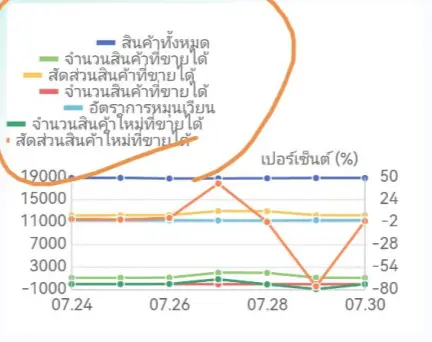
排查之後,鎖定罪魁禍首是u-charts.js裏面的這段代碼。APP計算文字寬度時,匹配不到諸如泰語等文字,字符默認與漢字同寬度。
function measureText(text, fontSize, context) {
  var width = 0;
  text = String(text);
  // #ifdef MP-ALIPAY || MP-BAIDU || APP-NVUE
  context = false;
  // #endif
  if (context !== false && context !== undefined && context.setFontSize && context.measureText) {
    context.setFontSize(fontSize);
    return context.measureText(text).width;
  } else {
    var text = text.split('');
    for (let i = 0; i < text.length; i++) {
      let item = text[i];
      if (/[a-zA-Z]/.test(item)) {
        width += 7;
      } else if (/[0-9]/.test(item)) {
        width += 5.5;
      } else if (/\./.test(item)) {
        width += 2.7;
      } else if (/-/.test(item)) {
        width += 3.25;
      } else if (/:/.test(item)) {
        width += 2.5;
      } else if (/[\u4e00-\u9fa5]/.test(item)) {
        width += 10;
      } else if (/\(|\)/.test(item)) {
        width += 3.73;
      } else if (/\s/.test(item)) {
        width += 2.5;
      } else if (/%/.test(item)) {
        width += 8;
      } else {
        width += 10;
      }
    }
    return width * fontSize / 10;
  }
}
然而,這些無法匹配的文字寬度遠沒有漢字寬。測試下發現,差距相當離譜。
let item = 'การปรับปรุงล้มเหลว'
console.log(item.length) // 18
let item2 = '我要寫十八個字一二三四五六七八九十零'
console.log(item.length) // 18
const canvas = document.createElement('canvas')
const context = canvas.getContext('2d')
context.font = 'bold 12pt arial'
console.log(context.measureText(item).width) // 142.671875
console.log(context.measureText(item2).width) // 288
解決方案我想到兩種,一種是直接圖例左對齊,簡單粗暴。另一種是修改源碼,針對目標語言匹配計算適當寬度。
