1 環境準備
1.1 編譯環境準備
-
1)配置編譯環境的幾大要素:
- (1)OS 平台選擇基於微軟的 WSL(Windows Subsystem for Linux)的 Ubuntu 22.04(見其它文章);
- (2)讀卡器+內存卡識別採用 usbipd(見其它文章);
- (3)交叉編譯工具鏈採用 arm-linux-gnueabihf-gcc;
-
2)WSL 和 usbipd 見其它文章,這裏僅記錄交叉編譯工具鏈的配置:
# 安裝其它工具庫 apt-get install build-essential libncurses5-dev u-boot-tools qemu-user-static \ debootstrap git binfmt-support libusb-1.0-0-dev pkg-config # (1)卸載原來的工具鏈 apt-get remove gcc-arm-linux-gnueabi* # (2)下載工具鏈(可任選一個下載) wget https://releases.linaro.org/components/toolchain/binaries/4.9-2017.01/arm-linux-gnueabihf/gcc-linaro-4.9.4-2017.01-x86_64_arm-linux-gnueabihf.tar.xz wget https://releases.linaro.org/components/toolchain/binaries/5.5-2017.10/arm-linux-gnueabihf/gcc-linaro-5.5.0-2017.10-x86_64_arm-linux-gnueabihf.tar.xz wget https://releases.linaro.org/components/toolchain/binaries/6.5-2018.12/arm-linux-gnueabihf/gcc-linaro-6.5.0-2018.12-x86_64_arm-linux-gnueabihf.tar.xz wget https://releases.linaro.org/components/toolchain/binaries/7.5-2019.12/arm-linux-gnueabihf/gcc-linaro-7.5.0-2019.12-x86_64_arm-linux-gnueabihf.tar.xz # (3)解壓 mkdir /usr/local/arm tar -xvf gcc-linaro-4.9.4-2017.01-x86_64_arm-linux-gnueabihf.tar.xz -C /usr/local/arm tar -xvf gcc-linaro-5.5.0-2017.10-x86_64_arm-linux-gnueabihf.tar.xz -C /usr/local/arm tar -xvf gcc-linaro-6.5.0-2018.12-x86_64_arm-linux-gnueabihf.tar.xz -C /usr/local/arm tar -xvf gcc-linaro-7.5.0-2019.12-x86_64_arm-linux-gnueabihf.tar.xz -C /usr/local/arm # (4)配置環境變量,在 /root/.bashrc 文件中添加: #export PATH=$PATH:gcc-linaro-4.9.4-2017.01-x86_64_arm-linux-gnueabihf/bin #export PATH=$PATH:gcc-linaro-5.5.0-2017.10-x86_64_arm-linux-gnueabihf/bin #export PATH=$PATH:gcc-linaro-6.5.0-2018.12-x86_64_arm-linux-gnueabihf/bin export PATH=$PATH:gcc-linaro-7.5.0-2019.12-x86_64_arm-linux-gnueabihf/bin # (5)使工具鏈的環境變量生效 cd && source ~/.bashrc # (6)測試 arm-linux-gnueabihf-gcc -v Using built-in specs. COLLECT_GCC=arm-linux-gnueabihf-gcc ...... gcc version 7.5.0 (Linaro GCC 7.5-2019.12) - 上面分別列出了 gcc 的 4.9、5.5、6.5、7.5 版本,根據自己要編譯的源碼選擇對應的版本,
比如 linux-sunxi 基於 linux-3.4 所以要選擇 gcc 4.9 版本,而這裏我們要編譯 linux 的
主線版本,所以選擇 gcc 的最新版本 7.5 -
通過修改 .bashrc 切換 gcc 版本時可能會遇到不生效的情況。原因是 $PATH 的內容會被繼
承,我們可以通過將 /usr/local/arm 下的舊 gcc 換個名字,然後重啓下系統解決。 -
3)配置結果:
[root@Chris] [2024-09-13 14:44:07] # [~] :
-> cat /etc/os-release
PRETTY_NAME="Ubuntu 22.04.4 LTS"
NAME="Ubuntu"
VERSION_ID="22.04"
VERSION="22.04.4 LTS (Jammy Jellyfish)"
......

[root@Chris] [2024-09-13 14:44:16] # [~] :
-> lsusb
Bus 002 Device 002: ID 067b:2731 Prolific Technology, Inc. USB SD Card Reader

[root@Chris] [2024-09-13 14:44:19] # [~] :
-> lsblk
NAME   MAJ:MIN RM   SIZE RO TYPE MOUNTPOINTS
......
sdd      8:48   1  29.1G  0 disk
├─sdd1   8:49   1    64M  0 part
└─sdd2   8:50   1  29.1G  0 part

[root@Chris] [2024-09-13 14:44:20] # [~] :
-> arm-linux-gnueabihf-gcc -v
Using built-in specs.
COLLECT_GCC=arm-linux-gnueabihf-gcc
......
gcc version 7.5.0 (Linaro GCC 7.5-2019.12)
1.2 主線源碼準備
源碼可以從其官方網站下載壓縮包,但是我更推薦通過 git 倉庫下載。原因有兩個:
一個是方便切換源碼版本;另外就是方便隨時查看修改內、還原錯誤修改。
1.2.1 linux 源碼
-
1)linux 源碼:3 個倉庫任選其一
# linux 源碼倉庫在 gitlab、github 上由 Linus Torvalds 維護
git clone https://git.kernel.org/pub/scm/linux/kernel/git/torvalds/linux.git
git clone https://github.com/torvalds/linux.git

# 由於 github 連接不穩定等原因,我們可以通過其它方式獲取源碼 —— 由 Gitee 官方
# 提供的 Linux 源碼的鏡像倉庫,每天同步一次。
git clone https://gitee.com/mirrors/Linux.git


# 由於這次編譯主要是為了支持 Tenda 的 aic8800 無線網卡,其支持的內核版本為 V3.10-V6.2,
# 目前(2024.9.13)最新的 v6.1 版本為 v6.1-rc8,所以這裏選擇 v6.1-rc8 版本。

# 查看內核版本分支
git branch -a       # 查看所有分支
git fetch --tags    # 獲取最新標籤
git tag | grep v6   # 查看並篩選標籤名
# 根據標籤創建分支
git checkout tags/v6.1-rc8

# 已經做了修改,又需要在內核源碼分支間切換時,可以使用 git stash,如:
# git stash [save "message"]    # 將未提交的更改保存到暫存區,並指定名稱為 message(可省略)
# git stash pop                 # 恢復暫存區的更改
1.2.2 U-Boot 源碼
-
1)u-boot 源碼:2 個倉庫任選其一
# 同理,u-boot 源碼也提供兩個倉庫地址,任選一個即可
# github 倉庫
git clone https://github.com/u-boot/u-boot.git
# gitee 鏡像倉庫
git clone https://gitee.com/mirrors/u-boot.git
1.2.3 啓動文件 boot.scr
-
1)新建 boot.cmd 文件,並輸入以下內容:
setenv stdout serial,hdmi setenv stderr serial,hdmi fatload mmc 0 0x46000000 uImage fatload mmc 0 0x49000000 sun7i-a20-cubieboard2.dtb setenv bootargs console=ttyS0,115200 rw [earlyprintk] root=/dev/mmcblk0p2 rootwait panic=10 ${extra} bootm 0x46000000 - 0x49000000 - 2)在上述內容的設置 bootargs 時,沒有添加 rw,會導致 “Read-only file system” 的錯誤。
-
3)編譯出 boot.scr:
mkimage -C none -A arm -T script -d boot.cmd boot.scr
1.2.4 根文件系統 rootfs
這裏我們使用 debootstrap 製作從鏡像網站下載的根文件系統包。
-
1)生成 rootfs:
## man debootstrap :
 # --no-check-gpg :Disables checking gpg signatures of retrieved Release files.
 #
 # 從 man 的示例 “debootstrap stretch ./stretch-chroot http://deb.debian.org/debian” 可知:
 # 這裏允許自定義下載源,官方的地址已經不支持 wheezy 版本,這裏通過指定阿里源來指定 debian 版本為 fullseye 或 bookworm
 #
debootstrap --foreign --no-check-gpg --arch armhf bookworm . http://mirrors.aliyun.com/debian/
debootstrap --foreign --no-check-gpg --arch armhf bullseye . http://mirrors.aliyun.com/debian/

# 如果要製作 ubuntu 根文件系統,則需要指定 ubuntu 的源
debootstrap --foreign --no-check-gpg --arch armhf noble . https://mirrors.aliyun.com/ubuntu-ports/
debootstrap --foreign --no-check-gpg --arch armhf jammy . https://mirrors.aliyun.com/ubuntu-ports/

cp /usr/bin/qemu-arm-static usr/bin/
LC_ALL=C LANGUAGE=C LANG=C chroot . /debootstrap/debootstrap --second-stage
至此,所有的環境我們準備就緒,使用 tree 命令查看一下:

2 內核編譯
2.1 添加 tenda aic8800 驅動(可選)
linux-sunxi 基於 linux-3.4 內核修改,而 Tenda U2 V5.0(基於 aic8800 芯片)支持的 linux 內核版本為 V3.10-V6.2。
嘗試在升級內核後的 Cubieboard2 上安裝 .deb 驅動包,但報錯 linux-headers 問題以及 Invalid module format 問題,因此選擇直接編譯到內核中。
# 複製內核源碼(來自其驅動的 deb 包解壓)
cp ~/aic8800/drivers/aic8800/ -r drivers/net/wireless/

# 打開 drivers/net/wireless/Makefile 文件,添加:
obj-$(CONFIG_AIC_WLAN_SUPPORT) += aic8800/

# 打開 drivers/net/wireless/Kconfig 文件,添加:
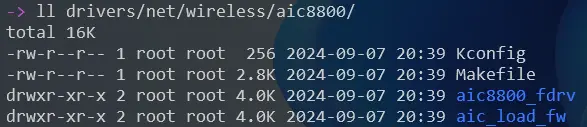
source "drivers/net/wireless/aic8800/Kconfig"- 查看修改結果:
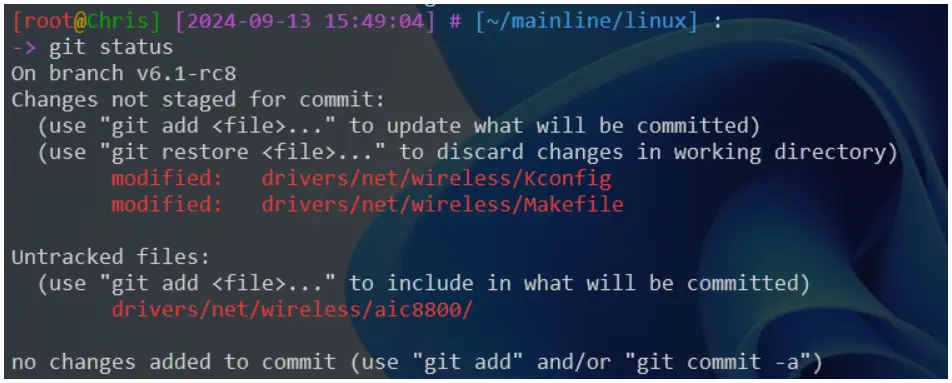
2.2 編譯 linux 內核
-
1)以 sunxi_defconfig 為基礎,生成 .config 配置文件:
make ARCH=arm CROSS_COMPILE=arm-linux-gnueabihf- sunxi_defconfig ...... # # configuration written to .config # 在 arch/arm/configs/ 目錄下有許多開發板的預定義配置文件,這裏我們選擇 Allwinner Cubieboard2 的 sunxi_defconfig -
2)編譯菜單項配置(這是一個需要不斷調試的枯燥工作):
make ARCH=arm CROSS_COMPILE=arm-linux-gnueabihf- menuconfig輸入上述命令後,會彈出編譯菜單項的窗口,根據自己的需求修改。我這裏需要無線網卡 AIC8800、USB 大容量設備(用來接 USB 轉 SSD)等。
*,表示該驅動將作為內核的一部分被編譯進內核映像中,鍵入 “Y” 生效;M,則表示該驅動將作為一個獨立的模塊編譯,並且可以在需要時通過 insmod 或 modprobe 加載,鍵入 “M” 生效;鍵入 “N” 表示不選中。

-
3)開始編譯(i7-9750 12 核心花費 5 分鐘):
make -j$(nproc) ARCH=arm CROSS_COMPILE=arm-linux-gnueabihf- zImage dtbs ...... OBJCOPY arch/arm/boot/zImage Kernel: arch/arm/boot/zImage is ready # 把 zImage 轉換為 uImage cd ~/mainline/linux mkimage -A arm -O linux -T kernel -C none -a 0x46000000 -e 0x46000000 -n "Linux kernel uImage" -d arch/arm/boot/zImage ../uImage -
4)複製 dtc(編譯與反編譯設備樹文件)到 /usr/bin 目錄備用:
cp ./scripts/dtc/dtc /usr/bin
3 U-Boot 編譯
- 1)查看 Cubieboard2 配置文件:

-
2)編譯生成 u-boot-sunxi-with-spl.bin 文件:
make ARCH=arm CROSS_COMPILE=arm-linux-gnueabihf- Cubieboard2_defconfig
make ARCH=arm CROSS_COMPILE=arm-linux-gnueabihf-

......
OBJCOPY spl/u-boot-spl-nodtb.bin
COPY    spl/u-boot-spl.bin
SYM     spl/u-boot-spl.sym
MKIMAGE spl/sunxi-spl.bin
MKIMAGE u-boot.img
COPY    u-boot.dtb
MKIMAGE u-boot-dtb.img
BINMAN  .binman_stamp
OFCHK   .config
4 分區與燒錄
4.1 sdcard 分區
-
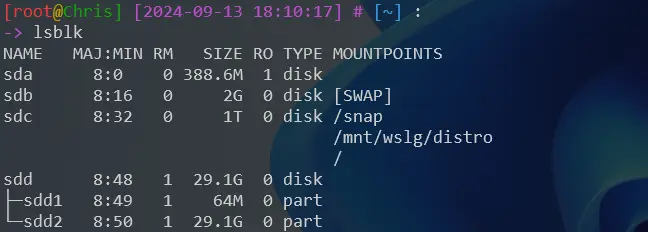
1)讀卡器插入主機後,查看:
[root@Chris] [2024-09-13 18:00:33] # [~] : -> lsblk NAME MAJ:MIN RM SIZE RO TYPE MOUNTPOINTS ..... sdd 8:48 1 29.1G 0 disk └─sdd1 8:49 1 29.1G 0 part - 2)創建 DOS 分區表:
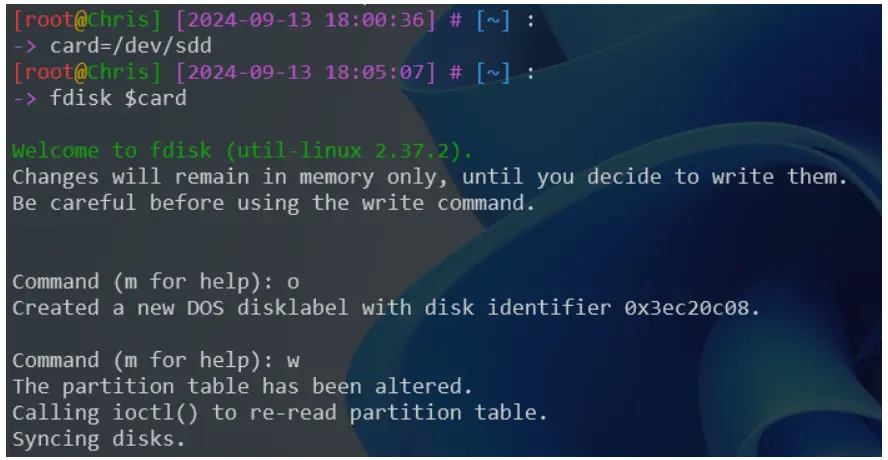
- 3)創建 2 個分區:
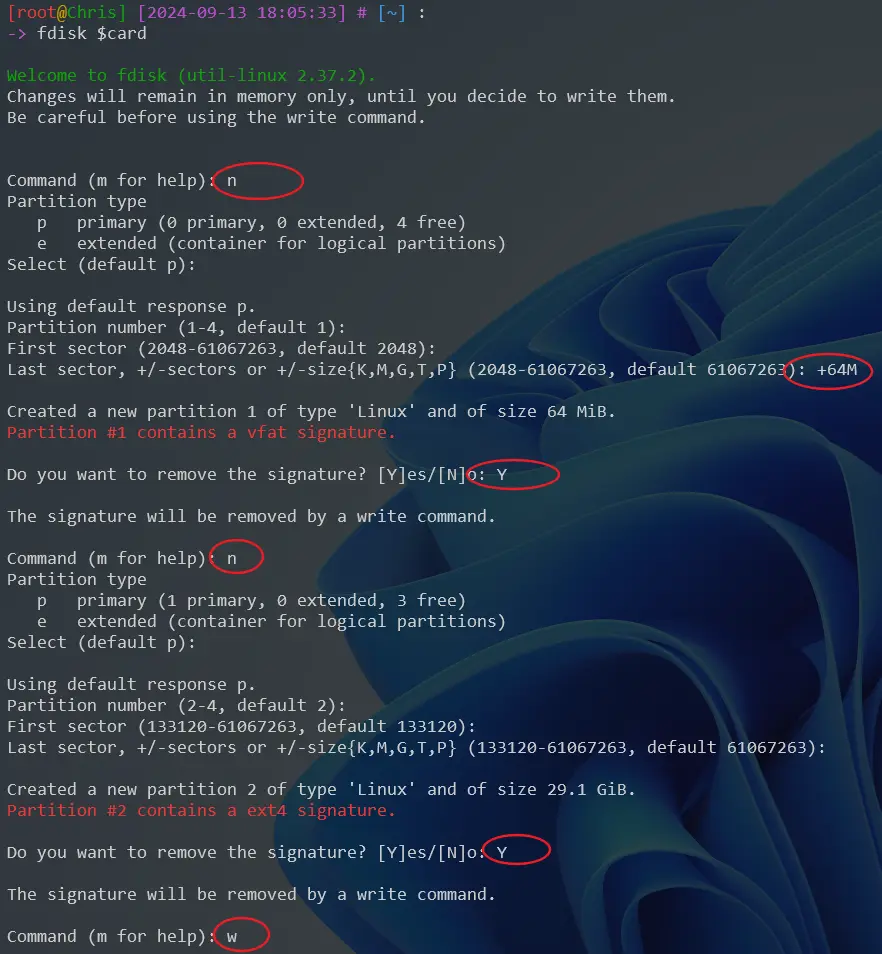
-
4)格式化:
mkfs.vfat ${card}1
mkfs.ext4 ${card}2
4.2 燒錄 SPL
-
1)SPL(Second Program Loader,可以認為是 uboot 的 bootloader,用來加載完整 uboot 到 SDRAM 中)燒錄:
dd if=u-boot-sunxi-with-spl.bin of=$card bs=1024 seek=8
sync

4.3 燒錄第 1 分區
-
2)燒錄鏡像、dtb、啓動文件 boot.scr 到 sdcard 的第一分區中:
cd ~/mainline/
mkdir /mnt/h

# 掛載分區 1
mount ${card}1                /mnt/h
cp linux/arch/arm/boot/dts/sun7i-a20-cubieboard2.dtb /mnt/h
cp linux/arch/arm/boot/zImage /mnt/h
cp boot.scr                   /mnt/h

# 卸載分區 1
sync && sudo umount /mnt/h

4.3 燒錄第 2 分區
第二分區主要燒錄根文件系統 rootfs。
-
1)配置根文件系統 rootfs:
cd ~/rootfs/chroot-armhf-bullseye/ chroot . passwd echo "Cubieboard2" > etc/hostname && cat etc/hostname echo "127.0.0.1 Cubieboard2" >> etc/hosts && cat etc/hosts # 安裝內核驅動模塊 cd ~/mainline/linux make ARCH=arm CROSS_COMPILE=arm-linux-gnueabihf- INSTALL_MOD_PATH=~/rootfs/chroot-armhf-bullseye/ modules modules_install cd ~/rootfs/chroot-armhf-bullseye/ # 初始化 inittab 文件 echo T0:2345:respawn:/sbin/getty -L ttyS0 115200 vt100 >> etc/inittab && cat etc/inittab # 掛載 SSD chroot . mkdir /data echo UUID=8612ea26-f6a4-4b2e-b9bc-775a662b0dea /data ext2 defaults,noatime,nofail 0 0 >> etc/fstab # 初始化 sources.list 文件 # vi etc/apt/sources.list chroot . apt-get update chroot . apt-get upgrade chroot . apt-get install openssh-server locales wireless-tools wpasupplicant vim lrzsz net-tools ntpdate echo "*/60 * * * * /usr/sbin/ntpdate ntp.sjtu.edu.cn" >> /var/spool/cron/crontabs/root echo "export LC_ALL=\"zh_CN.UTF-8\"" echo "en_US.UTF-8 UTF-8" > etc/locale.gen echo "zh_CN.UTF-8 UTF-8" >> etc/locale.gen chroot . locale-gen # 備份 rootfs。 cd ../ && tar -czvf chroot-armhf-bullseye-`date +%Y%m%d_%H%M%S`.tar.gz chroot-armhf-bullseye/ -
2)燒錄到第 2 分區:
# 掛載分區 2
mount ${card}2 /mnt/h
# 燒錄 rootfs
mv ~/rootfs/chroot-armhf-bullseye/* /mnt/h/
# 卸載分區 2
sync && umount /mnt/h
附錄:基於 AIC8800 的 Tenda U2 V5 USB WIFI
-
參考:
- 驅動編譯:https://cloud-atlas.readthedocs.io/zh-cn/latest/linux/ubuntu_...
- 內核驅動移植:https://www.cnblogs.com/weidongshan/articles/18367372
- AIC8800D Wi-Fi6/BT5.0 SoC USB移植手冊:https://bbs.16rd.com/thread-586140-1-1.html
- RK3568 Debian AIC8800移植:https://blog.csdn.net/zyaaaac/article/details/133947137
- A20網絡機頂盒移植4.5內核+U-Boot+rootfs:https://www.csdndocs.com/article/7504314
-
1)添加驅動程序:以基於 aic8800 的 USB WIFI 為例
- (1)將內核文件複製到 drivers/net/wireless 目錄下
-
(2)修改 drivers/net/wireless/Kconfig 文件,添加下面一行內容:
source "drivers/net/wireless/aic8800/Kconfig" -
(3)修改 drivers/net/wireless/Makefile 文件,添加下面一行內容:
obj-$(CONFIG_AIC_WLAN_SUPPORT) += aic8800/ -
(4)通過 make menuconfig 修改配置文件時,進行如下選擇:
Device Drivers  --->
[*] Network device support  --->
    [*]   Wireless LAN  --->
        [*]   AIC wireless Support
        <M>     AIC8800 wlan Support
        <M>     AIC8800 bluetooth Support (UART)
-
2)Linux 內核編譯參考:
# 安裝工具鏈 apt-get install build-essential bc bison flex libncurses5-dev libssl-dev \ gcc-arm-linux-gnueabihf arm-linux-gnueabihf-g++ # 下載內核 git clone -b v5.4 https://github.com/torvalds/linux.git cd linux # 生成默認的內核配置文件 make ARCH=arm CROSS_COMPILE=arm-linux-gnueabihf- defconfig # 啓動一個基於文本的交互式菜單,允許用户手動配置內核 make ARCH=arm CROSS_COMPILE=arm-linux-gnueabihf- menuconfig # 主要用於在現有配置基礎上進行增量更新,以適應新的內核版本或更新的默認配置 make ARCH=arm CROSS_COMPILE=arm-linux-gnueabihf- olddefconfig # 編譯內核鏡像 make -j$(nproc) ARCH=arm CROSS_COMPILE=arm-linux-gnueabihf- uImage modules # 僅編譯內核驅動 make -j$(nproc) ARCH=arm CROSS_COMPILE=arm-linux-gnueabihf- M=drivers/net/wireless/aic8800 modules # 清理 make ARCH=arm CROSS_COMPILE=arm-linux-gnueabihf- clean - 3)Tenda U2 V5 最小內核版本支持 3.10,在 3.18.140 版本編譯成功
-
4)問題處理(編譯 linux-3.11 版本時出現):ERROR: Kernel configuration is invalid.
現象: ERROR: Kernel configuration is invalid. include/generated/autoconf.h or include/config/auto.conf are missing. Run 'make oldconfig && make prepare' on kernel src to fix it. 處理: # 清理編譯失敗的文件 make mrproper # 生成默認的內核配置文件 make ARCH=arm CROSS_COMPILE=arm-linux-gnueabihf- defconfig # 啓動一個基於文本的交互式菜單,允許用户手動配置內核 make ARCH=arm CROSS_COMPILE=arm-linux-gnueabihf- menuconfig # 主要用於在現有配置基礎上進行增量更新,以適應新的內核版本或更新的默認配置 make ARCH=arm CROSS_COMPILE=arm-linux-gnueabihf- olddefconfig # 準備內核源碼樹,生成一些必要的頭文件和其他輔助文件。 make ARCH=arm CROSS_COMPILE=arm-linux-gnueabihf- prepare # 生成內核編譯過程中需要用到的腳本文件 make ARCH=arm CROSS_COMPILE=arm-linux-gnueabihf- scripts ... -
5)問題處理:
WARNING: Symbol version dump /root/linux-3.10.1/Module.symvers is missing; modules will have no dependencies and modversions. 先編譯內核鏡像,再編譯內核驅動即可 make -j$(nproc) ARCH=arm CROSS_COMPILE=arm-linux-gnueabihf- uImage modules make -j$(nproc) ARCH=arm CROSS_COMPILE=arm-linux-gnueabihf- M=drivers/net/wireless/aic8800 modules -
6)問題處理:
# make ARCH=arm CROSS_COMPILE=arm-linux-gnueabihf- sunxi_defconfig

drivers/net/wireless/aic8800/aic8800_fdrv/Kconfig:4: syntax error
drivers/net/wireless/aic8800/aic8800_fdrv/Kconfig:3: unknown statement "---help---"
drivers/net/wireless/aic8800/aic8800_fdrv/Kconfig:4:warning: ignoring unsupported character '.'
drivers/net/wireless/aic8800/aic8800_fdrv/Kconfig:4: unknown statement "This"
make[1]: *** [scripts/kconfig/Makefile:94: sunxi_defconfig] Error 1
make: *** [Makefile:697: sunxi_defconfig] Error 2

通過 make mrproper 命令清理舊的編譯緩存文件。