

1. 問題
項目環境
jdk:21
springboot:3.2.3
springcloud:2023.0.0
springdoc-openapi-starter-webmvc-ui:2.5.0
項目引入了springdoc,本地開發測試時,http://localhost:8080/swagger-ui/index.html頁面也能正常打開;發佈到測試環境之後,通過網關(SpringCloud Gateway)訪問頁面http://xxx.com/SERVICENAME/swagger-ui/index.html,卻無法打開。

2. 排查
通過F12可以發現,是因為頁面請求了swagger-config文件,但是文件地址返回404;404的原因是index.html裏請求的地址是http://xxx.com/v3/api-docs/swagger-config,而不是http://xxx.com/SERVICENAME/v3/api-docs/swagger-config。

3. 解決方案
3.1. 方案1(成功,但是作為公共包不合適)
通過官方文檔發現可以通過修改配置,自定義路徑:
springdoc:
  swagger-ui:
configUrl: /SERVICENAME/v3/api-docs/swagger-config配置完之後/swagger-ui/index.html請求swagger-config返回正常,但是頁面還是無法打開,原因是頁面又訪問了/v3/api-docs,並且返回了404,原因跟swagger-config是一樣的。
一樣可以通過配置修改路徑:
springdoc:
  api-docs:
path: /SERVICENAME/v3/api-docs可以看到configUrl的值其實就是在configUrl的值後面再加上/swagger-config,通過源碼org.springdoc.core.utils.Constants也可以證實:
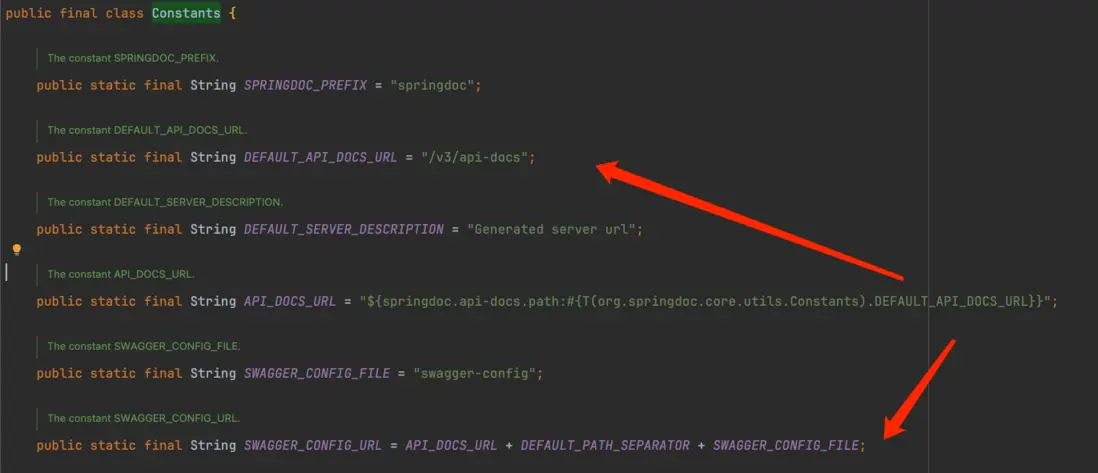
所以只需配置path即可,configUrl可以不用配置。
如果以一個項目的角度來看,問題是解決了。但是在開發的是一個平台公共包,SERVICENAME是未知的(不同的項目的值是不一樣的),所以公共包裏無法硬編碼;而如果讓每個項目引入公共包之後,在自己的項目上加上配置的話,增加了引入成本,並且請求走gateway時,路徑上可能除了SERVICENAME之外,還會加上其他的內容。
\( \color{red} 所以需要嘗試看是否還有其他通用的方案。 \)
3.2. 方案2(失敗)
參考:404 error with spring doc open api 2.1.0
在項目裏手動引入最新的webjars-locator:
<dependency>
      <groupId>org.webjars</groupId>
      <artifactId>webjars-locator</artifactId>
      <version>0.52</version>
</dependency>
\( \color{red} 沒有生效。 \)
3.3. 方案3(失敗)
參考:Spring Boot 中訪問 Swagger UI 報 404 not found 錯誤
在項目裏添加addResourceHandler:
@Configuration
public class WebMvcConfig extends WebMvcConfigurationSupport {

    @Override
    protected void addResourceHandlers(ResourceHandlerRegistry registry) {
        registry.addResourceHandler("/swagger-ui/**")
                .addResourceLocations("classpath:/META-INF/resources/webjars/swagger-ui/5.13.0/");
        super.addResourceHandlers(registry);
    }
}其中swagger-ui後面的版本號,取自己依賴的webjars版本:

\( \color{red} 沒有生效。 \)
3.4. 方案4(理論可行,但是沒有嘗試)
參考:springboot 搭配filebeat springboot 搭配 springdoc
在SpringCloud Gateway裏添加轉發規則:
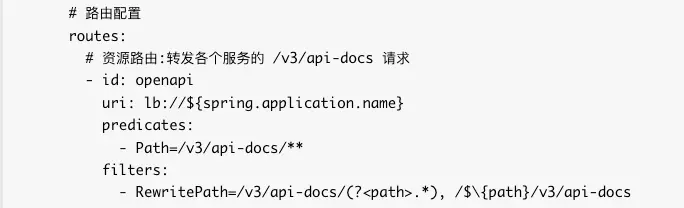
\( \color{red} 考慮到要去調整網關,影響比較大,並且網關不應該去關注下游系統具體使用的組件,所以沒做嘗試。 \)
3.5. 方案5(失敗)
參考:configUrl cache issue when using Swagger-UI
添加以下代碼:
@Bean
public SwaggerIndexPageTransformer computeConfigUrlSwagger(SwaggerUiConfigProperties swaggerUiConfig,
        SwaggerUiOAuthProperties swaggerUiOAuthProperties, SwaggerUiConfigParameters swaggerUiConfigParameters,
        SwaggerWelcomeCommon swaggerWelcomeCommon, ObjectMapperProvider objectMapperProvider) {
    return new SwaggerIndexPageTransformer(swaggerUiConfig, swaggerUiOAuthProperties, swaggerUiConfigParameters,
            swaggerWelcomeCommon, objectMapperProvider) {

        @Override
        public Resource transform(HttpServletRequest request, Resource resource, ResourceTransformerChain transformerChain)
                throws IOException {
            this.swaggerUiConfigParameters.setConfigUrl(null);
            return super.transform(request, resource, transformerChain);
        }
    };
}
\( \color{red} 沒有生效。 \) 從參考的文檔上其他的人也反饋沒有生效。
3.6. 方案6(成功)
通過方案5,知道可以在代碼裏動態調整路徑:每次打開/swagger-ui/index.html頁面時,都會調用SwaggerIndexPageTransformer的transform方法,方法返回的Resource對象的內容是頁面的html內容。
3.6.1. 首先要獲取從HOST到URI中間這一段Gateway加上的路徑
- 通過
request.getHeader("Host")獲取到請求的域名是IP:8080,而不是期望中的域名,因為從Gateway轉發到業務服務時,是從註冊中心中取到了IP並且通過IP+端口來轉發。 - 通過
request.getContextPath()獲取到應用的上下文路徑是空的,因為服務名是Gateway轉發時加上的,項目本身沒有配置。 - 通過debug發現,
Gateway在轉發請求時,會在header里加上一些x-forwarded-*信息:
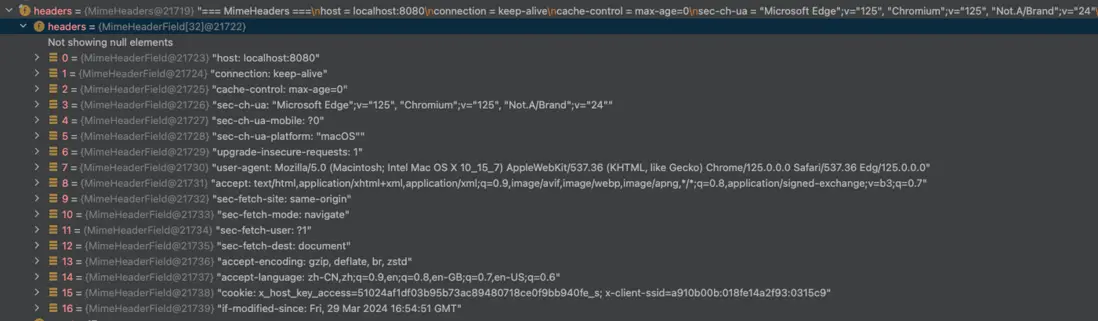
- 非通過
Gateway請求時(直接通過IP訪問服務),header信息如下:
- 所以可以通過
x-forwarded-*信息獲取到Gateway添加的前綴,並且還可以判斷當次請求是否走了Gateway。
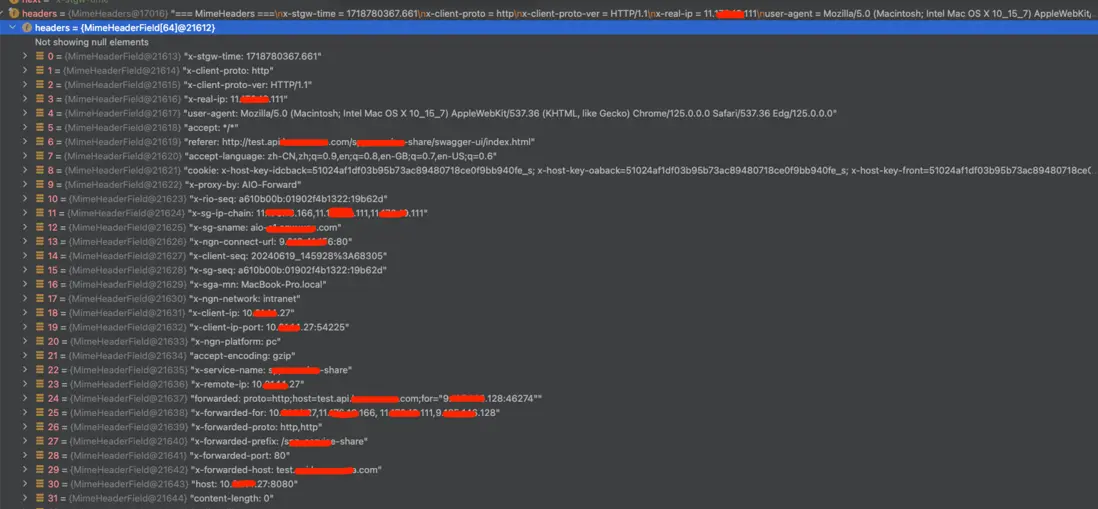
3.6.2.
實現代碼:
@Configuration
@ConditionalOnClass(SpringDocWebMvcConfiguration.class)
public class SwaggerConfiguration {

    @Bean
    public SwaggerIndexTransformer indexPageTransformer(SwaggerUiConfigProperties swaggerUiConfig,
            SwaggerUiOAuthProperties swaggerUiOAuthProperties, SwaggerUiConfigParameters swaggerUiConfigParameters,
            SwaggerWelcomeCommon swaggerWelcomeCommon, ObjectMapperProvider objectMapperProvider,
            SpringDocConfigProperties springDocConfigProperties) {
        return new RewritePathSwaggerIndexPageTransformer(swaggerUiConfig, swaggerUiOAuthProperties,
                swaggerUiConfigParameters, swaggerWelcomeCommon, objectMapperProvider, springDocConfigProperties);
    }

    /**
     * 重寫swagger地址,通過瀏覽器訪問/swagger-ui/index.html時,html頁面會請求/v3/api-docs和/v3/api-docs/swagger-config
     * 1)本地(localhost)訪問時,能正常返回
     * 2)測試環境&正式環境通過網關訪問時,會出現404,因為訪問的地址少了服務名:
     * 比如應該是“http://host:port/SERVICE-NAME/v3/api-docs”,但實際訪問的是“http://host:port//v3/api-docs”
     *
     * @author
     * @date 2024/6/19 15:11
     */
    public class RewritePathSwaggerIndexPageTransformer extends SwaggerIndexPageTransformer {

        private SpringDocConfigProperties springDocConfigProperties;
        private SwaggerUiConfigParameters swaggerUiConfigParameters;
        /**
         * 上一次請求獲取到的前綴
         */
        private String lastPrefix = Strings.EMPTY;

        public RewritePathSwaggerIndexPageTransformer(SwaggerUiConfigProperties swaggerUiConfig,
                SwaggerUiOAuthProperties swaggerUiOAuthProperties, SwaggerUiConfigParameters swaggerUiConfigParameters,
                SwaggerWelcomeCommon swaggerWelcomeCommon, ObjectMapperProvider objectMapperProvider,
                SpringDocConfigProperties springDocConfigProperties) {
            super(swaggerUiConfig, swaggerUiOAuthProperties, swaggerUiConfigParameters, swaggerWelcomeCommon,
                    objectMapperProvider);
            this.springDocConfigProperties = springDocConfigProperties;
            this.swaggerUiConfigParameters = swaggerUiConfigParameters;
        }

        @Override
        public Resource transform(HttpServletRequest request, Resource resource,
                ResourceTransformerChain transformerChain) throws IOException {
            ApiDocs apiDocs = springDocConfigProperties.getApiDocs();
            String apiDocsPath = apiDocs.getPath();
            String configUrl = swaggerUiConfigParameters.getConfigUrl();
            String prefix = getPrefix(request);
            // 考慮同一個服務,可能有時候會被“走網關訪問”,有時候會被“走IP+端口直接訪問”,所以這裏做了區分判斷
            // 通過網關轉發
            if (StringUtils.isNotBlank(prefix)) {
                // 上一次不是通過網關轉發,即需要重新調整;如果上一次是通過網關轉發,則不能調整,否則就疊加兩次了
                if (!StringUtils.equals(lastPrefix, prefix)) {
                    String newApiDocsPath = prefix + apiDocsPath;
                    apiDocs.setPath(newApiDocsPath);
                    String newConfigUrl = RegExUtils.replaceFirst(configUrl, apiDocsPath, newApiDocsPath);
                    swaggerUiConfigParameters.setConfigUrl(newConfigUrl);
                    lastPrefix = prefix;
                }
            } else {
                // 不是通過網關轉發
                // 上一次是通過網關轉發,即需要重新調整
                if (!StringUtils.equals(lastPrefix, prefix)) {
                    // 去掉轉發時,網關添加的路徑
                    String newApiDocsPath = RegExUtils.replaceFirst(apiDocsPath, lastPrefix, "");
                    apiDocs.setPath(newApiDocsPath);
                    String newConfigUrl = RegExUtils.replaceFirst(configUrl, apiDocsPath, newApiDocsPath);
                    swaggerUiConfigParameters.setConfigUrl(newConfigUrl);
                    lastPrefix = prefix;
                }
            }
            return super.transform(request, resource, transformerChain);
        }

        /**
         * 獲取網關轉發時,url上添加的前綴
         *
         * @param request
         * @return java.lang.String
         * @author
         * @date 2024/6/19 15:27
         */
        public String getPrefix(HttpServletRequest request) {
            // 獲取網關轉發的服務名
            return Optional.ofNullable(request.getHeader("x-forwarded-prefix")).orElse(Strings.EMPTY);
        }
    }
}
\( \color{red} 方案生效。 \)
