

實現效果
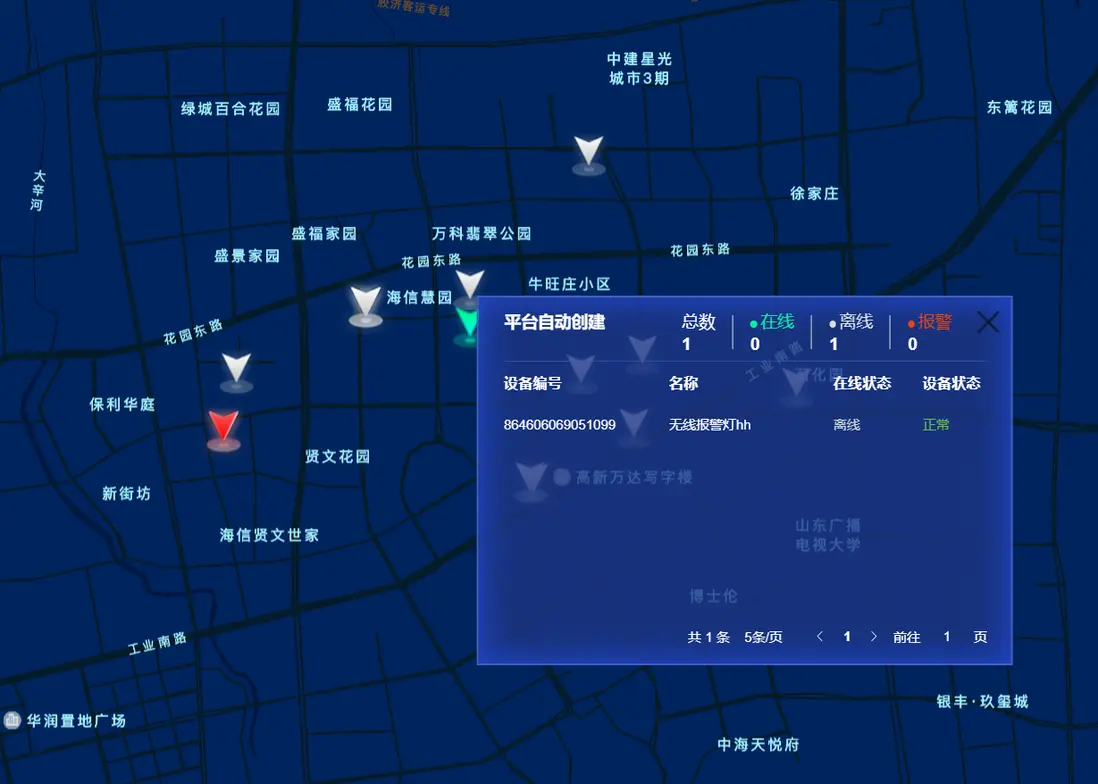
存在問題
InfoWindow採用騰訊地圖官方案例,實現複雜的界面會比較複雜,而且不利於維護。
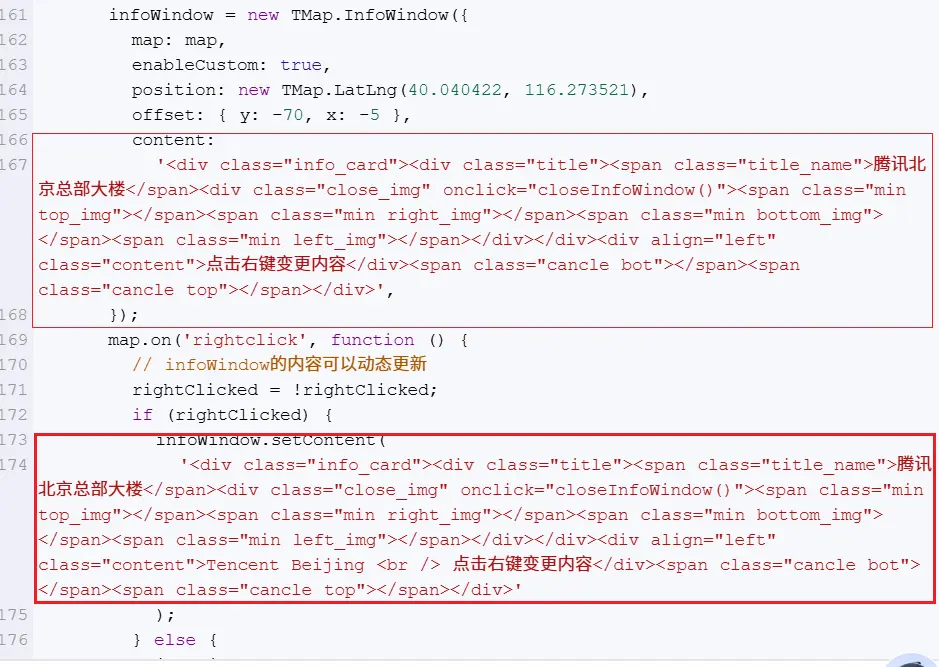
代碼實現
前端代碼
<div class="screen-map-container">
  <div id="tencentMapContainer" class="screen-bm-view"></div>
  <div ref="customOverlay" class="mapItemInfo">
      <el-button class="map-item-info-close" @click="mapItemInfoClose"></el-button>
      <div>
        <div class="statistics-container">
          <span style="position:absolute;left:0.27rem;font-weight: bold;color: #FFFFFF">{{mapItemInfoTitle}}</span>
          <div class="statistics-item" style="margin-left: 0.25rem" @click="mapItemInfoClick('all')">
            <div style="color: #FFFFFF">總數</div>
            <div class="number">{{mapInstallPointStatics.total}}</div>
          </div>
          <div class="border"></div>
          <div class="statistics-item" @click="mapItemInfoClick('online')">
            <div style="color: #06f1a8">
              <span class="point" style="border-color: #06f1a8;background: #06f1a8;"></span>在線
            </div>
            <div class="number">{{mapInstallPointStatics.online}}</div>
          </div>
          <div class="border"></div>
          <div class="statistics-item" @click="mapItemInfoClick('offline')">
            <div style="color: #d9dfdd">
              <span class="point" style="border-color: #d9dfdd;background: #d9dfdd;"></span>離線
            </div>
            <div class="number">{{mapInstallPointStatics.total-mapInstallPointStatics.online}}</div>
          </div>
          <div class="border"></div>
          <div class="statistics-item" @click="mapItemInfoClick('alarm')">
            <div style="color: #f14216">
              <span class="point" style="border-color: #f14216;background: #f14216;"></span>報警
            </div>
            <div class="number">{{mapInstallPointStatics.alarm}}</div>
          </div>
        </div>
        <div style="height: 1px;background-color: #4260c6A0;margin: 0.0625rem 0.125rem 0 0.125rem;"></div>
        <el-table v-loading="deviceLoading" :data="deviceList" style="height: 2.625rem;">
          <el-table-column label="設備編號" align="left" prop="imei"/>
          <el-table-column label="名稱"  align="left" prop="deviceName" show-overflow-tooltip/>
          <el-table-column label="在線狀態" align="left" prop="onlineState" width="80">
            <template #default="scope">
              <el-text size="small" v-if="scope.row.onlineState === 1" type="success" >在線</el-text>
              <el-text size="small" style="color: #cbd4d0;" v-else>離線</el-text>
<!--                          <el-tag size="small" color="transparent" style="color: #a6aaa8;border-color:transparent" v-else>離線</el-tag>-->
            </template>
          </el-table-column>
          <el-table-column label="設備狀態" align="left" prop="deviceState" width="80">
            <template #default="scope">
              <el-text size="small" v-if="scope.row.deviceState === 0" type="success">正常</el-text>
              <el-text size="small" v-else-if="scope.row.deviceState === 1" type="warning">故障</el-text>
              <el-text size="small" v-else type="danger">報警</el-text>
            </template>
          </el-table-column>
        </el-table>

        <pagination
            v-show="deviceTotal>0"
            :total="deviceTotal"
            size="small"
            :page-sizes="[5]"
            :background="false"
            :pager-count="3"
            v-model:page="deviceQueryParams.pageNum"
            v-model:limit="deviceQueryParams.pageSize"
            @pagination="getBoundDeviceList"
        />
      </div>
  </div>
</div>- <div id="tencentMapContainer" class="screen-bm-view"></div> 是地圖容器
- <div ref="customOverlay" class="mapItemInfo"> 是彈窗界面
js
我們需要某種方式,當彈窗時動態替換windowInfo顯示的內容。關鍵代碼是:
document.querySelector(".map-info-window").append(proxy.$refs.customOverlay);infoWindow = new TMap.InfoWindow({
map: tencentMap,
enableCustom: true,
position: new TMap.LatLng(40.040422, 116.273521),
offset: { y: 0, x: 20 },
content:'<div class="map-info-window"></div>',
});
infoWindow.close();map-info-window css樣式不重要,因為會被customOverlay替換掉。
.map-info-window{
width: 300px;
height: 300px;
}主要關鍵代碼如下:
初始化地圖、marker圖層、彈窗
import bdNormalPointIcon from '../../assets/images/map_point_6.png';
import bdAlarmPointIcon from '../../assets/images/map_point_4.png';
import bdAllOnlinePointIcon from '../../assets/images/map_point_1.png';
import bdFaultPointIcon from '../../assets/images/map_point_2.png';
import bdAllOfflinePointIcon from '../../assets/images/map_point_3.png';
//騰訊地圖對象
let tencentMap;
//騰訊地圖點標記對象
let markerLayer;
//信息彈窗
let infoWindow;
//初始化騰訊地圖
const initMap = () => {
if (tencentMap) {
console.log('地圖已初始化,不再重複初始化');
return;
}
let center = new TMap.LatLng(35.79717, 104.357285);
tencentMap = new TMap.Map(document.getElementById('tencentMapContainer'), {
center: center,//設置地圖中心點座標
zoom: 4.5, //設置地圖縮放級別
mapStyleId: 'style1', //設置地圖樣式
showScaleVideo: false, //顯示比例尺
});
tencentMap.removeControl(TMap.constants.DEFAULT_CONTROL_ID.ZOOM);
tencentMap.removeControl(TMap.constants.DEFAULT_CONTROL_ID.ROTATION);
markerLayer = new TMap.MultiMarker({
map: tencentMap, //指定地圖容器
//樣式定義
styles: {
//創建一個styleId為"myStyle"的樣式(styles的子屬性名即為styleId)
"normal": new TMap.MarkerStyle({
"width": 50, // 點標記樣式寬度(像素)
"height": 50, // 點標記樣式高度(像素)
//焦點在圖片中的像素位置,一般大頭針類似形式的圖片以針尖位置做為焦點,圓形點以圓心位置為焦點
"anchor": { x: 10, y: 30 },
"src": bdNormalPointIcon
}),
"online": new TMap.MarkerStyle({
"width": 50, // 點標記樣式寬度(像素)
"height": 50, // 點標記樣式高度(像素)
//焦點在圖片中的像素位置,一般大頭針類似形式的圖片以針尖位置做為焦點,圓形點以圓心位置為焦點
"anchor": { x: 10, y: 30 },
"src": bdAllOnlinePointIcon
}),
"offline": new TMap.MarkerStyle({
"width": 50, // 點標記樣式寬度(像素)
"height": 50, // 點標記樣式高度(像素)
//焦點在圖片中的像素位置,一般大頭針類似形式的圖片以針尖位置做為焦點,圓形點以圓心位置為焦點
"anchor": { x: 10, y: 30 },
"src": bdAllOfflinePointIcon
}),
"alarm": new TMap.MarkerStyle({
"width": 50, // 點標記樣式寬度(像素)
"height": 50, // 點標記樣式高度(像素)
//焦點在圖片中的像素位置,一般大頭針類似形式的圖片以針尖位置做為焦點,圓形點以圓心位置為焦點
"anchor": { x: 10, y: 30 },
"src": bdAlarmPointIcon
}),
},
//點標記數據數組
geometries: []
});
markerLayer.on('click',(e)=>{markerClick(e)});
infoWindow = new TMap.InfoWindow({
  map: tencentMap,
  enableCustom: true,
  position: new TMap.LatLng(40.040422, 116.273521),
  offset: { y: 0, x: 20 },
  content:'<div class="map-info-window"></div>',
});
infoWindow.close();
}添加marker
function requestInstallPoint(){
  listScreenInstallPoint(installPointQueryParams).then(response => {
    installPointList.value = response.rows;
    //清除標記點
    markerLayer.setGeometries([]);
    installPointList.value.forEach(item=>{
      addMaker(item);
    });
  });
}

function addMaker(item) {
    let markerId = item.id;
    if (item.deviceStatisticsDto.online === 0) {
      markerLayer.add([{
        "id": markerId,   //點標記唯一標識,後續如果有刪除、修改位置等操作,都需要此id
        "styleId": 'offline',  //指定樣式id
        "position": new TMap.LatLng(item.latitude,item.longitude),  //點標記座標位置
      }]);
    }else if (item.deviceStatisticsDto.alarm > 0) {
      markerLayer.add([{
        "id": markerId,   //點標記唯一標識,後續如果有刪除、修改位置等操作,都需要此id
        "styleId": 'alarm',  //指定樣式id
        "position": new TMap.LatLng(item.latitude,item.longitude),  //點標記座標位置
      }]);
    }else if(item.deviceStatisticsDto.online === item.deviceStatisticsDto.total){
      markerLayer.add([{
        "id": markerId,   //點標記唯一標識,後續如果有刪除、修改位置等操作,都需要此id
        "styleId": 'online',  //指定樣式id
        "position": new TMap.LatLng(item.latitude,item.longitude),  //點標記座標位置
      }]);
    }else {
      markerLayer.add([{
        "id": markerId,   //點標記唯一標識,後續如果有刪除、修改位置等操作,都需要此id
        "styleId": 'normal',  //指定樣式id
        "position": new TMap.LatLng(item.latitude,item.longitude),  //點標記座標位置
      }]);
    }
  }
彈窗顯示和關閉
function markerClick(e) {
    console.log('marker click-------------->', e);
    let markerId = e.geometry.id;
    //let position = e.geometry.position;
    let installPoint  = installPointList.value.find(item => item.id === markerId);

    markerPosition.value.lat= installPoint.latitude;
    markerPosition.value.lng= installPoint.longitude;

    deviceQueryParams.installId = installPoint.id;
    deviceQueryParams.pageNum = 1;
    deviceQueryParams.onlineState = null;
    deviceQueryParams.deviceState = null;
    getBoundDeviceList();

    mapItemInfoTitle.value = installPoint.installName;
    getInstallPointDeviceStatistics(installPoint.id).then(response => {
      mapInstallPointStatics.value = response.data;
    });

    document.querySelector(".map-info-window").append(proxy.$refs.customOverlay);
    infoWindow.setPosition(new TMap.LatLng(installPoint.latitude, installPoint.longitude));
    infoWindow.open();
  }

  function mapItemInfoClose(){
    infoWindow.close();
  }