前言
作為一名前端從業者不會點後端的知識怎麼可以。node.js成為了前端了解後端的首選。工欲善其事,必先利其器本。一款好的框架。是提效的根本。這是一篇從0到1入門egg的文章。
三者區別與聯繫
Express是基於 Node.js平台,快速、開放、極簡的 Web 開發框架,老牌框架,很多流行的框架的基石,簡單且擴展性強,適合做個人項目,自身缺少約束。
Koa是基於Node.js平台的下一代web框架,由Express原班人馬打造。特點:小巧靈活簡單易用。作為企業級開發過於基礎。
Egg為企業級框架和應用而生,奉行約定優於配置。Egg 繼承於 Koa
特點:
- 提供基於 Egg [定製上層框架]的能力
- 高度可擴展的[插件機制]
- 內置[多進程管理]
- 基於 [Koa]開發,性能優異
- 框架穩定,測試覆蓋率高
-
[漸進式開發]
起步
初始化項目:(腳手架)
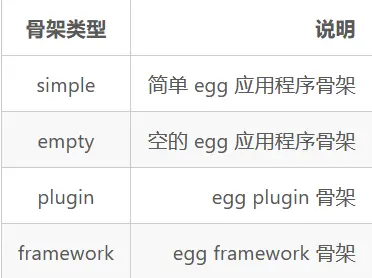
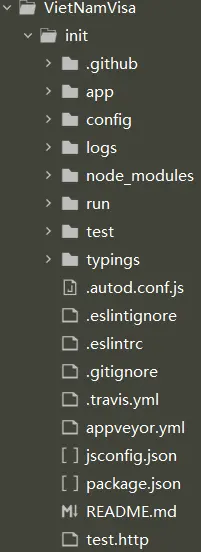
$ mkdir project-name//創建一個空的文件夾$ npm init egg --type=simple//simple表示骨架類型$ npm install || i //安裝依賴初始化項目後結構目錄如圖所示
啓動項目$ npm run dev//開發環境中使用 $ npm run start//生產環境中使用文件目錄介紹
主要文件目錄介紹
|-app//主要開發的文件
|   |-- controller//解析用户的輸入,處理後返回相應的結果
|   |-- db//啓動mongodb數據庫的dbpath路徑(可選)
|   |--extend//框架的擴展(內置對象擴展)
|   |    |---application.js//(固定名稱)
|   |    |---context.js//(固定名稱)
|   |    |---request.js//(固定名稱)
|   |    |---response.js//(固定名稱)
|   |    |---helper.js//(固定名稱)
|   |--middleware//編寫中間件
|   |--model//數據庫中表的模型
|   |--publie//靜態資源
|   |--schedule//定時任務
|   |--service//編寫業務邏輯層
|   |--view//模板文件
|   |---router.js//配置 URL 路由
|-config//存放配置文件
|   |--config.default.js//用於編寫配置文件
|   |--plugin.js//配置需要加載的插件
|-test//存放單元測試
|-logs//日誌文件
|-package.json//項目描述
內置對象
Application//全局應用對象=》繼承於koa
Context//請求級別對象=》繼承於koa
Request//請求級別對象=》繼承於koa
Response//請求級別對象=》繼承於koa
Controller//基類
Service//基類
Helper//提供一些實用的 utility 函數,自身是一個類
Config//配置
Logger//功能強大的日誌功能
Subscription//基類定時任務路由(router)
路由的作用:
用來描述請求 URL 和具體承擔執行動作的 Controller 的對應關係,用於統一所有路由規則。
基本使用方法:
在app/router.js中定義url的規則'use strict'; module.exports = app => { const { router, controller } = app; //註冊接口 router.get('/logon', controller.logon.Logon); /** *路由參數説明 *1.get請求 *2.url為/logon *3.執行controller文件夾下的logon文件中的Logon方法 **/ };路由實戰
1.參數獲取
如果是get請求ctx.query //或 ctx.params.xxx如果是post請求
ctx.request.body2.中間件使用
/*參數説明:
verb表示請求方式例如get、post
path-match表示路由url路徑
middleware1表示使用middleware1中間件可以添加多箇中間件
app.controller.action表示調用控制器中的方法
*/
router.verb('path-match', middleware1, ..., middlewareN, app.controller.action);
//例子
'use strict';
module.exports = app => {
  const { router, controller } = app;
//獲取中間件record=>app.middlewarel.xxx中xxx是middleware文件夾下對應的文件名
  const record=app.middlewarel.record();
  //註冊接口使用中間件
  router.get('/logon',record, controller.logon.Logon);

};
3.多路由映射
// app/router.js
module.exports = app => {
  require('./router/news')(app);
  require('./router/admin')(app);
};

// app/router/news.js
module.exports = app => {
  app.router.get('/news/list', app.controller.news.list);
  app.router.get('/news/detail', app.controller.news.detail);
};

// app/router/admin.js
module.exports = app => {
  app.router.get('/admin/user', app.controller.admin.user);
  app.router.get('/admin/log', app.controller.admin.log);
};
控制器(controller)
控制器的作用:
負責解析用户的輸入,處理後返回相應的結果
基本使用方法:
在app/controller/logon.js'use strict'; const Controller = require('egg').Controller; class LogonController extends Controller { async Logon() { const { ctx } = this; const req=ctx.query; const res=await ctx.service.logonService.logonUser(req); ctx.body = { code:200, msg:res } } } module.exports = LogonController;服務(service)
服務的作用:
複雜業務場景下用於做業務邏輯封裝的一個抽象層
基本使用方法:
在app/service/logonService.js'use strict' const Service=require('egg').Service; class logonService extends Service { async logonUser(obj){ const {ctx}=this; console.log(obj) const res=await ctx.model.UserModel.find(obj); console.log(res) if(res.length!=0){ return "該用户名已存在" }else{ //注意!!!!!!外部文件引用Model模塊中ctx.model.xxx中xxx指的是對應模塊文件文件名並且文件名首字母必須是大寫的(這個就有點嗶了個狗了) const _User = new ctx.model.UserModel({ UserName: obj.UserName, PassWord: obj.PassWord, }); // mongoose保存到數據庫 _User.save(); return "註冊成功" } } } module.exports=logonService模塊(model)
模塊的作用:
定義數據表的內容
基本使用方法:
在app/model/UserModel.jsmodule.exports=app=>{ const {mongoose}=app; const {Schema}=mongoose; const UserSchema=new Schema({ UserName:{type:String}, PassWord:{type:String} }); return mongoose.model('UserModel',UserSchema,'users') }插件
基本使用方法:
在config/plugin.js'use strict'; module.exports = { mongoose:{ enable:true, package:"egg-mongoose" }, cors:{ enable: true, package: 'egg-cors' } };在confing/config.default.js
'use strict';
module.exports = appInfo => {
  /**
   * built-in config
   * @type {Egg.EggAppConfig}
   **/
  const config = exports = {};
  // use for cookie sign key, should change to your own and keep security
  config.keys = appInfo.name + '_1641975352438_173';
  // add your middleware config here
  config.middleware = [];
  // add your user config here
  const userConfig = {
// myAppName: 'egg',
  };
  //跨域
  config.security={
  csrf:{
      enable:false
  },
  domainWhiteList:['*']
  }
  config.cors={
  origin:"*",
  allowMethods:"GET,HEAD,PUT,POST,DELETE,PATCH,OPTIONS"
  }
 //mongoose數據庫配置
  config.mongoose={
  url:'mongodb://127.0.0.1:27021/VietNamVisa',
  options:{useNewUrlParser:true,useUnifiedTopology:true},//其他配置
  }
  return {
...config,
...userConfig,
  };
};
定時任務
基本使用方法:
在app/scheduleconst Subscription = require('egg').Subscription; class RemoveFile extends Subscription { // 通過 schedule 屬性來設置定時任務的執行間隔等配置 static get schedule() { return { interval: '1m', // 每1分鐘 type: 'all', /*參數有all和worker*/ }; } // subscribe 是真正定時任務執行時被運行的函數 async subscribe() { //執行的方法 } } module.exports =GetTime;簡寫
module.exports = {
  schedule: {
   cron: '0 0 */3 * * *',//表示3小時執行
type: 'all', // 指定所有的 worker 都需要執行
  },
  async task(ctx) {
const res = await ctx.curl('http://www.api.com/cache', {
  dataType: 'json',
});
ctx.app.cache = res.data;
  },
};
框架擴展
基本使用方法:
在app/extend/application.jsmodule.exports ={ //方法擴展 methodName(){ const methodF=time() return methodF } //屬性擴展 get attributeName(){ return "我是擴展屬性" } function time(){ 方法內容。。。。 } }使用application擴展的方法和屬性
const {app}=this
//調用application擴展的方法
app.methodName()
///調用application擴展的屬性
app.attributeName
基本使用方法:
在app/extend/context.js//擴展方法和屬性同application相同使用application擴展的方法和屬性
const {ctx}=this
//調用application擴展的方法
ctx.methodName()
///調用application擴展的屬性
ctx.attributeName
基本使用方法:
在app/extend/request.js//同上訪問方法:
ctx.request.xxx基本使用方法:
在app/extend/response.js//同上訪問方法:
ctx.response.xxx基本使用方法:
在app/extend/helper.js//同上訪問方法:
ctx.helper.xxx以上就是egg基礎知識的分享。