

LigaAI 的評論編輯器、附件展示以及富文本編輯器都支持在 Vue2(Web)與 Vue3(VSCode、lDEA)中使用。這樣不僅可以在不同 Vue 版本的工程中間共享代碼,還能為後續升級 Vue3 減少一定阻礙。
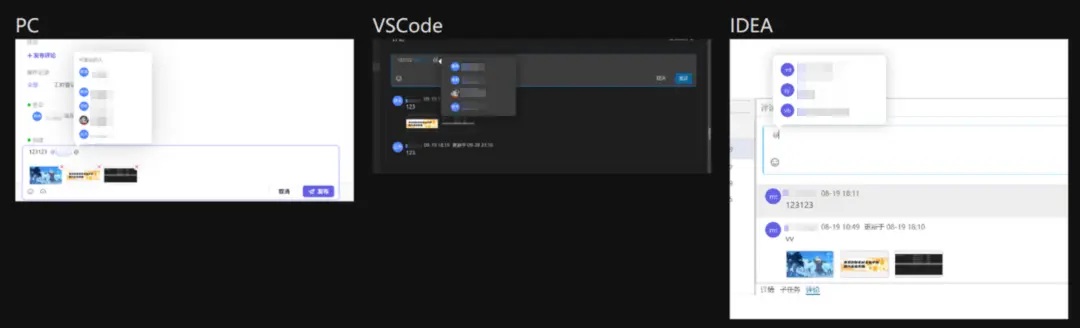
那麼,同時兼容 Vue2 與 Vue3 的代碼該如何實現?業務實踐中又有哪些代碼精簡和優化的小技巧?讓我們先從兼容代碼的工程化講起。
1. 工程化:編寫同時兼容 Vue2 與 Vue3 的代碼
原理上,兼容工作由兩部分完成:
- 編譯階段:負責根據使用的項目環境,自動選擇使用 Vue2 或 Vue3 的 API。使用時,只需要從
Vue-Demi裏面 import 需要使用的 API,就會自動根據環境進行切換;可以分為在瀏覽器中運行(IIFE)和使用打包工具(cjs、umd、esm)兩種情況。 - 運行階段:轉換
createElement函數的參數,使 Vue2 與 Vue3 的參數格式一致。Vue2 和 Vue3 Composition API 的區別非常小,運行時 API 最大的區別在於createElement函數的參數格式不一致,Vue3 換成了 React JSX 格式。
1.1 編譯階段——IIFE
在 window中定義一個 VueDemi 變量,然後檢查 window 中的 Vue 變量的版本,根據版本 reexport 對應的 API。
    var VueDemi = (function (VueDemi, Vue, VueCompositionAPI) {
      // Vue 2.7 有不同,這裏只列出 2.0 ~ 2.6 的版本
      if (Vue.version.slice(0, 2) === '2.') {
        for (var key in VueCompositionAPI) {
              VueDemi[key] = VueCompositionAPI[key]
        }
        VueDemi.isVue2 = true
      } else if (Vue.version.slice(0, 2) === '3.') {
        for (var key in Vue) {
        VueDemi[key] = Vue[key]
        }
        VueDemi.isVue3 = true
      }
        return VueDemi
      })(this.VueDemi,this.Vue,this.VueCompositionAPI)
1.2 編譯階段——打包工具
利用 npm postinstall 的 hook,檢查本地的 Vue 版本,然後根據版本 reexport 對應的 API。
    const Vue = loadModule('vue') // 這裏是檢查本地的 vue 版本
    if (Vue.version.startsWith('2.')) {
      switchVersion(2)
    }
    else if (Vue.version.startsWith('3.')) {
      switchVersion(3)
    }
    function switchVersion(version, vue) {
      copy('index.cjs', version, vue)
      copy('index.mjs', version, vue)
    }
    // VueDemi 自己的 lib 目錄下有 v2 v3 v2.7 三個文件夾,分別對應不同的 Vue 版本,Copy 函數的功能就是把需要的版本複製到 lib 目錄下
    // 然後在 package.json 裏面指向 lib/index.cjs 和 lib/index.mjs
    function copy(name, version, vue) {
      const src = path.join(dir, `v${version}`, name)
      const dest = path.join(dir, name)
      fs.write(dest, fs.read(src))
    }
1.3 運行階段 createElement 函數的區別
1.3.1 Vue 2
- attrs 需要寫在
attrs屬性中; on: { click=> {}}- scopedSlots 寫在
scopedSlots屬性中。
    h(LayoutComponent, {
        staticClass: 'button',
        class: { 'is-outlined': isOutlined },
        staticStyle: { color: '#34495E' },
        style: { backgroundColor: buttonColor },
        attrs: { id: 'submit' },
        domProps: { innerHTML: '' },
        on: { click: submitForm },
        key: 'submit-button',
        // 這裏只考慮 scopedSlots 的情況了
        // 之前的 slots 沒必要考慮,全部用 scopedSlots 是一樣的
        scopedSlots: {
          header: () => h('div', this.header),
          content: () => h('div', this.content),
        },
      }
    );
1.3.2 Vue 3
attrs和props一樣,只需寫在最外層;onClick: ()=> {}- slot 寫在
createElement函數的第三個參數中。
    h(LayoutComponent, {
        class: ['button', { 'is-outlined': isOutlined }],
        style: [{ color: '#34495E' }, { backgroundColor: buttonColor }],
        id: 'submit',
        innerHTML: '',
        onClick: submitForm,
        key: 'submit-button',
      }, {
        header: () => h('div', this.header),
        content: () => h('div', this.content),
      }
    );
1.4 完整代碼
    import { h as hDemi, isVue2 } from 'vue-demi';

    // 我們使用的時候使用的 Vue2 的寫法,但是 props 還是寫在最外層,為了 ts 的智能提示
    export const h = (
      type: String | Record<any, any>,
      options: Options & any = {},
      children?: any,
    ) => {
      if (isVue2) {
        const propOut = omit(options, [
          'props',
          // ... 省略了其他 Vue 2 的默認屬性如 attrs、on、domProps、class、style
        ]);
        // 這裏提取出了組件的 props
        const props = defaults(propOut, options.props || {});
        if ((type as Record<string, any>).props) {
          // 這裏省略了一些過濾 attrs 和 props 的邏輯,不是很重要
          return hDemi(type, { ...options, props }, children);
        }
        return hDemi(type, { ...options, props }, children);
      }

      const { props, attrs, domProps, on, scopedSlots, ...extraOptions } = options;

      const ons = adaptOnsV3(on); // 處理事件
      const params = { ...extraOptions, ...props, ...attrs, ...domProps, ...ons }; // 排除 scopedSlots

      const slots = adaptScopedSlotsV3(scopedSlots); // 處理 slots
      if (slots && Object.keys(slots).length) {
        return hDemi(type, params, {
          default: slots?.default || children,
          ...slots,
        });
      }
      return hDemi(type, params, children);
    };

    const adaptOnsV3 = (ons: Object) => {
      if (!ons) return null;
      return Object.entries(ons).reduce((ret, [key, handler]) => {
        // 修飾符的轉換
        if (key[0] === '!') {
          key = key.slice(1) + 'Capture';
        } else if (key[0] === '&') {
          key = key.slice(1) + 'Passive';
        } else if (key[0] === '~') {
          key = key.slice(1) + 'Once';
        }
        key = key.charAt(0).toUpperCase() + key.slice(1);
        key = `on${key}`;

        return { ...ret, [key]: handler };
      }, {});
    };

    const adaptScopedSlotsV3 = (scopedSlots: any) => {
      if (!scopedSlots) return null;
      return Object.entries(scopedSlots).reduce((ret, [key, slot]) => {
        if (isFunction(slot)) {
          return { ...ret, [key]: slot };
        }
        return ret;
      }, {} as Record<string, Function>);
    };
2. 編碼技巧:利用代數數據類型精簡代碼
這裏跟大家分享我自己總結的用於優化代碼的理論工具。温馨提示,可能和書本上的原有概念有些不同。
於我而言,衡量一段代碼複雜度的方法是看狀態數量。狀態越少,邏輯、代碼就越簡單;狀態數量越多,邏輯、代碼越複雜,越容易出錯。因此,我認為「好代碼」的特徵之一就是,在完成業務需求的前提下,儘量減少狀態的數量(即大小)。
那麼,什麼是狀態?在 Vue 的場景下,可以這麼理解:
- data 裏面的變量就是狀態,props、計算屬性都不是狀態。
- Composition API 中
ref和reactive是狀態,而 computed 不是狀態。
2.1 什麼是「狀態」?
狀態是可以由系統內部行為更改的數據,而狀態大小是狀態所有可能的值的集合的大小,記作 size(State)。而代碼複雜度 = States.reduce((acc, cur) => acc * size(cur),1)。
2.1.1 常見數據類型的狀態大小
一些常見的數據類型,比如 unit 的狀態大小是 1,在前端裏可以是 null、undefined;所有的常量、非狀態的大小也是 1。而 Boolean 的狀態大小是 2。
Number和 String 一類有多個或無限個值的數據類型,在計算狀態大小時需明確一點,我們只關心狀態在業務邏輯中的意義,而不是其具體值,因此區分會影響業務邏輯的狀態值即可。
例如,一個接口返回的數據是一個數字,但我們只關心這個數字是正數還是負數,那麼這個數字的狀態大小就是 2。
2.1.2 複合類型的狀態大小
複合類型分為和類型與積類型兩種。
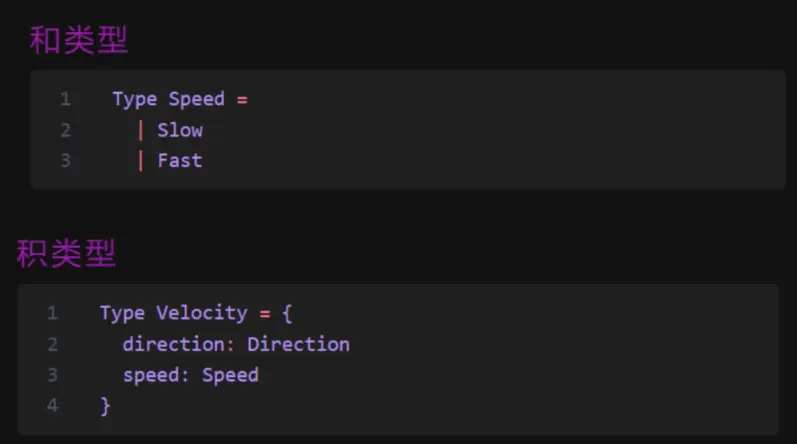
和類型狀態大小的計算公式為 size(C) = size(A) + size(B),而積類型狀態大小的計算公式為 size(C) = size(A) * size(B)。
瞭解完代碼優化標準後,我們通過一個案例説明如何利用代數數據類型,精簡代碼。
2.2 案例:評論編輯器的顯示控制
在 LigaAI 中,每個評論都有兩個編輯器,一個用來編輯評論,一個用來回複評論;且同一時間最多隻允許存在一個活動的編輯器。
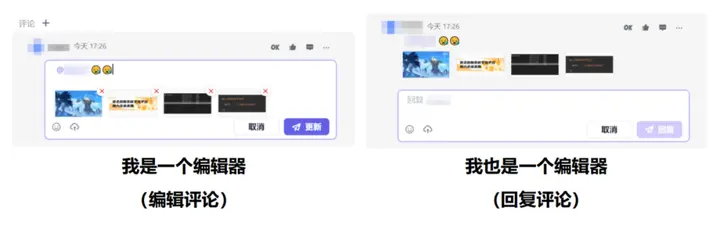
2.2.1 優化前的做法
為回覆組件定義兩個布爾變量 IsShowReply 和 IsShowEdit ,通過 v-if 控制是否顯示編輯器。點擊「回覆」按鈕時,邏輯如下:
(1) 判斷自己的 IsShowReply 是否為 true,如果是,直接返回;
(2) 判斷自己的 IsshowEdit,如果為 true 則修改為 false,關閉編輯評論;
(3) 依次設置所有其他評論組件的 IsShowReply 和 IsShowEdit 為 false;
(4) 修改自己的 IsShowReply 為 true。
當有 10 個評論組件時,代碼複雜度是多少?
    size(CommentComponent) = size(Boolean) * size(Boolean) = 2 * 2 = 4
    size(total) = size(CommentComponent) ^ count(CommentComponent) = 4 ^ 10 = 1048576
儘管邏輯上互斥,但這些組件在代碼層面毫無關係,可以全部設置為 true。如果代碼出現問題(包括寫錯),沒處理好互斥,這種情況完全可能出現。處理互斥還涉及查找 dom 和組件,出問題的機率也會大大提高。
2.2.2 優化後的做法
在 store 中定義一個字符串變量 activeCommentEditor,表示當前活動的評論組件及其類型。
    type CommentId = number;
    type ActiveCommentStatus = `${'Edit' | 'Reply'}${CommentId}` | 'Close'; // TS 的模板字符串類型
    let activeCommentEditor: ActiveCommentStatus = 'Close';
除 'Close' 外,該變量還由兩部分組成。第一部分説明當前是「編輯評論」還是「回覆評論」,第二部分説明評論的 id。按鈕的回調函數(如點擊回覆),只需要設置
activeCommentEditor = `Reply${id}`組件使用時,可以這樣
    v-if="activeCommentEditor === `Edit${id}`"
    v-if="activeCommentEditor === `Reply${id}`"
就這麼簡單,沒有判斷,沒有 dom,沒有其他組件。雖然 id 是 number,但於前端而言只是一個常量,所以其大小為 1。那麼當有 10 個評論組件時,這段代碼的複雜度就是
size(total) = size('Reply''Edit') * count(Comment) * 1 + size('close') = 2 * 10 * 1 +1 = 21在實際使用中,我們發現確實存在 21 種狀態;在代碼層面,我們也精準控制了這個值只能在這 21 種正確的狀態中,所以出錯的機率也大大降低(幾乎不可能出錯)。
以上就是今天想跟大家分享的 Vue2 和 Vue3 代碼兼容的實現和優化方案。後續我們也會分享或補充更多相關案例與完整代碼,請持續關注 LigaAI@SegmentFault 。
LigaAI-新一代智能研發協作平台 助力開發者揚帆遠航,歡迎申請試用我們的產品,期待與你一路同行!


