

@[toc]
平時我們項目中涉及到 AOP,基本上就是聲明式配置一下就行了,無論是基於 XML 的配置還是基於 Java 代碼的配置,都是簡單配置即可使用。聲明式配置有一個好處就是對源代碼的侵入小甚至是零侵入。不過今天鬆哥要和小夥伴們聊一聊編程式的 AOP,為什麼要聊這個話題呢?因為在 Spring 源碼中,底層就是通過這種方式創建代理對象的,所以如果自己會通過編程式的方式進行 AOP 開發,那麼在看 Spring 中相關源碼的時候,就會很好理解了。
如果小夥伴們對 AOP 的基本用法還不熟悉,可以在公眾號【江南一點雨】後台回覆 ssm,有鬆哥錄製的免費入門視頻。
1. 基本用法
1.1 基於 JDK 的 AOP
我們先來看基於 JDK 動態代理的 AOP。
假設我有如下一個計算器接口:
public interface ICalculator {
    void add(int a, int b);

    int minus(int a, int b);
}
然後給這個接口提供一個實現類:
public class CalculatorImpl implements ICalculator {
    @Override
    public void add(int a, int b) {
        System.out.println(a + "+" + b + "=" + (a + b));
    }

    @Override
    public int minus(int a, int b) {
        return a - b;
    }
}
現在假設我要生成一個代理對象,利用編程式的方式,代碼如下:
ProxyFactory proxyFactory = new ProxyFactory();
proxyFactory.setTarget(new CalculatorImpl());
proxyFactory.addInterface(ICalculator.class);
proxyFactory.addAdvice(new MethodInterceptor() {
    @Override
    public Object invoke(MethodInvocation invocation) throws Throwable {
        Method method = invocation.getMethod();
        String name = method.getName();
        System.out.println(name+" 方法開始執行了。。。");
        Object proceed = invocation.proceed();
        System.out.println(name+" 方法執行結束了。。。");
        return proceed;
    }
});
ICalculator calculator = (ICalculator) proxyFactory.getProxy();
calculator.add(3, 4);
這裏幾個方法應該都好理解:
- setTarget 方法是設置真正的代理對象。這個在我們之前的 @Lazy 註解為啥就能破解死循環?一文中大家已經接觸過了。
- addInterface,基於 JDK 的動態代理是需要有接口的,這個方法就是設置代理對象的接口。
- addAdvice 方法就是添加增強/通知。
- 最後通過 getProxy 方法獲取到一個代理對象然後去執行。
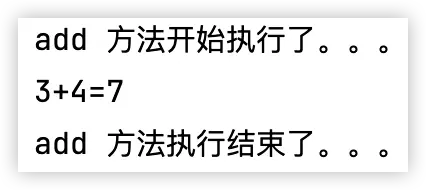
最終打印結果如下:
1.2 基於 CGLIB 的 AOP
如果被代理的對象沒有接口,那麼可以通過基於 CGLIB 的動態代理來生成代理對象。
假設我有如下類:
public class UserService {

    public void hello() {
        System.out.println("hello javaboy");
    }
}
要給這個類生成代理對象,如下:
ProxyFactory proxyFactory = new ProxyFactory();
proxyFactory.setTarget(new UserService());
proxyFactory.addAdvice(new MethodInterceptor() {
    @Override
    public Object invoke(MethodInvocation invocation) throws Throwable {
        String name = invocation.getMethod().getName();
        System.out.println(name+" 方法開始執行了。。。");
        Object proceed = invocation.proceed();
        System.out.println(name+" 方法執行結束了。。。");
        return proceed;
    }
});
UserService us = (UserService) proxyFactory.getProxy();
us.hello();
其實道理很簡單,沒有接口就不設置接口就行了。
1.3 源碼分析
在上面生成代理對象的 getProxy 方法中,最終會執行到 createAopProxy 方法,在該方法中會根據是否有接口來決定是使用 JDK 動態代理還是 CGLIB 動態代理:
@Override
public AopProxy createAopProxy(AdvisedSupport config) throws AopConfigException {
    if (config.isOptimize() || config.isProxyTargetClass() || hasNoUserSuppliedProxyInterfaces(config)) {
        Class<?> targetClass = config.getTargetClass();
        if (targetClass.isInterface() || Proxy.isProxyClass(targetClass) || ClassUtils.isLambdaClass(targetClass)) {
            return new JdkDynamicAopProxy(config);
        }
        return new ObjenesisCglibAopProxy(config);
    }
    else {
        return new JdkDynamicAopProxy(config);
    }
}
從這段源碼中可以看到,有接口就是 JDK 動態代理,沒有接口則是 CGLIB 動態代理。不過在最上面有一個 if 判斷,這個判斷中有三個條件,分別來和小夥伴們説一下:
config.isOptimize()
這個方法是判斷是否需要優化。因為傳統上大家都認為 CGLIB 動態代理性能高於 JDK 動態代理,不過這些年 JDK 版本更新也是非常快,現在兩者性能差異已經不大了。如果這個屬性設置為 true,那麼系統就會去判斷是否有接口,有接口就 JDK 動態代理,否則就 CGLIB 動態代理。
如果需要設置該屬性,可以通過如下代碼設置:
proxyFactory.setOptimize(true);config.isProxyTargetClass()
這個屬性作用也是類似,我們平時在使用 AOP 的時候,有時候也會設置這個屬性,這個屬性如果設置為 true,則會進入到 if 分支中,但是 if 分支中的 if 則不宜滿足,所以一般情況下,如果這個屬性設置為 true,就意味着無論是否有接口,都使用 CGLIB 動態代理。如果這個屬性為 false,則有接口就使用 JDK 動態代理,沒有接口就使用 CGLIB 動態代理。
hasNoUserSuppliedProxyInterfaces(config)
這個方法主要做兩方面的判斷:
- 當前代理對象如果沒有接口,則直接返回 true。
- 當前代理對象有接口,但是接口是 SpringProxy,則返回 true。
返回 true 基本上就意味着要使用 CGLIB 動態代理了,返回 false 則意味着使用 JDK 動態代理。
如果是基於 JDK 的動態代理,那麼最終調用的就是 JdkDynamicAopProxy#getProxy() 方法,如下:
@Override
public Object getProxy() {
    return getProxy(ClassUtils.getDefaultClassLoader());
}
@Override
public Object getProxy(@Nullable ClassLoader classLoader) {
    if (logger.isTraceEnabled()) {
        logger.trace("Creating JDK dynamic proxy: " + this.advised.getTargetSource());
    }
    return Proxy.newProxyInstance(classLoader, this.proxiedInterfaces, this);
}
Proxy.newProxyInstance 這就是 JDK 裏邊的動態代理了,這很好懂。
如果是基於 CGLIB 的動態代理,那麼最終調用的就是 CglibAopProxy#getProxy() 方法,如下:
@Override
public Object getProxy() {
    return buildProxy(null, false);
}
private Object buildProxy(@Nullable ClassLoader classLoader, boolean classOnly) {
    try {
        Class<?> rootClass = this.advised.getTargetClass();
        Assert.state(rootClass != null, "Target class must be available for creating a CGLIB proxy");
        Class<?> proxySuperClass = rootClass;
        if (rootClass.getName().contains(ClassUtils.CGLIB_CLASS_SEPARATOR)) {
            proxySuperClass = rootClass.getSuperclass();
            Class<?>[] additionalInterfaces = rootClass.getInterfaces();
            for (Class<?> additionalInterface : additionalInterfaces) {
                this.advised.addInterface(additionalInterface);
            }
        }
        // Validate the class, writing log messages as necessary.
        validateClassIfNecessary(proxySuperClass, classLoader);
        // Configure CGLIB Enhancer...
        Enhancer enhancer = createEnhancer();
        if (classLoader != null) {
            enhancer.setClassLoader(classLoader);
            if (classLoader instanceof SmartClassLoader smartClassLoader &&
                    smartClassLoader.isClassReloadable(proxySuperClass)) {
                enhancer.setUseCache(false);
            }
        }
        enhancer.setSuperclass(proxySuperClass);
        enhancer.setInterfaces(AopProxyUtils.completeProxiedInterfaces(this.advised));
        enhancer.setNamingPolicy(SpringNamingPolicy.INSTANCE);
        enhancer.setAttemptLoad(true);
        enhancer.setStrategy(new ClassLoaderAwareGeneratorStrategy(classLoader));
        Callback[] callbacks = getCallbacks(rootClass);
        Class<?>[] types = new Class<?>[callbacks.length];
        for (int x = 0; x < types.length; x++) {
            types[x] = callbacks[x].getClass();
        }
        // fixedInterceptorMap only populated at this point, after getCallbacks call above
        enhancer.setCallbackFilter(new ProxyCallbackFilter(
                this.advised.getConfigurationOnlyCopy(), this.fixedInterceptorMap, this.fixedInterceptorOffset));
        enhancer.setCallbackTypes(types);
        // Generate the proxy class and create a proxy instance.
        return (classOnly ? createProxyClass(enhancer) : createProxyClassAndInstance(enhancer, callbacks));
    }
    catch (CodeGenerationException | IllegalArgumentException ex) {
        throw new AopConfigException("Could not generate CGLIB subclass of " + this.advised.getTargetClass() +
                ": Common causes of this problem include using a final class or a non-visible class",
                ex);
    }
    catch (Throwable ex) {
        // TargetSource.getTarget() failed
        throw new AopConfigException("Unexpected AOP exception", ex);
    }
}
關於直接使用 JDK 創建動態代理對象和直接使用 CGLIB 創建動態代理對象的代碼我就不做過多介紹了,這些都是基本用法,鬆哥在之前錄製的免費的 SSM 入門教程中都和小夥伴們講過了,這裏就不囉嗦了。
2. Advisor
2.1 Advisor
Advisor = Pointcut+Advice。
前面的案例我們只是設置了 Advice,沒有設置 Pointcut,這樣最終攔截下來的是所有方法。
如果有需要,我們可以直接設置一個 Advisor,這樣就可以指定需要攔截哪些方法了。
我們先來看一下 Advisor 的定義:
public interface Advisor {
    Advice EMPTY_ADVICE = new Advice() {};
    Advice getAdvice();
    boolean isPerInstance();
}
可以看到,這裏主要的就是 getAdvice 方法,這個方法用來獲取一個通知/增強。另外一個 isPerInstance 目前並沒有使用,默認返回 true 即可。在具體實踐中,我們更關注它的一個子類:
public interface PointcutAdvisor extends Advisor {

    Pointcut getPointcut();

}
這個子類多了一個 getPointcut 方法,PointcutAdvisor 這個接口很好的詮釋了 Advisor 的作用:Pointcut+Advice。
2.2 Pointcut
Pointcut 又有眾多的實現類:
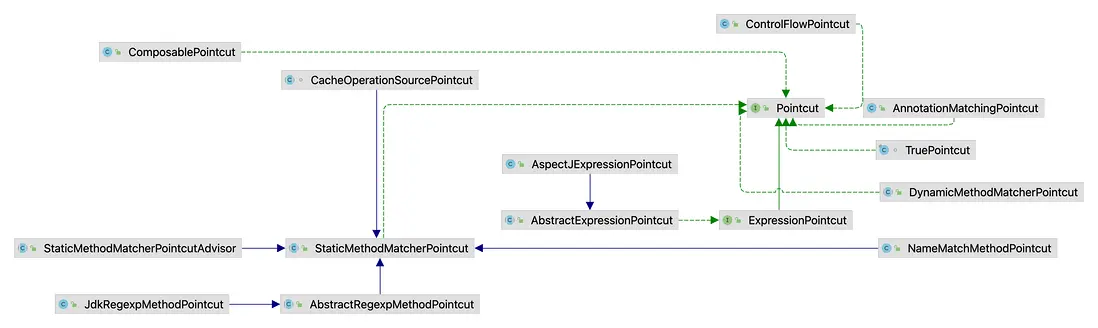
挑兩個有意思的説一下,其他的其實也都差不多。
2.2.1 Pointcut
首先我們先來看下這個接口:
public interface Pointcut {
    ClassFilter getClassFilter();
    MethodMatcher getMethodMatcher();
    Pointcut TRUE = TruePointcut.INSTANCE;
}
接口裏邊有兩個方法,看名字大概也能猜出來意思:
- getClassFilter:這個是類的過濾器,通過這個可以刷選出來要攔截的類。
- MethodMatcher:這個是方法過濾器,通過這個可以刷選出來需要攔截的方法。
至於 ClassFilter 本身其實就很好懂了:
@FunctionalInterface
public interface ClassFilter {
    boolean matches(Class<?> clazz);
    ClassFilter TRUE = TrueClassFilter.INSTANCE;
}
就一個 matches 方法,傳入一個 Class 對象,然後執行比較即可,返回 true 就表示要攔截,返回 false 則表示不攔截。
MethodMatcher 也類似,如下:
public interface MethodMatcher {
    boolean matches(Method method, Class<?> targetClass);
    boolean isRuntime();
    boolean matches(Method method, Class<?> targetClass, Object... args);
    MethodMatcher TRUE = TrueMethodMatcher.INSTANCE;
}
這裏三個方法,兩個是做匹配的 matches 方法,當 isRuntime 方法返回 true 的時候,才會執行第二個帶 args 參數的 matches 方法。
舉個簡單的使用案例,假設我現在要攔截所有方法,那麼我可以按照如下方式定義:
public class AllClassAndMethodPointcut implements Pointcut {
    @Override
    public ClassFilter getClassFilter() {
        return ClassFilter.TRUE;
    }

    @Override
    public MethodMatcher getMethodMatcher() {
        return MethodMatcher.TRUE;
    }
}
這是自帶的兩個常量,表示攔截所有類和所有方法。
再假如,我要攔截 CalculatorImpl 類的 add 方法,那麼我可以按照如下方式來定義:
public class ICalculatorAddPointcut implements Pointcut {
    @Override
    public ClassFilter getClassFilter() {
        return new ClassFilter() {
            @Override
            public boolean matches(Class<?> clazz) {
                return clazz.getName().equals("org.javaboy.bean.aop.CalculatorImpl");
            }
        };
    }

    @Override
    public MethodMatcher getMethodMatcher() {
        NameMatchMethodPointcut matcher = new NameMatchMethodPointcut();
        matcher.addMethodName("add");
        return matcher;
    }
}
2.2.2 AspectJExpressionPointcut
我們平時寫 AOP,比較常用的是通過表達式來定義切面,那麼這裏就可以使用 AspectJExpressionPointcut,這是一個類,所以可以不用繼承新類,直接使用創建使用即可,如下:
AspectJExpressionPointcut pointcut = new AspectJExpressionPointcut();
pointcut.setExpression("execution(* org.javaboy.bean.aop.ICalculator.add(..))");
如上切點就表示攔截 ICalculator 類中的 add 方法。
2.3 Advice
這個好説,就是增強/通知,在本文第 1.1、1.2 小節中均已演示過,不再贅述。
2.4 Advisor 實踐
接下來鬆哥通過一個案例來和小夥伴們演示一下如何添加一個 Advisor:
ProxyFactory proxyFactory = new ProxyFactory();
proxyFactory.setTarget(new CalculatorImpl());
proxyFactory.addInterface(ICalculator.class);
proxyFactory.addAdvisor(new PointcutAdvisor() {
    @Override
    public Pointcut getPointcut() {
        AspectJExpressionPointcut pointcut = new AspectJExpressionPointcut();
        pointcut.setExpression("execution(* org.javaboy.bean.aop.ICalculator.add(..))");
        return pointcut;
    }
    @Override
    public Advice getAdvice() {
        return new MethodInterceptor() {
            @Override
            public Object invoke(MethodInvocation invocation) throws Throwable {
                Method method = invocation.getMethod();
                String name = method.getName();
                System.out.println(name + " 方法開始執行了。。。");
                Object proceed = invocation.proceed();
                System.out.println(name + " 方法執行結束了。。。");
                return proceed;
            }
        };
    }
    @Override
    public boolean isPerInstance() {
        return true;
    }
});
ICalculator calculator = (ICalculator) proxyFactory.getProxy();
calculator.add(3, 4);
calculator.minus(3, 4);
在 getPointcut 方法中,可以返回 3.2 小節中不同的切點,都是 OK 沒有問題的。getAdvice 就是前面定義的通知。
其實在本文的 1.1、1.2 小節中,我們直接添加了 Advice 而沒有配置 Advisor,我們自己添加的 Advice 在內部也是被自動轉為了一個 Advisor,相關源碼如下:
@Override
public void addAdvice(Advice advice) throws AopConfigException {
    int pos = this.advisors.size();
    addAdvice(pos, advice);
}
/**
 * Cannot add introductions this way unless the advice implements IntroductionInfo.
 */
@Override
public void addAdvice(int pos, Advice advice) throws AopConfigException {
    if (advice instanceof IntroductionInfo introductionInfo) {
        addAdvisor(pos, new DefaultIntroductionAdvisor(advice, introductionInfo));
    }
    else if (advice instanceof DynamicIntroductionAdvice) {
        // We need an IntroductionAdvisor for this kind of introduction.
        throw new AopConfigException("DynamicIntroductionAdvice may only be added as part of IntroductionAdvisor");
    }
    else {
        addAdvisor(pos, new DefaultPointcutAdvisor(advice));
    }
}
小夥伴們看到,我們傳入的 Advice 對象最終被轉為一個 DefaultPointcutAdvisor 對象,然後調用了 addAdvisor 方法進行添加操作。
public DefaultPointcutAdvisor(Advice advice) {
    this(Pointcut.TRUE, advice);
}
可以看到,在 DefaultPointcutAdvisor 初始化的時候,設置了 Pointcut.TRUE,也就是所有類的所有方法都會被攔截。也就是 Advice 最終都會被轉為 Advisor。
3. 小結
好啦,這個就是編程式 AOP 的一個簡單用法,這篇文章主要是希望小夥伴們對編程式 AOP 有一個簡單的瞭解,這樣在後續的 AOP 源碼分析中才會更加輕鬆一些~
