

引言
如標題所言,本文介紹JVM的三個時間如何區分,用户時間,系統時間和真實時間的區別是什麼。
Source
GC Logging – user, sys, real – which time to use? & Gandhi

In the Garbage Collection log file, 3 types of time are reported for every single GC event:
在垃圾回收日誌文件中,每個 GC 事件都會報告 3 種類型的時間:
- ‘user’
- ‘sys’
- ‘real’
- 用户
- 系統
- 真實
Example: [Times: user=11.53 sys=1.38, real=1.03 secs].
For any engineer who is analyzing the GC logs will have following two questions:
任何工程師在分析 GC 日誌時都會遇到以下兩個問題:
- What is the difference between ‘user’, ‘sys’, and ‘real’ times?
- Which time should I use for measurement?
- 用户"、"系統 "和 "實際 "時間有什麼區別?
- 我應該使用哪個時間進行測量?
When I started with Garbage Collection I had question #1. However, this knowledge, which I have shared below, was easy to gain.
剛開始學習垃圾回收時,我遇到了第 1 個問題。
不過,我在下面分享的這些知識很容易獲得。
However as the author of http://gceasy.io/ (a universal garbage collection log analysis tool), I was constantly asking myself question #2. Since http://gceasy.io reports several insightful metrics and graphs, on which time should I standardize? Now that http://gceasy.io is widely adopted, there is a great responsibility to represent the facts accurately.
我應該在哪個時間段進行標準化呢?現在,http://gceasy.io 已被廣泛採用,我有責任準確地反映事實。
但聖雄甘地(?)幫我澄清了第 2 個問題。
實際上,他確實幫了我。
你可能會問聖雄甘地和垃圾收集記錄時間有什麼關係?我説的有道理嗎?
But Mahatma Gandhi helped me to clarify question #2. Really he did help me. You might wonder what Mahatma Gandhi has to do with Garbage collection logging times. Am I making any sense here?
不過,作為 http://gceasy.io/(一款通用的垃圾收集日誌分析工具)的作者,我一直在問自己第二個問題。
既然 http://gceasy.io 報告了多個有洞察力的指標和圖表,
My wife keeps saying I talk non-sense most of the time (which is true as well). But in this case, I might be able to convenience you, my friend.
作者吐槽:我妻子一直説我經常胡説八道(這也是事實)。
但在這種情況下,我也許能為你提供方便,我的朋友。
History(歷史)
Before even getting into GC Time, let’s just take couple minutes to learn about the Unix command “time.”
在瞭解 GC Time 之前,我們先花幾分鐘瞭解一下 Unix 命令 "time"。
When you issue the below UNIX command:
當您發出以下 UNIX 命令時:
time lsYou are going to see output like this:
您將看到這樣的輸出結果:
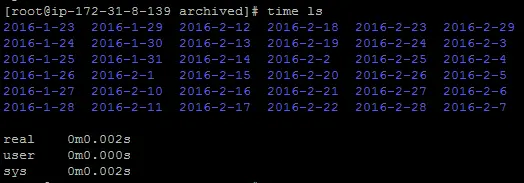
個人機器輸出結果如下:
[alexxander@localhost ~]$ time ls
get-docker.sh  hello.lua

real    0m0.016s
user    0m0.001s
sys    0m0.005s
The ‘time ls’ command first displays the output of execution of the “ls” command, which lists all the directories/files in the current directory:
time ls "命令首先顯示 "ls "命令的執行輸出,該命令列出了當前目錄下的所有目錄/文件:

Next you see the amount of time it’s taken to execute “ls”, which is:
接下來你會看到執行 "ls "所花費的時間,即ls這個命令的總體執行時長:
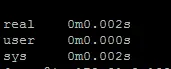
Note here “real”, “user”, “sys” times are displayed. This is the same data that we see in GC logs.
注意這裏顯示的是 "real"、"user "和 "sys "時間。這與我們在 GC 日誌中看到的數據相同。
Below is a great definition provided in StackOverflow for each of these times:
下面是 StackOverflow 提供的關於這些時間的定義:
Real is wall clock time – time from start to finish of the call. This is all elapsed time including time slices used by other processes and time the process spends blocked (for example if it is waiting for I/O to complete).
Real 是時鐘時間:從調用開始到結束的時間。
這是所有已耗費的時間,包括其他進程使用的時間片和進程被阻塞的時間(例如等待 I/O 完成的時間)。
User is the amount of CPU time spent in user-mode code (outside the kernel) within the process. This is only actual CPU time used in executing the process. Other processes and time the process spends blocked do not count towards this figure.
User是進程內用户模式代碼(內核外)所用的 CPU 時間。
這只是執行進程時實際使用的 CPU 時間。
其他進程和進程被阻塞的時間不計算在內。
Sys is the amount of CPU time spent in the kernel within the process. This means executing CPU time spent in system calls within the kernel, as opposed to library code, which is still running in user-space. Like ‘user’, this is only CPU time used by the process.
Sys 是進程在內核中花費的 CPU 時間。
這意味着在內核中執行系統調用所耗費的 CPU 時間,而不是仍在用户空間運行的庫代碼。
與 "用户 "一樣,這只是進程使用的 CPU 時間。
User+Sys will tell you how much actual CPU time your process used. Note that this is across all CPUs, so if the process has multiple threads it could potentially exceed the wall clock time reported by Real.
User+Sys 將告訴你,進程實際使用了多少 CPU 時間。
請注意,這是在所有 CPU 上使用的時間,因此如果進程有多個線程,就有可能超過 Real 報告的掛鐘時間。
Java GC Times(Java GC 時間)
This is the same concept that is applied in GC logging as well. Let’s look at couple examples to understand this concept better.
這個概念同樣適用於 GC 日誌。讓我們看幾個例子來更好地理解這個概念。
Example 1:
[Times: user=11.53 sys=1.38, real=1.03 secs]In this example: ‘user’ + ‘sys’ is much greater than ‘real’ time. That’s because this log time is collected from the JVM, where multiple GC threads are configured on a multi-core/multi-processors server. As multiple threads execute GC in parallel, the workload is shared amongst these threads, thus actual clock time (‘real’) is much less than total CPU time (‘user’ + ‘sys’).
在本例中,"用户 "+"系統 "時間遠遠大於 "實際 "時間。
這是因為日誌時間是從 JVM 收集的,在多核/多處理器服務器上配置了多個 GC 線程。
由於多個線程並行執行 GC,工作量由這些線程分擔,因此實際時鐘時間 (‘real’))遠少於 CPU 總時間 (‘user’ + ‘sys’).。
Example 2:
[Times: user=0.09 sys=0.00, real=0.09 secs] Above is an example of GC Times collected from a Serial Garbage Collector. As Serial Garbage collector always uses a single thread only, real time is equal to the sum of user and system times.
以上是從串行垃圾收集器收集的 GC 時間示例。
由於串行垃圾收集器始終只使用一個線程,因此實際時間等於用户時間和系統時間之和。
How Mahatma Gandhi Helped Me(聖雄甘地是如何幫助我的)
I still haven’t answered the question how Mahatma Gandhi helped me. Following was one of his immortal quote on customers:
我還沒有回答聖雄甘地是如何幫助我的這個問題。
以下是他關於客户的不朽名言之一:

a customer is the most important visitor, on our premise, he is not dependent upon us we are dependant upon him he is not interruption on work he is the purpose of it he is not an outsider to our businesse he is part of it we are not doing him a favor by serving him... he is doing us a favor by swing us the opportunity to-do-it mahatma gandhi
顧客是我們最重要的訪客,他不依賴於我們,我們依賴於他,他不是工作的干擾,他是工作的目的,他不是我們業務的局外人,他是我們業務的一部分,我們為他服務不是幫他的忙......他為我們提供機會,讓我們去做,才是幫我們的忙。
According to Gandhi, the Customer is the primary focus. Similarly, when you are looking at performance optimization, you are primarily optimizing response time for your customer. The customer doesn’t care how many GC threads you use or how many processors you have. What matters is how many seconds he has to wait before he sees his screen painted with data. For that reason, I have used “real” time, which is basically the “clock time” for all the metrics and graphs in thehttp://gceasy.io/ (universal garbage collection log analysis tool).
甘地認為,客户是首要關注點。
同樣,當你考慮性能優化時,你主要是在為你的客户優化響應時間。
客户並不關心你使用了多少個 GC 線程,也不關心你有多少個處理器。
重要的是,他需要等待多少秒才能看到屏幕上的數據。
因此,我使用了 "實時 "時間,它基本上是http://gceasy.io/(通用垃圾收集日誌分析工具)中所有指標和圖表的 "時鐘時間"。
But it doesn’t mean ‘sys’ or ‘user’ times are not important. They are also important to see whether you want to increase your GC thread count or CPU processor count, to reduce your GC pause times.
但這並不意味着 "系統 "或 "用户 "時間不重要。
它們對於確定是否要增加 GC 線程數或 CPU 處理器數以減少 GC 暫停時間也很重要。
