

Source
Pass arguments into a function - Linux Bash Shell Scripting Tutorial Wiki (cyberciti.biz)
Let us see how to pass parameters to a Bash function.
讓我們看看如何向 Bash 函數傳遞參數。
- A shell function is nothing but a set of one or more commands/statements that act as a complete routine.
- Each function must have a unique name.
- Shell functions have their own command line argument or parameters.
- Use shell variable $1](https://bash.cyberciti.biz/guide/$1 "$1"), [$2,..$n to access argument passed to the function.
- shell 函數是由一條或多條命令/語句組成的一個完整例程。
- 每個函數都必須有一個唯一的名稱。
- shell 函數有自己的命令行參數。
-
使用 shell 變量 $1](https://bash.cyberciti.biz/guide/$1"$1")、[$2...$n 訪問傳遞給函數的參數。
Passing parameters to a Bash function向 Bash 函數傳遞參數
- The syntax is as follows to create user-defined functions in a shell script:
在 shell 腳本中創建用户定義函數的語法如下:
function_name(){
   command_block_here
}

## OR ##

function function_name_here(){
   command_line_block
}

## passing parameters to a Bash function ##

my_function_name(){
  arg1=$1
  arg2=$2
  command on $arg1
}
Invoke function
- To invoke the the function use the following syntax:
要調用該函數,請使用以下語法:
my_function_name foo barWhere,
- my_function_name = Your function name.
- foo = Argument # 1 passed to the function (positional parameter # 1).
- bar = Argument # 2 passed to the function.
- my_function_name = 您的函數名稱。
- foo = 傳遞給函數的參數 # 1(位置參數 # 1)。
-
- bar = 傳遞給函數的參數 # 2。
Examples
Create a function called fresh.sh:
創建一個名為 fresh.sh 的函數:
#!/bin/bash

# write a function
fresh(){
   # t stores $1 argument passed to fresh()
   t=$1
   echo "fresh(): \$0 is $0"
   echo "fresh(): \$1 is $1"
   echo "fresh(): \$t is $t"
   echo "fresh(): total args passed to me $#"
   echo "fresh(): all args (\$@) passed to me -\"$@\""
   echo "fresh(): all args (\$*) passed to me -\"$*\""
}

# invoke the function with "Tomato" argument
echo "**** calling fresh() 1st time ****"
fresh Tomato

# invoke the function with total 3 arguments
echo "**** calling fresh() 2nd time ****"
fresh Tomato Onion Paneer
Save and close the file. Run it as follows:
保存並關閉文件。按以下步驟運行:
chmod +x fresh.sh
./fresh.sh
Sample outputs:
樣本輸出:
**** calling fresh() 1st time ****
fresh(): $0 is ./fresh.sh
fresh(): $1 is Tomato
fresh(): $t is Tomato
fresh(): total args passed to me 1
fresh(): all args ($@) passed to me -"Tomato"
fresh(): all args ($*) passed to me -"Tomato"
**** calling fresh() 2nd time ****
fresh(): $0 is ./fresh.sh
fresh(): $1 is Tomato
fresh(): $t is Tomato
fresh(): total args passed to me 3
fresh(): all args ($@) passed to me -"Tomato Onion Paneer"
fresh(): all args ($*) passed to me -"Tomato Onion Paneer"
Let us try one more example. Create a new shell script to determine if given name is file or directory (cmdargs.sh):
讓我們再試一個例子。創建一個新的 shell 腳本來判斷給定的名稱是文件還是目錄(cmdargs.sh):
#!/bin/bash
# Name - cmdargs.sh
# Purpose - Passing positional parameters to user defined function
# 目的 - 將位置參數傳遞給用户定義函數
# -----------------------------------------------------------------
file="$1"

# User-defined function
is_file_dir(){
        # $f is local variable
    local f="$1"
        # file attributes comparisons using test i.e. [ ... ]
    [ -f "$f" ] && { echo "$f is a regular file."; exit 0; }
    [ -d "$f" ] && { echo "$f is a directory."; exit 0; }
    [ -L "$f" ] && { echo "$f is a symbolic link."; exit 0; }
    [ -x "$f" ] && { echo "$f is an executeble file."; exit 0; }
}

# make sure filename supplied as command line arg else die
# 確保文件名作為命令行參數提供,否則 die
[ $# -eq 0 ] && { echo "Usage: $0 filename"; exit 1; }

# invoke the is_file_dir and pass $file as arg
# 調用 is_file_dir,並將 $file 作為參數傳入
is_file_dir "$file
Run it as follows:
運行方法如下
./cmdargs.sh /etc/resolv.conf
./cmdargs.sh /bin/date
./cmdargs.sh $HOME
./cmdargs.sh /sbin
Sample outputs:
樣本輸出:
/etc/resolv.conf is a regular file.
/bin/date is a regular file.
/home/vivek is a directory.
/sbin is a directory.
Function shell variables
- All function parameters or arguments can be accessed via $1, $2, $3,..., $N.
- [$0](https://bash.cyberciti.biz/guide/$0 "$0") always point to the shell script name.
- $*](https://bash.cyberciti.biz/guide/$* "$*") or [$@ holds all parameters or arguments passed to the function.
- [$#](https://bash.cyberciti.biz/guide/$ "$") holds the number of positional parameters passed to the function.
- 所有函數參數或參數都可以通過
$1, $2, $3,..., $N訪問。 - [$0](https://bash.cyberciti.biz/guide/$0 "$0")總是指向 shell 腳本名。
- $* ](https://bash.cyberciti.biz/guide/$* "$*") 或 [$@ 保存傳遞給函數的所有參數。
- [$#](https://bash.cyberciti.biz/guide/$ "$") 保存傳遞給函數的位置參數的個數。
How do I display function name? 如何顯示功能名稱?
$0](https://bash.cyberciti.biz/guide/$0 "$0") always point to the shell script name. However, you can use an array variable called [FUNCNAME") which contains the names of all shell functions currently in the execution call stack. The element with index 0 is the name any currently-executing shell function.This variable _exists only_ when a shell function is executing.
$0](https://bash.cyberciti.biz/guide/$0 "$0")總是指向 shell 腳本名。不過,您可以使用一個名為 [FUNCNAME")的數組變量,它包含當前執行調用堆棧中所有 shell 函數的名稱。索引為 0 的元素是當前正在執行的 shell 函數的名稱。
FUNCNAME in action
Create a shell script called funcback.sh:
創建名為 funcback.sh 的 shell 腳本:
#!/bin/bash
#  funcback.sh : Use $FUNCNAME
backup(){
    local d="$1"
    [[ -z $d ]] && { echo "${FUNCNAME}(): directory name not specified"; exit 1; }
    echo "Starting backup..."
}

backup $1
Save and close the file. Run it as follows:
保存並關閉文件。按以下步驟運行:
chmod +x funcback.sh
funcback.sh /home
funcback.sh
Sample outputs:
樣本輸出:
backup(): directory name not specifiedReturn values
返回值
It is possible to pass a value from the function back to the bash using the return command. The return statement terminates the function. The syntax is as follows:
可以使用 return command將函數值傳回 bash。return 語句終止函數。語法如下
return
return [value]
One can force script to exit with the return value specified by [value]. If [value] is omitted, the return status is that of the last command executed within the function or script.
可以強制腳本以 [value] 指定的返回值退出。如果省略 [value],返回狀態將是函數或腳本中最後執行的命令的狀態。
Examples
Create a new file called math.sh:
新建一個名為 math.sh 的文件:
#!/bin/bash
#!/bin/bash
# Name - math.sh
# Purpose - Demo return value
# ------------------------------------

## user define function
math(){
    local a=$1
    local b=$2
    local sum=$(( a + b))
    return $sum
}

## call the math function with 5 and 10 as  arguments
math 5 10

## display back result (returned value) using $?
echo "5 + 10 = $?"
Run it as follows:
運行方法如下
chmod +x math.sh
./math.sh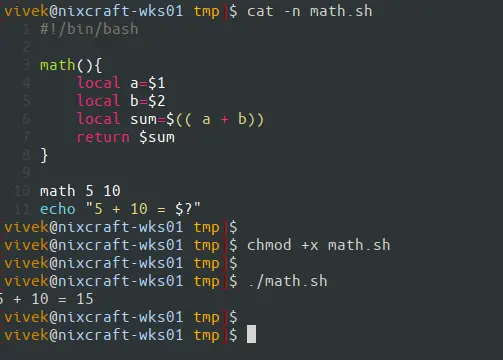
The above example is straightforward. The return command returns any given value between zero (0) and 255. By default, the value passed by the return statement is the current value of the exit status variable. For example, the following code will return wrong values as it is not between zero (0) and 255.
上面的例子很簡單。return 命令 返回介於零 (0) 和 255 之間的任意給定值。默認情況下,return 語句傳遞的值是 exit status 變量的當前值。例如,以下代碼將返回錯誤的值,因為它不在零(0)和 255 之間。
math 500 100Here is the proper use of return command (bash-task.sh):
下面是 return command的正確用法(bash-task.sh):
#!/bin/bash
# Name: bash-task.sh
# Purpose: Check if a file exists or not using custom bash function and return value
# -----------------------------------------------------------------------------------

# set values
readonly TRUE=0
readonly FALSE=1

# get input from the CLI
file="$1"

# return $TRUE (0) if file found
# return $FALSE (1) if file not found
is_file_found(){
    [ -f "$1" ] && return $TRUE || return $FALSE
}

# show usage info if $1 not passed to our script
if [ $# -eq 0 ]
then
    echo "Usage: $0 filename"
    exit 1
fi

# let us call our function
is_file_found "$file"

# take action based upon return value
if [ $? -eq 0 ]
then
    echo "$file added to backup task"
else
    echo "$file not found."
fi
Run it as follows:
運行方法如下
chmod +x bash-task.sh
./bash-task.sh
./bash-task.sh /etc/passwd
./bash-task.sh /foo/bar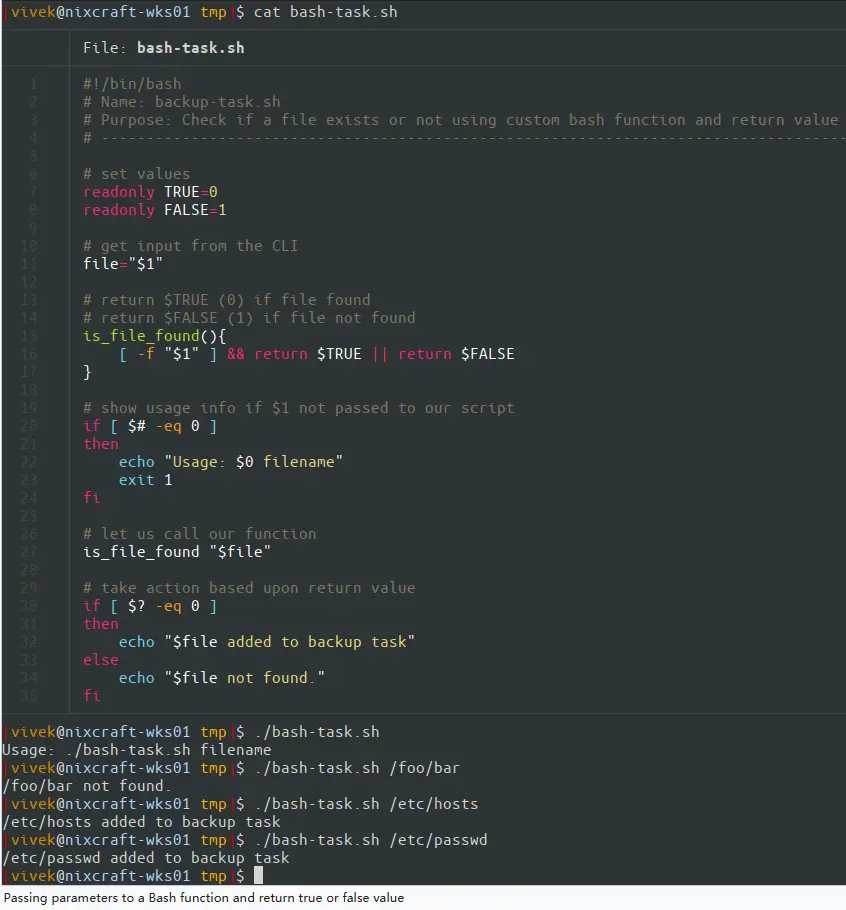
Passing parameters to a Bash function and return true or false value
向 Bash 函數傳遞參數並返回 true 或 false 值
How to return custom value from a user-defined function?
As I said earlier, you can't use return command. However, the workaround is as following using the printf command/echo command:
正如前面所説,不能使用 return command。不過,變通方法如下:使用 printf 命令/echo命令:
#!/bin/bash
#!/bin/bash
# Name - math.sh
# Purpose - Demo how to return custom value
# -----------------------------------------

## user define function that use echo/printf
math(){
    local a=$1
    local b=$2
    local sum=$(( a + b))
    echo $sum
}

## call the math function with 5 and 10 as  arguments
total=$(math 500 42)

## display back result (returned value) using $?
echo "500 + 42 = $total"
Listing functions 列出函數
Use the typeset command") or declare command.
使用 typeset command")或 declare command。
Show the known functions and their code/definitions顯示已知函數及其代碼/定義
Open the terminal and then run:
打開終端,然後運行:
declare -f
declare -f function_name_here
## or ##
typeset -f
typeset -f function_name_here
How to remove or unset functions 如何刪除或取消設置函數
Use the unset command") to unset values and attributes of shell variables and functions:
使用 unset 命令 取消設置 shell 變量 和 函數 的值和屬性:
unset -f function_name_here
unset -f foo
unset -f bar