前言
假期真快,轉眼國慶假期已經到了最後一天。這次國慶沒有出去玩,在北京看了看房子,原先的房子快要到期了,找了個更加通透一點的房子,採光也很好。
閒暇時間準備優化下 DevNow 的搜索組件,經過上一版 搜索組件優化 - Command ⌘K 的優化,現在的搜索內容只能支持標題,由於有時候標題不能百分百概括文章主題,所以希望支持 摘要 和 文章內容 搜索。
搜索庫的橫向對比
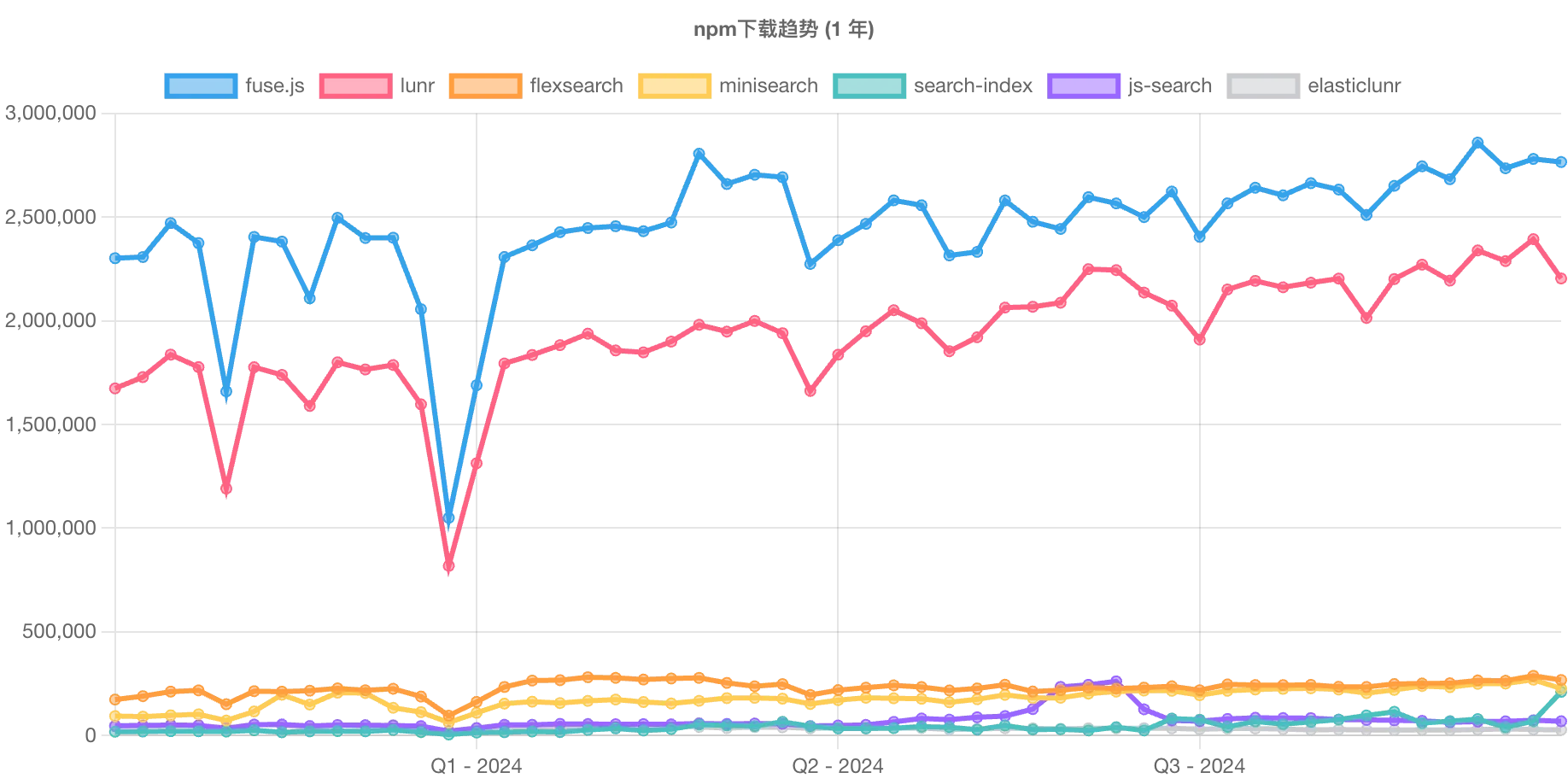
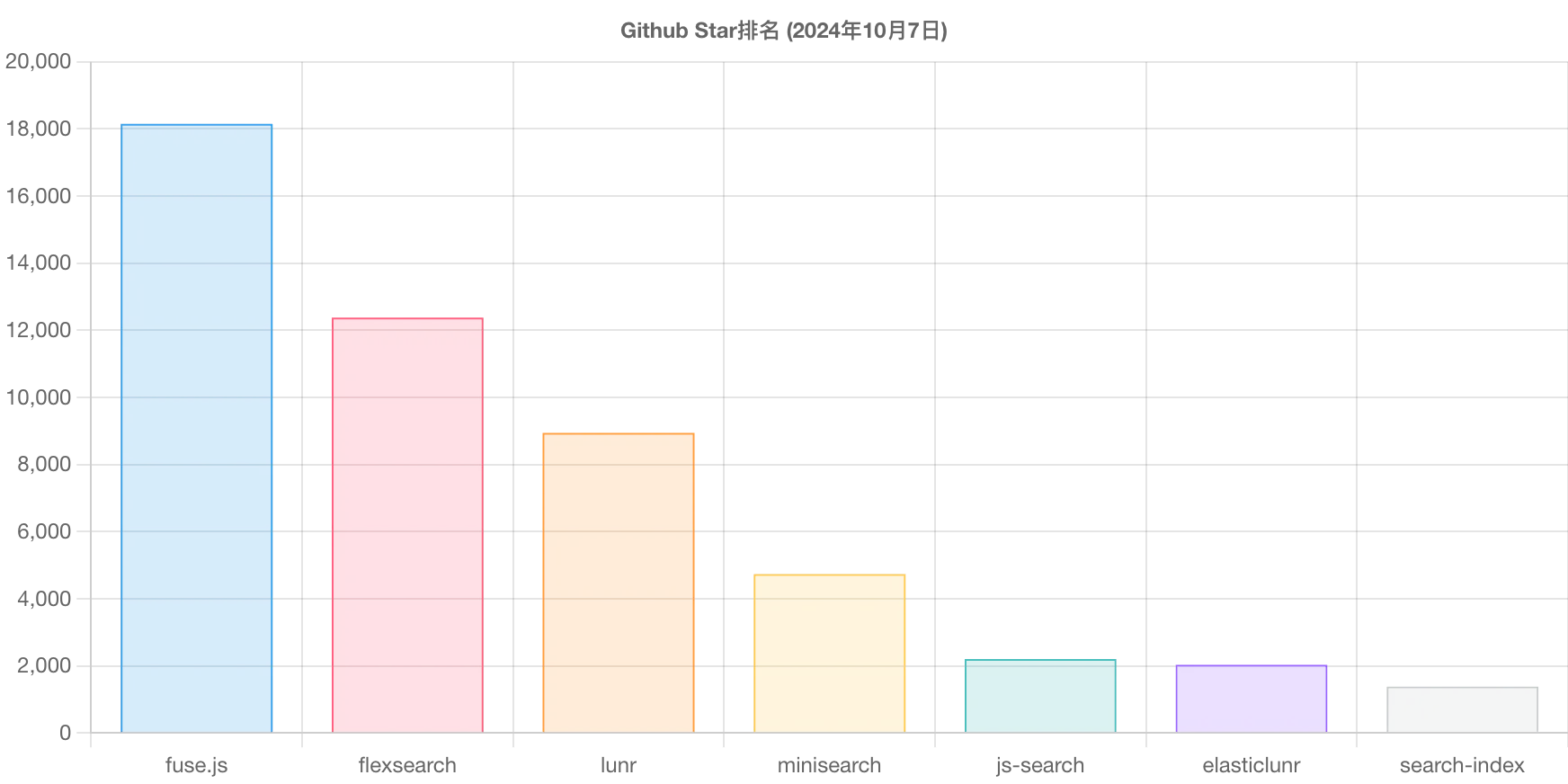
這裏需要對比了 fuse.js 、 lunr 、 flexsearch 、 minisearch 、 search-index 、 js-search 、 elasticlunr ,對比詳情。下邊是各個庫的下載趨勢和star排名。
選擇 Lunr 的原因
其實每個庫都有一些相關的側重點。
lunr.js是一個輕量級的JavaScript庫,用於在客户端實現全文搜索功能。它基於倒排索引的原理,能夠在不依賴服務器的情況下快速檢索出匹配的文檔。lunr.js的核心優勢在於其簡單易用的API接口,開發者只需幾行代碼即可為靜態網頁添加強大的搜索功能。
lunr.js的工作機制主要分為兩個階段:索引構建和查詢處理。首先,在頁面加載時,lunr.js會根據預定義的規則構建一個倒排索引,該索引包含了所有文檔的關鍵字及其出現的位置信息。接着,在用户輸入查詢字符串後,lunr.js會根據索引快速找到包含這些關鍵字的文檔,並按照相關度排序返回結果。
為了提高搜索效率和準確性,lunr.js還支持多種高級特性,比如同義詞擴展、短語匹配以及布爾運算等。這些功能使得開發者能夠根據具體應用場景定製搜索算法,從而提供更加個性化的用户體驗。此外,lunr.js還允許用户自定義權重分配策略,以便更好地反映文檔的重要程度。
DevNow 中接入 Lunr
這裏使用 Astro 的 API端點 來構建。
在靜態生成的站點中,你的自定義端點在構建時被調用以生成靜態文件。如果你選擇啓用 SSR 模式,自定義端點會變成根據請求調用的實時服務器端點。靜態和 SSR 端點的定義類似,但 SSR 端點支持附加額外的功能。
構造索引文件
// search-index.json.js

import { latestPosts } from '@/utils/content';
import lunr from 'lunr';
import MarkdownIt from 'markdown-it';
const stemmerSupport = await import('lunr-languages/lunr.stemmer.support.js');
const zhPlugin = await import('lunr-languages/lunr.zh.js');
// 初始化 stemmer 支持
stemmerSupport.default(lunr);
// 初始化中文插件
zhPlugin.default(lunr);
const md = new MarkdownIt();

let documents = latestPosts.map((post) => {
  return {
    slug: post.slug,
    title: post.data.title,
    description: post.data.desc,
    content: md.render(post.body)
  };
});
export const LunrIdx = lunr(function () {
  this.use(lunr.zh);
  this.ref('slug');
  this.field('title');
  this.field('description');
  this.field('content');

  // This is required to provide the position of terms in
  // in the index. Currently position data is opt-in due
  // to the increase in index size required to store all
  // the positions. This is currently not well documented
  // and a better interface may be required to expose this
  // to consumers.
  // this.metadataWhitelist = ['position'];

  documents.forEach((doc) => {
    this.add(doc);
  }, this);
});

export async function GET() {
  return new Response(JSON.stringify(LunrIdx), {
    status: 200,
    headers: {
      'Content-Type': 'application/json'
    }
  });
}
構建搜索內容
// search-docs.json.js

import { latestPosts } from '@/utils/content';
import MarkdownIt from 'markdown-it';
const md = new MarkdownIt();
let documents = latestPosts.map((post) => {
  return {
    slug: post.slug,
    title: post.data.title,
    description: post.data.desc,
    content: md.render(post.body),
    category: post.data.category
  };
});

export async function GET() {
  return new Response(JSON.stringify(documents), {
    status: 200,
    headers: {
      'Content-Type': 'application/json'
    }
  });
}
重構搜索組件
// 核心代碼

import { debounce } from 'lodash-es';
import lunr from 'lunr';

interface SEARCH_TYPE {
  slug: string;
  title: string;
  description: string;
  content: string;
  category: string;
}

const [LunrIdx, setLunrIdx] = useState<null | lunr.Index>(null);
const [LunrDocs, setLunrDocs] = useState<SEARCH_TYPE[]>([]);
const [content, setContent] = useState<
    | {
            label: string;
            id: string;
            children: {
                label: string;
                id: string;
            }[];
        }[]
    | null
>(null);

useEffect(() => {
    const _init = async () => {
        if (!LunrIdx) {
            const response = await fetch('/search-index.json');
            const serializedIndex = await response.json();
            setLunrIdx(lunr.Index.load(serializedIndex));
        }
        if (!LunrDocs.length) {
            const response = await fetch('/search-docs.json');
            setLunrDocs(await response.json());
        }
    };
    _init();
}, [LunrIdx, LunrDocs.length]);

const onInputChange = useCallback(
    debounce(async (search: string) => {
        if (!LunrIdx || !LunrDocs.length) return;
        // 根據搜索內容從索引中結果
        const searchResult = LunrIdx.search(search);
        const map = new Map<
            string,
            { label: string; id: string; children: { label: string; id: string }[] }
        >();

        if (searchResult.length > 0) {
            for (var i = 0; i < searchResult.length; i++) {
                const slug = searchResult[i]['ref'];
                // 根據索引結果 獲取對應文章內容
                const doc = LunrDocs.filter((doc) => doc.slug == slug)[0];
                // 下邊主要是數據結構優化
                const category = categories.find((item) => item.slug === doc.category);
                if (!category) {
                    return;
                } else if (!map.has(category.slug)) {
                    map.set(category.slug, {
                        label: category.title || 'DevNow',
                        id: category.slug || 'DevNow',
                        children: []
                    });
                }
                const target = map.get(category.slug);
                if (!target) return;
                target.children.push({
                    label: doc.title,
                    id: doc.slug
                });
                map.set(category.slug, target);
            }
        }
        setContent([...map.values()].sort((a, b) => a.label.localeCompare(b.label)));
    }, 200),

    [LunrIdx, LunrDocs.length]
);
過程中遇到的問題
基於 shadcn/ui Command 搜索展示
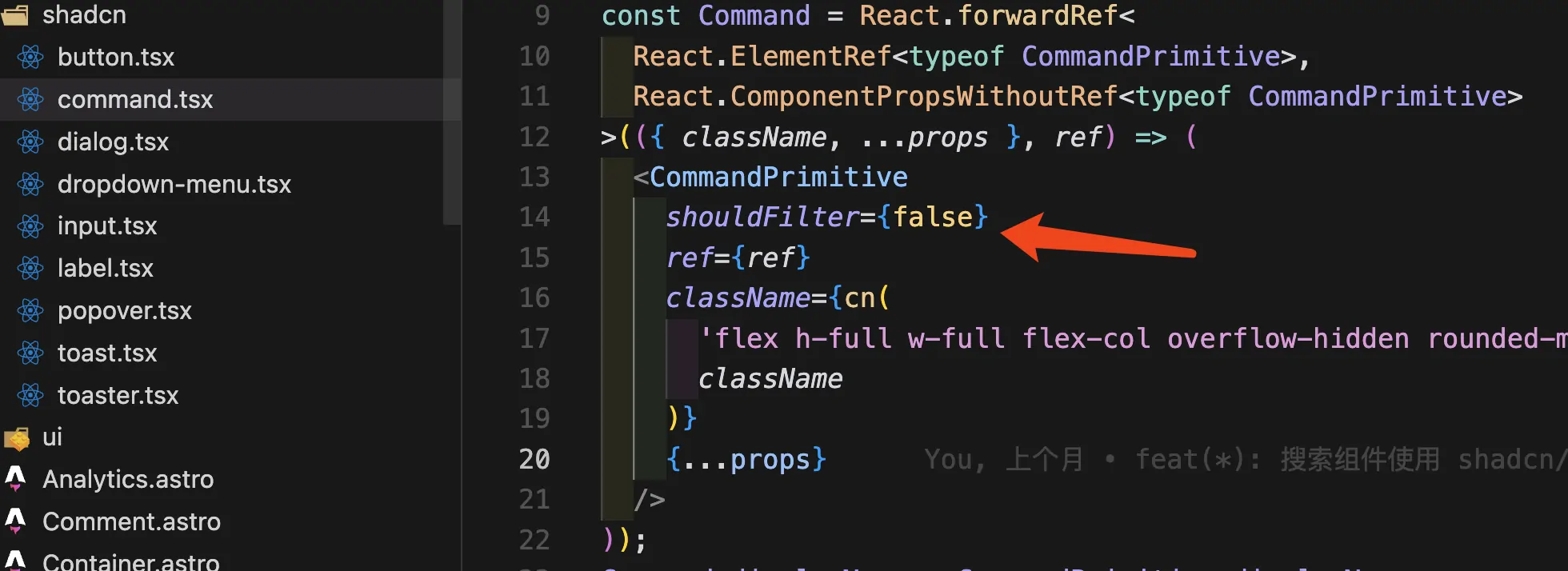
如果像我這樣自定義搜索方式和內容的話,需要把 Command 組件中自動過濾功能關掉。否則搜索結果無法正常展示。
上調函數最大持續時間
當文檔比較多的時候,構建的 索引文件 和 內容文件 可能會比較大,導致請求 504。 需要上調 Vercel 的超時策略。可以在項目社會中適當上調,默認是10s。

前端搜索的優劣
| 特性 | Lunr.js | Algolia |
|---|---|---|
| 搜索方式 | 純前端(在瀏覽器中處理) | 後端 API 服務 |
| 成本 | 完全免費 | 有免費計劃,但有使用限制 |
| 性能 | 大量數據時性能較差 | 高效處理大規模數據 |
| 功能 | 基礎搜索功能 | 高級搜索功能(拼寫糾錯、同義詞等) |
| 索引更新 | 手動更新索引(需要重新生成) | 實時更新索引 |
| 數據量 | 適合小規模數據 | 適合大規模數據 |
| 隱私 | 索引暴露在客户端,難以保護私有數據 | 後端處理,數據可以安全存儲 |
| 部署複雜度 | 簡單(無需後端或 API) | 需要配置後端或使用 API |
適合使用 Lunr.js 的場景
- 小型靜態網站:如果你的網站內容較少(如幾十篇文章或文檔),Lunr.js 可以提供不錯的搜索體驗,不需要複雜的後端服務。
- 不依賴外部服務:如果你不希望依賴第三方服務(如 Algolia),並且希望完全控制搜索的實現,Lunr.js 是一個不錯的選擇。
- 預算有限:對於不想支付搜索服務費用的項目,Lunr.js 是完全免費的,且足夠應對基礎需求。
- 無私密內容:如果你的站點沒有敏感或私密的內容,Lunr.js 的客户端索引是可接受的。
適合使用 Algolia 的場景
- 大規模數據網站:如果你的網站有大量內容(成千上萬條數據),Algolia 的後端搜索服務可以提供更好的性能和更快的響應時間。
- 需要高級搜索功能:如果你需要拼寫糾錯、自動補全、過濾器等功能,Algolia 提供的搜索能力遠超 Lunr.js。
- 動態內容更新:如果你的網站內容經常變動,Algolia 可以更方便地實時更新索引。
- 數據隱私需求:如果你需要保護某些私密數據,使用 Algolia 的後端服務更為安全。
總結
基於 Lunr.js 的前端搜索方案適合小型、靜態、預算有限且無私密數據的網站,它提供了簡單易用的純前端搜索解決方案。但如果你的網站規模較大、搜索需求複雜或有隱私保護要求,Algolia 這樣專業的搜索服務會提供更好的性能和功能。