

1.安裝svn軟件
yum install subversion2.創建SVN版本庫
mkdir /var/svn
cd /var/svn
svnadmin create /var/svn/svnrepos
ls 查看

3.svn目錄説明
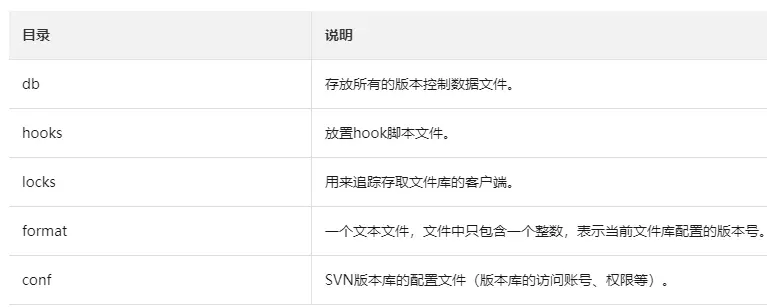
4.修改授權文件
vim authz改為如下內容
### This file is an example authorization file for svnserve.
### Its format is identical to that of mod_authz_svn authorization
### files.
### As shown below each section defines authorizations for the path and
### (optional) repository specified by the section name.
### The authorizations follow. An authorization line can refer to:
###  - a single user,
###  - a group of users defined in a special [groups] section,
###  - an alias defined in a special [aliases] section,
###  - all authenticated users, using the '$authenticated' token,
###  - only anonymous users, using the '$anonymous' token,
###  - anyone, using the '*' wildcard.
###
### A match can be inverted by prefixing the rule with '~'. Rules can
### grant read ('r') access, read-write ('rw') access, or no access
### ('').

[aliases]
# joe = /C=XZ/ST=Dessert/L=Snake City/O=Snake Oil, Ltd./OU=Research Institute/CN=Joe Average

[groups]

admin = zhangsan
user = zhangsan,lisi

[/]
@admin = rw
@user = rw
5.修改用户密碼
vim passwd改為如下內容
[users]

zhangsan = testpassword
lisi = testpassword
6.修改svnserve.conf,去掉一些註釋的地方
vim svnserve.conf如下所示
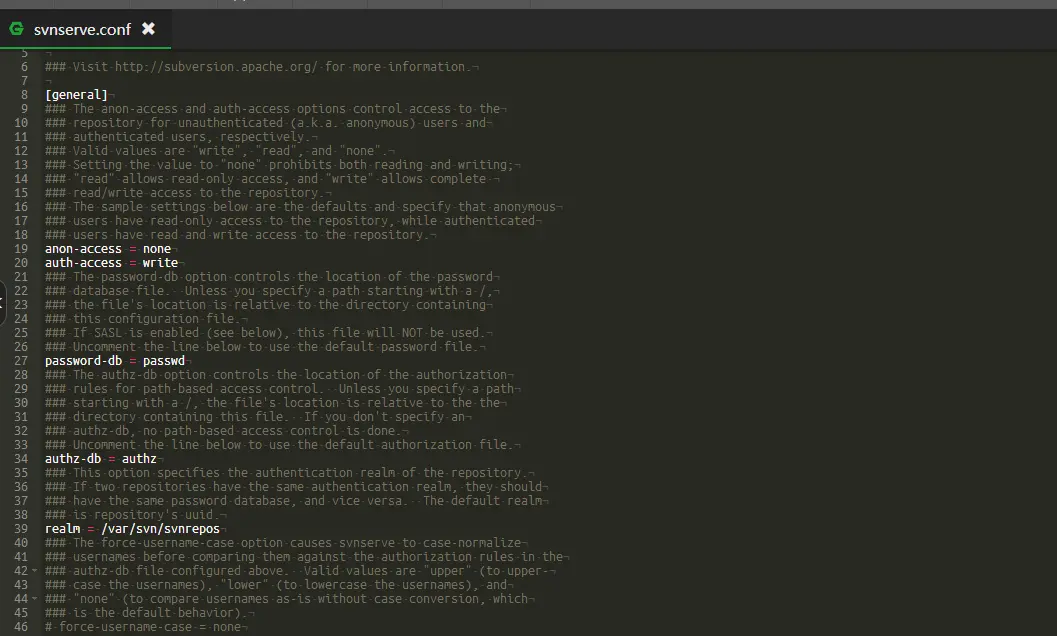
7.啓動或殺掉重啓svn
svnserve -d -r /var/svn
<!--3690是svn的默認端口,需要在阿里雲的安全組和寶塔上放行端口-->
kill $(lsof -t -i:3690)
8.使用如下方式在windows上訪問
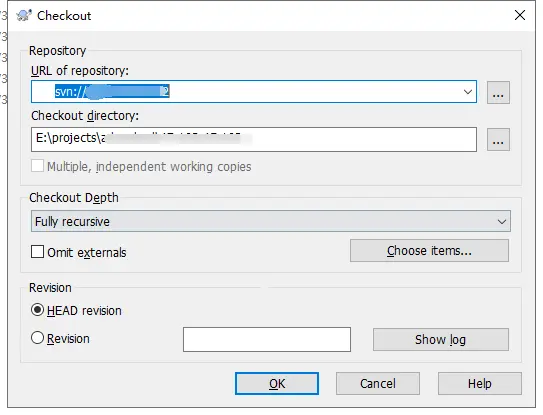
PS:訪問時如果報錯,/var/svn/cloud/conf/svnserve.conf:19: Option expected 是因為配置文件中沒有頂格寫,圖中是正確的
