

Android自動化測試
測試金字塔
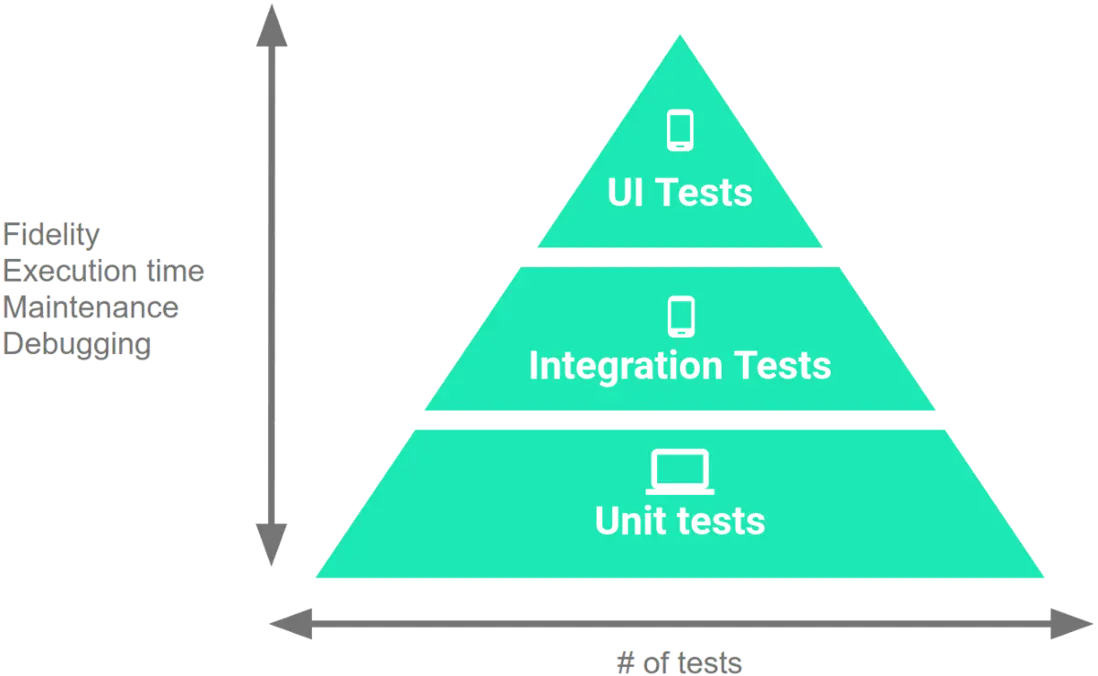
沿着金字塔逐級向上,從小型測試到大型測試,各類測試的保真度逐級提高,但維護和調試工作所需的執行時間和工作量也逐級增加。因此,您編寫的單元測試應多於集成測試,集成測試應多於端到端測試。雖然各類測試的比例可能會因應用的用例不同而異,但我們通常建議各類測試所佔比例如下:小型測試佔70%,中型測試佔20%,大型測試佔10%。
單元測試(小型測試)
用於驗證應用的行為,一次驗證一個類。
原則(F.I.R.S.T)
Fast(快),單元測試要運行的足夠快,單個測試方法一般要立即(一秒之內)給出結果。
Idependent(獨立),測試方法之間不要有依賴(先執行某個測試方法,再執行另一個測試方法才能通過)。
Repeatable(重複),可以在本地或 CI 不同環境(機器上)上反覆執行,不會出現不穩定的情況。
Self-Validating(自驗證),單元測試必須包含足夠多的斷言進行自我驗證。
Timely(及時),理想情況下應測試先行,至少保證單元測試應該和實現代碼一起及時完成並提交。
除此之外,測試代碼應該具備最好的可讀性和最少的維護代價,絕大多數情況下寫測試應該就像用領域特定語言描述一個事實,甚至不用經過仔細地思考。
構建本地單元測試
當需要更快地運行測試而不需要與在真實設備上運行測試關聯的保真度和置信度時,可以使用本地單元測試來驗證應用的邏輯。
-
如果測試對
Android框架有依賴性(特別是與框架建立複雜交互的測試),則最好使用Robolectric添加框架依賴項。例:待測試的類同時依賴
Context、Intent、Bundle、Application等Android Framework中的類時,此時我們可以引入Robolectric框架進行本地單元測試的編寫。 -
如果測試對
Android框架的依賴性極小,或者如果測試僅取決於我們自己應用的對象,則可以使用諸如Mockito之類的模擬框架添加模擬依賴項。(BasicUnitAndroidTest)例:待測試的類只依賴
java api(最理想的情況),此時對於待測試類所依賴的其他類我們就可以利用Mockito框架mock其依賴類,再進行當前類的單元測試編寫。(EmailValidatorTest)例:待測試的類除了依賴
java api外僅依賴Android Framework中Context這個類,此時我們就可以利用Mockito框架mockContext類,再進行當前類的單元測試編寫。(SharedPreferencesHelperTest)
設置測試環境
在Android Studio項目中,本地單元測試的源文件存儲在module-name/src/test/java/中。
在模塊的頂級build.gradle文件中,將以下庫指定為依賴項:
    dependencies {
        // Required -- JUnit 4 framework
        testImplementation "junit:junit:$junitVersion"
        // Optional -- Mockito framework
        testImplementation "org.mockito:mockito-core:$mockitoCoreVersion"

        // Optional -- Robolectric environment
       testImplementation "androidx.test:core:$xcoreVersion"
       testImplementation "androidx.test.ext:junit:$extJunitVersion"
       testImplementation "org.robolectric:robolectric:$robolectricVersion"
} 如果單元測試依賴於資源,需要在module的build.gradle文件中啓用includeAndroidResources選項。然後,單元測試可以訪問編譯版本的資源,從而使測試更快速且更準確地運行。
    android {
        // ...

        testOptions {
            unitTests {
                includeAndroidResources = true
            }
        }
    }
@RunWith(AndroidJUnit4::class)
@Config(manifest = Config.NONE)
class PeopleDaoTest {
private lateinit var database: PeopleDatabase
private lateinit var peopleDao: PeopleDao
@Before
fun `create db`() {
database = Room.inMemoryDatabaseBuilder(
ApplicationProvider.getApplicationContext(),
PeopleDatabase::class.java
).allowMainThreadQueries().build()
peopleDao = database.peopleDao()
}
@Test
fun `should return empty list when getPeople without inserted data`() {
val result = peopleDao.getPeople(pageId = 1)
assertThat(result).isNotNull()
assertThat(result).isEmpty()
}如果單元測試包含異步操作時,可以使用awaitility庫進行測試;當使用RxJava響應式編程庫時,可以自定義rule:
class RxJavaRule : TestWatcher() {
    override fun starting(description: Description?) {
        super.starting(description)

        RxJavaPlugins.setIoSchedulerHandler {
            Schedulers.trampoline()
        }
        RxJavaPlugins.setNewThreadSchedulerHandler {
            Schedulers.trampoline()
        }
        RxJavaPlugins.setComputationSchedulerHandler {
            Schedulers.trampoline()
        }

        RxAndroidPlugins.setMainThreadSchedulerHandler {
            Schedulers.trampoline()
        }
        RxAndroidPlugins.setInitMainThreadSchedulerHandler {
            Schedulers.trampoline()
        }
    }

    override fun finished(description: Description?) {
        super.finished(description)

        RxJavaPlugins.reset()

        RxAndroidPlugins.reset()
    }
}TestScheduler中triggerActions的使用。
@RunWith(JUnit4::class)
class FilmViewModelTest {
    @get:Rule
    val instantTaskExecutorRule = InstantTaskExecutorRule()
    @get:Rule
    val rxJavaRule = RxJavaRule()

    private val repository = mock(Repository::class.java)

    private val testScheduler = TestScheduler()

    private lateinit var viewModel: FilmViewModel

    @Before
    fun init() {
        viewModel = FilmViewModel(repository)
    }

    @Test
    fun `should return true when loadFilms is loading`() {
        `when`(repository.getPopularFilms(1)).thenReturn(
            Single.just(emptyList<Film>())
                .subscribeOn(testScheduler)
        )

        viewModel.loadFilms(0)

        assertThat(getValue(viewModel.isLoading)).isTrue()
        testScheduler.triggerActions()
        assertThat(getValue(viewModel.isLoading)).isFalse()
    }

    @Test
    fun `should return films list when loadFilms successful`() {
        `when`(repository.getPopularFilms(1)).thenReturn(
            Single.just(
                listOf(
                    Film(123, "", "", "", "", "", "", 1)
                )
            ).subscribeOn(testScheduler)
        )

        viewModel.loadFilms(0)

        assertThat(getValue(viewModel.films)).isNull()
        testScheduler.triggerActions()
        assertThat(getValue(viewModel.films)).isNotNull()
        assertThat(getValue(viewModel.films).size).isEqualTo(1)
    }
}TestSubscriber的使用。
@RunWith(JUnit4::class)
class WebServiceTest {
    private lateinit var webService: WebService

    private lateinit var mockWebServer: MockWebServer

    @get:Rule
    val instantExecutorRule = InstantTaskExecutorRule()

    @Before
    fun `start service`() {
        mockWebServer = MockWebServer()

        webService = Retrofit.Builder()
            .baseUrl(mockWebServer.url("/"))
            .addConverterFactory(GsonConverterFactory.create())
            .addCallAdapterFactory(RxJava2CallAdapterFactory.create())
            .build()
            .create(WebService::class.java)
    }

    @Test
    fun `should return fim list when getFilms successful`() {
        assertThat(webService).isNotNull()

        enqueueResponse("popular_films.json")

        val testObserver = webService.getPopularFilms(page = 1)
            .map {
                it.data
            }.test()

        testObserver.assertNoErrors()
        testObserver.assertValueCount(1)
        testObserver.assertValue {
            assertThat(it).isNotEmpty()
            assertThat(it[0].id).isEqualTo(297761)
            assertThat(it[1].id).isEqualTo(324668)
            it.size == 2
        }
        testObserver.assertComplete()
        testObserver.dispose()
    }

    @After
    fun `stop service`() {
        mockWebServer.shutdown()
    }

    private fun enqueueResponse(fileName: String) {
        val inputStream = javaClass.classLoader?.getResourceAsStream("api-response/$fileName")
            ?: return
        val source = inputStream.source().buffer()
        val mockResponse = MockResponse()
        mockWebServer.enqueue(
            mockResponse
                .setBody(source.readString(Charsets.UTF_8))
        )
    }
}
構建插樁單元測試
插樁單元測試是在物理設備和模擬器上運行的測試,此類測試可以利用Android框架API。插樁測試提供的保真度比本地單元測試要高,但運行速度要慢得多。因此,我們建議只有在必須針對真實設備的行為進行測試時才使用插樁單元測試。
設置測試環境
在Android Studio項目中,插樁測試的源文件存儲在module-name/src/androidTest/java/。
在模塊的頂級build.gradle文件中,將以下庫指定為依賴項:
    android {
        defaultConfig {
            testInstrumentationRunner "androidx.test.runner.AndroidJUnitRunner"
        }
    }
dependencies {
androidTestImplementation "androidx.test.ext:junit:$extJunitVersion"
androidTestImplementation "androidx.test:core:$xcoreVersion"
androidTestImplementation "androidx.test:rules:$rulesVersion"
// Optional -- Truth library
androidTestImplementation "androidx.test.ext:truth:$androidxtruthVersion"
androidTestImplementation "org.mockito:mockito-core:$mockitoCoreVersion"
androidTestImplementation "org.mockito:mockito-android:$mockitoAndroidVersion"
}@RunWith(AndroidJUnit4::class)
@SmallTest
class FilmDaoTest {
@get:Rule
var instantTaskExecutorRule = InstantTaskExecutorRule()
private lateinit var database: FilmDatabase
private lateinit var filmDao: FilmDao
@Before
fun initDb() {
database = Room.inMemoryDatabaseBuilder(
ApplicationProvider.getApplicationContext(),
FilmDatabase::class.java
).build()
filmDao = database.filmData()
}
@Test
fun should_return_film_list_when_getFilms_with_inserted_film_list() {
filmDao.insert(
Film(100, "", "", "", "", "", "", 1)
)
filmDao.insert(
Film(101, "", "", "", "", "", "", 1)
)
val result = filmDao.getFilms(1)
assertThat(result).isNotNull()
assertThat(result).isNotEmpty()
assertThat(result.size).isEqualTo(2)
assertThat(result[0].id).isEqualTo(100)
assertThat(result[0].page).isEqualTo(1)
assertThat(result[1].id).isEqualTo(101)
}
@Test
fun should_return_film_list_with_size_1_when_getFilms_with_inserted_2_same_film() {
filmDao.insert(
Film(100, "", "", "", "", "", "", 1)
)
filmDao.insert(
Film(100, "1223", "111", "", "", "", "", 1)
)
val result = filmDao.getFilms(1)
assertThat(result).isNotNull()
assertThat(result).isNotEmpty()
assertThat(result.size).isEqualTo(1)
assertThat(result[0].id).isEqualTo(100)
assertThat(result[0].page).isEqualTo(1)
}
@Test
fun should_return_empty_list_when_getFilms_with_deleteAll_called() {
filmDao.insert(
Film(100, "", "", "", "", "", "", 1)
)
filmDao.deleteAll()
val newResult = filmDao.getFilms(1)
assertThat(newResult).isNotNull()
assertThat(newResult).isEmpty()
}
@After
fun closeDb() = database.close()
}總結:
- 基於目前流行的
MVP、MVVM架構設計模式,MVP中Model層和Presenter層儘量不依賴Android Framework,MVVM中Model層和ViewModel層儘量不依賴Android Framework。 - 類的設計做到單一職責原則,依賴其他類時提供方便mock的方式(例如作為構造方法參數傳遞),某一個方法依賴其他對象時,小重構該對象作為方法參數傳入。
- 方法儘量短小(方法太長時可以利用重構手法在方法中再提取方法)。
- 只覆蓋public方法單元測試,privite方法可以間接測試。
- 當依賴
Android Framework API非常少時,可以採用Mock Android api的方式。 - 當嚴重依賴
Android Framework API時,引入Robolectric庫模擬Android環境或者放入AndroidTest目錄作為插樁單元測試在物理設備上跑。 - 使用
Robolectric庫寫本地單元測試時,依賴的某些類的方法調用出問題導致測試failed時,可以使用shadow類提供默認實現。 - 每條測試採用
Given、When、Then的方式進行區分.
@Test
public void should_do_something_if_some_condition_fulfills() {
    // Given 設置前置條件

    // When 執行被測方法

    // Then 驗證方法結果
}
集成測試(中型測試)
用於驗證模塊內堆棧級別之間的交互或相關模塊之間的交互
- 如果應用使用了用户不直接與之交互的組件(如
Service或ContentProvider),應驗證這些組件在應用中的行為是否正確。
設置測試環境
參考插樁單元測試環境設置
Service測試
- 利用
ServiceTestRule,可在單元測試方法運行之前啓動服務,並在測試完成後關閉服務。 ServiceTestRule類不支持測試IntentService對象。如果需要測試IntentService對象,可以應將邏輯封裝在一個單獨的類中,並創建相應的單元測試。
@MediumTest
@RunWith(AndroidJUnit4.class)
public class LocalServiceTest {
    @Rule
    public final ServiceTestRule mServiceRule = new ServiceTestRule();

    @Test
    public void testWithBoundService() throws TimeoutException {
        // Create the service Intent.
        Intent serviceIntent =
                new Intent(getApplicationContext(), LocalService.class);

        // Data can be passed to the service via the Intent.
        serviceIntent.putExtra(LocalService.SEED_KEY, 42L);

        // Bind the service and grab a reference to the binder.
        IBinder binder = mServiceRule.bindService(serviceIntent);

        // Get the reference to the service, or you can call public methods on the binder directly.
        LocalService service = ((LocalService.LocalBinder) binder).getService();

        // Verify that the service is working correctly.
        assertThat(service.getRandomInt(), is(any(Integer.class)));
    }
}
ContentProvider的測試
使用ProviderTestRule
 @Rule
 public ProviderTestRule mProviderRule =
     new ProviderTestRule.Builder(MyContentProvider.class, MyContentProvider.AUTHORITY).build();

 @Test
 public void verifyContentProviderContractWorks() {
     ContentResolver resolver = mProviderRule.getResolver();
     // perform some database (or other) operations
     Uri uri = resolver.insert(testUrl, testContentValues);
     // perform some assertions on the resulting URI
     assertNotNull(uri);
 }
@Rule
public ProviderTestRule mProviderRule =
new ProviderTestRule.Builder(MyContentProvider.class, MyContentProvider.AUTHORITY)
.setDatabaseCommands(DATABASE_NAME, INSERT_ONE_ENTRY_CMD, INSERT_ANOTHER_ENTRY_CMD)
.build();
@Test
public void verifyTwoEntriesInserted() {
ContentResolver mResolver = mProviderRule.getResolver();
// two entries are already inserted by rule, we can directly perform assertions to verify
Cursor c = null;
try {
c = mResolver.query(URI_TO_QUERY_ALL, null, null, null, null);
assertNotNull(c);
assertEquals(2, c.getCount());
} finally {
if (c != null && !c.isClosed()) {
c.close();
}
}
}Android沒有為BroadcastReceiver提供單獨的測試用例類。要驗證BroadcastReceiver是否正確響應,可以測試向其發送Intent對象的組件。或者,可以通過調用ApplicationProvider.getApplicationContext()來創建BroadcastReceiver的實例,然後調用要測試的BroadcastReceiver方法(通常,這是onReceive()方法)
端到端測試(大型測試)
用於驗證跨越了應用的多個模塊的用户操作流程
界面測試的一種方法是直接讓測試人員對目標應用執行一系列用户操作,並驗證其行為是否正常。不過,這種人工方法會非常耗時、繁瑣且容易出錯。一種更高效的方法是編寫界面測試,以便以自動化方式執行用户操作。自動化方法可以以可重複的方式快速可靠地運行測試。
設置測試環境
    dependencies {
        androidTestImplementation "androidx.test.ext:junit:$extJunitVersion"
        androidTestImplementation "androidx.test:core:$xcoreVersion"
        androidTestImplementation "androidx.test:rules:$rulesVersion"
        // Optional -- Truth library
        androidTestImplementation "androidx.test.ext:truth:$androidxtruthVersion"
        androidTestImplementation "org.mockito:mockito-core:$mockitoCoreVersion"
        androidTestImplementation "org.mockito:mockito-android:$mockitoAndroidVersion"
         // Optional -- UI testing with Espresso
        androidTestImplementation "androidx.test.espresso:espresso-core:$espressoVersion"
        androidTestImplementation "androidx.test.espresso:espresso-intents:$espressoVersion"
        // Optional -- UI testing with UI Automator
        androidTestImplementation "androidx.test.uiautomator:uiautomator:$uiautomatorVersion"
}- 涵蓋單個應用的界面測試:這種類型的測試可驗證目標應用在用户執行特定操作或在其
Activity中輸入特定內容時的行為是否符合預期。它可讓您檢查目標應用是否返回正確的界面輸出來響應應用Activity中的用户交互。諸如Espresso之類的界面測試框架可讓您以編程方式模擬用户操作,並測試複雜的應用內用户交互。(espresso測試單個應用的界面例子) - 涵蓋多個應用的界面測試:這種類型的測試可驗證不同用户應用之間交互或用户應用與系統應用之間交互的正確行為。例如,您可能想要測試相機應用是否能夠與第三方社交媒體應用或默認的
Android相冊應用正確分享圖片。支持跨應用交互的界面測試框架(如UI Automator)可讓您針對此類場景創建測試。(uiautomator測試多個應用的界面)
參考例子testing-samples
