

前言:
編輯 Word 文檔時,使用有序列表或無序列表有助於我們更好地組織文檔內容,使其邏輯關係更為直觀易懂。例如在文中創建多個小標題,又或是列舉多個同類型事務等等情況。 其中有序列表會按特定的順序來排列內容,而無序列表中則沒有特定的排列順序,每個項目前面都有一個符號或標記。 以上兩個列表均可以通過C#代碼實現。下面是方法介紹。
準備工作
在這篇教程中,所使用的類庫是Free Spire.Doc for .NET(免費版),支持在.NET平台處理Word文檔。有以下兩種方法安裝:
方法一:
直接在Visual Studio中搜索安裝。
- 先在Visual Studio中創建一個C#項目並打開。
- 依次選擇“解決方案資源管理器”>右鍵“引用”> “管理NuGet程序包”
- 搜索Free Spire.Doc for .NET並安裝。
方法二:
在程序中手動引入Spire.doc.dll文件。
- 下載並安裝Free Spire.Doc for .NET 。
- 在Visual Studio中創建一個C#項目並打開。
- 在 “解決方案資源管理器”中右鍵“引用”。
- 依次選擇“添加引用”> “瀏覽”,找到安裝路徑下BIN文件夾中的dll文件,點擊“確定”。
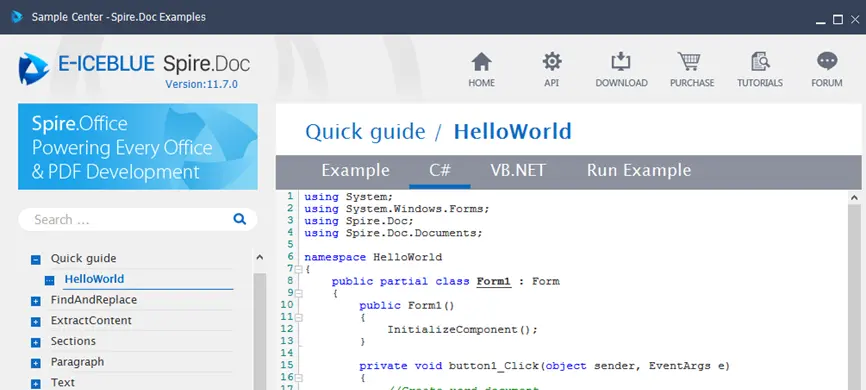
推薦第二種安裝方法,這樣更便於在安裝的“SampleCenter.exe”中查找各種參考代碼。
參考代碼:
有序列表
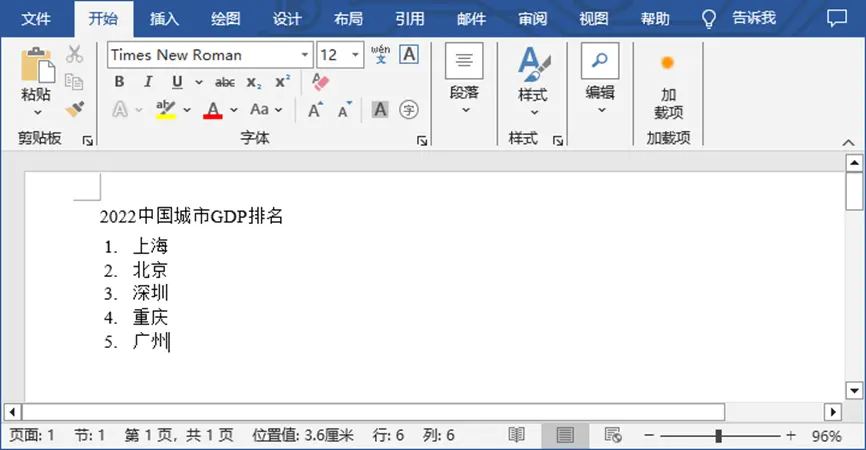
想要在Word文檔中插入有序列表,可以通過Free Spire.Doc for .NET提供的ListStyle 類創建一個Numbered列表樣式。然後再調用Paragraph.ListFormat.ApplyStyle()方法將創建的樣式應用到指定的段落中。下面是完整的示例代碼。
using Spire.Doc;
using Spire.Doc.Documents;

namespace CreateOrderedList
{
    class Program
    {
        static void Main(string[] args)
        {
            //創建Document對象
            Document document = new Document();

            //添加section
            Section section = document.AddSection();

            //創建一個Numbered列表樣式
            ListStyle listStyle = new ListStyle(document, ListType.Numbered);
            listStyle.Name = "numberedList";
            listStyle.Levels[0].PatternType = ListPatternType.DecimalEnclosedParen;
            listStyle.Levels[0].TextPosition = 20;
            document.ListStyles.Add(listStyle);

            //添加段落,設置文本
            Paragraph paragraph = section.AddParagraph();
            paragraph.AppendText("2022中國城市GDP排名");
            paragraph.Format.AfterSpacing = 5f;

            //添加其他段落、應用列表樣式
            paragraph = section.AddParagraph();
            paragraph.AppendText("上海");
            paragraph.ListFormat.ApplyStyle("numberedList");
            paragraph.ListFormat.ListLevelNumber = 0;

            paragraph = section.AddParagraph();
            paragraph.AppendText("北京");
            paragraph.ListFormat.ApplyStyle("numberedList");
            paragraph.ListFormat.ListLevelNumber = 0;

            paragraph = section.AddParagraph();
            paragraph.AppendText("深圳");
            paragraph.ListFormat.ApplyStyle("numberedList");
            paragraph.ListFormat.ListLevelNumber = 0;

            paragraph = section.AddParagraph();
            paragraph.AppendText("重慶");
            paragraph.ListFormat.ApplyStyle("numberedList");
            paragraph.ListFormat.ListLevelNumber = 0;

            paragraph = section.AddParagraph();
            paragraph.AppendText("廣州");
            paragraph.ListFormat.ApplyStyle("numberedList");
            paragraph.ListFormat.ListLevelNumber = 0;

            //保存結果文檔
            document.SaveToFile("有序列表.docx", FileFormat.Docx);
        }
    }
}
以下是效果圖:
無序列表
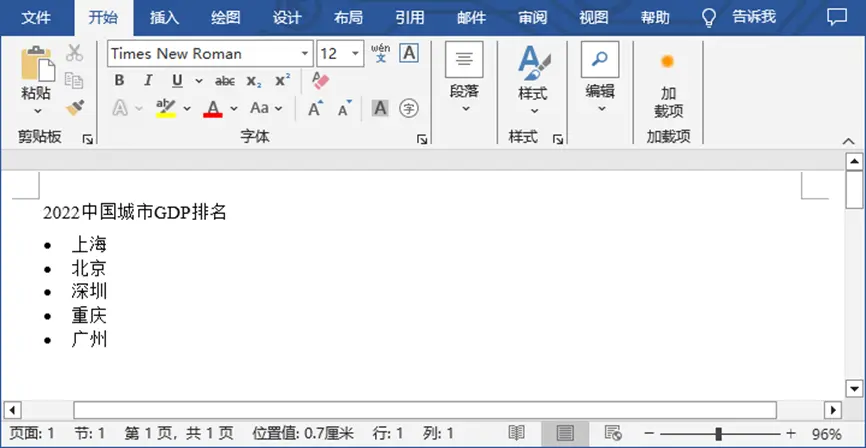
插入無序列表與插入有序列表的過程大致相似,不過在創建列表樣式時,需要設置為Bulleted。然後同樣的,調用Paragraph.ListFormat.ApplyStyle()方法將該樣式應用到指定的段落文本中。
using Spire.Doc;
using Spire.Doc.Documents;

namespace CreateUnorderedList
{
    class Program
    {
        static void Main(string[] args)
        {
            //創建Document對象
            Document document = new Document();

            //添加一個section
            Section section = document.AddSection();

            //創建一個Bulleted列表樣式
            ListStyle listStyle = new ListStyle(document, ListType.Bulleted);
            listStyle.Name = "bulletedList";
            listStyle.Levels[0].BulletCharacter = "\x00B7";
            listStyle.Levels[0].CharacterFormat.FontName = "Symbol";
            listStyle.Levels[0].TextPosition = 20;
            document.ListStyles.Add(listStyle);

            //添加段落,設置文本
            Paragraph paragraph = section.AddParagraph();
            paragraph.AppendText("2022中國城市GDP排名");
            paragraph.Format.AfterSpacing = 5f;

            //添加其他段落、應用列表樣式
            paragraph = section.AddParagraph();
            paragraph.AppendText("上海");
            paragraph.ListFormat.ApplyStyle("bulletedList");
            paragraph.ListFormat.ListLevelNumber = 0;

            paragraph = section.AddParagraph();
            paragraph.AppendText("北京");
            paragraph.ListFormat.ApplyStyle("bulletedList");
            paragraph.ListFormat.ListLevelNumber = 0;

            paragraph = section.AddParagraph();
            paragraph.AppendText("深圳");
            paragraph.ListFormat.ApplyStyle("bulletedList");
            paragraph.ListFormat.ListLevelNumber = 0;

            paragraph = section.AddParagraph();
            paragraph.AppendText("重慶");
            paragraph.ListFormat.ApplyStyle("bulletedList");
            paragraph.ListFormat.ListLevelNumber = 0;

            paragraph = section.AddParagraph();
            paragraph.AppendText("廣州");
            paragraph.ListFormat.ApplyStyle("bulletedList");
            paragraph.ListFormat.ListLevelNumber = 0;

            //保存結果文檔
            document.SaveToFile("無序列表.docx", FileFormat.Docx);
        }
    }
}
以下是效果圖:
參考文章:
C#/VB.NET: Insert Lists in a Word Document
