

什麼是生命週期
從Vue實例創建、運行、到銷燬期間,總是伴隨着各種各樣的事件,這些事件,統稱為生命週期。生命週期鈎子就是生命週期事件的別名(生命週期鈎子 = 生命週期函數 = 生命週期事件)
生命週期圖示
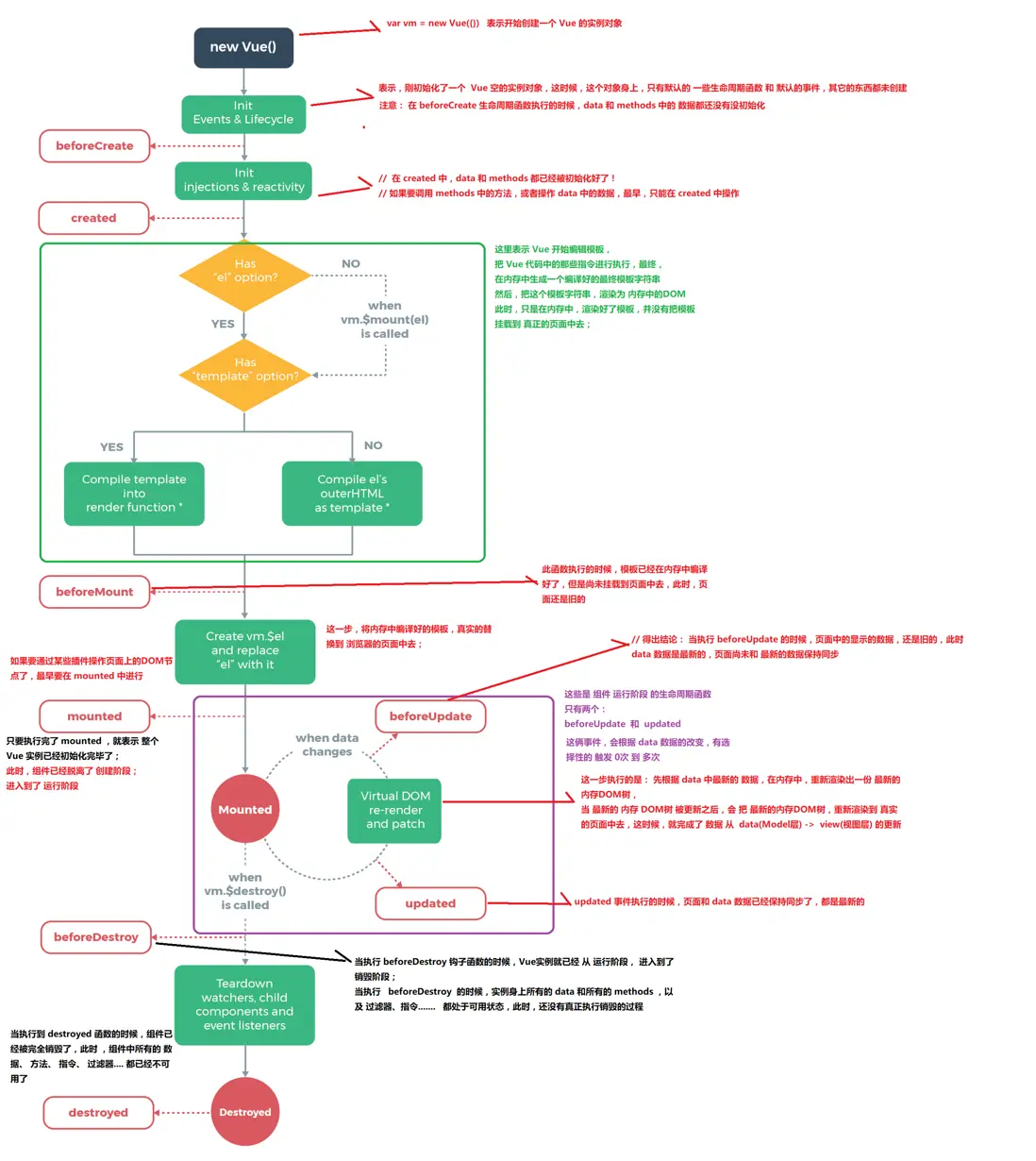
主要的生命週期函數分類
-
創建期間的生命週期函數:
beforeCreate:實例剛在內存中被創建出來,此時,還沒有初始化好 data 和 methods 屬性 created:實例已經在內存中創建OK,此時 data 和 methods 已經創建OK,此時還沒有開始 編譯模板 beforeMount:此時已經完成了模板的編譯,但是還沒有掛載到頁面中 mounted:此時,已經將編譯好的模板,掛載到了頁面指定的容器中顯示 -
運行期間的生命週期函數:
beforeUpdate:狀態更新之前執行此函數, 此時 data 中的狀態值是最新的,但是界面上顯示的 數據還是舊的,因為此時還沒有開始重新渲染DOM節點 updated:實例更新完畢之後調用此函數,此時 data 中的狀態值 和 界面上顯示的數據,都已經完成了更新,界面已經被重新渲染好了! -
銷燬期間的生命週期函數:
beforeDestroy:實例銷燬之前調用。在這一步,實例仍然完全可用。

destroyed:Vue 實例銷燬後調用。調用後,Vue 實例指示的所有東西都會解綁定,所有的事件監聽器會被移除,所有的子實例也會被銷燬。
生命週期深入研究
看了上面的圖和函數分類,想必大家對生命週期有了初步瞭解,為了更加詳細演示生命週期鈎子執行順序,接下來結合代碼去看看
<!DOCTYPE html>
<html lang="en">
<head>
  <meta charset="UTF-8">
  <title>vue生命週期和鈎子函數</title>
  <script type="text/javascript" src="https://cdn.jsdelivr.net/npm/vue@2.6.10/dist/vue.js"></script>
</head>
<body>
<div id="app">
  <p>{{message}}</p>
</div>

<script type="text/javascript">

  var app = new Vue({
    el: '#app',
    data: {
      message: "hello world"
    },
    beforeCreate: function () {
      console.group('beforeCreate 創建前狀態===============》');
      console.log("%c%s", "color:red", "el     : " + this.$el); //undefined
      console.log("%c%s", "color:red", "data   : " + this.$data); //undefined
      console.log("%c%s", "color:red", "message: " + this.message)
    },
    created: function () {
      console.group('created 創建完畢狀態===============》');
      console.log("%c%s", "color:red", "el     : " + this.$el); //undefined
      console.log("%c%s", "color:red", "data   : " + this.$data); //已被初始化
      console.log("%c%s", "color:red", "message: " + this.message); //已被初始化
    },
    beforeMount: function () {
      console.group('beforeMount 掛載前狀態===============》');
      console.log("%c%s", "color:red", "el     : " + (this.$el)); //已被初始化
      console.log(this.$el);
      console.log("%c%s", "color:red", "data   : " + this.$data); //已被初始化
      console.log("%c%s", "color:red", "message: " + this.message); //已被初始化
    },
    mounted: function () {
      console.group('mounted 掛載結束狀態===============》');
      console.log("%c%s", "color:red", "el     : " + this.$el); //已被初始化
      console.log(this.$el);
      console.log("%c%s", "color:red", "data   : " + this.$data); //已被初始化
      console.log("%c%s", "color:red", "message: " + this.message); //已被初始化
    },
    beforeUpdate: function () {
      console.group('beforeUpdate 更新前狀態===============》');
      console.log("%c%s", "color:red", "el     : " + this.$el);
      console.log(this.$el);
      console.log("%c%s", "color:red", "data   : " + this.$data);
      console.log("%c%s", "color:red", "message: " + this.message);
    },
    updated: function () {
      console.group('updated 更新完成狀態===============》');
      console.log("%c%s", "color:red", "el     : " + this.$el);
      console.log(this.$el);
      console.log("%c%s", "color:red", "data   : " + this.$data);
      console.log("%c%s", "color:red", "message: " + this.message);
    },
    beforeDestroy: function () {
      console.group('beforeDestroy 銷燬前狀態===============》');
      console.log("%c%s", "color:red", "el     : " + this.$el);
      console.log(this.$el);
      console.log("%c%s", "color:red", "data   : " + this.$data);
      console.log("%c%s", "color:red", "message: " + this.message);
    },
    destroyed: function () {
      console.group('destroyed 銷燬完成狀態===============》');
      console.log("%c%s", "color:red", "el     : " + this.$el);
      console.log(this.$el);
      console.log("%c%s", "color:red", "data   : " + this.$data);
      console.log("%c%s", "color:red", "message: " + this.message)
    }
  })
</script>
</body>
</html>
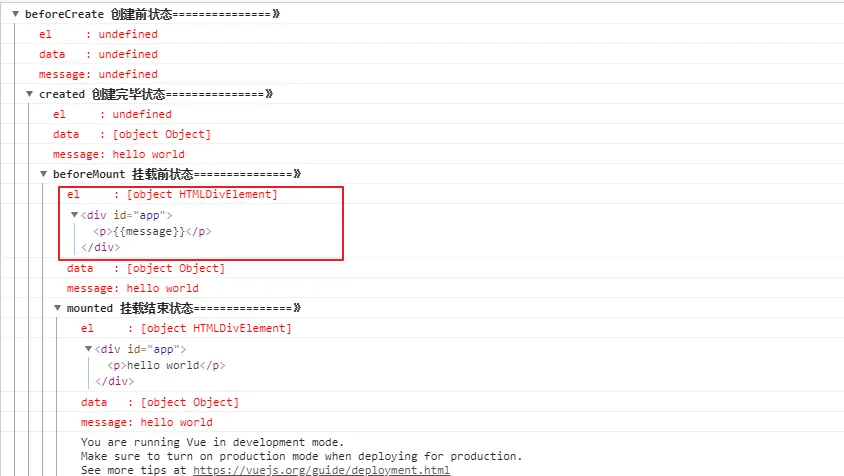
1)create 和 mounted 相關
咱們在chrome瀏覽器裏打開,F12看console就能發現
beforecreated:el 和 data 並未初始化
created:完成了 data 數據的初始化,el沒有
beforeMount:完成了 el 和 data 初始化
mounted :完成掛載
另外在標紅處,我們能發現el還是 {{message}},這裏就是應用的 Virtual DOM(虛擬Dom)技術,先把坑佔住了。到後面mounted掛載的時候再把值渲染進去。
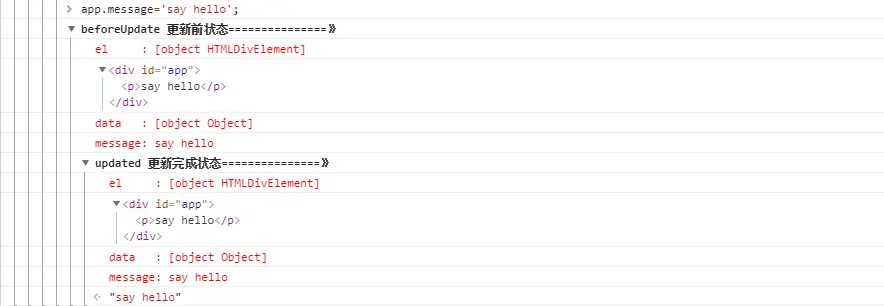
2)update 相關
這裏我們在 chrome console裏執行以下命令
app.message= 'say hello';
下面就能看到data裏的值被修改後,將會觸發update的操作
3)destroy 相關
在console裏執行下命令對 vue實例進行銷燬。銷燬完成後,我們再重新改變message的值,vue不再對此動作進行響應了。但是原先生成的dom元素還存在,可以這麼理解,執行了destroy操作,後續就不再受vue控制了。
app.$destroy();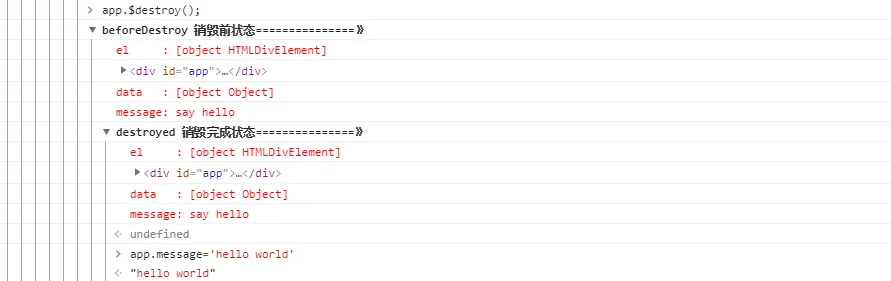
參考文獻:
https://segmentfault.com/a/11...
