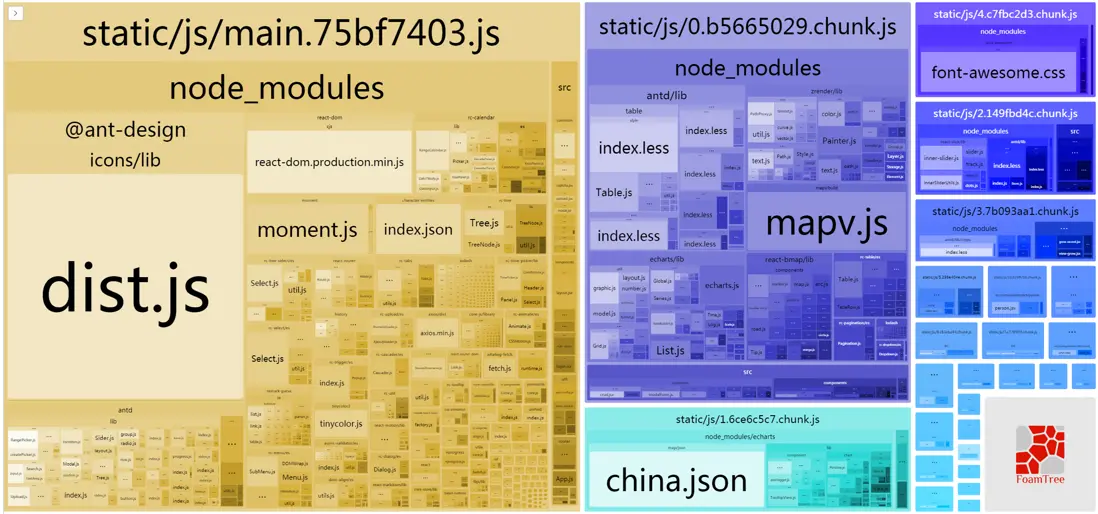
我做 react 開發時通常是直接用的 create-react-app。最近想分析一下一個用 create-react-app 開發的項目的打包結果,看看有沒有什麼可以優化的地方。
項目情況
執行 npm run eject 導出配置(單向操作,不可逆)。
項目中使用的一些庫:
"dependencies": {
    "antd": "^3.9.2",
    "axios": "^0.18.0",
    "echarts": "^3.8.5",
    "less": "^3.0.1",
    "moment": "^2.21.0",
    "react": "^16.4.2",
    "react-dom": "^16.2.0",
    "react-router-dom": "^4.2.2",
},
"devDependencies": {
    "babel-loader": "7.1.2",
    "babel-plugin-import": "^1.6.5",
    "webpack": "3.8.1",
    "webpack-bundle-analyzer": "3.0.2",
}
antd 按需加載
按照官網配置,使用 babel-plugin-import,在 package.json 中配置:
  "babel": {
    "plugins": [
      [
        "import",
        {
          "libraryName": "antd",
          "style": true
        }
      ]
    ]
  }
項目中直接使用:
import { Button } from 'antd';Moment.js locale 打包優化
create-react-app 的 webpack 已經做好配置了:
plugins: [
    ...
    // Moment.js is an extremely popular library that bundles large locale files
    // by default due to how Webpack interprets its code. This is a practical
    // solution that requires the user to opt into importing specific locales.
    // https://github.com/jmblog/how-to-optimize-momentjs-with-webpack
    // You can remove this if you don't use Moment.js:
    new webpack.IgnorePlugin(/^\.\/locale$/, /moment$/),
    ...
]
router component 懶加載
import React from 'react';

export default class Bundle extends React.Component {
    state = {
        mod: null
    }

    componentWillMount() {
        this.load(this.props);
    }

    componentWillReceiveProps(nextProps) {
        if (nextProps.load !== this.props.load) {
            this.load(nextProps);
        }
    }

    async load(props) {
        this.setState({
            mod: null
        });
        /*
          使用 props.load() 返回的是一個 promise
         */
        const mod = await props.load();

        this.setState({
            mod: mod.default ? mod.default : mod
        });
    }

    render() {
        return this.state.mod ? this.props.children(this.state.mod) : null;
    }
}
const lazyLoad = loadComponent => props => (
<Bundle load={loadComponent}>
{Comp => (Comp ? <Comp {...props} /> : <Loading/>)}
</Bundle>
);使用:
// dynamic import
const Demo = lazyLoad(() => import('../components/demo'));

// react-router
<Route path="/demo" component={Demo} />
分析項目打包情況
使用工具webpack-bundle-analyzer,將打包內容轉換成可縮放的樹狀圖。
// 安裝
yarn add -D webpack-bundle-analyzer
在 config/webpack.config.dev.js 或 config/webpack.config.prod.js 中添加:
const BundleAnalyzerPlugin = require('webpack-bundle-analyzer').BundleAnalyzerPlugin;
...
plugins: [
    ...
    new BundleAnalyzerPlugin(),
    ...
]
...
默認在 127.0.0.1:8888 頁面顯示。
添加在 config/webpack.config.dev.js後,每次 npm start 時都會彈出分析頁面。
添加在 config/webpack.config.prod.js後,每次 npm build 時都會彈出分析頁面。
項目分析結果:
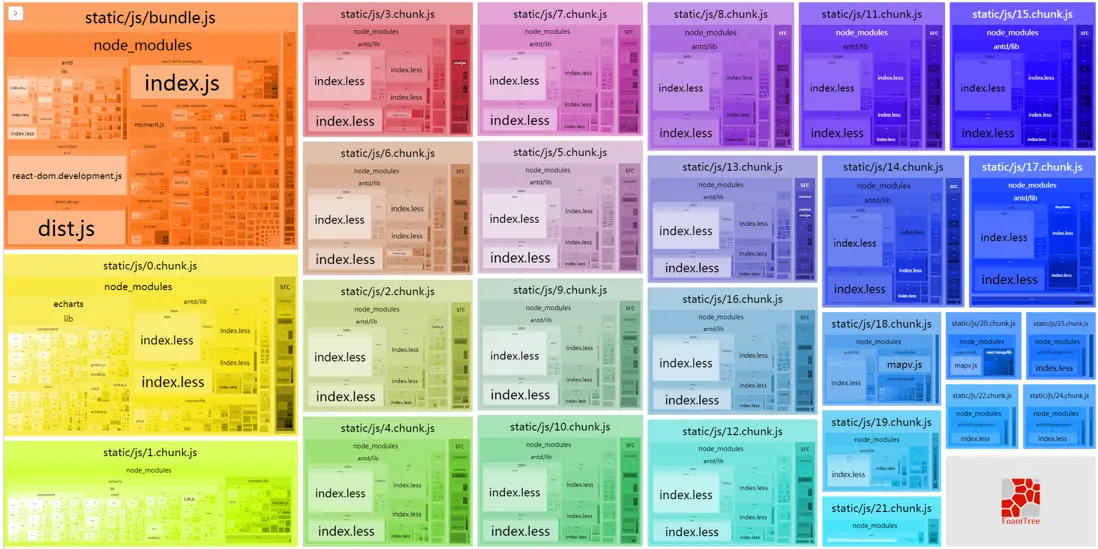
發現問題:
- 多個 chunk 中重複打包了相同的 antd 組件代碼(table, pagination, .etc)。
- echarts 全部打包了進來,體積太大。
優化
antd 組件代碼重複打包問題
由於我對 webpack 不算太熟,知道 webpack 3 中可以用 plugin CommonsChunkPlugin 抽取公共代碼,但具體用法不甚明瞭,折騰了很久都沒有作用,終於在 antd github 的 issues 中找到答案:
plugins: [
    ...
    new webpack.optimize.CommonsChunkPlugin({
      minChunks: 2,
      minSize: 0,
      children: true,
      deepChildren: true,
      async: true
    }),
    ...
]
似乎去掉 name 就可以了?這一點我還沒搞清楚是為什麼。
echarts 按需加載
參考在 webpack 中使用 ECharts,
import echarts from 'echarts/lib/echarts';
import 'echarts/lib/chart/map';
import 'echarts/lib/chart/pie';
import 'echarts/lib/chart/scatter';
import 'echarts/lib/chart/effectScatter';
import 'echarts/lib/component/geo';
import 'echarts/lib/component/tooltip';
import chinaJson from 'echarts/map/json/china.json';

...
echarts.registerMap('china', chinaJson);
...
需要注意,可以按需引入的模塊列表見 https://github.com/ecomfe/ech...