

white-space和text-wrap這兩個CSS屬性的區別、用法和實際應用場景
White-space 屬性
控制元素內空白的處理方式及文本換行行為。
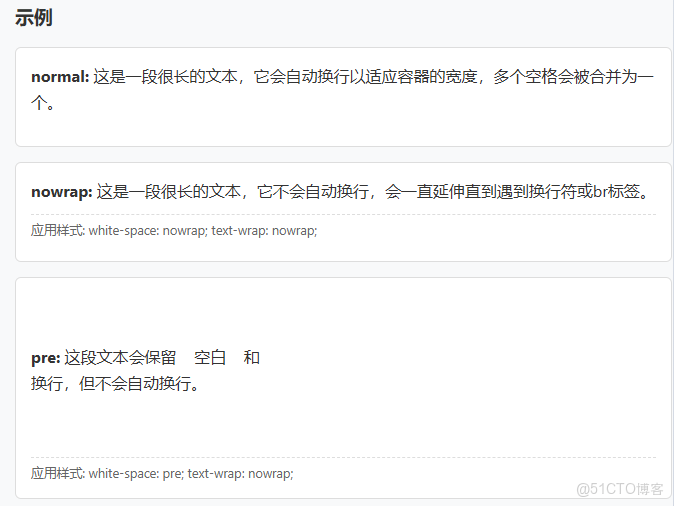
.white-space: normal | nowrap | pre | pre-wrap | pre-line | break-spaces;
|
值 |
描述 |
|
normal |
默認值。空白會被忽略,文本自動換行 |
|
nowrap |
文本不換行,直到遇到<br>標籤 |
|
pre |
保留空白和換行,文本不自動換行 |
|
pre-wrap |
保留空白和換行,文本自動換行 |
|
pre-line |
合併空白序列,保留換行,文本自動換行 |
|
break-spaces |
類似pre-wrap,但任何空白處都可以換行 |
Text-wrap 屬性
控制文本的換行方式(較新的屬性,瀏覽器支持度不同)。
text-wrap: wrap | nowrap | balance | pretty;
|
值 |
描述 |
|
wrap |
默認值。允許文本在單詞邊界處換行 |
|
nowrap |
文本不換行 |
|
balance |
嘗試平衡文本行長度,使各行長度相近 |
|
pretty |
在換行時避免出現孤行(單獨一個詞在一行) |

核心差異對比
主要區別總結
- white-space 主要控制空白字符的處理和基本的換行行為
- text-wrap 專門控制文本的換行方式,提供更精細的排版控制
- white-space 是傳統屬性,瀏覽器支持非常好
- text-wrap 是較新的屬性,部分值(如balance、pretty)的瀏覽器支持有限
- 兩者可以組合使用,實現更復雜的文本排版需求
核心差異概覽
<!DOCTYPE html>
<html lang="zh-CN">
<head>
<meta charset="UTF-8">
<meta name="viewport" content="width=device-width, initial-scale=1.0">
<title>White-space vs Text-wrap 屬性對比</title>
<style>
* {
margin: 0;
padding: 0;
box-sizing: border-box;
font-family: 'Segoe UI', system-ui, sans-serif;
}
body {
background: linear-gradient(135deg, #f5f7fa 0%, #c3cfe2 100%);
color: #333;
line-height: 1.6;
padding: 20px;
min-height: 100vh;
}
.container {
max-width: 1200px;
margin: 0 auto;
background: white;
border-radius: 12px;
box-shadow: 0 10px 30px rgba(0,0,0,0.1);
overflow: hidden;
}
header {
background: linear-gradient(90deg, #4b6cb7 0%, #182848 100%);
color: white;
padding: 30px;
text-align: center;
}
h1 {
font-size: 2.5rem;
margin-bottom: 10px;
}
.subtitle {
font-size: 1.2rem;
opacity: 0.9;
}
.content {
padding: 30px;
display: grid;
grid-template-columns: 1fr 1fr;
gap: 30px;
}
.section {
background: #f8f9fa;
border-radius: 8px;
padding: 20px;
border-left: 4px solid #4b6cb7;
}
h2 {
color: #182848;
margin-bottom: 15px;
padding-bottom: 10px;
border-bottom: 1px solid #e0e0e0;
}
.example-box {
background: white;
border: 1px solid #ddd;
border-radius: 6px;
padding: 15px;
margin: 15px 0;
min-height: 100px;
}
.code {
background: #2d2d2d;
color: #f8f8f2;
padding: 15px;
border-radius: 6px;
font-family: 'Consolas', monospace;
margin: 10px 0;
overflow-x: auto;
}
.property-table {
width: 100%;
border-collapse: collapse;
margin: 20px 0;
}
.property-table th, .property-table td {
border: 1px solid #ddd;
padding: 12px;
text-align: left;
}
.property-table th {
background: #4b6cb7;
color: white;
}
.property-table tr:nth-child(even) {
background: #f2f2f2;
}
.comparison {
grid-column: 1 / -1;
background: #eef5ff;
padding: 25px;
border-radius: 8px;
margin-top: 20px;
}
.demo-container {
display: grid;
grid-template-columns: repeat(3, 1fr);
gap: 20px;
margin-top: 20px;
}
.demo-item {
background: white;
padding: 15px;
border-radius: 6px;
box-shadow: 0 3px 10px rgba(0,0,0,0.08);
}
.demo-title {
font-weight: bold;
margin-bottom: 10px;
color: #4b6cb7;
}
footer {
text-align: center;
padding: 20px;
background: #f1f1f1;
color: #666;
font-size: 0.9rem;
}
@media (max-width: 768px) {
.content {
grid-template-columns: 1fr;
}
.demo-container {
grid-template-columns: 1fr;
}
}
/* 示例樣式 */
.nowrap {
white-space: nowrap;
}
.pre {
white-space: pre;
}
.pre-wrap {
white-space: pre-wrap;
}
.pre-line {
white-space: pre-line;
}
.wrap-normal {
text-wrap: wrap;
}
.wrap-nowrap {
text-wrap: nowrap;
}
.wrap-balance {
text-wrap: balance;
}
.wrap-pretty {
text-wrap: pretty;
}
.long-text {
width: 100%;
max-width: 300px;
}
</style>
</head>
<body>
<div class="container">
<header>
<h1>White-space vs Text-wrap</h1>
<p class="subtitle">CSS文本處理屬性詳解與對比</p>
</header>
<div class="content">
<div class="section">
<h2>White-space 屬性</h2>
<p>控制元素內空白的處理方式及文本換行行為。</p>
<div class="code">
.white-space: normal | nowrap | pre | pre-wrap | pre-line | break-spaces;
</div>
<table class="property-table">
<tr>
<th>值</th>
<th>描述</th>
</tr>
<tr>
<td>normal</td>
<td>默認值。空白會被忽略,文本自動換行</td>
</tr>
<tr>
<td>nowrap</td>
<td>文本不換行,直到遇到<br>標籤</td>
</tr>
<tr>
<td>pre</td>
<td>保留空白和換行,文本不自動換行</td>
</tr>
<tr>
<td>pre-wrap</td>
<td>保留空白和換行,文本自動換行</td>
</tr>
<tr>
<td>pre-line</td>
<td>合併空白序列,保留換行,文本自動換行</td>
</tr>
<tr>
<td>break-spaces</td>
<td>類似pre-wrap,但任何空白處都可以換行</td>
</tr>
</table>
<h3>示例</h3>
<div class="example-box">
<p><strong>normal:</strong> 這是一段很長的文本,它會自動換行以適應容器的寬度,多個空格會被合併為一個。</p>
</div>
<div class="example-box nowrap">
<p><strong>nowrap:</strong> 這是一段很長的文本,它不會自動換行,會一直延伸直到遇到換行符或br標籤。</p>
</div>
<div class="example-box pre">
<p><strong>pre:</strong> 這段文本會保留 空白 和
換行,但不會自動換行。</p>
</div>
</div>
<div class="section">
<h2>Text-wrap 屬性</h2>
<p>控制文本的換行方式(較新的屬性,瀏覽器支持度不同)。</p>
<div class="code">
text-wrap: wrap | nowrap | balance | pretty;
</div>
<table class="property-table">
<tr>
<th>值</th>
<th>描述</th>
</tr>
<tr>
<td>wrap</td>
<td>默認值。允許文本在單詞邊界處換行</td>
</tr>
<tr>
<td>nowrap</td>
<td>文本不換行</td>
</tr>
<tr>
<td>balance</td>
<td>嘗試平衡文本行長度,使各行長度相近</td>
</tr>
<tr>
<td>pretty</td>
<td>在換行時避免出現孤行(單獨一個詞在一行)</td>
</tr>
</table>
<h3>示例</h3>
<div class="example-box long-text">
<p class="wrap-normal"><strong>wrap:</strong> 這是一段很長的文本,它會在單詞邊界處正常換行。</p>
</div>
<div class="example-box long-text">
<p class="wrap-nowrap"><strong>nowrap:</strong> 這是一段很長的文本,它不會換行,會一直延伸。</p>
</div>
<div class="example-box long-text">
<p class="wrap-balance"><strong>balance:</strong> 這是一段很長的文本,它會嘗試平衡各行的長度。</p>
</div>
</div>
<div class="comparison">
<h2>核心差異對比</h2>
<div class="demo-container">
<div class="demo-item">
<div class="demo-title">White-space: nowrap</div>
<div class="nowrap long-text">
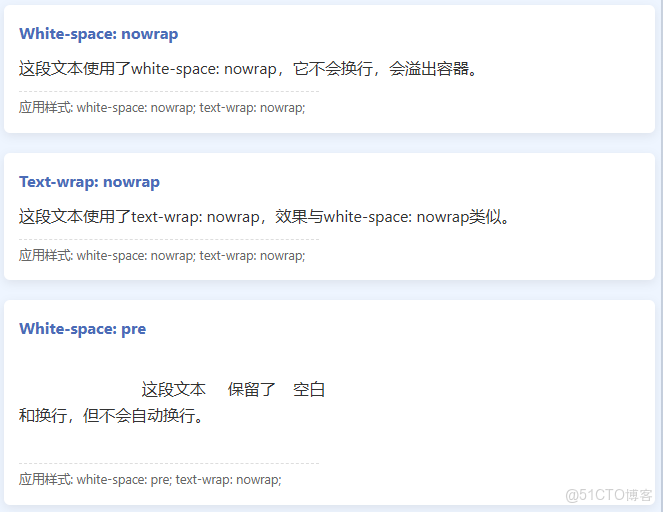
這段文本使用了white-space: nowrap,它不會換行,會溢出容器。
</div>
</div>
<div class="demo-item">
<div class="demo-title">Text-wrap: nowrap</div>
<div class="wrap-nowrap long-text">
這段文本使用了text-wrap: nowrap,效果與white-space: nowrap類似。
</div>
</div>
<div class="demo-item">
<div class="demo-title">White-space: pre</div>
<div class="pre long-text">
這段文本 保留了 空白
和換行,但不會自動換行。
</div>
</div>
<div class="demo-item">
<div class="demo-title">Text-wrap: balance</div>
<div class="wrap-balance long-text">
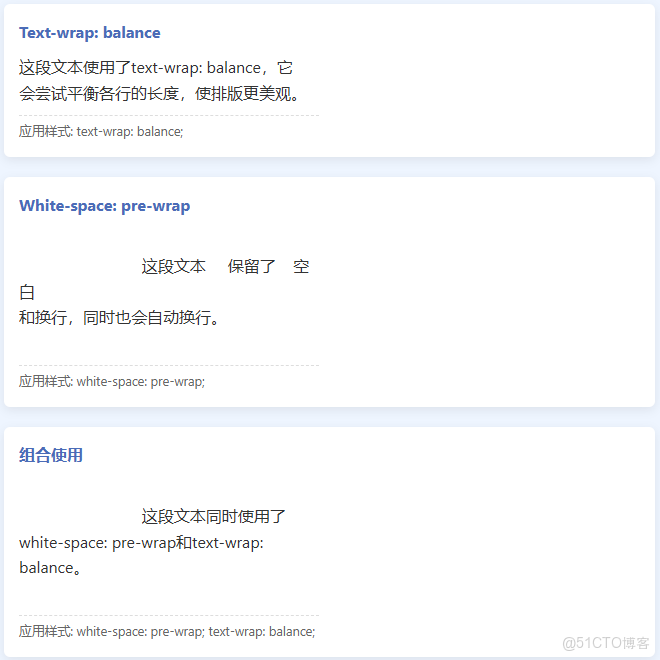
這段文本使用了text-wrap: balance,它會嘗試平衡各行的長度,使排版更美觀。
</div>
</div>
<div class="demo-item">
<div class="demo-title">White-space: pre-wrap</div>
<div class="pre-wrap long-text">
這段文本 保留了 空白
和換行,同時也會自動換行。
</div>
</div>
<div class="demo-item">
<div class="demo-title">組合使用</div>
<div class="pre-wrap wrap-balance long-text">
這段文本同時使用了white-space: pre-wrap和text-wrap: balance。
</div>
</div>
</div>
<h3>主要區別總結</h3>
<ul style="margin-left: 20px; margin-top: 15px;">
<li><strong>white-space</strong> 主要控制空白字符的處理和基本的換行行為</li>
<li><strong>text-wrap</strong> 專門控制文本的換行方式,提供更精細的排版控制</li>
<li><strong>white-space</strong> 是傳統屬性,瀏覽器支持非常好</li>
<li><strong>text-wrap</strong> 是較新的屬性,部分值(如balance、pretty)的瀏覽器支持有限</li>
<li>兩者可以組合使用,實現更復雜的文本排版需求</li>
</ul>
</div>
</div>
<footer>
<p>White-space vs Text-wrap 屬性對比 | 實際使用時請考慮瀏覽器兼容性</p>
</footer>
</div>
<script>
// 添加一些交互效果
document.addEventListener('DOMContentLoaded', function() {
const examples = document.querySelectorAll('.example-box, .demo-item');
examples.forEach(example => {
example.addEventListener('mouseenter', function() {
this.style.transform = 'translateY(-5px)';
this.style.transition = 'transform 0.3s ease';
});
example.addEventListener('mouseleave', function() {
this.style.transform = 'translateY(0)';
});
});
// 動態顯示當前使用的CSS屬性
const styleDisplays = document.querySelectorAll('.example-box, .demo-item > div:not(.demo-title)');
styleDisplays.forEach(display => {
const computedStyle = window.getComputedStyle(display);
const whiteSpace = computedStyle.whiteSpace;
const textWrap = computedStyle.textWrap;
if (whiteSpace !== 'normal' || textWrap !== 'wrap') {
const info = document.createElement('div');
info.style.fontSize = '0.8rem';
info.style.color = '#666';
info.style.marginTop = '10px';
info.style.paddingTop = '5px';
info.style.borderTop = '1px dashed #ddd';
let infoText = '應用樣式: ';
if (whiteSpace !== 'normal') infoText += `white-space: ${whiteSpace}; `;
if (textWrap !== 'wrap') infoText += `text-wrap: ${textWrap};`;
info.textContent = infoText;
display.appendChild(info);
}
});
});
</script>
</body>
</html>關鍵點總結
- white-space 主要控制空白字符(空格、製表符、換行符)的處理方式
- 決定是否合併空白、是否保留源碼格式
- 控制文本是否自動換行
- text-wrap 專門控制文本換行的方式
- 提供更精細的排版控制(如平衡行長度)
- 是較新的CSS屬性,部分值瀏覽器支持有限
- 主要區別
- white-space更關注空白字符的處理
- text-wrap更關注換行質量和排版美觀
- 兩者可以組合使用實現複雜排版需求
在實際開發中,white-space屬性使用更廣泛且瀏覽器支持更好,而text-wrap的balance和pretty值可以為標題和短文本提供更好的視覺效果。
