

Orbeon Forms 通過配置屬性進行配置。 它們通常設置在名為 properties-local.xml 的文件中,並存儲在 Orbeon Forms WAR 文件中,如下所示:
WEB-INF/resources/config/properties-local.xml:
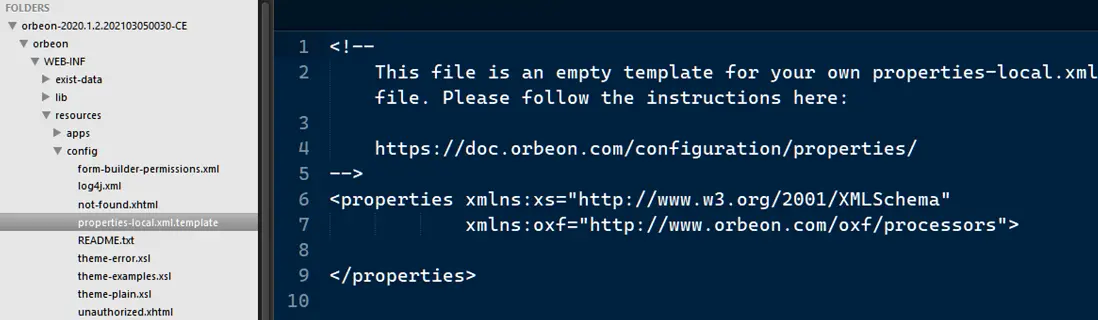
Orbeon Forms 可以做一些開箱即用的事情,而您無需在 properties-local.xml 中進行任何設置。 但是,如果您想更改默認行為(並且很可能為了設置訪問控制、數據庫訪問、配置按鈕等),您將需要對該文件進行更改。 本文描述了該過程的基礎知識。
您可以通過編輯 properties-local.xml 來更改屬性。 該文件位於 Orbeon Forms Web 應用程序內的目錄 WEB-INF/resources/config 中。
如果該文件在您的 Orbeon Forms 安裝中尚不存在,您可以通過將文件 properties-local.xml.template 重命名或複製到 properties-local.xml 中來創建它。 此時,您的 properties-local.xml 將只包含一個開始 \<properties\> 標記和結束 \</properties\> 標記,您需要編輯它以在這兩個標記之間添加屬性,如下所示:
<properties xmlns:xs="http://www.w3.org/2001/XMLSchema"
            xmlns:oxf="http://www.orbeon.com/oxf/processors">
    <property as="xs:string"
              name="oxf.fr.persistence.provider.*.*.*"
              value="oracle"/>
</properties>
屬性由以下組成:
- 一種類型,例如 xs:boolean
- 名稱,例如 oxf.resources.versioned
- 一個值,例如 true
- 可選的,很少有處理器名稱,例如 oxf:page-flow,它指的是 XPL 處理器名稱
一個例子:
<property
  as="xs:boolean"
  name="oxf.resources.versioned"
  value="true"/>
保存屬性文件(例如 properties-local.xml)後,會立即考慮對大多數屬性的更改,但僅在首次啓動服務器時才考慮對某些屬性的更改。
Built-in property files
這些屬性的默認值在以下文件中提供,這些文件存儲在 orbeon-resources-private.jar 中:
- config/properties-dev.xml:root of dev mode properties
- config/properties-prod.xml:root of prod mode properties
- config/properties-base.xml:base Orbeon Forms properties
- config/properties-xforms.xml
- config/properties-form-runner.xml
- config/properties-form-builder.xml
通常,您不應修改這些文件。
通常,您可以在 properties-local.xml 中定義所有自定義屬性。 但是,如果 properties 的價值需要因環境而異,例如 dev 和 prod 的值不同,那麼您可以在 properties-local-dev.xml 和 properties-local-prod.xml 中定義這些屬性兩次,並根據文件為屬性定義不同的值。 在這種情況下,您仍將保留不因 properties-local.xml 中的環境而不同的自定義屬性。
您在 properties-local-dev.xml 中定義的屬性僅適用於開發運行模式,並且在這種情況下覆蓋 properties-local.xml 中的屬性。
您在 properties-local-prod.xml 中定義的屬性僅適用於 prod 運行模式,在這種情況下會覆蓋 properties-local.xml 中的屬性。
