官方鏈接:https://sap.github.io/spartac...
The Spartacus event service provides a stream of events that you can consume without a tight integration to specific components or modules. The event system is used in Spartacus to build integrations to third party systems, such as tag managers and web trackers.
Spartacus 事件服務提供了一個事件流,您可以使用這些事件流,而無需與特定組件或模塊緊密集成。 Spartacus 中使用事件系統來構建與第三方系統的集成,例如標籤管理器和網絡跟蹤器。
The event service also allows you to decouple certain components. For example, you might have a component that dispatches an event, and another component that reacts to this event, without requiring any hard dependency between the components.
事件服務還允許您解耦某些組件。 例如,您可能有一個分派事件的組件和另一個對該事件做出反應的組件,而無需組件之間的任何硬依賴。
一個例子:
import { CxEvent } from "@spartacus/core";
export class CartAddEntryEvent extends CxEvent {
  cartId: string;
  userId: string;
  productCode: string;
  quantity: number;
}
在 app module 裏監聽這個事件的代碼:
export class AppModule {
  constructor(events: EventService, myAdapter: OccCartAdapter) {
    const result$ = events.get(CartAddEntrySuccessEvent);
    result$.subscribe((event) => console.log(event));
  }
}
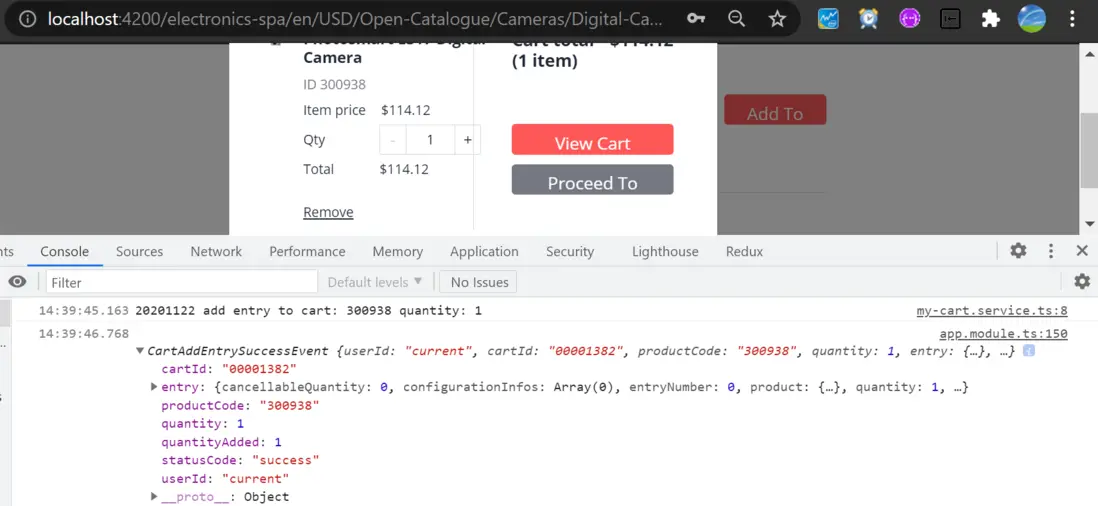
運行時,我一旦將某個產品加到購物車裏,就會觸發上面 app module 裏註冊的匿名函數的 console.log, 打印出 CartAddEntrySuccessEvent 實例的值。
Pulling Additional Data From Facades - 從 Facade 中提取額外數據
如果您需要比特定事件中包含的數據更多的數據,您可以將此數據與其他流組合。 例如,您可以從 facade 收集額外的數據。
以下是對“添加到購物車事件”做出反應的示例,然後等待購物車 stable(因為需要從後端重新加載 OCC 購物車),然後將所有購物車數據附加到事件數據:
constructor(
    events: EventService,
    cartService: ActiveCartService
    ){}
/* ... */

const result$ = this.events.get(CartAddEntrySuccessEvent).pipe(
    // When the above event is captured, wait for the cart to be stable
    // (because OCC reloads the cart after any cart operation)...
    switchMap((event) =>
        this.cartService.isStable().pipe(filter(Boolean), mapTo(event))
    ),
    // Merge the state snapshot of the cart with the data from the event:
    withLatestFrom(this.cartService.getActive()),
    map(([event, cart]) => ({ ...event, cart }))
);
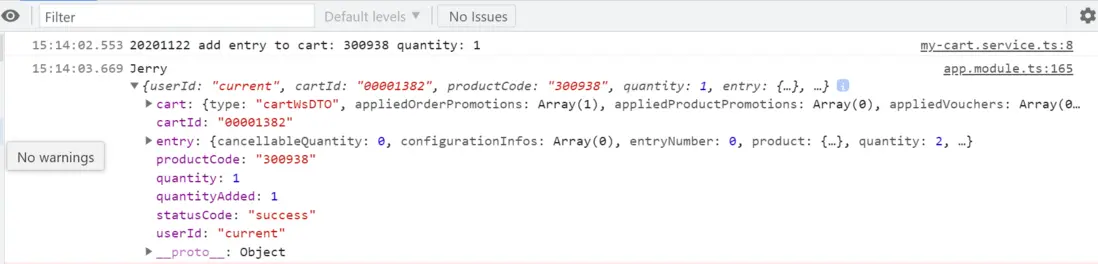
運行時效果:
更多Jerry的原創文章,盡在:"汪子熙":