

背景
最近做項目時需要為折線圖(angular 中使用 echarts 畫的圖)上的點設置更加個性化的顯示和操作:
- 不同數值區間的點以不同顏色顯示。
- 點擊圖上的點後會執行自定義的操作。
查看官方文檔後發現,這其實並不困難。因為 echatrs 支持以方法的返回值作為圖表中某個屬性的值,也提供了接口以監測點擊事件,可以在其回調函數中設置點擊後的自定義操作。
echarts 官方文檔點擊這裏。
於是對於點的顏色顯示問題就有了這樣的代碼:
  inputWarningValue: number = 1000;

  lineChartOption = {
    xAxis: {
      type: 'category',
      data: ['Mon', 'Tue', 'Wed', 'Thu', 'Fri', 'Sat', 'Sun']
    },
    yAxis: {
      type: 'value'
    },
    series: [{
      data: [820, 932, 901, 934, 1290, 1330, 1320],
      type: 'line',
      itemStyle: {
        normal: {
          color: function (params: { value: any[]; }) {
            const yValue = params.value[1];
            if (yValue > this.inputWarningValue) {
              return '#ff0031';  // 紅色
            } else {
              return '#048ABF';  // 藍色
            }
          }
        }
      },
      lineStyle: {color: '#0367A6'},
    }]
  } as EChartsOption;
這麼寫會報錯:

但是將函數的寫法由 function () {} 改為箭頭函數 () => {} 就不會報錯了。像這樣:
...
itemStyle: {
        normal: {
          color: (params: { value: any[]; }) => {
            const yValue = params.value[1];
            if (yValue > this.inputWarningValue) {
              return '#ff0031'; // 紅色
            } else {
              return '#048ABF'; // 藍色
            }
          }
        }
      },
...
對於點擊後的自定義操作我是這麼寫的:
  constructor(private router: Router,
              private route: ActivatedRoute) {

  }
  ngOnInit() {
    this.initCharts();
  }
  initCharts() {
    const ec = echarts as any;
    const lineChart = ec.init(document.getElementById('lineChart'));
    lineChart.on('click', function () {
      console.log('item click');
      // 點擊某個點後跳轉路由
      this.router.navigate(['any-url'], {relativeTo: this.route}).then();
    })
    lineChart.setOption(this.lineChartOption);
  }
這樣也會報錯:
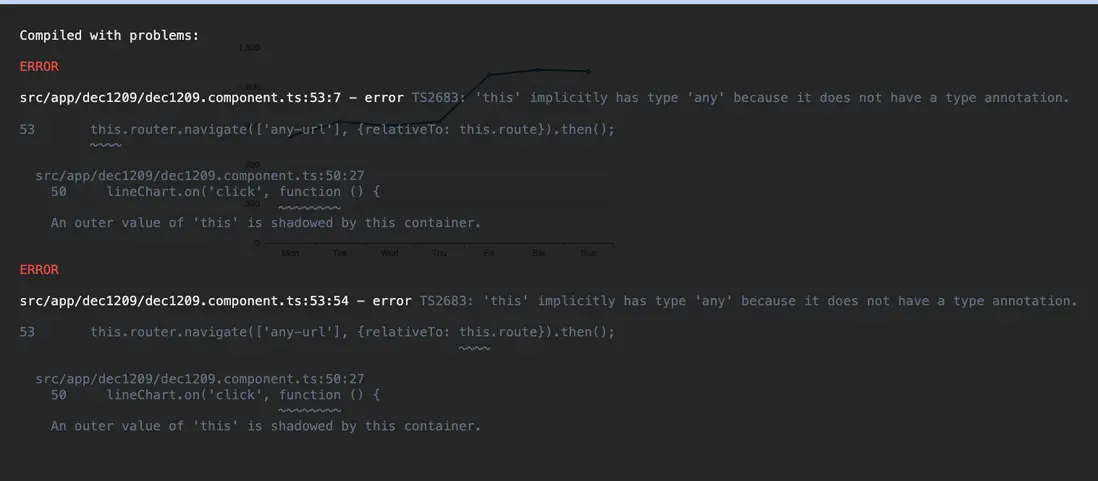
後來嘗試發現,除了改變函數的寫法外,也還可以用注入靜態變量的方式解決的這個問題:
  private static routerRef: Router
  private static routeRef: ActivatedRoute
  constructor(private router: Router,
              private route: ActivatedRoute) {
    Dec1209Component.routerRef = router;
    Dec1209Component.routeRef = route;
  }
  ngOnInit() {
    this.initCharts();
  }
  initCharts() {
    const ec = echarts as any;
    const lineChart = ec.init(document.getElementById('lineChart'));
    lineChart.on('click', function () {
      console.log('item click');
      // 點擊某個點後跳轉路由
      Dec1209Component.routerRef.navigate(['any-url'], {relativeTo: Dec1209Component.routeRef}).then();
    })
    lineChart.setOption(this.lineChartOption);
}分析之後可以發現,上述兩個情形,本質上其實是相同的問題:在不同情況下,this 的指向其實是不一樣的。
不同情況下 this 的指向
結果集與情況分類
首先,我們對於 this 指向的結果集需要有個大致的概念。
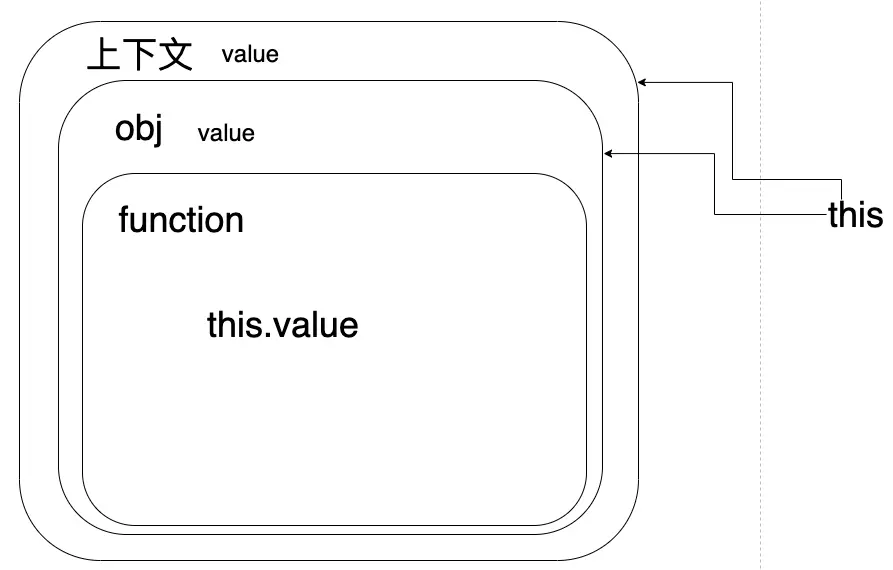
我們一般接觸的 this 指向有兩個可能的結果:當前對象、當前對象的上下文。
其次我們都知道,this 的使用場景通常都在某個函數中,所以這裏所説的不同情況其實指的也就是函數的不同情況。
函數在寫法上我們最常見有兩種:
- 普通寫法:
function() {}。一般在類中我們都會這麼定義函數。 - 箭頭函數:
() => {}。一般在回調中我們會用這種寫法。
函數的調用方式也可以分類:
- 對象方法調用:
object.function()。最常見的調用方式。 - 將方法賦值給變量後再調用:
const func = object.function; func()。不太常見。
我們姑且可以根據上述分類來分別測試 this 的指向。
測試及結果
angular 中我們可以在某個組件中準備這樣的測試代碼:
export class Dec1209Component implements OnInit {
  value: string = 'getFromContext';
  ngOnInit() {
    const object = {
      value: "getFromSelfObj",
      getValueByArrow: () => {
        return this.value;
      },
      getValueByGeneral() {
        return this.value;
      },
    };

    console.log('箭頭函數 + 對象方法調用', object.getValueByArrow());

    const arrowFunc = object.getValueByArrow;
    console.log('箭頭函數 + 賦值變量調用', arrowFunc());

    console.log('普通寫法 + 對象方法調用', object.getValueByGeneral());

    const generalFunc = object.getValueByGeneral;
    console.log('普通寫法 + 賦值變量調用', generalFunc());
  }
}
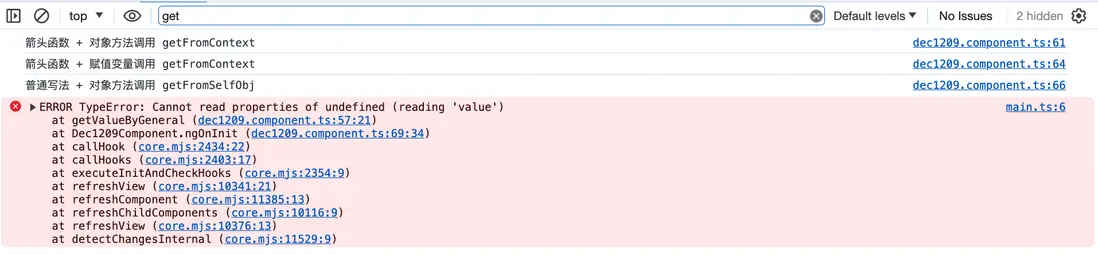
運行後得到以下結果:
總結
一、函數寫法為箭頭函數 function: () => {} 時
不管是對象方法調用,還是賦值變量調用,this 指向當前定義函數時所在的上下文。
二、函數寫法為普通寫法 function() {} 時
1.對象方法調用時,this 指向的就是當前執行函數時所在的上下文,通常就是當前對象。
2.賦值變量調用時,this 似乎既不指向當前對象,也不指向當前對象的上下文。(待深究)
希望這篇文章對你有幫助。
參考資料
https://zhuanlan.zhihu.com/p/104565681
https://zhongsp.gitbooks.io/typescript-handbook/content/doc/w...
