

最後一次更新於2019/07/08
效果演示圖

這是一個用C語言實現的《飛天蜈蚣》的“復刻”,由於Linux操作系統下的圖形庫不夠繪製絢麗的畫面,因此在本程序中僅用簡單的符號來代表不同的遊戲角色。
訪問本油管鏈接可以阿達雅游戲的視頻: https://www.youtube.com/watch...
基本介紹
注意: 本程序需要引入 ncurses 庫, 這個庫只存在於 Unix 的操作系統. 在開始運行之前,建議您通過以下 Debian/Ubuntu Linux 的命令行安裝需要的庫:
sudo apt−get install libncurses5−dev libncursesw5−dev
//libncurses5−dev: Developer’s libraries for ncurses
//libncursesw5−dev: Developer’s libraries for ncursesw
問題重申
基於原始的雅達利遊戲, 我重寫了部分規則. 為了使我的程序畫面更加穩定和流程,我做了以下必要的前提條件.
遊戲規則
蠍子是遊戲裏另一個一意孤行的角色. 相比於蜘蛛, 它就完全是個壞蛋, 它雖然只能向左或向右走但是一旦它碰到玩家玩家就會失去一條生命.
蜈蚣
蜈蚣是玩家最主要要消滅的敵人. 如果沒有任何障礙物, 蜈蚣只會一行接着一行地往下走.每次玩家擊中蜈蚣的部位都會變成一個蘑菇. 如果擊中的部位既不在頭也不在尾, 蜈蚣就會自己撕裂成兩部分, 獲得新的頭部並向上或向下接近玩家. 除此之外, 如果蜈蚣遇到蘑菇或者牆壁時, 它會拐彎下移. 儘量讓自己遠離蜈蚣,如果被它碰到的話也會失去生命哦!
為了讓上述規則更易懂, 我創建瞭如下關係表格:
| 撞擊關係 | 玩家 | 子彈 | 蘑菇 | 蜈蚣 |
|---|---|---|---|---|
| 蜘蛛 | 玩家死亡, 失誤一次生命 | 蜘蛛死亡, 獲得600分 | 蘑菇消失, 蘑菇總數 - 1 | 不考慮 |
| 蠍子 | 玩家死亡, 失誤一次生命 | 蠍子死亡, 獲得600分 | 不考慮 | 不考慮 |
| 蜈蚣 | 玩家死亡, 失誤一次生命 | 擊中頭部給100分,其餘情況給10分 | 蜈蚣掉頭 | 其中一隻蜈蚣掉頭 |
| 蘑菇 | 蘑菇消失, 蘑菇總數 - 1 | 4 次成功射擊後獲得1分 | 不考慮 | 不考慮 |
除此以外, 我在遊戲中設置了不同關卡. 每個關卡初始的蜈蚣身節是相等的. 但隨着蘑菇數量的增多, 玩家很難能擊中蜈蚣. 更不用説蠍子和蜘蛛了.
基本猜想
我在運行程序的時候遇到許多非程序性問題. 因此, 我羅列出必要的假設:
- 在每個關卡最開始的時候, 如果蘑菇所在位置和蜈蚣初始位置重合, 玩家可以認為該蘑菇會被蜈蚣吃掉.
- 蜘蛛只會出現在遊戲窗口的下端. 相反的, 蠍子只會出現在遊戲窗口的上方.
- 玩家的操控範圍不能超過遊戲窗口的邊界. 除此之外, 玩家不能穿越蘑菇但子彈可以.
- 蜈蚣被射中的身節會變成蘑菇, 這些新生成的蘑菇會隨着失敗重玩或闖關成功而存在除非被吃掉或擊中.
遊戲流程圖
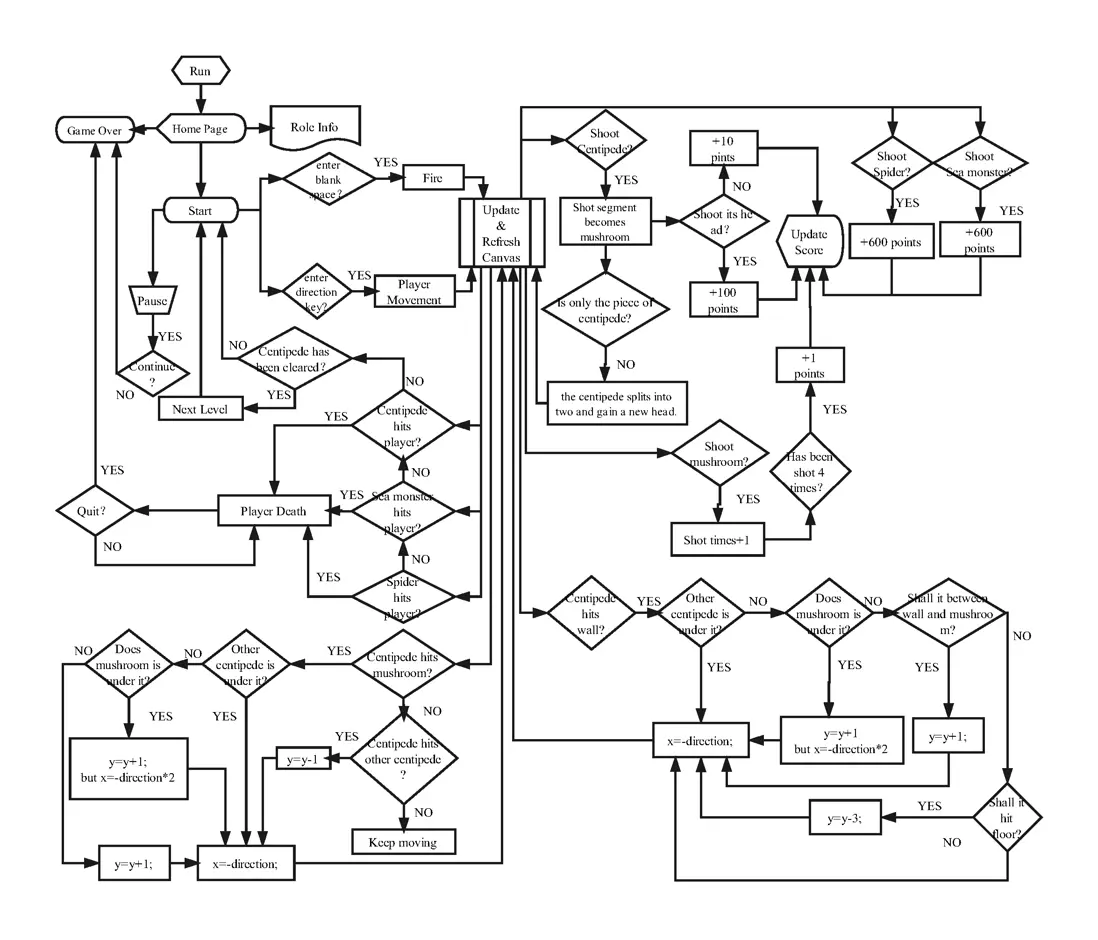
下圖詳細地介紹整個遊戲的流程, 包括碰撞結果, 分數更新和角色移動等. 在這些過程中, 每次計算機從 I/O 獲得運行順序並決定是滿足碰撞條件, 然後, 再創新畫布並更新分數.
如果您仍然不熟悉遊戲流程,可訪問下方的油管鏈接觀看遊戲通關全過程:
https://www.youtube.com/watch...
或者查看原始的流程圖:
https://www.processon.com/vie...
函數實現
開始菜單
首先, 我需要創建一個主菜單來簡單介紹遊戲規則. 這個滾動菜單需要給用户提供兩種選擇: 開始遊戲或退出遊戲.
/* 這些選項將在介紹菜單裏顯示*/
char *startMenu[] = {
        "Start", "Exit",
};

/* 介紹菜單裏的文字內容*/
char *readme[] = {
        "*Centipede Game*",
        " ",
        "This game is written by Hephaest, Lancaster University.",
        "Before the game, you'd better recognize these following characters.",
        " ",
        "*Character*",
        " ",
        "_^_",
        "|H|  Master",
        "---",
        " ",
        "This role is for you! you can move it by pressing keyboard:",
        "KEY_LEFT, KEY_RIGHT, KEY_UP and KEY_DOWN.",
        "Besides, you can fire bullets by pressing the blank space key.",
        " ",
        "*********O Centipede",
        " ",
        "This is the major character you need to shoot.",
        "Once it hits you, you lose your life.",
        "You only have 4 lives, be careful!",
        " ",
        "& Mushroom",
        " ",
        "This is a barrier, you cannot walk through it unless you destroy it.",
        "Once you destroy one of them, you will lose 4 bullets.",
        "Don't worry, you have tons of bullets.",
        " ",
        "_$ Sea monster",
        " ",
        "This character walks line by line. You can shoot it and get a bonus.",
        "However, once it hits you, you lose your life.",
        " ",
        "^W^ Spider",
        " ",
        "This character crawls all the time.",
        "Spider could either help you by eating mushrooms or hitting you.",
        " ",
        "*Tips*",
        " ",
        "Press \'P\' or \'p\' to pause.",
        "Press \'C\' or \'c\' to continue.",
        "Press \'Q\' or \'q\' to quit or replay.",
        " ",
        "All in all, be careful! Hope you enjoy the game!",
        " ",
};

/* 下列選項將出現在退出菜單 */
char *quitMenu[] = {
        "No",
        "Yes",
        "Replay",
};
在此之後, 我需要創建一個窗口來顯示這個菜單. 因為我沒有找到滾動菜單的UI框架, 只要再每行文字裏追加滾動菜單屬性.
/* 此功能是簡介菜單裏用户指針使用 */
void start()
{
    ITEM **start_items;
    int c;
    MENU *menu;
    WINDOW *start_menu;
    int n_startMenu, item, n_readme;

    /* Curses initialization */
    initscr();
    start_color();
    cbreak();
    noecho();
    init_pair(1, COLOR_WHITE, COLOR_BLACK);
    init_pair(2, COLOR_RED, COLOR_YELLOW);

    /* 創建介紹菜單選項.
     * 以下操作主要旨在實現以下要求:
     * 1. Readme 只是用來顯示文字的.
     * 2. 高亮所有在開始菜單裏的選項.
     */
    n_startMenu = ARRAY_SIZE(startMenu);
    n_readme = ARRAY_SIZE(readme);
    start_items = (ITEM **)calloc(n_startMenu+n_readme+1, sizeof(ITEM *));
    for(item = 0; item < n_readme; item++)
    {
        start_items[item] = new_item(readme[item], readme[item]);
        item_opts_off(start_items[item], O_SELECTABLE);
        set_item_userptr(start_items[item], Click);
    }
    int cho = 0;
    for(;item < n_readme + n_startMenu; item++)
    {
        start_items[item] = new_item(startMenu[cho], startMenu[cho]);
        /* Set the user pointer, even in readme*/
        set_item_userptr(start_items[item], Click);
        cho++;
    }
    /* 設置最後一個為 NULL */
    start_items[n_readme + n_startMenu] = (ITEM *)NULL;
    /* 創建菜單 */
    menu = new_menu((ITEM **)start_items);

    /* 這些顏色設置將應用於開始選項*/
    set_menu_fore(menu, COLOR_PAIR(2));
    set_menu_back(menu, COLOR_PAIR(1));
    set_menu_grey(menu, COLOR_PAIR(1));
    menu_opts_off(menu, O_SHOWDESC);

    /* 創建窗户並讓他位於屏幕中央 */
    int max_y, max_x;
    getmaxyx(stdscr, max_y, max_x);
    int x_position = (max_x-box_length)/2;
    int y_position = (max_y-box_width)/2;
    start_menu = newwin(box_width, box_length, y_position, x_position);
    keypad(start_menu, TRUE);//To listen keyboard

    /* 設置主窗口和子窗口 */
    set_menu_win(menu, start_menu);
    set_menu_sub(menu, derwin(start_menu, box_width-1, box_length-2, 1, 1));
    set_menu_format(menu, 18, 1);// Set 18 lines inside the box and one choices each line

    /* 創建邊界框 */
    box(start_menu, 0, 0);
    refresh();

    /* 發佈菜單 */
    post_menu(menu);
    wrefresh(start_menu);

    while((c = wgetch(start_menu)) != KEY_END)
    {
        switch(c)
        {    case KEY_DOWN:
                menu_driver(menu, REQ_DOWN_ITEM);
                break;
            case KEY_UP:
                menu_driver(menu, REQ_UP_ITEM);
                break;
            case KEY_NPAGE:
                menu_driver(menu, REQ_SCR_DPAGE);
                break;
            case KEY_PPAGE:
                menu_driver(menu, REQ_SCR_UPAGE);
                break;
            case 10: /* This is Enter key*/
            {
                /*To point to current choice*/
                ITEM *cur;
                void (*p)(char *);
                cur = current_item(menu);
                p = item_userptr(cur);
                p((char *)item_name(cur));
                pos_menu_cursor(menu);
                break;
            }
        }

        wrefresh(start_menu);
    }

    /* 清除菜單並清除緩存 */
    unpost_menu(menu);
    for(int i = 0; i < n_startMenu + n_readme; ++i)
        free_item(start_items[i]);
    free_menu(menu);
    /* 退出當前窗口並等待下一個窗口*/
    endwin();
}
主菜單被分為2部分: 第一部分是文字(只是用來顯示, 就算點擊了也無任何響應). 在第二部分, 設置用户指針允許玩家做出選擇. 為了提醒玩家確定自己的選擇, 我高亮每個選項的背景色.
/* 過濾選擇 */
void Click(char *choice)
{
    if(choice == "Exit")
    {
        endwin();
        exit(0);
    }
    if(choice == "Start") {
        clear();
        refresh();
        Initialization();
        GameInterface();
    }
}
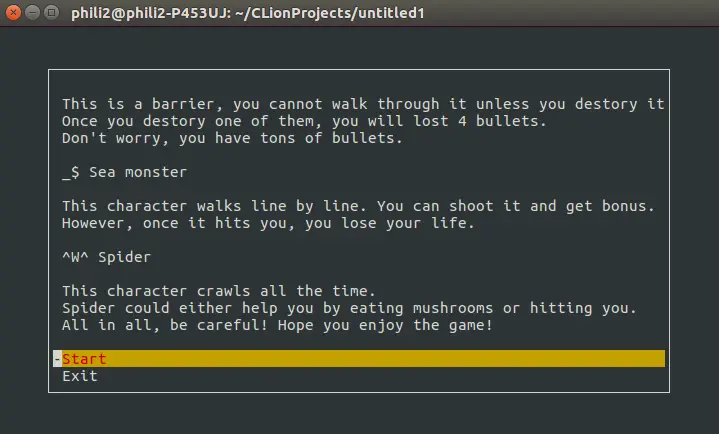
以上代碼的運行結果如下圖所示.
角色扮演
蘑菇 被隨機地放置在整個遊戲窗口, 可以使用循環語句查找位置重疊的蘑菇並給它們重新設置新的位置.
/*
 * 創建蘑菇
 * 以下操作主要旨在實現以下要求:
 * 1. 蘑菇的位置應隨機生成.
 * 2. 第一行和後三行被蜈蚣和玩家預先佔有.
 */
void MushroomProduce(int y, int x)
{
    int i = 0;
    mushLength = 20;
    srand(time(NULL));
    do {
        mushroom[i].x = rand() % (x - 3) + 1;
        mushroom[i].y =rand() % (y - 4) + 1;
        for (int j = 0; j < mushLength; j++) {
            if (mushroom[i].x == mushroom[j].x && mushroom[i].y == mushroom[j].y && i != j)
            {
                mushroom[i].x = rand() % (x - 2);
                mushroom[i].y =rand() % (y - 4) + 1;
            }
        }
        i++;
    } while (i < mushLength); /* 直到沒有重疊 */
    for(int i = 0; i < mushLength; i++) mushroom[i].mush_record=4;
}
玩家 通過使用 getmaxyx() 函數來放置在遊戲窗口下方中央的位置.
/*
 * 玩家創建
 * 以下操作主要旨在實現以下要求:
 * 1. 確保玩家在遊戲窗口底端的中央位置.
 */
void MasterProduce(WINDOW *win)
{
    int win_y;
    int win_x;
    getmaxyx(win, win_y, win_x);
    master_1_y = win_y - 3;
    master_1_x = (win_x - master_length) / 2;
    master_2_y = win_y - 2;
    master_2_x = (win_x - master_length) / 2;
    master_3_y = win_y - 1;
    master_3_x = (win_x - master_length) / 2;
    curr_bullet_y = master_1_y;
    curr_bullet_x = master_1_x + 1;
    /* 繪製窗口 */
    mvwprintw(win, master_1_y, master_1_x, "_");
    mvwprintw(win, master_1_y, master_1_x + 1, "^");
    mvwprintw(win, master_1_y, master_1_x + 2, "_");
    mvwprintw(win, master_2_y, master_2_x, "|") ;
    mvwprintw(win, master_2_y, master_2_x + 1, "H");
    mvwprintw(win, master_2_y, master_2_x + 2, "|");
    mvwprintw(win, master_3_y, master_3_x, "-");
    mvwprintw(win, master_3_y, master_3_x + 1, "-");
    mvwprintw(win, master_3_y, master_3_x + 2, "-");
}
蜈蚣 通過 getmaxyx() 方法放置在遊戲窗口上方的中央位置並使用 positions(x,y) 從尾到頭賦值.
/*
 * 創建蜈蚣
 * 從尾部開始
 */
void CentipedeProduce(int x)
{
    int i;
    Length = 10;
    int start_x = (x - Length) / 2;
    for (i = Length - 1; i >= 0; i--) {
        Centipede[i].x = start_x;
        Centipede[i].y = 0;
        start_x++;
    }
    for(int i = 0; i < Length; i++)
    {
        for(int j = 0; j < mushLength; j++)
        {
            if(Centipede[i].x == mushroom[j].x && Centipede[i].y == mushroom[j].y)
            {
                j++;
                while (j < mushLength) {
                    mushroom[j - 1].x = mushroom[j].x;
                    mushroom[j - 1].y = mushroom[j].y;
                    mushroom[j - 1].mush_record = mushroom[j].mush_record;
                    j++;
                }
                mushLength -= 1;
            }
        }
        Centipede[i].head = -1;
        Centipede[i].Clear = -1;
        Centipede[i].x_direction = 1;
        Centipede[i].y_direction = 1;
    }
    Centipede[0].head = 0;
}
對於蜘蛛和蠍子而言, 然而, 它們並不總是出現在固定位置, 需要使用變量 num 來決定從遊戲窗口左側還是右側出現. 除此之外, 可以使用另一個隨機變量控制它們的出現與否 (詳見下方源碼).
/*
 * 創建蠍子
 * 以下操作主要旨在實現以下要求:
 * 確保蠍子隨機出現.
 */
void Sea_MonsterProduce(int y, int x)
{
    srand(time(NULL));
    int start_y = rand() % y/2+1;
    int num = rand() % 2;
    if(num == 0)
    {
        Sea_Monster[0].x = 1;
        Sea_Monster[0].y = start_y;
        Sea_Monster[1].x = 0;
        Sea_Monster[1].y = start_y;
        Sea_Monster[0].x_direction = 1;
    }
    if(num == 1)
    {
        Sea_Monster[0].x = x - 2;
        Sea_Monster[0].y = start_y;
        Sea_Monster[1].x = x - 1;
        Sea_Monster[1].y = start_y;
        Sea_Monster[0].x_direction = -1;
    }
}

/*
 * 創建蜘蛛
 * 以下操作主要旨在實現以下要求:
 * 確保蜘蛛隨機出現.
 */
void SpiderProduce(int y, int x)
{
    int start_y = y - (rand() % y / 2 + 1);
    if(num == 1)
    {
        int start_x = 0;
        for(int i = 0; i < 3; i++)
        {
            Spider[i].x = start_x;
            Spider[i].y = start_y;
            start_x++;
            Spider[i].x_direction = 1;
            Spider[i].y_direction = 1;
        }
    }
    if(num == -1)
    {
        int start_x = x - 2;
        for(int i = 0; i < 3; i++)
        {
            Spider[i].x = start_x;
            Spider[i].y = start_y;
            start_x--;
            Spider[i].x_direction = -1;
            Spider[i].y_direction = 1;
        }
    }
}
隨機函數:
 /* 當蜈蚣在移動使,蠍子和蜘蛛也有隨機出現的機會 */
    srand(time(NULL));
    int ran_sea = rand() % 10;
    if(ran_sea == 1) sea_appear=1;
    int ran_spider = rand() % 5;
    if(ran_spider == 1) spider_appear = 1;
移動的敵人
這些敵人包括蜘蛛, 蠍子和蜈蚣. 前兩者比後者在處理上簡單很多.
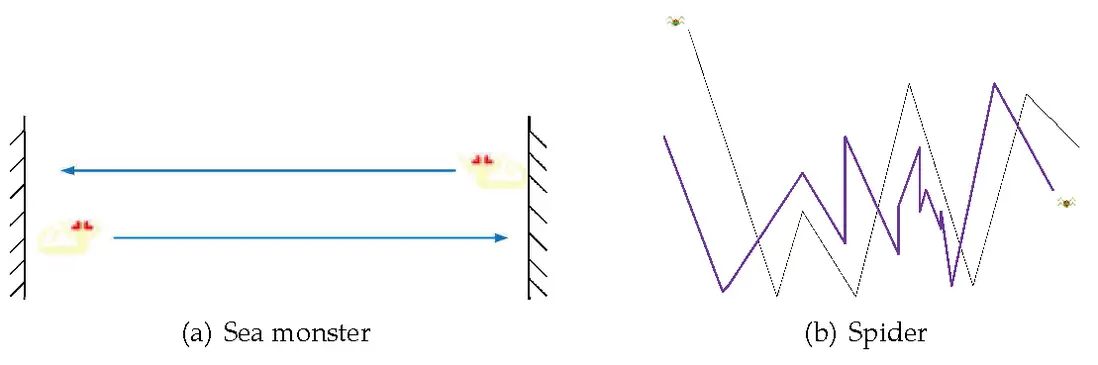
如上圖所示, 蠍子是平行移動的, 並會撞上游戲窗口的邊界, 計算機會給它一個初始位置並讓它消失在遊戲窗口. 而蜘蛛的爬行是很隨意的, 無規律可言. 然而, 我使用了比 飛天蜈蚣 種更復雜的方法實現蜘蛛的爬行: 在 x 和 y 方向上的二維隨機數. 但這也可能會造成蜘蛛在同一條軌跡上來回爬行 (詳見下圖) 但由於隨機數 x 和 y 都是非負數因此蜘蛛最終會總窗口一端爬向窗口另一端.
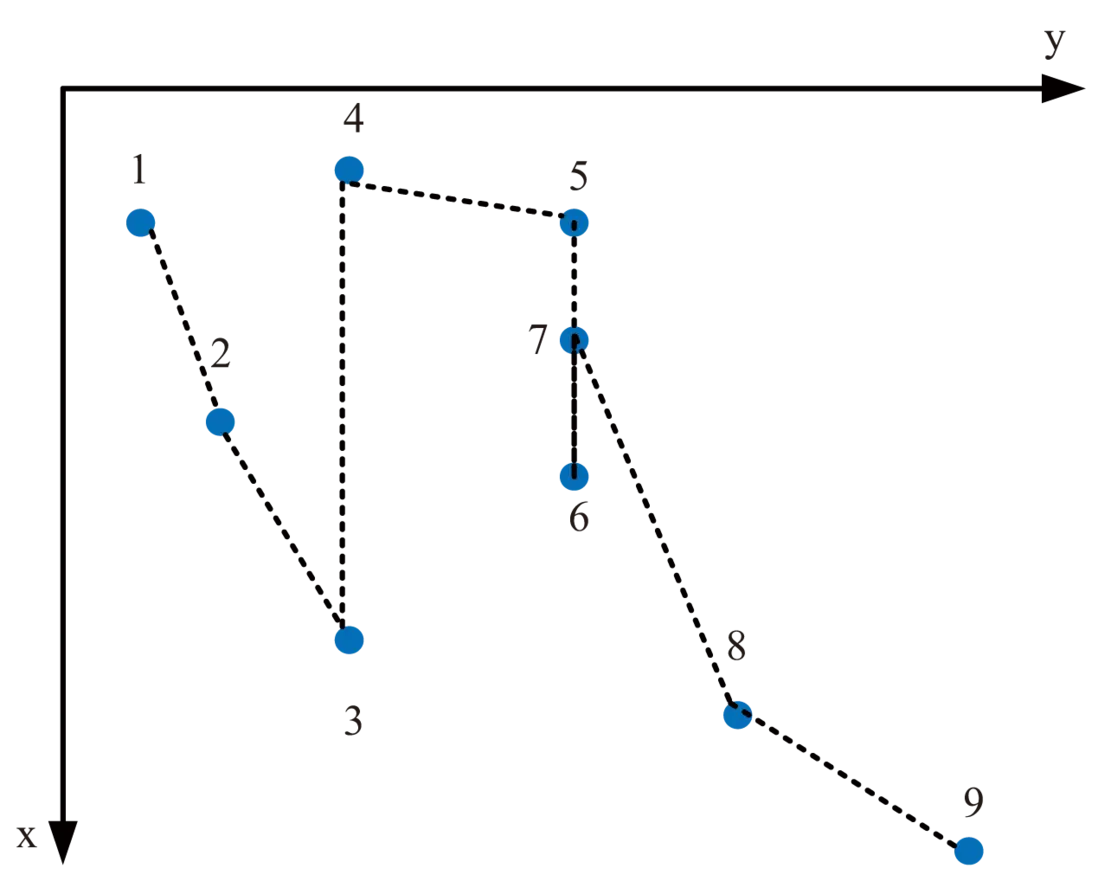
除此以外, 我設置了蜘蛛 x 和 y 方向的邊界條件以防它撞上自己的同伴蠍子. 另外, 我設置了布爾二值來延緩蜘蛛爬行的速度並讓他依次從遊戲窗口的左邊或右邊出現.
/* 移動的蠍子.
 * 此功能為了實現蠍子的水平移動.
 */
void sea_monsterMove(int x)
{
        Sea_Monster[1].x = Sea_Monster[0].x;
        Sea_Monster[0].next_x = Sea_Monster[0].x + Sea_Monster[0].x_direction;
        /* 如果蠍子即將走到窗口邊界, 使其消失 */
        if (Sea_Monster[0].next_x > x || Sea_Monster[0].next_x < 0)
        {
            Sea_Monster[0].x = -1;
            Sea_Monster[1].x = -1;
            sea_appear = 0;
        }
        else
        {
            Sea_Monster[0].x += Sea_Monster[0].x_direction;
        }
}

/* 移動的蜘蛛.
 * 此功能為了實現蜘蛛在 x 和 y 方向的移動.
 */
void SpiderMove(int x,int y)
{
    srand(time(NULL));
    int ran_y = y-(rand() % y / 2 + 3);
    int ran_x = rand() % 2;
    for(int j = 0; j < 3; j++)
    {
        Spider[j].next_x = Spider[j].x + ran_x*Spider[j].x_direction;
        Spider[j].next_y = Spider[j].y + Spider[j].y_direction;
        /* 如果蜘蛛即將走到窗口邊界, 重設初始位置並使其消失 */
        if (Spider[j].next_x > x || Spider[j].next_x < 0)
        {
            Spider[0].x = -1;
            Spider[1].x = -1;
            Spider[2].x = -1;
            spider_appear = 0;
            num *= -1;
            break;
        }
        /* 如果蜘蛛將觸碰遊戲窗口的下邊界, 更改 y 方向*/
        if(Spider[j].next_y > y - 1 || Spider[j].next_y < ran_y)
        {
            Spider[j].y_direction *= -1;
        }
            Spider[j].x += ran_x*Spider[j].x_direction;
            Spider[j].y += Spider[j].y_direction;
    }
}
就蠍子而言, 它是本遊戲中最複雜的情況. 我將我能想到的所有情況都在下方列出. 我主要使用方法是結構體和數組. 因為碰撞每次都需要考慮每個身節的變化情況, 因此數組更容易幫我定位到指定身節. 每一次移動, 只需要處理蜈蚣頭部運動情況, 並讓它的身節跟着頭部運動即可. 最後, 重刷畫布. 具體的操作已在下方源碼中列出.
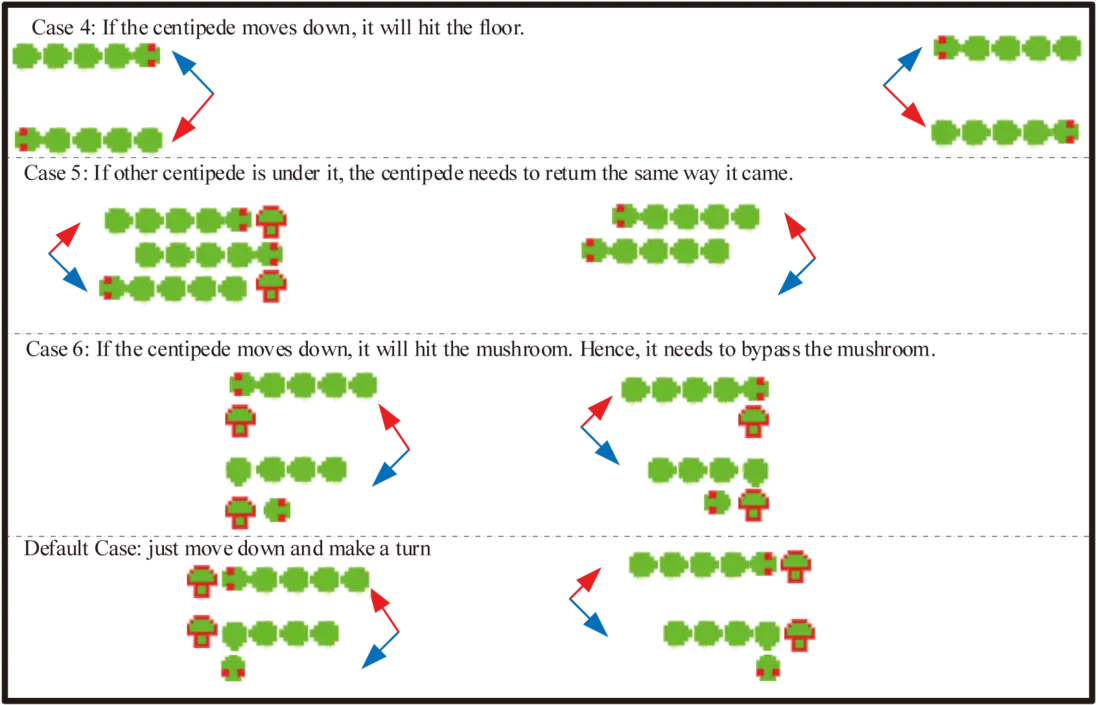
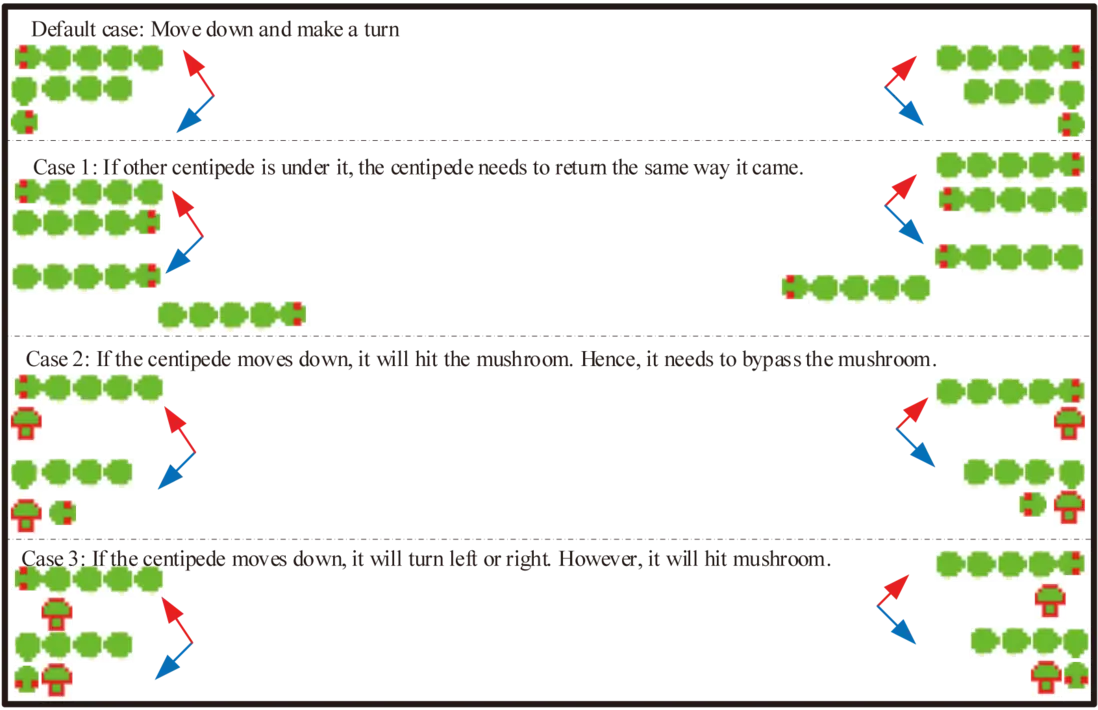
/*
 * 此功能用於確定蜈蚣的每個身節應該到達的位置.
 * 一旦蜈蚣開始移動, 需要對它的運動情況進行分開討論.
 */
void CentipedeMove(int x, int y)
{
    for(int i = 0; i < Length; i++)
    {
        int skip=0;//This is used to mark
        /* 僅移動尚未射中的蜈蚣的身節 */
        if(Centipede[i].head >=0 && Centipede[i].Clear < 0)
        {
            int j = i;
            int k = i + 1;
            /* 對於多個蜈蚣,識別他們的頭部,並使他們自己的身體跟隨他們 */
            while(k <= Length - 1 && Centipede[k].head < 0 && Centipede[k].Clear < 0)
            {
                j++;
                k++;
            }
            while(j > i)
            {
                Centipede[j].x = Centipede[j - 1].x;
                Centipede[j].y = Centipede[j - 1].y;
                Centipede[j].x_direction = Centipede[j-1].x_direction;
                j--;
            }
            Centipede[i].next_x = Centipede[i].x + Centipede[i].x_direction;
            Centipede[i].next_y = Centipede[i].y + Centipede[i].y_direction;
            /* 如果蜈蚣即將撞上游戲窗口左右邊界, 它需要下移並掉頭. 然而:
             * 1. 如果有另一條蜈蚣正在它下方, 此蜈蚣只能原路返回.
             * 2. 如果蜈蚣下移時會撞上蘑菇. 那麼, 蜈蚣需要躲避蘑菇.
             * 3. 如果蜈蚣下移後的下一秒會撞上蘑菇, 它就無法掉頭只能再繼續下移一格.
             * 4. 如果下移後蜈蚣即將撞上游戲窗口的下邊界, 蜈蚣需要上移掉頭.
             */
            if (Centipede[i].next_x > x || Centipede[i].next_x < 0)
            {
                /* 針對情況1 */
                for(int k = 0; k < Length; k++)
                {
                    if(Centipede[k].Clear < 0 && (k < i || k > j))
                    {
                        if(Centipede[i].next_y == Centipede[k].y && Centipede[i].x == Centipede[k].x)
                        {
                            Centipede[i].x_direction *= -1;
                            skip = 1;
                        }
                    }
                }

                for(int j = 0; j < mushLength; j++)
                {
                    /* 針對情況2 */
                    if(Centipede[i].next_y == mushroom[j].y && Centipede[i].x == mushroom[j].x)
                    {
                        Centipede[i].x_direction *= -1;
                        Centipede[i].y += 1;
                        skip=1;
                        Centipede[i].x += Centipede[i].x_direction;
                    }
                    /* 針對情況3 */
                    if(Centipede[i].next_y == mushroom[j].y && Centipede[i].x - 1 == mushroom[j].x || Centipede[i].next_y == mushroom[j].y && Centipede[i].x + 1 == mushroom[j].x)
                    {
                        Centipede[i].y += 1;
                        skip = 1;
                    }
                }
                /* 針對情況4 */
                if (Centipede[i].next_y > y)
                {
                    Centipede[i].y -= 3;
                    Centipede[i].x_direction *= -1;
                    skip = 1;
                }
                /* 默認情況, 只需要下移掉頭 */
                if(!skip)
                {
                    Centipede[i].x_direction *= -1;
                    Centipede[i].y += 1;
                }
            }
            else
            {
                /* 如果蜈蚣的頭部即將撞上蘑菇, 它將會下移掉頭. 然而:
                 * 5. 如果它正下方是另一條蜈蚣, 該蜈蚣只能原路返回.
                 * 6. 如果下移後會撞上蘑菇. 它需要躲避蘑菇.
                 */
                for(int j = 0; j < mushLength; j++)
                {
                    if(Centipede[i].next_x == mushroom[j].x && Centipede[i].y == mushroom[j].y)
                    {
                        /* 針對情況5 */
                        for(int k = 0; k < Length; k++)
                        {
                            if(Centipede[k].Clear < 0 && (k < i || k > j))
                            {
                                if(Centipede[i].next_y == Centipede[k].y && Centipede[i].x == Centipede[k].x)
                                {
                                    Centipede[i].x_direction *= -1;
                                    skip = 1;
                                }
                            }
                        }
                        /* 針對情況6 */
                        for(int k = 0; k < mushLength; k++)
                        {
                            if(Centipede[i].next_y == mushroom[k].y && Centipede[i].x == mushroom[k].x && j!=k)
                            {
                                Centipede[i].x_direction *= -1;
                                Centipede[i].y += 1;
                                skip = 1;
                                Centipede[i].x += Centipede[i].x_direction;
                            }
                        }
                        /* 默認情況, 只需要下移和頭 */
                        if(!skip)
                        {
                            Centipede[i].x_direction *= -1;
                            Centipede[i].y += 1;
                            skip = 1;
                        }
                    }
                }
                /* 針對情況 7
                 * 如果該蜈蚣和另一條蜈蚣相向而行, 那麼:
                 * 該蜈蚣接受妥協, 向下移動並掉頭.
                 */
                for(int k = 0; k < Length; k++)
                {
                    if(Centipede[k].Clear < 0 && (k < i || k > j))
                    {
                        if(Centipede[i].next_x == Centipede[k].x && Centipede[i].y == Centipede[k].y)
                        {
                                Centipede[i].x_direction *= -1;
                                Centipede[i].y += 1;
                                skip = 1;
                        }
                     }
                }
                /* 如果都不屬於上述情況, 只需要讓蜈蚣繼續沿 x 方向移動 */
                if(skip==0) Centipede[i].x += Centipede[i].x_direction;
            }
        }
    }
}
移動的玩家
我使用 getch() 函數來監聽鍵盤輸入. 然而, 在同步 I/O 中監聽意味着計算機無法調度程序的其他部分運行. 因此必須使用多線程來監聽鍵盤輸入. 這部分沒有什麼需要探討的實現原理, 只需要記住玩家是不能穿越遊戲窗口的邊界和蘑菇的. 以下是源碼部分:
/*
 * 此功能用於始終從鍵盤接收玩家輸入!
 */
void * waitForKey() {
    while (1) {
        usleep(10);//以防宏塊
        ch = getch();
    }
}

/*
 * 鍵盤監聽器
 * 以下操作主要實現以下要求:
 * 1. 玩家可以上下左右移動.
 * 2. 玩家按下空格鍵即可射擊.
 * 3. 如果玩家觸碰蘑菇, 玩家暫停移動.
 * 4. 如果玩家觸碰遊戲窗口邊界, 玩家暫停移動.
 * 5. 當子彈被觸發時, 子彈應從玩家當前位置射出.
 */
void getOrder(WINDOW *win, int x, int y)
{
    int skip = 0;
    switch(ch)
    {
        case KEY_LEFT:
            for(int i = 0; i < mushLength; i++)
            {
                if(master_1_x == 0 || (master_1_y == mushroom[i].y && master_1_x == mushroom[i].x + 1) || (master_2_y == mushroom[i].y && master_2_x == mushroom[i].x + 1) || (master_3_y == mushroom[i].y && master_3_x == mushroom[i].x + 1))//on the  left hand of master
                {
                    // 略過
                    skip = 1;
                }
            }
            if(!skip)
            {
                master_1_x -= 1;
                master_2_x -= 1;
                master_3_x -= 1;
                curr_bullet_y = master_1_y;
                curr_bullet_x = master_1_x + 1;
            }
            break;
        case KEY_RIGHT:
            for(int i = 0; i < mushLength; i++)
            {
                if ((master_1_x + 2) == x - 1 || (master_1_y == mushroom[i].y && master_1_x + 2 == mushroom[i].x - 1) ||
                    (master_2_y == mushroom[i].y && master_2_x + 2 == mushroom[i].x - 1) ||
                    (master_3_y == mushroom[i].y && master_3_x + 2 == mushroom[i].x - 1))
                {
                    // 略過
                    skip=1;
                }
            }
            if(!skip)
            {
                master_1_x += 1;
                master_2_x += 1;
                master_3_x += 1;
                curr_bullet_y = master_1_y;
                curr_bullet_x = master_1_x + 1;
            }
            break;
        case KEY_UP:
            for(int i = 0; i < mushLength; i++)
            {
                if (master_1_y == 0 || (master_1_y == mushroom[i].y + 1 && master_1_x == mushroom[i].x) || (master_1_y == mushroom[i].y + 1 && master_1_x + 1 == mushroom[i].x) || (master_1_y == mushroom[i].y + 1 && master_1_x + 2 == mushroom[i].x))
                {
                    // 略過
                    skip=1;
                }
            }
            if(!skip)
            {
                master_1_y -= 1;
                master_2_y -= 1;
                master_3_y -= 1;
                curr_bullet_y = master_1_y;
                curr_bullet_x = master_1_x + 1;
            }
            break;
        case KEY_DOWN:
            for(int i = 0; i < mushLength; i++)
            {
                if (master_3_y == y - 1 || (master_3_y == mushroom[i].y - 1 && master_3_x == mushroom[i].x) || (master_3_y == mushroom[i].y - 1 && master_3_x + 1 == mushroom[i].x) || (master_3_y == mushroom[i].y - 1 && master_3_x + 2 == mushroom[i].x))
                {
                    // 略過
                    skip = 1;
                }
            }
            if(!skip)
            {
                master_1_y += 1;
                master_2_y += 1;
                master_3_y += 1;
                curr_bullet_y = master_1_y;
                curr_bullet_x = master_1_x + 1;
            }
            break;
        case ' ':
            bullet_x = curr_bullet_x;
            bullet_y = curr_bullet_y;
            Fire = 1;
            break;
    }
    ch = 0;
    mvwprintw(win, master_1_y, master_1_x, "_");
    mvwprintw(win, master_1_y, master_1_x + 1, "^");
    mvwprintw(win, master_1_y, master_1_x + 2, "_");
    mvwprintw(win, master_2_y, master_2_x, "|");
    mvwprintw(win, master_2_y, master_2_x + 1, "H");
    mvwprintw(win, master_2_y, master_2_x + 2, "|");
    mvwprintw(win, master_3_y, master_3_x , "-");
    mvwprintw(win, master_3_y, master_3_x + 1, "-");
    mvwprintw(win, master_3_y, master_3_x + 2, "-");
}
菜單操作
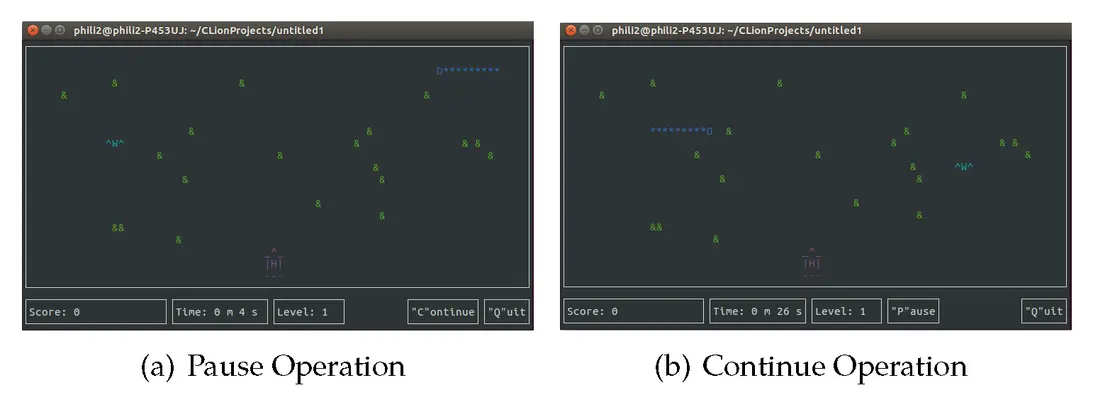
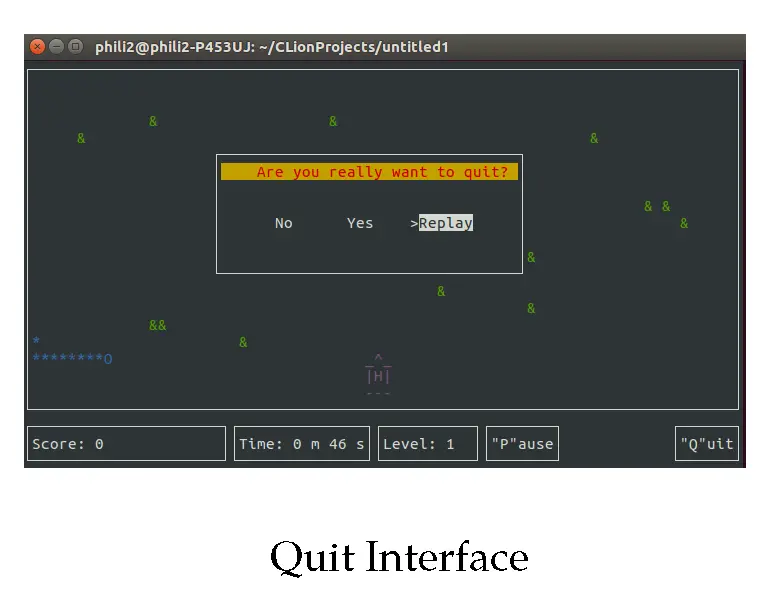
我在遊戲界面創建了三個選項. 如果玩家按下 P 或 p, 該按鈕將消失. 所有的操作都會被暫停並且 Continue 按鈕出現. 相反地, 如果玩家按下 C 或 c, 該按鈕將消失. 所有被中斷的操作繼續並且 Pause 按鈕出現. 除此之外, 玩家可以隨時退出遊戲窗口, 只需要按下 Q 或者 q 並選擇 Yes.
/* 這個結構體為了實現 "Pause" 和 "Continue" 按鈕的隱藏 */
typedef struct PANEL_HIDE {
    int hide;
}Panel;

/*
 * 事件監聽器
 * 以下操作主要實現以下要求:
 * 1. 如果玩家按下 "Continue", 該按鈕消失並顯示 "Pause" 按鈕.
 * 2. 如果玩家按下 "Pause", 該按鈕消失並顯示t "Continue" 按鈕.
 */
void getInt(PANEL *Con, PANEL *Pau, int x, int y, WINDOW* win)
{
    Panel *temp;
    switch(ch)
    {
        case 'c':
        case 'C':
            temp = (Panel *)panel_userptr(Con);
            hide_panel(Con);
            temp->hide = TRUE;
            if(temp->hide == TRUE)
            {
                temp = (Panel *) panel_userptr(Pau);
                show_panel(Pau);
                temp->hide = FALSE;
            }
            stop = 0;
            interrupt_end = time(NULL);
            break;
        case 'p':
        case 'P':
            temp = (Panel *)panel_userptr(Pau);
            hide_panel(Pau);
            temp->hide = TRUE;
            temp = (Panel *)panel_userptr(Con);
            if(temp->hide == TRUE)
            {    show_panel(Con);
                temp->hide = FALSE;
            }
            stop = 1;
            if(interrupt_begin == 0) interrupt_begin = time(NULL);
            break;
        case 'Q':
        case 'q':
            QuitMenu(Pau,x,y);
            break;
        case KEY_END:
            endwin();
            exit(0);
    }
}

/*
 * 退出菜單
 * 以下操作主要實現以下要求:
 * 1. 創建一個新窗口並覆蓋原來的窗口.
 * 2. 然而, 如果玩家點擊 "No", 當前窗口消失並使原來的窗口浮現.
 * 3. 如果玩家點擊 "Yes", 關閉所有的窗口並結束遊戲進程.
 * 4. 否則, 玩家仍可以繼續玩遊戲.
 */
void QuitMenu(PANEL *Pau, int x, int y)
{
    ITEM **my_items;
    MENU *my_menu;
    WINDOW *my_menu_win;
    Panel *temp;
    int n_quitMenu, i;

    /* Curses 初始化 */
    initscr();
    start_color();
    cbreak();
    noecho();
    keypad(stdscr, TRUE);
    init_pair(1, COLOR_WHITE, COLOR_BLACK);
    init_pair(2, COLOR_RED, COLOR_YELLOW);

    /* 創建菜單和選項 */
    n_quitMenu = ARRAY_SIZE(quitMenu);
    my_items = (ITEM **)calloc(n_quitMenu + 1, sizeof(ITEM *));
    for(i = 0; i < n_quitMenu; i++)
        my_items[i] = new_item(quitMenu[i], quitMenu[i]);
    my_items[n_quitMenu] = (ITEM *)NULL;
    my_menu = new_menu(my_items);

    /* 使窗口位於正中央 */
    menu_opts_off(my_menu, O_SHOWDESC);
    int lent=(x-quit_length) / 2;
    int widt=(y-quit_width) / 2;
    my_menu_win = newwin(8, 35, widt, lent);
    keypad(my_menu_win, TRUE);

    /* 設置主窗口和子窗口 */
    set_menu_win(my_menu, my_menu_win);
    set_menu_sub(my_menu, derwin(my_menu_win,2, 26, 4, 6));
    set_menu_format(my_menu, 1, 3);
    set_menu_mark(my_menu, ">");
    box(my_menu_win, 0, 0);
    wattron(my_menu_win,COLOR_PAIR(2));
    mvwprintw(my_menu_win, 1, 1,"    Are you really want to quit? ");
    wattroff(my_menu_win,COLOR_PAIR(2));
    post_menu(my_menu);
    wrefresh(my_menu_win);
    int check = 0;
    while(check != 1)
    {
        switch(ch)
        {
            /* 每一次 ch = getch()後, 需要給 ch 一個初始值. 否則, 報告錯誤. */
            case KEY_LEFT:
                menu_driver(my_menu, REQ_PREV_ITEM);
                ch = 0;
                break;
            case KEY_RIGHT:
                menu_driver(my_menu, REQ_NEXT_ITEM);
                ch = 0;
                break;
            case 10:    /* 這是 Enter 鍵 */
            {
                if(item_name(current_item(my_menu)) == "Yes")
                {
                    ch = 0;
                    wclear(my_menu_win);
                    endwin();
                    delwin(subwin(my_menu_win, 2, 26, 4, 6));
                    delwin(my_menu_win);
                    endwin();
                    exit(0);
                }
                /* 清空退出菜單並返回遊戲 */
                if(item_name(current_item(my_menu)) == "No")
                {
                    wclear(my_menu_win);
                    endwin();
                    delwin(subwin(my_menu_win, 2, 26, 4, 6));
                    delwin(my_menu_win);
                    check = 1;
                    ch = 0;
                    break;
                }
                /* 清空退出菜單並重新開始遊戲 */
                if(item_name(current_item(my_menu)) == "Replay")
                {
                    check = 1;
                    temp = (Panel *)panel_userptr(Pau);
                    hide_panel(Pau);
                    temp->hide = TRUE;
                    endwin();
                    clear();
                    Initialization();
                    GameInterface();
                    ch = 0;
                    break;
                }
            }
        }
        wrefresh(my_menu_win);
    }
    unpost_menu(my_menu);
    free_menu(my_menu);
    for(i = 0; i < n_quitMenu; ++i)
        free_item(my_items[i]);
}
碰撞問題
我把碰撞問題分成2部分. 第一部分是子彈射中敵人: 對於蜘蛛和蠍子只需要一個子彈就夠了, 蜈蚣的單個身節也只需要一個但蘑菇需要4枚子彈才能完全消除. 然而, 射中蜈蚣不同位置獲得的獎勵分數也不同. 另外, 蜈蚣被擊中的部位可能會長出新的頭部, 我已把所有我能想到的情況羅列在下方. 如果玩家把蜈蚣全部身節都射中了, 玩家就能成功進入下一關.
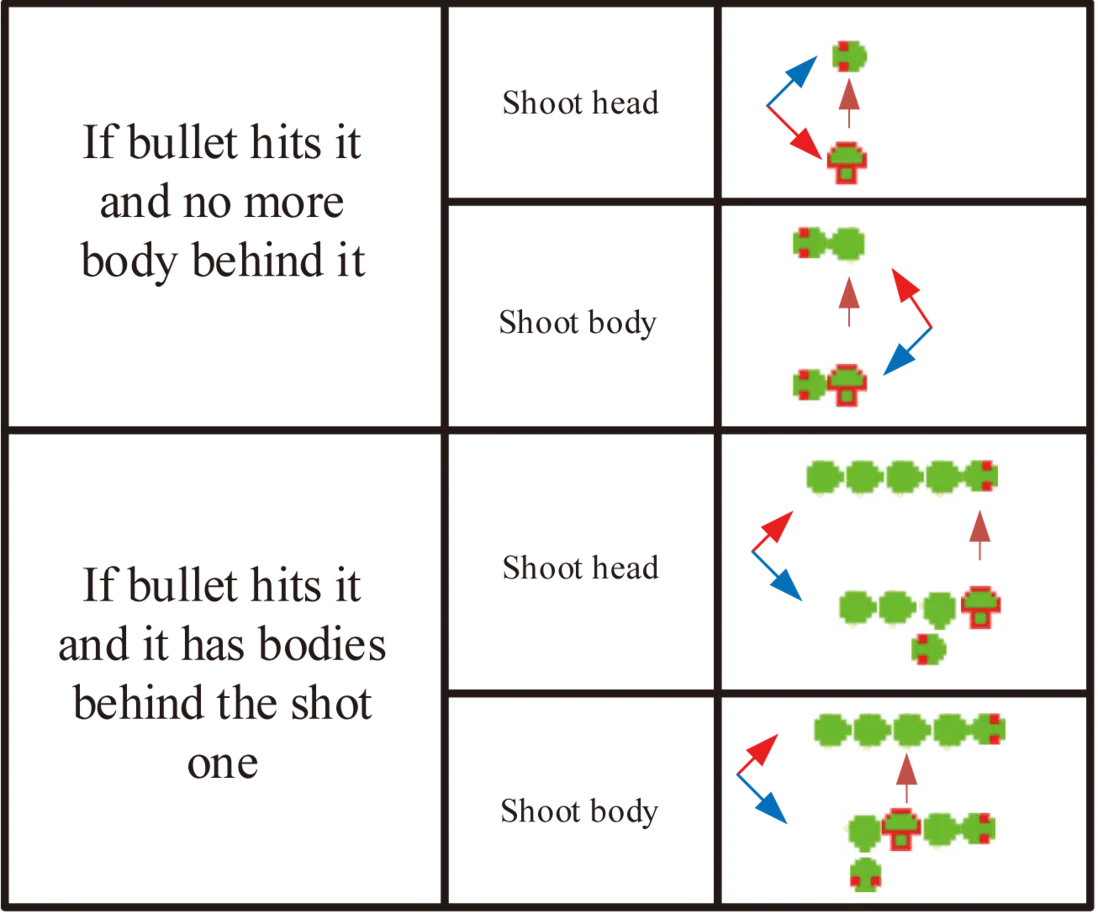
第二部分是敵人成功擊中玩家, 玩家會失去一次生命當沒有多餘的生命之後宣告玩家遊戲失敗. 在被擊中後, 如果玩家還有多餘的生命, 玩家可以選擇重新挑戰, 然而, 每一個蘑菇需要4枚子彈才能消除. 所有的敵人將從初始位置重新出現.
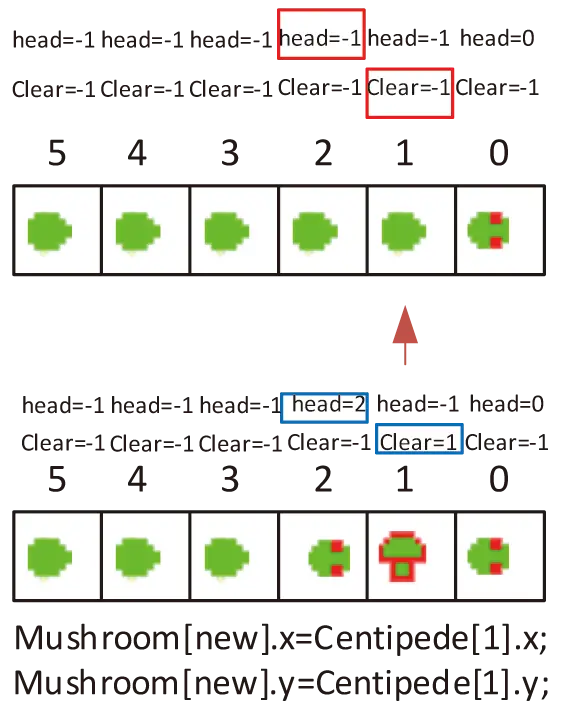
您可能會好奇如何實現蜈蚣一分為二的. 其實, 只需要在結構體裏定義一個整型 Clear 就可以追蹤蜈蚣的每個身節. 比如, 玩家射中第 ith 個身節, 只需要將此位置 Centipede[i] 記錄它的狀態. 清除, 所有身節的初始清除狀態值都是 -1. 在這之後, 遍歷所有清除值 -1 的身節並使頭部的清除值大於或等於 0 (這意味着頭部沒有被射中並且它們是蜈蚣的第一個身節). 我不需要關係其他身節清除值的變化, 在移動中只需要讓它們跟從頭節點變化即可.
/*
 * 碰撞檢驗
 * 以下操作主要旨在實現以下要求:
 * 1. 一旦子彈射中目標, 程序需要計算分數並確認是否使其消失.
 * 2. 一旦敵人攻擊到玩家, 程序判定玩家當此遊戲失敗並確認玩家是否還有多餘的生命.
 */
void CollisionCheck(WINDOW *win,WINDOW *win0,int boundary,PANEL *Pau)
{
    /* 子彈射中蘑菇, 蘑菇只有經受4次子彈攻擊才會被銷燬 */
    for(int i = 0; i < mushLength; i++) {
        if (bullet_x == mushroom[i].x && bullet_y == mushroom[i].y)
        {
            mushroom[i].mush_record -=1;
            score += 0;// 略過
            mvwprintw(win, 1, 1, "Score: %d", score);
            if (mushroom[i].mush_record == 0) {
                i++;
                while (i < mushLength) {
                    mushroom[i - 1].x = mushroom[i].x;
                    mushroom[i - 1].y = mushroom[i].y;
                    mushroom[i - 1].mush_record = mushroom[i].mush_record;
                    i++;
                }
                mushLength -= 1;
                score += 1;// 如果蘑菇被銷燬,獲得1分獎勵
                mvwprintw(win, 1, 1, "Score: %d", score);
            }
            Fire = 0;
        }
    }
    /* 當蜘蛛碰到蘑菇, 蘑菇被蜘蛛吃掉 */
    for(int i = 0; i < mushLength; i++) {
        if (Spider[1].x == mushroom[i].x && Spider[1].y == mushroom[i].y)
        {
            mushroom[i].mush_record = 0;
            i++;
            while (i < mushLength)
            {
                mushroom[i - 1].x = mushroom[i].x;
                mushroom[i - 1].y = mushroom[i].y;
                mushroom[i - 1].mush_record = mushroom[i].mush_record;
                i++;
            }
            mushLength -= 1;
        }
    }
    /* 一旦蜘蛛或蠍子碰到玩家, 玩家死亡 */
    for(int i = 0; i < 3; i++)
    {
        if((Spider[i].x == master_1_x && Spider[i].y == master_1_y) || (Spider[i].x == master_1_x + 1 && Spider[i].y == master_1_y) || (Spider[i].x==master_1_x+2 && Spider[i].y == master_1_y) ||
           (Spider[i].x == master_2_x && Spider[i].y == master_2_y) || (Spider[i].x == master_2_x + 2 && Spider[i].y == master_2_y) ||
           (Spider[i].x == master_3_x &&  Spider[i].y == master_3_y) || (Spider[i].x == master_3_x + 1 && Spider[i].y == master_3_y) || (Spider[i].x==master_3_x+2 && Spider[i].y == master_3_y))
        {
            end(win0,boundary,Pau);
        }
    }

    for(int i=0;i<2;i++)
    {
        if((Sea_Monster[i].x == master_1_x && Sea_Monster[i].y == master_1_y) || (Sea_Monster[i].x == master_1_x + 1 && Sea_Monster[i].y == master_1_y) || (Sea_Monster[i].x == master_1_x + 2 && Sea_Monster[i].y == master_1_y) ||
           (Sea_Monster[i].x == master_2_x && Sea_Monster[i].y == master_2_y) || (Sea_Monster[i].x == master_2_x + 2 && Sea_Monster[i].y == master_2_y) ||
           (Sea_Mo nster[i].x == master_3_x && Sea_Monster[i].y == master_3_y) || (Sea_Monster[i].x == master_3_x + 1 && Sea_Monster[i].y == master_3_y) || (Sea_Monster[i].x == master_3_x + 2 && Sea_Monster[i].y == master_3_y))
        {
            end(win0,boundary,Pau);
        }
    }


    /* 一旦子彈射中蜘蛛或蠍子, 它們被立即消滅*/
    for(int i = 0; i < 2; i++) {
        if (bullet_x == Sea_Monster[i].x && bullet_y == Sea_Monster[i].y)
        {
            score += 600;// 當此射擊獲得600分獎勵
            mvwprintw(win, 1, 1, "Score: %d", score);
            Sea_Monster[0].x = -1;
            Sea_Monster[1].x = -1;
            sea_appear = 0;
            Fire = 0;
        }
    }

    for(int i = 0; i < 3; i++) {
        if (bullet_x == Spider[i].x && bullet_y == Spider[i].y)
        {
            score += 600;// 當此射擊獲得600分獎勵
            mvwprintw(win, 1, 1, "Score: %d", score);
            Spider[0].x = -1;
            Spider[1].x = -1;
            Spider[2].x = -1;
            spider_appear = 0;
            Fire = 0;
        }
    }
    /* 一旦子彈打中蜈蚣, 程序應對打中情況分類討論 */
    for(int i = 0; i < Length; i++)
    {
        if(bullet_x == Centipede[i].x && bullet_y == Centipede[i].y)
        {
            /* 如果打中的部位沒有任何標記 */
            if(Centipede[i].Clear < 0)
            {
                /* 所有下述情況都有一個共同結果: 打中身節變成蘑菇 */
                mushLength += 1;
                mushroom[mushLength - 1].x = Centipede[i].x;
                mushroom[mushLength - 1].y = Centipede[i].y;
                mushroom[mushLength - 1].mush_record = 4;
                Centipede[i].Clear = i;
                /* 如果打中的身節是尾身節 */
                if(Centipede[i + 1].Clear >= 0 && i + 1 < Length)
                {
                    /* 如果打中的是頭部 */
                    if (i == Centipede[i].head)
                    {
                        score += 100;// 當此射擊獲得100分獎勵
                        mvwprintw(win, 1, 1, "Score: %d",score);
                    }
                    else
                    {
                        score += 10;// 當此射擊獲得10分獎勵
                        mvwprintw(win, 1, 1, "Score: %d",score);
                    }
                    Fire = 0;
                    break;
                }
                /* 如果打中的身節不是尾身節 */
                if(Centipede[i + 1].Clear < 0 && i + 1 < Length)
                {
                    // 蜈蚣分裂成兩個, 並長出新的頭部
                    Centipede[i + 1].head = i + 1;
                    /* 如果打中的是頭部 */
                    if (i == Centipede[i].head)
                    {
                        score += 100;// 當此射擊獲得100分獎勵
                        mvwprintw(win, 1, 1, "Score: %d",score);
                    }
                    else
                    {
                        score += 10;// 當此射擊獲得10分獎勵
                        mvwprintw(win, 1, 1, "Score: %d",score);
                    }
                    Fire=0;
                    break;
                }
            }
        }
        /* 一旦蜈蚣擊中玩家, 程序應對打中情況分類討論 */
        if(Centipede[i].Clear<0)
        {
            if((Centipede[i].x == master_1_x && Centipede[i].y == master_1_y) || (Centipede[i].x == master_1_x + 1 && Centipede[i].y == master_1_y) || (Centipede[i].x == master_1_x + 2 && Centipede[i].y == master_1_y) ||
               (Centipede[i].x == master_2_x && Centipede[i].y == master_2_y) || (Centipede[i].x == master_2_x + 2 && Centipede[i].y == master_2_y) || (Centipede[i].x==master_3_x && Centipede[i].y == master_3_y)||(Centipede[i].x == master_3_x + 1 && Centipede[i].y == master_3_y) || (Centipede[i].x == master_3_x + 2 && Centipede[i].y == master_3_y))
            {
                end(win0, boundary, Pau);
                break;
            }
        }
    }
}

/*
 * 此函數將玩家的死亡分類成兩種情況.
 * 以下操作主要旨在實現以下要求:
 * 1. 一旦玩家失去生命, 他們有權選擇是否重試一遍.
 * 2. 然而, 一旦玩家失去所有生命, 宣告玩家挑戰失敗.
 */
void end(WINDOW* win, int boundary, PANEL *Pau) {
    int x;
    int y;
    int start_x;
    int start_y;
    int start1_x;
    int start2_x;
    life--;
    if(life > 0)
    {
        getmaxyx(win, y, x);
        start_x = (x - fake_lost) / 2;
        start1_x = (x - fake_lost_w) / 2;
        start2_x = (x - chance_left) / 2;
        start_y = (y - 3) / 2;
        int Times = 3;
        interrupt_begin = time(NULL);
        while(Times > 0)
        {
            wclear(win);
            mvwprintw(win,start_y, start_x, "You lost!");
            mvwprintw(win,start_y + 1, start1_x, "%d second later you will try again!", Times);
            mvwprintw(win,start_y + 2, start2_x, "Chance left: %d", life);
            wrefresh(win);
            usleep(SECOND);
            Times--;
        }
        interrupt_end = time(NULL);
        wclear(win);
        Fire = 0;
        /* 重啓所有角色, 包括新生成的蘑菇 */
        MasterProduce(win);
        Reset_Sea();
        Reset_Spider();
        CentipedeProduce(boundary);
        Reset_Mushroom(win);
    }
    else
    {
        getmaxyx(win, y, x);
        start_x=(x - lost) / 2;
        start_y=(y - 3) / 2;
        wclear(win);
        mvwprintw(win,start_y, start_x, "Game Over! you lost!");
        mvwprintw(win,start_y + 1, start_x, "Your score: %d", score);
        mvwprintw(win,start_y + 2, start_x, "Playtime: %d m %d s", min, sec);
        wrefresh(win);
        while(ch != 'Q'||ch != 'q')
        {
            switch(ch)
            {
                case 'Q':
                case 'q':
                    QuitMenu(Pau,x,y);
                    ch = 0;
                    break;
            }
            mvwprintw(win, start_y, start_x, "Game Over! you lost!");
            mvwprintw(win, start_y + 1, start_x, "Your score: %d", score);
            mvwprintw(win, start_y + 2, start_x, "Playtime: %d m %d s", min, sec);
            wrefresh(win);
        }
    }
}

/*
 * 該函數用於檢驗玩家是否消滅了蜈蚣所有的身節.
 * 以下操作主要旨在實現以下要求:
 * 1. 每當玩家成功擊中蜈蚣, 程序記錄擊中的次數.
 * 2. 如果擊中次數等於蜈蚣總長, 恭喜玩家進入下一關. 否則, 不發生任何變動.
 */
int success(WINDOW* win,int boundary,PANEL *Pau)
{
    int count=0;
    int x;
    int y;
    int start_x;
    int start_y;
    int start1_x;

    for(int i=0;i<Length;i++)
    {
        if(Centipede[i].Clear>=0) count++;
    }
    if(count == Length)
    {
        Level += 1;
        /* 總共只有5個關卡. */
        if(Level == 6)
        {
            getmaxyx(win, y, x);
            start_x=(x - WIN) / 2;
            start_y=(y - 2) / 2;
            wclear(win);
            mvwprintw(win, start_y, start_x, "You win!");
            mvwprintw(win, start_y + 1, start_x, "Your score: %d", score);
            mvwprintw(win, start_y + 2, start_x, "Playtime: %d m %d s", min, sec);
            wrefresh(win);
            while(ch != 'Q'||ch != 'q')
            {
                switch(ch)
                {
                    case 'Q':
                    case 'q':
                        QuitMenu(Pau,x,y);
                        break;
                }
            }
        }
        else
        {
            getmaxyx(win, y, x);
            start_x = (x - Congrat) / 2;
            start1_x = (x - Congrat_w) / 2;
            start_y = (y - 2) / 2;
            int Times = 3;
            interrupt_begin = time(NULL);
            while(Times > 0)
            {
                wclear(win);
                mvwprintw(win,start_y, start_x,"Congratulations!");
                mvwprintw(win,start_y + 1, start1_x,"%d second later you will go to level %d",Times,Level);
                wrefresh(win);
                usleep(SECOND);
                Times--;
            }
            interrupt_end = time(NULL);
            /*
             * 如果玩家挑戰成功, 更改所有角色的顏色並增長蜈蚣長度.
             * 重新設置所有角色的初始位置.
             */
            wclear(win);
            Fire = 0;
            changeColor();
            MasterProduce(win);
            Reset_Sea();
            Reset_Spider();
            CentipedeProduce(boundary);
            wrefresh(win);
        }
    }
    /* 如果只剩下最後一個身節未被擊中, 加速蜈蚣運行的速度 */
    else if(count == Length - 1) usleep(SHORT_DELAY);
    else usleep(DELAY);
}
畫布刷新
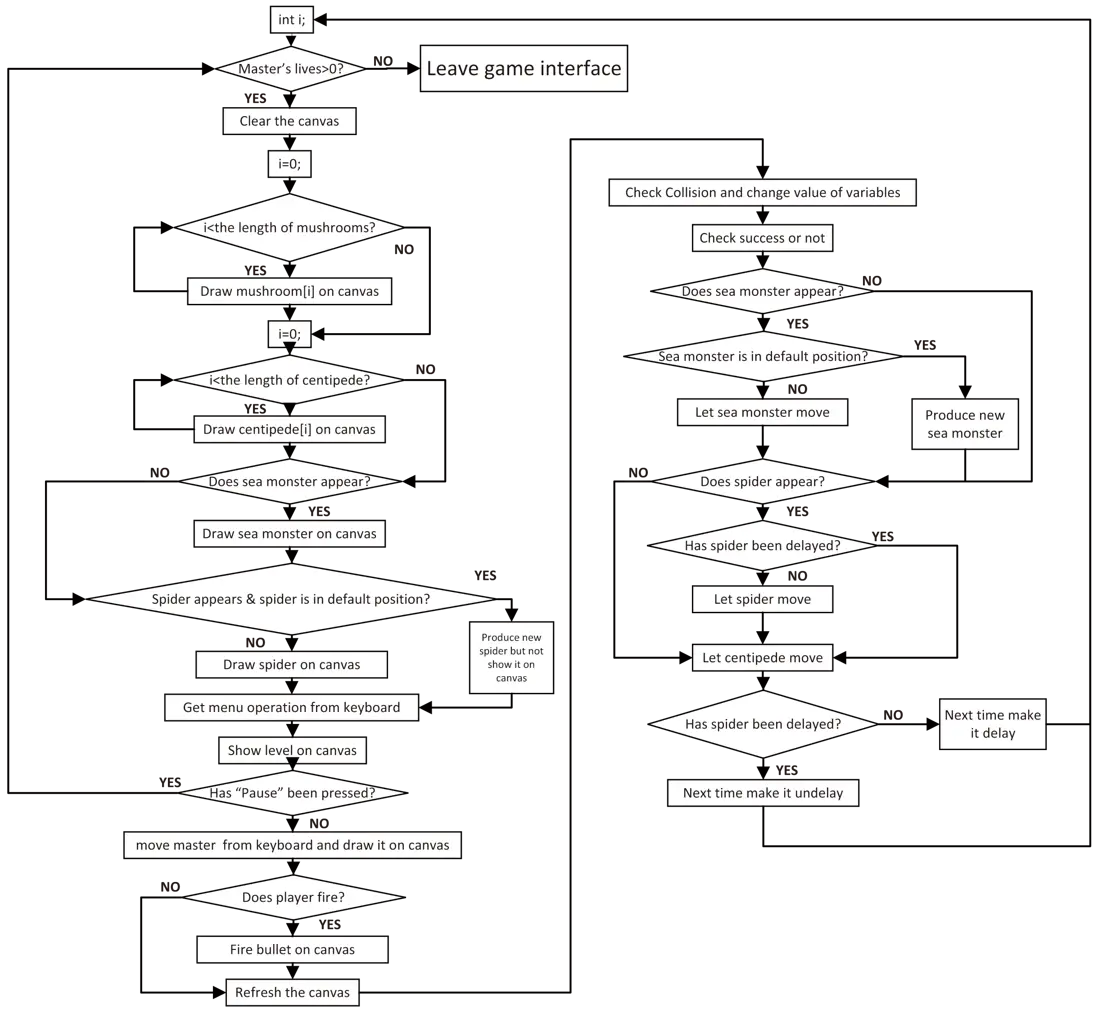
經過多次調試後我終於找到比較理想的畫布刷新順序 (詳見下方源碼). 通過控制變量 delay_spider 來控制蜘蛛爬行的速度. 下方的代碼主要是為了刷新遊戲窗口的畫布. 沒有特別有技術困難的地方, 流程詳情詳見上方提到的流程圖.
/* 此功能用於創建遊戲界面 */
void GameInterface()
{

    WINDOW *my_wins[8];
    PANEL  *my_panels[6];
    Panel panel_datas[6];
    int i = 0, max_y = 0, max_x = 0, win_6_x, win_6_y;
    score = 0; min = 0; sec = 0;
    interrupt = 0; interrupt_begin = 0; interrupt_end = 0;
    begin = 0; over = 0;

    /* Curses 初始化 */
    initscr();
    noecho();//don't display input character
    start_color();
    init_pair(8, COLOR_MAGENTA, COLOR_BLACK);
    init_pair(7, COLOR_CYAN, COLOR_BLACK);
    init_pair(6, COLOR_BLUE, COLOR_BLACK);
    init_pair(5, COLOR_YELLOW, COLOR_BLACK);
    init_pair(4, COLOR_GREEN, COLOR_BLACK);
    init_pair(3, COLOR_RED, COLOR_BLACK);
    curs_set(FALSE);

    int listener;
    listener = pthread_create(& work, NULL, waitForKey, NULL);//Create thread for master
    if (listener != 0) {
        exit(1);
    }

    /* 以下操作主要旨在實現以下要求:
     * 1. 在大窗口裏新建7個小窗口.
     * 2. 除此之外, 其他窗口用來展示分數, 用時以及可選按鈕.
     * 3. 除了大窗口, 每個小窗口都有屬於自己的畫板.
     * 4. 只有“continue”的畫板需要在遊戲的開始時被隱藏.
     */
    getmaxyx(stdscr, max_y, max_x);
    /* 為窗口新建畫板 */
    my_wins[0] = newwin(max_y-score_line, max_x, 0, 0);//big window
    my_wins[1] = newwin(score_line, max_x-quit-level-Pause-Continue-Time, max_y-score_line, 0);//score
    mvwprintw(my_wins[1], 1, 1, "Score: %d", score);
    my_wins[7] = newwin(score_line,Time,max_y-score_line,max_x-quit-level-Pause-Continue-Time);//time
    mvwprintw(my_wins[7], 1, 1, "Time: ");
    my_wins[2] = newwin(score_line, level, max_y-score_line, max_x-quit-level-Pause-Continue);//level
    my_wins[3] = newwin(score_line, Pause, max_y-score_line,max_x-quit-Pause-Continue);//Pause
    mvwprintw(my_wins[3], 1, 1, "\"P\"ause");//Pause label
    my_wins[4] = newwin(score_line, Continue, max_y-score_line, max_x-quit-Continue);//Replay
    mvwprintw(my_wins[4], 1, 1, "\"C\"ontinue"); //Continue label
    my_wins[5] = newwin(score_line, quit, max_y-score_line, max_x-quit);//quit
    mvwprintw(my_wins[5], 1, 1, "\"Q\"uit");//quit label
    my_wins[6] = newwin(max_y-score_line-2, max_x-2, 1, 1);// ball
    getmaxyx(my_wins[6], win_6_y, win_6_x);
    keypad(stdscr, TRUE);

    for(i = 0; i < 6; i++) box(my_wins[i], 0, 0);
    for(i = 0; i < 6; i++) my_panels[i] = new_panel(my_wins[i]);
    my_panels[6] = new_panel(my_wins[7]);
    for(i = 0; i < 6; i++)
    {
        panel_datas[i].hide = FALSE;
        set_panel_userptr(my_panels[i], &panel_datas[i]);
    }
    panel_datas[6].hide = FALSE;
    set_panel_userptr(my_panels[6], &panel_datas[7]);
    panel_datas[4].hide = TRUE;
    hide_panel(my_panels[4]);

    /* 將畫板顯示在屏幕上 */
    doupdate();
    /* 在遊戲的剛開始新建所有角色並初始化 */
    MushroomProduce(win_6_y,win_6_x-1);
    MasterProduce(my_wins[6]);
    CentipedeProduce(win_6_x);
    /* 如果發現用户沒有多餘的生命, 則宣告遊戲失敗 */
    begin = time(NULL);
    while(life > 0)
    {
        wclear(my_wins[6]);
        for(i = 0; i < mushLength; i++)
        {
            wattron(my_wins[6],COLOR_PAIR(mushroom_color));
            mvwprintw(my_wins[6],mushroom[i].y,mushroom[i].x,"&");
            wattroff(my_wins[6],COLOR_PAIR(mushroom_color));
        }
        wattron(my_wins[6],COLOR_PAIR(centipede_color));
        for(i = 0; i < Length; i++)
        {
            if(Centipede[i].Clear<0)
            {

                if(i == Centipede[i].head) mvwprintw(my_wins[6],Centipede[i].y,Centipede[i].x,"O");
                else mvwprintw(my_wins[6],Centipede[i].y,Centipede[i].x,"*");
            }
        }
        wattroff(my_wins[6],COLOR_PAIR(centipede_color));
        if(sea_appear)
        {
            wattron(my_wins[6],COLOR_PAIR(sea_color));
            mvwprintw(my_wins[6],Sea_Monster[0].y, Sea_Monster[0].x, "$");
            mvwprintw(my_wins[6],Sea_Monster[1].y, Sea_Monster[1].x, "_");
            wattroff(my_wins[6],COLOR_PAIR(sea_color));
        }
        if(Spider[1].x != -1 & spider_appear)
        {
                wattron(my_wins[6],COLOR_PAIR(spider_color));
                mvwprintw(my_wins[6],Spider[0].y, Spider[0].x, "^");
                mvwprintw(my_wins[6],Spider[1].y, Spider[1].x, "W");
                mvwprintw(my_wins[6],Spider[2].y, Spider[2].x, "^");
                wattroff(my_wins[6],COLOR_PAIR(spider_color));
        }
        else SpiderProduce(win_6_y,win_6_x);

        mvwprintw(my_wins[2], 1, 1, "Level: %d",Level);
        getInt(my_panels[4],my_panels[3],win_6_x,win_6_y,my_wins[6]);
        if(stop<1)
        {
            wattron(my_wins[6],COLOR_PAIR(master_color));
            getOrder(my_wins[6],win_6_x,win_6_y);
            wattroff(my_wins[6],COLOR_PAIR(master_color));
            wattron(my_wins[6],COLOR_PAIR(bullet_color));
            if(Fire)
            {
                bullet_y -= 1;
                mvwprintw(my_wins[6],bullet_y,bullet_x,"|");
            }
            else
            {
                bullet_y = master_1_y;
                bullet_x = master_1_x+1;
            }
            wattroff(my_wins[6],COLOR_PAIR(bullet_color));
            wrefresh(my_wins[2]);
            wrefresh(my_wins[1]);
            wrefresh(my_wins[6]);
            CollisionCheck(my_wins[1],my_wins[6],win_6_x,my_panels[3]);
            success(my_wins[6],win_6_x,my_panels[3]);
            if(sea_appear)
            {
                if(Sea_Monster[0].x != -1) sea_monsterMove(win_6_x);
                else Sea_MonsterProduce(win_6_y,win_6_x);
            }

            if(spider_appear && delay_spider == 1) SpiderMove(win_6_x,win_6_y);

            CentipedeMove(win_6_x - 1, win_6_y - 1);
            delay_spider *= -1;
            //timer
            over = time(NULL);
            double seconds = difftime(over,begin);
            if(difftime(interrupt_end,interrupt_begin)>0)
            {
                interrupt += difftime(interrupt_end,interrupt_begin);
                interrupt_begin = 0;
                interrupt_end = 0;
            }
            seconds -= interrupt;
            if(seconds >= 60)
            {
                min = ((int)seconds) / 60;
                sec = ((int)seconds) - min*60;
            }
            else sec=(int)seconds;
            wclear(my_wins[7]);
            box(my_wins[7], 0, 0);
            mvwprintw(my_wins[7], 1, 1, "Time: %d m %d s",min,sec);
            wrefresh(my_wins[7]);
        }
        update_panels();
        doupdate();
    };
    endwin();
}
源碼地址
如果我的文章可以幫到您,勞煩您點進源碼點個 ★ Star 哦!
