

文檔下載是很多app,尤其是企業應用中常用的功能。使用APICloud開發app時,可以使用api.download方法實現下載;預覽文檔可以使用superFile 模塊。superFile 模塊封裝了基於騰訊瀏覽服務TBS,使用X5Webkit內核,實現文件的展示功能,支持多種文件格式(PDF、Word、Execl、TXT、PPT)。
在項目中添加superFile模塊:
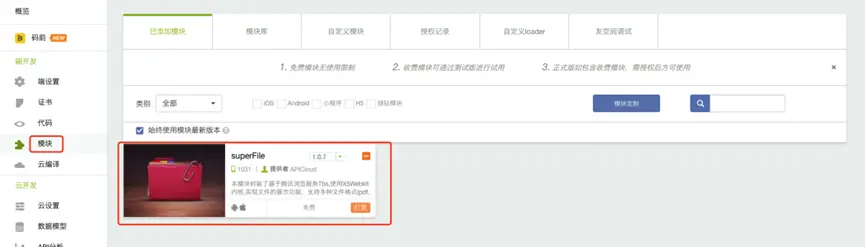
然後編譯自定義loader ,把自定義loader 安裝包安裝到手機上,然後就可以使用APICloud Studio3 wifi 同步功能,把代碼同步到自定義loader 中進行調試。 參考教程: https://docs.apicloud.com/Dev-Guide/Custom_Loader
實例代碼如下:
<template>
    <safe-area>
        <scroll-view class="main" scroll-y>
            <view><text onclick='this.downloadDoc_open'>下載並打開文檔</text></view>
        </scroll-view>
    </safe-area>
</template>
<style>
.main {
    width: 100%;
    height: 100%;
    background-color: #fff;
}
</style>
<script>
export default {
    name: 'test',
    data() {
        return {

        }
    },
    apiready() {

    },
    methods: {

        downloadDoc_open() {
            api.download({
                url: '',  // 填寫要下載文檔的url
                savePath: 'fs://myapp/test.doc',
                report: true,
                cache: true,
                allowResume: true
            }, function (ret, err) {
                if (ret.state == 1) {
                    //下載成功
                    console.log(JSON.stringify(ret));
                    if (api.systemType == 'ios') {
                        // ios  不需要初始化,直接open
                        var superFile = api.require('superFile');
                        superFile.open({
                            path: ret.savePath,
                        })
                    }
                    if (api.systemType == 'android') {
                        console.log(2);
                        var superFile = api.require('superFile');
                        superFile.init(function (ret) {
                            if (ret.eventType == 'onViewInitFinished') {
                                superFile.open({
                                    path: ret.savePath
                                })
                            }
                        });
                    }
                }
            });
        }

    }
}
</script>