【高心星出品】
列表(List)
列表介紹
列表作為一種容器,會自動按其滾動方向排列子組件,向列表中添加組件或從列表中移除組件會重新排列子組件。
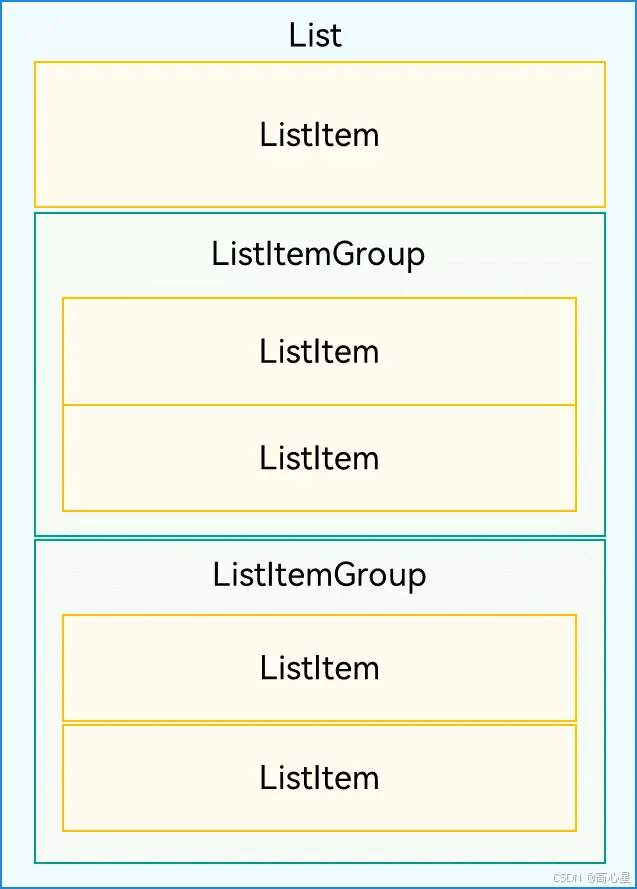
List的子組件必須是ListItemGroup或ListItem,ListItem和ListItemGroup必須配合List來使用。
列表佈局
List佈局方向可以垂直也可以水平,當垂直佈局的時候主軸為垂直,可以呈現單列或多列形式;當水平佈局的時候主軸為水平,可以呈現單行或多行形式。
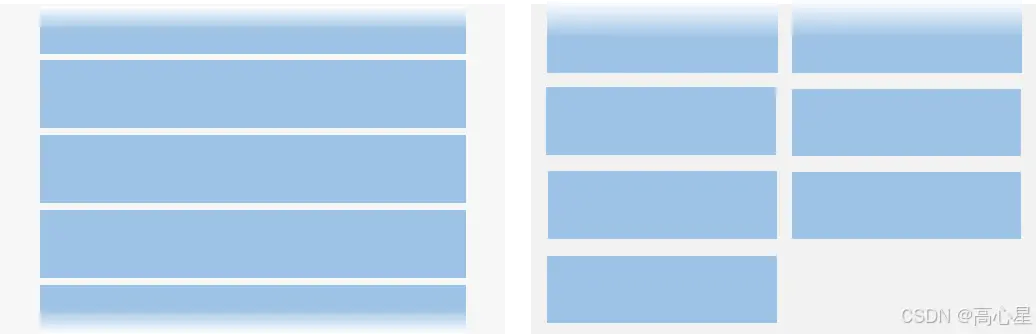
主軸為垂直的方向
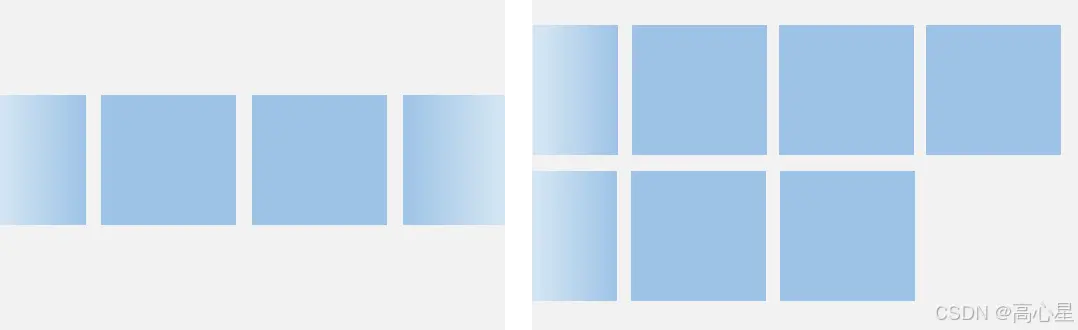
主軸為水平的方向
設置主軸方向
List組件主軸默認是垂直方向,即默認情況下不需要手動設置List方向,就可以構建一個垂直滾動列表。
若是水平滾動列表場景,將List的listDirection屬性設置為Axis.Horizontal即可實現。listDirection默認為Axis.Vertical,即主軸默認是垂直方向。
List() {
  ...
}
.listDirection(Axis.Horizontal)
設置交叉軸方向
List組件的交叉軸佈局可以通過lanes和alignListItem屬性進行設置,lanes屬性用於確定交叉軸排列的列表項數量,alignListItem用於設置子組件在交叉軸方向的對齊方式。
List() {
  ...
}
.lanes(2)
.alignListItem(ListItemAlign.Center)
列表填充
列表填充針對子佈局視圖和數據源,將數據源中每一條數據初始化給子佈局視圖ListItem就實現了列表填充。
在日常開發中,我們需要自定義ItemView和創建數據源Datas。
private contacts = [
    new Contact('小明', $r("app.media.iconA")),
    new Contact('小紅', $r("app.media.iconB")),
    ...
  ]
//數據源
  build() {
    List() {
      ForEach(this.contacts, (item: Contact) => { //迭代初始化給listitem
        ListItem() {
          Row() {
            Image(item.icon)
              .width(40)
              .height(40)
              .margin(10)
            Text(item.name).fontSize(20)
          }
          .width('100%')
          .justifyContent(FlexAlign.Start)
        }
      }, item => item.key)
    }
    .width('100%')
運行效果:

分組列表填充
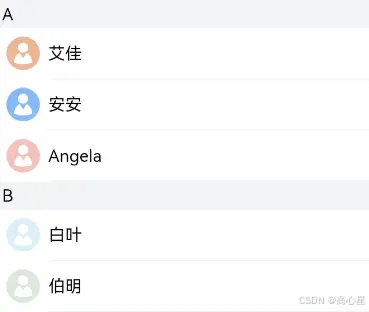
分組列表填充的時候,數據源在設計的時候要設計標題和該標題對應的數據,在迭代的時候要進行嵌套循環。
//創建數據源
contactsGroups: object[] = [
  {
    title: 'A',
    contacts: [
      new Contact('艾佳', $r('app.media.iconA')),
      new Contact('安安', $r('app.media.iconB')),
      new Contact('Angela', $r('app.media.iconC')),
    ],
  },
  {
    title: 'B',
    contacts: [
      new Contact('白葉', $r('app.media.iconD')),
      new Contact('伯明', $r('app.media.iconE')),
    ],
  },
  ...
]
List() {
  // 循環渲染ListItemGroup,contactsGroups為多個分組聯繫人contacts和標題title的數據集合
  ForEach(this.contactsGroups, item => {
    ListItemGroup({ header: this.itemHead(item.title) }) {
      // 循環渲染ListItem
      ForEach(item.contacts, (contact) => {
        ListItem() {
          ...
        }
      }, item => item.key)
    }
    ...
  })
粘性標題
分組填充的時候可以通過sticky設置粘性標題。
List() {
      // 循環渲染ListItemGroup,contactsGroups為多個分組聯繫人contacts和標題title的數據集合
      ForEach(this.contactsGroups, item => {
        ListItemGroup({ header: this.itemHead(item.title) }) {
          // 循環渲染ListItem
          ForEach(item.contacts, (contact) => {
            ListItem() {
              ...
            }
          }, item => item.key)
        }
        ...
      })
    }
    .sticky(StickyStyle.Header)  // 設置吸頂,實現粘性標題效果
  }
運行效果為:

滾動條位置
設置滾動位置
List組件初始化時,可以通過scroller參數綁定一個Scroller對象,進行列表的滾動控制。
通過scrollToIndex快速滾動到固定位置。
private listScroller: Scroller = new Scroller();
Stack({ alignContent: Alignment.BottomEnd }) {
  // 將listScroller用於初始化List組件的scroller參數,完成listScroller與列表的綁定。
  List({ space: 20, scroller: this.listScroller }) {
    ...
  }
  ...

  Button() {
    ...
  }
  .onClick(() => {
    // 點擊按鈕時,指定跳轉位置,返回列表頂部
    this.listScroller.scrollToIndex(0)
  })
  ...
}
滾到監聽
在List滾動的時候,可以通過監聽List組件的onScrollIndex事件來獲取滾動的索引位置。
可以配合字母表索引組件AlphabetIndexer來實現快速索引。
 Stack({ alignContent: Alignment.End }) {
      List({ scroller: this.listScroller }) {
        ...
      }
      .onScrollIndex((firstIndex: number) => {
        // 根據列表滾動到的索引值,重新計算對應聯繫人索引欄的位置this.selectedIndex
        ...
      })
      ...

      // 字母表索引組件
      AlphabetIndexer({ arrayValue: alphabets, selected: 0 })
        .selected(this.selectedIndex)
      ...
    }
  }
運行效果為:

列表項側滑
ListItem列表項可以通過設置swipeAction屬性來控制列表項的左右滑動功能。
swipeAction屬性方法初始化時有必填參數SwipeActionOptions,其中,start參數表示設置列表項右滑時起始端滑出的組件,end參數表示設置列表項左滑時尾端滑出的組件。
@Builder itemEnd(index: number) {
    // 側滑後尾端出現的組件
    Button({ type: ButtonType.Circle }) {
      Image($r('app.media.ic_public_delete_filled'))
        .width(20)
        .height(20)
    }
    .onClick(() => {
      this.messages.splice(index, 1);
    })
    ...
  }
    List() {
        ForEach(this.messages, (item, index) => {
          ListItem() {
            ...
          }
          .swipeAction({ end: this.itemEnd.bind(this, index) }) // 設置側滑屬性
        }, item => item.id.toString())
      }
運行效果為: