

【高心星出品】
圖像變換
圖片處理指對PixelMap進行相關的操作,如獲取圖片信息、裁剪、縮放、偏移、旋轉、翻轉、設置透明度、讀寫像素數據等。圖片處理主要包括圖像變換、位圖操作,本文介紹圖像變換。
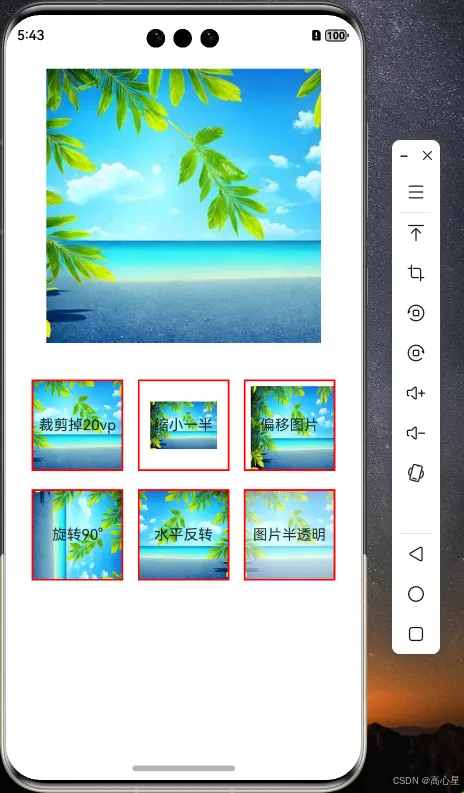
圖形裁剪
// 裁剪圖片 x,y為裁剪的起始座標,size為裁剪的圖片寬和高
temp.cropSync({ x: 20, y: 20, size: { width: this.imagewidth - 20, height: this.imageheight - 20 } })
圖形縮放
// 縮放圖片
temp.scaleSync(0.5, 0.5)
圖形偏移
// 偏移圖片
temp.translateSync(30, 20)
圖形旋轉
// 旋轉角度
temp.rotateSync(90)
圖形反轉
// 水平反轉圖片
temp.flipSync(true, false)
圖形透明度
// 圖片半透明
temp.opacitySync(0.5)
完整代碼
import { image } from '@kit.ImageKit';

@Entry
@Component
struct PmChange {
  @State message: string = 'Hello World';
  @State pm: PixelMap | undefined = undefined
  @State crop: PixelMap | undefined = undefined
  private imagewidth: number = 0
  private imageheight: number = 0

  genpm(index: number) {
    // 獲取資源圖片的字節
    let buffer = getContext(this).resourceManager.getMediaContentSync($r('app.media.jingse')).buffer.slice(0)
    // 生成imagesource
    let source = image.createImageSource(buffer)
    // 轉化為pixelmap
    let temp = source.createPixelMapSync({ editable: true })
    switch (index) {
      case 0:
        // 裁剪圖片 x,y為裁剪的起始座標,size為裁剪的圖片寬和高
        temp.cropSync({ x: 20, y: 20, size: { width: this.imagewidth - 20, height: this.imageheight - 20 } })
        return temp
      case 1:
        // 縮放圖片
        temp.scaleSync(0.5, 0.5)
        return temp
      case 2:
        // 偏移圖片
        temp.translateSync(30, 20)
        return temp
      case 3:
        // 旋轉角度
        temp.rotateSync(90)
        return temp
      case 4:
        // 水平反轉圖片
        temp.flipSync(true, false)
        return temp
      case 5:
        // 圖片半透明
        temp.opacitySync(0.5)
        return temp
      default :
        return temp


    }
  }

  aboutToAppear(): void {
    this.pm=this.genpm(-1)
    let imginfo = this.pm.getImageInfoSync()
    // 獲取圖片的寬和高
    this.imagewidth = imginfo.size.width
    this.imageheight = imginfo.size.height

  }

  build() {
    Column() {
      Image(this.pm).width(300).height(300).margin({ top: 20 })
      Flex({
        direction: FlexDirection.Row,
        wrap: FlexWrap.Wrap,
        justifyContent: FlexAlign.SpaceAround,

      }) {
        Stack() {
          Image(this.genpm(0)).width(100).height(100).border({width:2,color:Color.Red})
          Text('裁剪掉20vp')
        }.margin({top:20})

        Stack() {
          Image(this.genpm(1)).width(100).height(100).objectFit(ImageFit.ScaleDown).border({width:2,color:Color.Red})
          Text('縮小一半')
        }.margin({top:20})

        Stack() {
          Image(this.genpm(2)).width(100).height(100).objectFit(ImageFit.Fill).border({width:2,color:Color.Red})
          Text('偏移圖片')
        }.margin({top:20})

        Stack() {
          Image(this.genpm(3)).width(100).height(100).border({width:2,color:Color.Red})
          Text('旋轉90°')
        }.margin({top:20})

        Stack() {
          Image(this.genpm(4)).width(100).height(100).border({width:2,color:Color.Red})
          Text('水平反轉')
        }.margin({top:20})

        Stack() {
          Image(this.genpm(5)).width(100).height(100).border({width:2,color:Color.Red})
          Text('圖片半透明')
        }.margin({top:20})
      }.width('100%')
      .padding(20)
    }.width('100%')
    .height('100%')
  }
}
Color.Red})
          Text('圖片半透明')
        }.margin({top:20})
      }.width('100%')
      .padding(20)
    }.width('100%')
    .height('100%')
  }
}
