

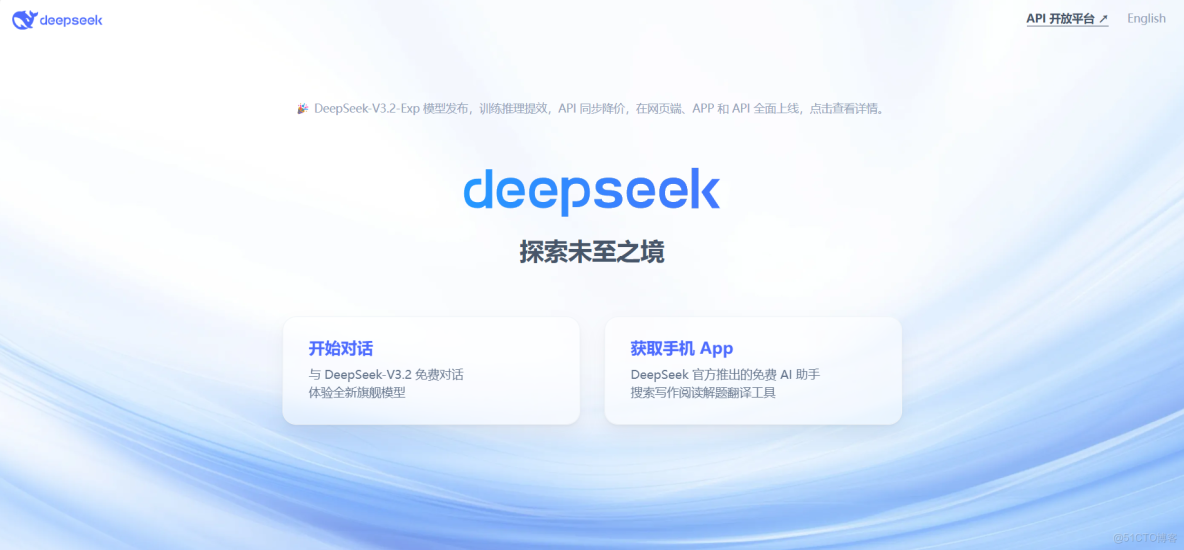
一、官網鏈接
首次調用 API | DeepSeek API Docs
二、基礎準備
- 通過curl(http協議)獲取接口返回信息,僅需在請求頭上攜帶bearer-token即可
- 模型分為deepseek-chat(非思考模式)和deepseek-reasoner(思考模式)
- 目前價格1 箇中文字符 ≈ 0.6 個 token,百萬token(含輸入+輸出字符總和)在2-3元左右,價格還算便宜
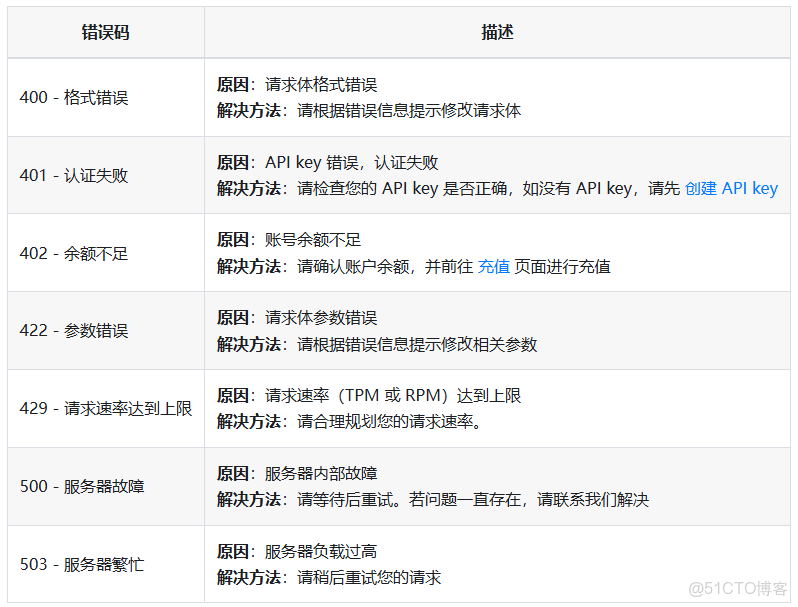
- 常見錯誤碼:
三、開通及調用步驟
1.購買API
DeepSeek 開放平台
填寫郵箱即可:
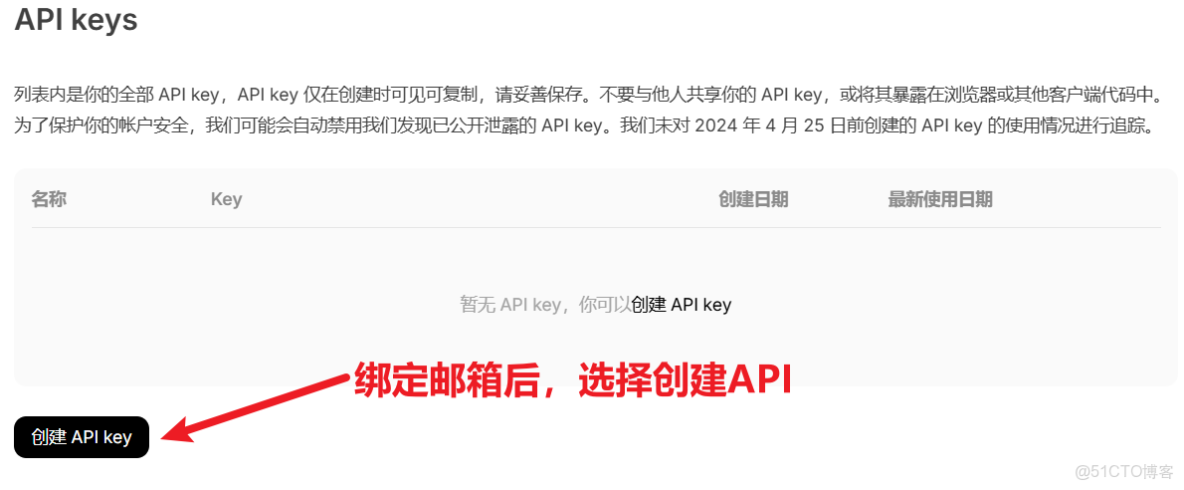
假設我創建的API是:
1d6d0af5-def1-4dd3-9b38-e2832f082eee
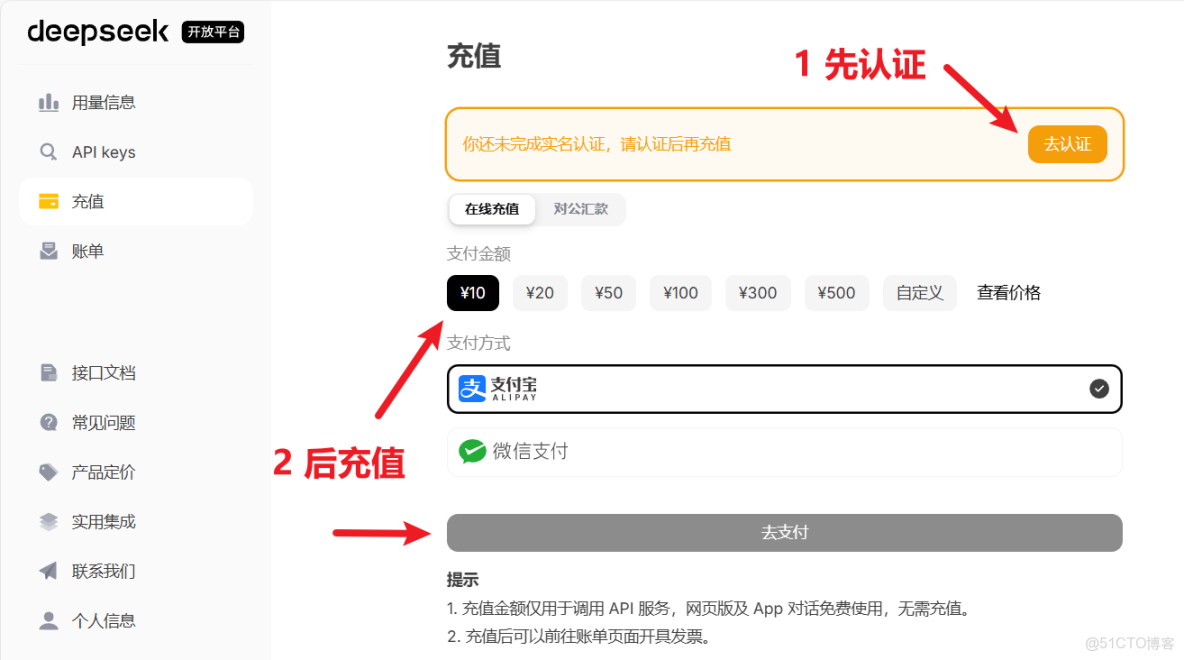
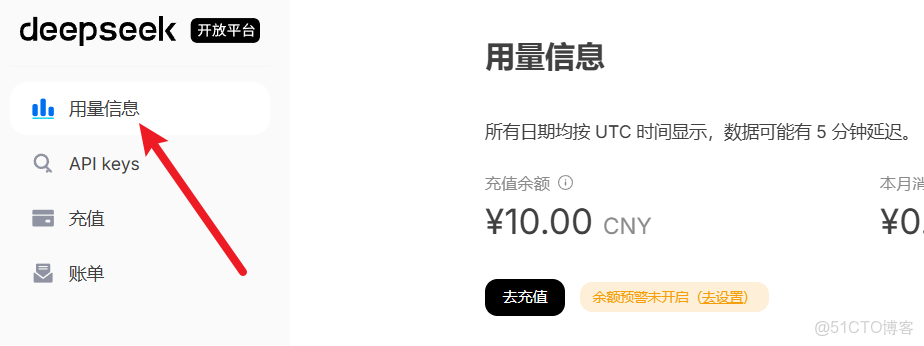
2.API餘額充值
3.第一個curl!
注意:
1.以下token請填寫你自己的,我的token 1d6d0af5-def1-4dd3-9b38-e2832f082eee 僅為示例,是不可用的
2.可用Postman或者編程語言發起HTTP請求,按照官網格式請求接口
curl --location 'https://api.deepseek.com/chat/completions' \
--header 'Content-Type: application/json' \
--header 'Accept: application/json' \
--header 'Authorization: Bearer 1d6d0af5-def1-4dd3-9b38-e2832f082eee' \
--header 'Cookie: HWWAFSESID=ec161c121d866cf40a; HWWAFSESTIME=1762866628587' \
--data '{
  "messages": [
    {
      "content": "晚上好!DeepSeek,你是一個在中國很好用的Ai模型,是嗎?",
      "role": "user"
    }
  ],
  "model": "deepseek-chat",
  "frequency_penalty": 0,
  "max_tokens": 4096,
  "presence_penalty": 0,
  "response_format": {
    "type": "text"
  },
  "stop": null,
  "stream": false,
  "stream_options": null,
  "temperature": 1,
  "top_p": 1,
  "tools": null,
  "tool_choice": "none",
  "logprobs": false,
  "top_logprobs": null
}'
響應:
{
    "id": "a75d2c0a-9d90-4c5d-xxxx-d22a1fe8492a",
    "object": "chat.completion",
    "created": 1762866633,
    "model": "deepseek-chat",
    "choices": [
        {
            "index": 0,
            "message": {
                "role": "assistant",
                "content": "晚上好!很高興見到你!😊\n\n是的,我確實是DeepSeek,一個在中國很好用的AI助手!我可以幫你解答各種問題,無論是學習、工作還是生活中的疑惑,我都很樂意為你提供幫助。\n\n今天過得怎麼樣?有什麼我可以為你做的嗎?不管是聊天、解決問題、創作內容,還是其他任何需要,我都在這裏等着你!✨"
            },
            "logprobs": null,
            "finish_reason": "stop"
        }
    ],
    "usage": {
        "prompt_tokens": 20,
        "completion_tokens": 76,
        "total_tokens": 96,
        "prompt_tokens_details": {
            "cached_tokens": 0
        },
        "prompt_cache_hit_tokens": 0,
        "prompt_cache_miss_tokens": 20
    },
    "system_fingerprint": "fp_ffc7281d48_xxxx0820_fp8_xxxache"
}
4.保持上下文連續對話
把 AI 回答過的話一字不動的寫在messages裏面即可,注意從上往下是從以前到現在的順序。
{
  "messages": [
    {"role": "user", "content": "誰是中國第一位進入太空的宇航員?"},
    {"role": "assistant", "content": "是楊利偉。"},
    {"role": "user", "content": "那誰是中國第二位進入太空的宇航員?"},
    {"role": "assistant", "content": "中國第二位進入太空的宇航員是**費俊龍**。\n\n他與**聶海勝**一起,於2005年10月12日乘坐**神舟六號**載人飛船進入太空,執行了中國首次“多人多天”的載人航天飛行任務。\n\n因此,準確地説,費俊龍和聶海勝是**並列**中國第二位進入太空的宇航員。"},
    {"role": "user", "content": "那誰是中國第三位進入太空的宇航員?"}
  ],
  "model": "deepseek-chat",
  "frequency_penalty": 0,
  "max_tokens": 4096,
  "presence_penalty": 0,
  "response_format": {
    "type": "text"
  },
  "stop": null,
  "stream": false,
  "stream_options": null,
  "temperature": 1,
  "top_p": 1,
  "tools": null,
  "tool_choice": "none",
  "logprobs": false,
  "top_logprobs": null
}
四、重要參數總結
{
  "messages": [
    {
      "content": "You are a helpful assistant",
      "role": "user"
    }
  ],
  "model": "deepseek-chat", -- 可選deepseek-chat, deepseek-reasoner ,非思考模式 or 思考模式
  "frequency_penalty": 0, -- 可選-1,0,1,分別代表內容:儘量重複、均衡、儘量不重複
  "max_tokens": 4096, -- 最大輸出量,一般默認就好
  "presence_penalty": 0, -- 可選-1,0,1,分別代表主題:儘量重複、均衡、儘量不重複
  "response_format": {
    "type": "text" -- 可選text, json_object,輸出是文字還是json,如果是json,上面的messages.content一定要出現json關鍵字,並説明json有哪些字段
  },
  "stop": null,
  "stream": false, -- 關閉流式響應,一次性返回
  "stream_options": null,
  "temperature": 1,
  "top_p": 1,
  "tools": null,
  "tool_choice": "none",
  "logprobs": false,
  "top_logprobs": null
}
五、C#調用接口示例
public class InputModel
{
    public List<Message> messages { get; set; } = new List<Message>();
    public string model { get; set; }= "deepseek-chat";
    public int frequency_penalty { get; set; }
    public int max_tokens { get; set; } = 4096;
    public int presence_penalty { get; set; }
    public Response_Format response_format { get; set; }
    public bool stream { get; set; }
    public int temperature { get; set; }
    public int top_p { get; set; } = 1;
    public string tool_choice { get; set; } = "none";
    public bool logprobs { get; set; }
}

public class Response_Format
{
    public string type { get; set; } = "text";
}

public class Message
{
    public string role { get; set; } = "user";
    public string content { get; set; }
}

public string GetAnswer(string ask)
{
    var client = new HttpClient();
    var request = new HttpRequestMessage(HttpMethod.Post, "https://api.deepseek.com/chat/completions");
    request.Headers.Add("Accept", "application/json");
    request.Headers.Add("Authorization", "Bearer 1d6d0af5-def1-4dd3-9b38-e2832f082eee");
    var json = JsonConvert.SerializeObject(new InputModel { messages = new List<Message> { new Message { content = ask } } });
    var content = new StringContent(json, Encoding.UTF8, "application/json");
    request.Content = content;
    var response = client.Send(request);
    response.EnsureSuccessStatusCode();
    var result = response.Content.ReadAsStringAsync().Result;
    return result;
}
本文章為轉載內容,我們尊重原作者對文章享有的著作權。如有內容錯誤或侵權問題,歡迎原作者聯繫我們進行內容更正或刪除文章。
