

實現功能
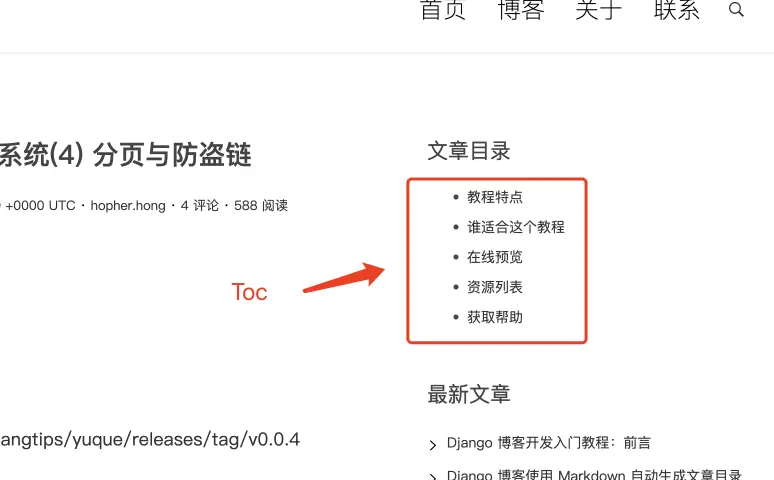
- 增加文章詳情頁Toc文章目錄
實現思路
對文章內容提取 h1, h2, h3, h4, h5 標籤與錨,這裏我們將採用到第三方包
- github.com/PuerkitoBio/goquery
// handler/post.go

html = `
<h1 id="H55oy1">語雀文章內容</h1>
<h2 id="H55oy2">語雀文章內容</h2>
<h3 id="H55oy3">語雀文章內容</h3>
<h4 id="H55oy4">語雀文章內容</h4>
<h5 id="H55oy5">語雀文章內容</h5>
`
doc, _ := goquery.NewDocumentFromReader(strings.NewReader(html))

var navs []*Nav
doc.Find("h1, h2, h3, h4, h5").Each(func(i int, s *goquery.Selection) {
    // ...
    navs = append(navs, &Nav{
        ID: "",
        Title: "",
        Level: "",
    })
})

type Nav struct {
    ID string
    Title string
    Level int
}
詳細實現
- handler/post.go#PostDetail, 增加 toc 變量
-
theme/default/detail.html, 渲染 toc
// PostDetail 文章詳情頁
func PostDetail(s service.IYuQue) http.HandlerFunc {
  return func(w http.ResponseWriter, r *http.Request) {

      // 文章內容
      content := detail.Data.BodyHtml
      // 替換html中的cdn鏈接進行反向代理
      content = strings.Replace(content, "https://cdn.nlark.com/", "/", -1)

      var navs []*Nav
      doc, _ := goquery.NewDocumentFromReader(strings.NewReader(content))
      doc.Find("h1, h2, h3, h4, h5").Each(func(i int, s *goquery.Selection) {

          // 提取 ID
          id, _ := s.Attr("id")
          id = strings.ReplaceAll(id, "\\", "")
          id = strings.ReplaceAll(id, "\"", "")
          // 提取標題
          text := s.Text()

          // 提取標題等級
          level := 1

          if s.Is("h1") {
              level = 1
          }

          if s.Is("h2") {
              level = 2
          }

          if s.Is("h3") {
              level = 3
          }

          if s.Is("h4") {
              level = 4
          }

          if s.Is("h5") {
              level = 5
          }

          nav := &Nav{
              Text:  text,
              Level: level,
              ID:    id,
          }
          navs = append(navs, nav)
      })

      // 模塊變量
      post := Post{
          Title:     detail.Data.Title,
          Content:   template.HTML(content),
          CreatedAt: detail.Data.CreatedAt,
          Toc:       navs,
      }

      t.Execute(w, map[string]interface{}{
          "post": post,
      })
  }
}
{{ if .post.Toc }}
<div class="widget widget-content">
    <h3 class="widget-title">文章目錄</h3>
    <ul style="list-style-type: none;padding-left: 0;">
        {{ range $i, $v := .post.Toc }}
        {{ if eq $v.Level 1}}
        <li>
            <a href="#{{ $v.ID }}" >{{ $v.Text }}</a>
        </li>
        {{ end }}
        {{ if eq $v.Level 2}}
        <li>
            <a href="#{{ $v.ID }}" style="padding-left: 15px;" >{{ $v.Text }}</a>
        </li>
        {{ end }}
        {{ if eq $v.Level 3}}
        <li>
            <a href="#{{ $v.ID }}" style="padding-left: 30px;" >{{ $v.Text }}</a>
        </li>
        {{ end }}
        {{ if eq $v.Level 4}}
        <li>
            <a href="#{{ $v.ID }}" style="padding-left: 45px;" >{{ $v.Text }}</a>
        </li>
        {{ end }}
        {{ if eq $v.Level 5}}
        <li>
            <a href="#{{ $v.ID }}" style="padding-left: 60px;" >{{ $v.Text }}</a>
        </li>
        {{ end }}
        {{ end }}
    </ul>
</div>
{{ end }}
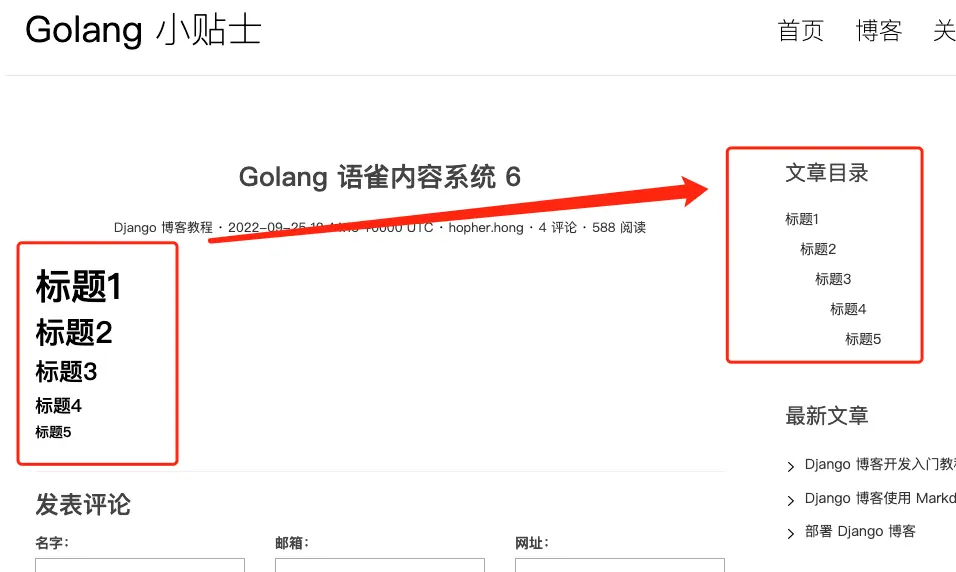
最終效果
本節完整代碼
https://github.com/golangtips/yuque/releases/tag/v0.0.5
