一、單點登錄SSO介紹
目前每家企業或者平台都存在不止一套系統,由於歷史原因每套系統採購於不同廠商,所以系統間都是相互獨立的,都有自己的用户鑑權認證體系,當用户進行登錄系統時,不得不記住每套系統的用户名密碼,同時,管理員也需要為同一個用户設置多套系統登錄賬號,這對系統的使用者來説顯然是不方便的。我們期望的是如果存在多個系統,只需要登錄一次就可以訪問多個系統,只需要在其中一個系統執行註銷登錄操作,則所有的系統都註銷登錄,無需重複操作,這就是單點登錄(Single Sign On 簡稱SSO)系統實現的功能。
單點登錄是系統功能的定義,而實現單點登錄功能,目前開源且流行的有CAS和OAuth2兩種方式,過去我們用的最多的是CAS,現在隨着SpringCloud的流行,更多人選擇使用SpringSecurity提供的OAuth2認證授權服務器實現單點登錄功能。
OAuth2是一種授權協議的標準,任何人都可以基於這個標準開發Oauth2授權服務器,現在百度開放平台、騰訊開放平台等大部分的開放平台都是基於OAuth2協議實現, OAuth2.0定義了四種授權類型,最新版OAuth2.1協議定義了七種授權類型,其中有兩種因安全問題已不再建議使用:
【OAuth2.1 建議使用的五種授權類型】
- Authorization Code 【授權碼授權】:用户通過授權服務器重定向URL返回到客户端後,應用程序從URL中獲取授權碼,並使用授權碼請求訪問令牌。
- PKCE【Proof Key for Code Exchange 授權碼交換證明密鑰】:授權碼類型的擴展,用於防止CSRF和授權碼注入攻擊。
- Client Credentials【客户端憑證授權】:直接由客户端使用客户端 ID 和客户端密鑰向授權服務器請求訪問令牌,無需用户授權,通常用與系統和系統之間的授權。
- Device Code【設備代碼授權】:用於無瀏覽器或輸入受限的設備,使用提前獲取好的設備代碼獲取訪問令牌。
-
Refresh Token【刷新令牌授權】:當訪問令牌失效時,可以通過刷新令牌獲取訪問令牌,不需要用户進行交互。
【OAuth2.1 不建議/禁止使用的兩種授權類型】
- Implicit Flow【隱式授權】:隱式授權是以前推薦用於本機應用程序和 JavaScript 應用程序的簡化 OAuth 流程,其中訪問令牌立即返回,無需額外的授權代碼交換步驟。其通過HTTP重定向直接返回訪問令牌,存在很大的風險,不建議使用,有些授權服務器直接禁止使用此授權類型。
-
Password Grant【密碼授權】:客户端通過用户名密碼向授權服務器獲取訪問令牌。因客户端需收集用户名和密碼,所以不建議使用,最新的 OAuth 2 安全最佳實踐完全不允許密碼授權。
【SpringSecurity對OAuth2協議的支持】:
通過SpringSecurity官網可知,通過長期的對OAuth2的支持,以及對實際業務的情景考慮,大多數的系統都不需要授權服務器,所以,Spring官方不再推薦使用spring-security-oauth2,SpringSecurity逐漸將spring-security-oauth2中的OAuth2登錄、客户端、資源服務器等功能抽取出來,集成在SpringSecurity中,並單獨新建spring-authorization-server項目實現授權服務器功能。
目前我們瞭解最多的是Spring Security OAuth對OAuth2協議的實現和支持,這裏需要區分Spring Security OAuth和Spring Security是兩個項目,過去OAth2相關功能都在Spring Security OAuth項目中實現,但是自SpringSecurity5.X開始,SpringSecurity項目開始逐漸增加Spring Security OAuth中的功能,自SpringSecurity5.2開始,添加了OAuth 2.0 登錄, 客户端, 資源服務器的功能。但授權服務器的功能,並不打算集成在SpringSecurity項目中,而是新建了spring-authorization-server項目作為單獨的授權服務器:詳細介紹。spring-security實現的是OAuth2.1協議,spring-security-oauth2實現的是OAuth2.0協議。
Spring未來的計劃是將 Spring Security OAuth 中當前的所有功能構建到 Spring Security 5.x 中。 在 Spring Security 達到與 Spring Security OAuth 的功能對等之後,他們將繼續支持錯誤和安全修復至少一年。【GitEgg框架單點登錄實現計劃】:
因spring-authorization-server目前最新發布版本0.2.3,部分功能仍在不斷的修復和完善,還不足以應用到實際生產環境中,所以,我們目前使用spring-security-oauth2作為授權服務器,待後續spring-authorization-server發佈穩定版本後,再進行遷移升級。
【spring-security-oauth2默認實現的授權類型】:
- 隱式授權(Implicit Flow)【spring-authorization-server不再支持此類型】
- 授權碼授權(Authorization Code)
- 密碼授權(Password Grant)【spring-authorization-server不再支持此類型】
- 客户端憑證授權(Client Credentials)
- 刷新令牌授權 (Refresh Token)
在GitEgg微服務框架中,gitegg-oauth已經引入了spring-security-oauth2,代碼中使用了了Oauth2的密碼授權和刷新令牌授權,並且自定義擴展了【短信驗證碼授權類型】和【圖形驗證碼授權】,這其實是密碼授權的擴展授權類型。
目前,基本上所有的SpringCloud微服務授權方式都是使用的OAuth2密碼授權模式獲取token,可能你會有疑惑,為什麼上面最新的Oauth2協議已經不建議甚至是禁止使用密碼授權類型了,而我們GitEgg框架的系統管理界面還要使用密碼授權模式來獲取token?因為不建議使用密碼授權類型的原因是第三方客户端會收集用户名密碼,存在安全風險。而在我們這裏,我們的客户端是自有系統管理界面,不是第三方客户端,所有的用户名密碼都是我們自有系統的用户名密碼,只要做好系統安全防護,就可最大限度的避免用户名密碼泄露給第三方的風險。
在使用spring-security-oauth2實現單點登錄之前,首先我們一定要搞清楚單點登錄SSO、OAuth2、spring-security-oauth2的區別和聯繫:
- 單點登錄SSO是一種系統登錄解決方案的定義,企業內部系統登錄以及互聯網上第三方QQ、微信、GitHub登錄等都是單點登錄。
- OAuth2是一種系統授權協議,它包含多種授權類型,我們可以使用授權碼授權和刷新令牌授權兩種授權類型來實現單點登錄功能。
-
spring-security-oauth2是對OAuth2協議中授權類型的具體實現,也是我們實現單點登錄功能實際用到的代碼。
二、SpringSecurity單點登錄服務端和客户端實現流程解析
單點登錄業務流程時序圖:
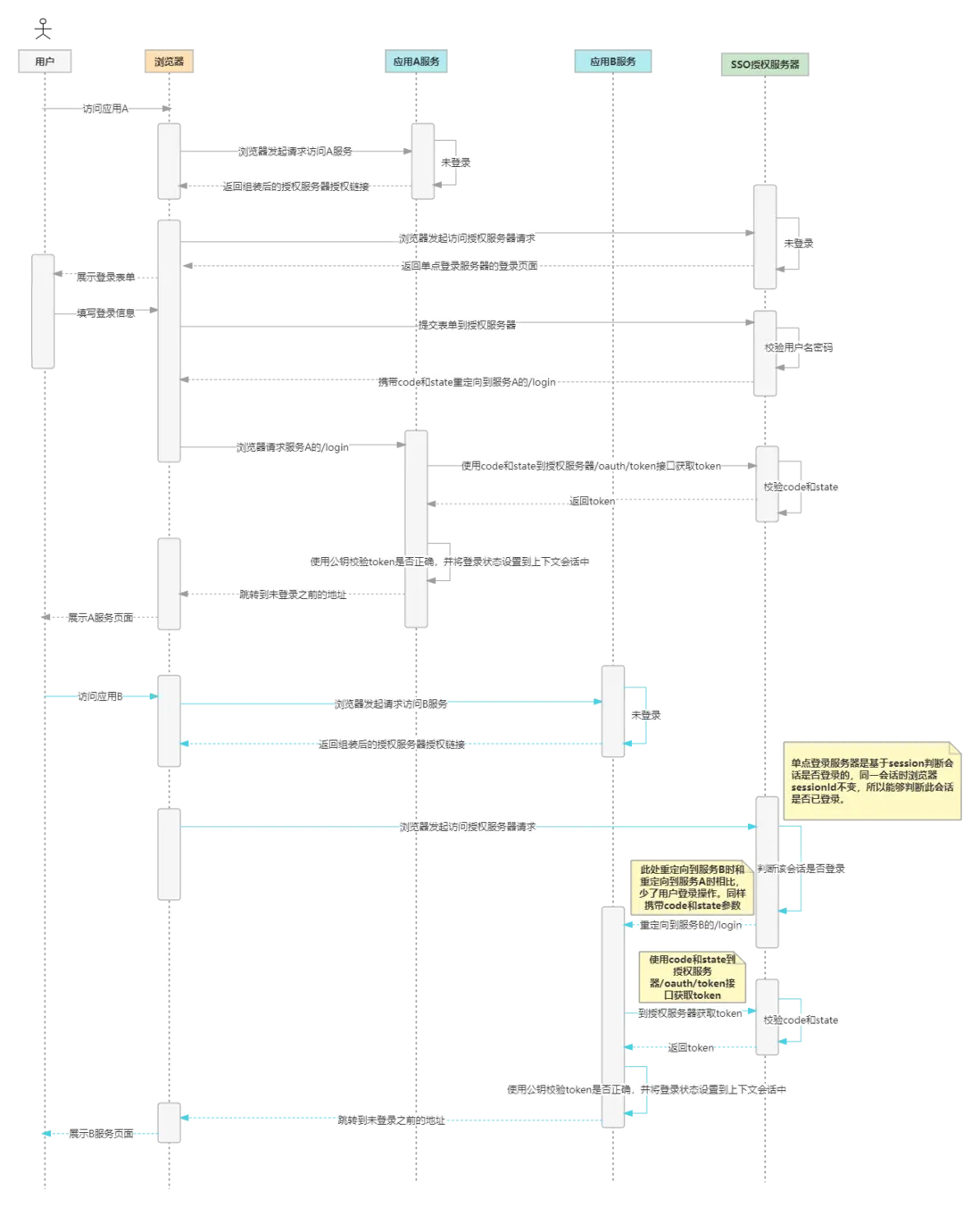
A系統(單點登錄客户端)首次訪問受保護的資源觸發單點登錄流程説明
- 1、用户通過瀏覽器訪問A系統被保護的資源鏈接
- 2、A系統判斷當前會話是否登錄,如果沒有登錄則跳轉到A系統登錄地址/login
- 3、A系統首次接收到/login請求時沒有state和code參數,此時A系統拼接系統配置的單點登錄服務器授權url,並重定向至授權鏈接。
- 4、單點登錄服務器判斷此會話是否登錄,如果沒有登錄,那麼返回單點登錄服務器的登錄頁面。
- 5、用户在登錄頁面填寫用户名、密碼等信息執行登錄操作。
- 6、單點登錄服務器校驗用户名、密碼並將登錄信息設置到上下文會話中。
- 7、單點登錄服務器重定向到A系統的/login鏈接,此時鏈接帶有code和state參數。
- 8、A系統再次接收到/login請求,此請求攜帶state和code參數,系統A通過OAuth2RestTemplate請求單點登錄服務端/oauth/token接口獲取token。
- 9、A系統獲取到token後,首先會對token進行解析,並使用配置的公鑰對token進行校驗(非對稱加密),如果校驗通過,則將token設置到上下文,下次訪問請求時直接從上下文中獲取。
- 10、A系統處理完上下問會話之後重定向到登錄前請求的受保護資源鏈接。
B系統(單點登錄客户端)訪問受保護的資源流程説明
- 1、用户通過瀏覽器訪問B系統被保護的資源鏈接
- 2、B系統判斷當前會話是否登錄,如果沒有登錄則跳轉到B系統登錄地址/login
- 3、B系統首次接收到/login請求時沒有state和code參數,此時B系統拼接系統配置的單點登錄服務器授權url,並重定向至授權鏈接。
- 4、單點登錄服務器判斷此會話是否登錄,因上面訪問A系統時登陸過,所以此時不會再返回登錄界面。
- 5、單點登錄服務器重定向到B系統的/login鏈接,此時鏈接帶有code和state參數。
- 6、B系統再次接收到/login請求,此請求攜帶state和code參數,系統B通過OAuth2RestTemplate請求單點登錄服務端/oauth/token接口獲取token。
- 7、B系統獲取到token後,首先會對token進行解析,並使用配置的公鑰對token進行校驗(非對稱加密),如果校驗通過,則將token設置到上下文,下次訪問請求時直接從上下文中獲取。
- 8、B系統處理完上下問會話之後重定向到登錄前請求的受保護資源鏈接。
spring-security-oauth2 單點登錄代碼實現流程説明:
- 1、用户通過瀏覽器訪問單點登錄被保護的資源鏈接
- 2、SpringSecurity通過上下文判斷是否登錄(SpringSecurity單點登錄服務端和客户端默認都是基於session的),如果沒有登錄則跳轉到單點登錄客户端地址/login
- 3、單點登錄客户端OAuth2ClientAuthenticationProcessingFilter攔截器通過上下文獲取token,因第一次訪問單點登錄客户端/login時,沒有code和state參數,所以拋出UserRedirectRequiredException異常
- 4、單點登錄客户端捕獲UserRedirectRequiredException異常,並根據配置文件中的配置,組裝並跳轉到單點登錄服務端的授權鏈接/oauth/authorize,鏈接及請求中會帶相關配置參數
- 5、單點登錄服務端收到授權請求,根據session判斷是否此會話是否登錄,如果沒有登錄則跳轉到單點登錄服務器的統一登錄界面(單點登錄服務端也是根據session判斷是否登錄的,在這裏為了解決微服務的session集羣共享問題,引入了spring-session-data-redis)
- 6、用户完成登錄操作後,單點登錄服務端重定向到單點登錄客户端的/login鏈接,此時鏈接帶有code和state參數
- 7、再次用到第三步的OAuth2ClientAuthenticationProcessingFilter攔截器通過上下文獲取token,此時上下文中肯定沒有token,所以會通過OAuth2RestTemplate請求單點登錄服務端/oauth/token接口使用重定向獲得的code和state換取token
- 8、單點登錄客户端獲取到token後,首先會對token進行解析,並使用配置的公鑰對token進行校驗(非對稱加密),如果校驗通過,則將token設置到上下文,下次訪問請求時直接從上下文中獲取。
- 9、單點登錄客户端處理完上下問會話之後重定向到登錄前請求的受保護資源鏈接。
三、使用【授權碼授權】和【刷新令牌授權】來實現單點登錄服務器
1、自定義單點登錄服務器頁面
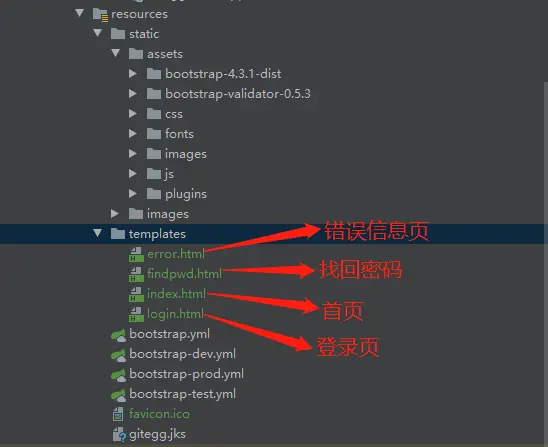
當我們的gitegg-oauth作為授權服務器使用時,我們希望定製自己的登錄頁等信息,下面我們自定義登錄、主頁、錯誤提示頁、找回密碼頁。其他需要的頁面可以自己定義,比如授權確認頁,我們此處業務不需要用户二次確認,所以這裏沒有自定義此頁面。
-
在gitegg-oauth工程的pom.xml中添加Thymeleaf依賴,作為Spring官方推薦的模板引擎,我們使用Thymeleaf來實現前端頁面的渲染展示。
<!--thymeleaf 模板引擎 渲染單點登錄服務器頁面--> <dependency> <groupId>org.springframework.boot</groupId> <artifactId>spring-boot-starter-thymeleaf</artifactId> </dependency> -
在GitEggOAuthController中新增頁面跳轉路徑
/** * 單點登錄-登錄頁 * @return */ @GetMapping("/login") public String login() { return "login"; } /** * 單點登錄-首頁:當直接訪問單點登錄系統成功後進入的頁面。從客户端系統進入的,直接返回到客户端頁面 * @return */ @GetMapping("/index") public String index() { return "index"; } /** * 單點登錄-錯誤頁 * @return */ @GetMapping("/error") public String error() { return "error"; } /** * 單點登錄-找回密碼頁 * @return */ @GetMapping("/find/pwd") public String findPwd() { return "findpwd"; } - 在resources目錄下新建static(靜態資源)目錄和templates(頁面代碼)目錄,新增favicon.ico文件
-
自定義登錄頁login.html代碼
<!DOCTYPE html> <html xmlns:th="http://www.thymeleaf.org"> <head> <meta charset="UTF-8"> <meta http-equiv="X-UA-Compatible" content="IE=edge,chrome=1"> <meta name="description" content="統一身份認證平台"> <meta name="viewport" content="width=device-width, initial-scale=1.0"> <title>統一身份認證平台</title> <link rel="shortcut icon" th:href="@{/gitegg-oauth/favicon.ico}"/> <link rel="bookmark" th:href="@{/gitegg-oauth/favicon.ico}"/> <link type="text/css" rel="stylesheet" th:href="@{/gitegg-oauth/assets/bootstrap-4.3.1-dist/css/bootstrap.min.css}"> <link type="text/css" rel="stylesheet" th:href="@{/gitegg-oauth/assets/bootstrap-validator-0.5.3/css/bootstrapValidator.css}"> <link type="text/css" rel="stylesheet" th:href="@{/gitegg-oauth/assets/css/font-awesome.min.css}"> <link type="text/css" rel="stylesheet" th:href="@{/gitegg-oauth/assets/css/login.css}"> <!--[if IE]> <script type="text/javascript" th:src="@{/gitegg-oauth/assets/js/html5shiv.min.js}"></script> <![endif]--> </head> <body> <div class="htmleaf-container"> <div class="form-bg"> <div class="container"> <div class="row login_wrap"> <div class="login_left"> <span class="circle"> <!-- <span></span> <span></span> --> <img th:src="@{/gitegg-oauth/assets/images/logo.svg}" class="logo" alt="logo"> </span> <span class="star"> <span></span> <span></span> <span></span> <span></span> <span></span> <span></span> <span></span> <span></span> </span> <span class="fly_star"> <span></span> <span></span> </span> <p id="title"> GitEgg Cloud 統一身份認證平台 </p> </div> <div class="login_right"> <div class="title cf"> <ul class="title-list fr cf "> <li class="on">賬號密碼登錄</li> <li>驗證碼登錄</li> <p></p> </ul> </div> <div class="login-form-container account-login"> <form class="form-horizontal account-form" th:action="@{/gitegg-oauth/login}" method="post"> <input type="hidden" class="form-control" name="client_id" value="gitegg-admin"> <input id="user_type" type="hidden" class="form-control" name="type" value="user"> <input id="user_mobileType" type="hidden" class="form-control" name="mobile" value="0"> <div class="input-wrapper input-account-wrapper form-group"> <div class="input-icon-wrapper"> <i class="input-icon"> <svg t="1646301169630" class="icon" viewBox="64 64 896 896" version="1.1" xmlns="http://www.w3.org/2000/svg" p-id="8796" width="1.2em" height="1.2em" fill="currentColor"><path d="M858.5 763.6c-18.9-44.8-46.1-85-80.6-119.5-34.5-34.5-74.7-61.6-119.5-80.6-0.4-0.2-0.8-0.3-1.2-0.5C719.5 518 760 444.7 760 362c0-137-111-248-248-248S264 225 264 362c0 82.7 40.5 156 102.8 201.1-0.4 0.2-0.8 0.3-1.2 0.5-44.8 18.9-85 46-119.5 80.6-34.5 34.5-61.6 74.7-80.6 119.5C146.9 807.5 137 854 136 901.8c-0.1 4.5 3.5 8.2 8 8.2h60c4.4 0 7.9-3.5 8-7.8 2-77.2 33-149.5 87.8-204.3 56.7-56.7 132-87.9 212.2-87.9s155.5 31.2 212.2 87.9C779 752.7 810 825 812 902.2c0.1 4.4 3.6 7.8 8 7.8h60c4.5 0 8.1-3.7 8-8.2-1-47.8-10.9-94.3-29.5-138.2zM512 534c-45.9 0-89.1-17.9-121.6-50.4S340 407.9 340 362c0-45.9 17.9-89.1 50.4-121.6S466.1 190 512 190s89.1 17.9 121.6 50.4S684 316.1 684 362c0 45.9-17.9 89.1-50.4 121.6S557.9 534 512 534z" p-id="8797"></path></svg> </i> </div> <input type="text" class="input" name="username" placeholder="請輸入您的賬號"> </div> <div class="input-wrapper input-psw-wrapper form-group"> <div class="input-icon-wrapper"> <i class="input-icon"> <svg t="1646302713220" class="icon" viewBox="64 64 896 896" version="1.1" xmlns="http://www.w3.org/2000/svg" p-id="8931" width="1.2em" height="1.2em" fill="currentColor"><path d="M832 464h-68V240c0-70.7-57.3-128-128-128H388c-70.7 0-128 57.3-128 128v224h-68c-17.7 0-32 14.3-32 32v384c0 17.7 14.3 32 32 32h640c17.7 0 32-14.3 32-32V496c0-17.7-14.3-32-32-32zM332 240c0-30.9 25.1-56 56-56h248c30.9 0 56 25.1 56 56v224H332V240z m460 600H232V536h560v304z" p-id="8932"></path><path d="M484 701v53c0 4.4 3.6 8 8 8h40c4.4 0 8-3.6 8-8v-53c12.1-8.7 20-22.9 20-39 0-26.5-21.5-48-48-48s-48 21.5-48 48c0 16.1 7.9 30.3 20 39z" p-id="8933"></path></svg> </i> </div> <input id="password" type="password" class="input" name="password" placeholder="請輸入您的密碼"> </div> <div id="account-err" class="err-msg" style="width: 100%; text-align: center;"></div> <button type="submit" class="login-btn" id="loginSubmit">立即登錄</button> <div class="forget" id="forget">忘記密碼?</div> </form> </div> <div class="login-form-container mobile-login" style="display: none;"> <form class="form-horizontal mobile-form" th:action="@{/gitegg-oauth/phoneLogin}" method="post"> <input id="tenantId" type="hidden" class="form-control" name="tenant_id" value="0"> <input id="type" type="hidden" class="form-control" name="type" value="phone"> <input id="mobileType" type="hidden" class="form-control" name="mobile" value="0"> <input id="smsId" type="hidden" class="form-control" name="smsId"> <div class="input-wrapper input-account-wrapper form-group input-phone-wrapper"> <div class="input-icon-wrapper"> <i class="input-icon"> <svg t="1646302822533" class="icon" viewBox="0 0 1024 1024" version="1.1" xmlns="http://www.w3.org/2000/svg" p-id="9067" width="1.2em" height="1.2em" fill="currentColor"><path d="M744 62H280c-35.3 0-64 28.7-64 64v768c0 35.3 28.7 64 64 64h464c35.3 0 64-28.7 64-64V126c0-35.3-28.7-64-64-64z m-8 824H288V134h448v752z" p-id="9068"></path><path d="M512 784m-40 0a40 40 0 1 0 80 0 40 40 0 1 0-80 0Z" p-id="9069"></path></svg> </i> </div> <input id="phone" type="text" class="input" name="phone" maxlength="11" placeholder="請輸入手機號"> </div> <div class="code-form form-group sms-code-wrapper"> <div class="input-wrapper input-sms-wrapper"> <div class="input-icon-wrapper"> <i class="input-icon"> <svg t="1646302879723" class="icon" viewBox="0 0 1024 1024" version="1.1" xmlns="http://www.w3.org/2000/svg" p-id="9203" width="1.2em" height="1.2em" fill="currentColor"><path d="M928 160H96c-17.7 0-32 14.3-32 32v640c0 17.7 14.3 32 32 32h832c17.7 0 32-14.3 32-32V192c0-17.7-14.3-32-32-32z m-40 110.8V792H136V270.8l-27.6-21.5 39.3-50.5 42.8 33.3h643.1l42.8-33.3 39.3 50.5-27.7 21.5z" p-id="9204"></path><path d="M833.6 232L512 482 190.4 232l-42.8-33.3-39.3 50.5 27.6 21.5 341.6 265.6c20.2 15.7 48.5 15.7 68.7 0L888 270.8l27.6-21.5-39.3-50.5-42.7 33.2z" p-id="9205"></path></svg> </i> </div> <input id="code" type="text" class="input-code" name="code" maxlength="6" placeholder="請輸入驗證碼"> </div> <div class="input-code-wrapper"> <a id="sendBtn" href="javascript:sendCode();">獲取驗證碼</a> </div> </div> <div id="mobile-err" class="err-msg" style="width: 100%; text-align: center;"></div> <button type="submit" class="login-btn" id="loginSubmitByCode">立即登錄</button> </form> </div> </div> </div> </div> </div> <div class="related"> Copyrights © 2021 GitEgg All Rights Reserved. </div> </div> <script type="text/javascript" th:src="@{/gitegg-oauth/assets/js/jquery-2.1.4.min.js}"></script> <script type="text/javascript" th:src="@{/gitegg-oauth/assets/bootstrap-4.3.1-dist/js/bootstrap.min.js}"></script> <script type="text/javascript" th:src="@{/gitegg-oauth/assets/bootstrap-validator-0.5.3/js/bootstrapValidator.js}"></script> <script type="text/javascript" th:src="@{/gitegg-oauth/assets/js/md5.js}"></script> <script type="text/javascript" th:src="@{/gitegg-oauth/assets/js/jquery.form.js}"></script> <script type="text/javascript" th:src="@{/gitegg-oauth/assets/js/login.js}"></script> </body> </html> -
自定義登錄login.js代碼
var countdown=60;
jQuery(function ($) {
  countdown = 60;

  $('.account-form').bootstrapValidator({
      message: '輸入錯誤',
      feedbackIcons: {
          valid: 'glyphicon glyphicon-ok',
          invalid: 'glyphicon glyphicon-remove',
          validating: 'glyphicon glyphicon-refresh'
      },
      fields: {
          username: {
              container: '.input-account-wrapper',
              message: '輸入錯誤',
              validators: {
                  notEmpty: {
                      message: '用户賬號不能為空'
                  },
                  stringLength: {
                      min: 2,
                      max: 32,
                      message: '賬號長度範圍2-32個字符。'
                  },
                  regexp: {
                      regexp: /^[a-zA-Z0-9_\.]+$/,
                      message: '用户名只能由字母、數字、點和下劃線組成'
                  }
              }
          },
          password: {
              container: '.input-psw-wrapper',
              validators: {
                  notEmpty: {
                      message: '密碼不能為空'
                  },
                  stringLength: {
                      min: 5,
                      max: 32,
                      message: '密碼長度範圍6-32個字符。'
                  }
              }
          }
      }
  });

  $('.mobile-form').bootstrapValidator({
      message: '輸入錯誤',
      feedbackIcons: {
          valid: 'glyphicon glyphicon-ok',
          invalid: 'glyphicon glyphicon-remove',
          validating: 'glyphicon glyphicon-refresh'
      },
      fields: {
          phone: {
              message: '輸入錯誤',
              container: '.input-phone-wrapper',
              validators: {
                  notEmpty: {
                      message: '手機號不能為空'
                  },
                  regexp: {
                      regexp: /^1\d{10}$/,
                      message: '手機號格式錯誤'
                  }
              }
          },
          code: {
              container: '.input-sms-wrapper',
              validators: {
                  notEmpty: {
                      message: '驗證碼不能為空'
                  },
                  stringLength: {
                      min: 6,
                      max: 6,
                      message: '驗證碼長度為6位。'
                  }
              }
          }
      }
  });

  var options={
      beforeSerialize: beforeFormSerialize,
      success: formSuccess,//提交成功後執行的回掉函數
      error: formError,//提交失敗後執行的回掉函數
      headers : {"TenantId" : 0},
      clearForm: true,//提交成功後是否清空表單中的字段值
      restForm: true,//提交成功後是否充值表單中的字段值,即恢復到頁面加載是的狀態
      timeout: 6000//設置請求時間,超過時間後,自動退出請求,單位(毫秒)
  }

  var mobileOptions={
      success: mobileFormSuccess,//提交成功後執行的回掉函數
      error: mobileFormError,//提交失敗後執行的回掉函數
      headers : {"TenantId" : 0},
      clearForm: true,//提交成功後是否清空表單中的字段值
      restForm: true,//提交成功後是否充值表單中的字段值,即恢復到頁面加載是的狀態
      timeout: 6000//設置請求時間,超過時間後,自動退出請求,單位(毫秒)
  }

  function beforeFormSerialize(){
      $("#account-err").html("");
      $("#username").val($.trim($("#username").val()));
      $("#password").val($.md5($.trim($("#password").val())));
  }

  function formSuccess(response){
      $(".account-form").data('bootstrapValidator').resetForm();
      if (response.success)
      {
          window.location.href = response.targetUrl;
      }
      else
      {
          $("#account-err").html(response.message);
      }
  }


  function formError(response){
      $("#account-err").html(response);
  }

  function mobileFormSuccess(response){
      $(".mobile-form").data('bootstrapValidator').resetForm();
      if (response.success)
      {
          window.location.href = response.targetUrl;
      }
      else
      {
          $("#mobile-err").html(response.message);
      }
  }


  function mobileFormError(response){
      $("#mobile-err").html(response);
  }

  $(".account-form").ajaxForm(options);

  $(".mobile-form").ajaxForm(mobileOptions);

  $(".nav-left a").click(function(e){
      $(".account-login").show();
      $(".mobile-login").hide();
  });

  $(".nav-right a").click(function(e){
      $(".account-login").hide();
      $(".mobile-login").show();
  });

  $("#forget").click(function(e){
      window.location.href = "/find/pwd";
  });

  $('.title-list li').click(function(){
      var liindex = $('.title-list li').index(this);
      $(this).addClass('on').siblings().removeClass('on');
      $('.login_right div.login-form-container').eq(liindex).fadeIn(150).siblings('div.login-form-container').hide();
      var liWidth = $('.title-list li').width();

      if (liindex == 0)
      {
          $('.login_right .title-list p').css("transform","translate3d(0px, 0px, 0px)");
      }
      else {
          $('.login_right .title-list p').css("transform","translate3d("+liWidth+"px, 0px, 0px)");
      }

  });

});

function sendCode(){
  $(".mobile-form").data('bootstrapValidator').validateField('phone');
  if(!$(".mobile-form").data('bootstrapValidator').isValidField("phone"))
  {
      return;
  }

  if(countdown != 60)
  {
      return;
  }
  sendmsg();
  var phone = $.trim($("#phone").val());
  var tenantId = $("#tenantId").val();
  $.ajax({
      //請求方式
      type : "POST",
      //請求的媒體類型
      contentType: "application/x-www-form-urlencoded;charset=UTF-8",
      dataType: 'json',
      //請求地址
      url : "/code/sms/login",
      //數據,json字符串
      data : {
          tenantId: tenantId,
          phoneNumber: phone,
          code: "aliValidateLogin"
      },
      //請求成功
      success : function(result) {
          $("#smsId").val(result.data);
      },
      //請求失敗,包含具體的錯誤信息
      error : function(e){
          console.log(e);
      }
  });
};

function sendmsg(){
  if(countdown==0){
      $("#sendBtn").css("color","#181818");
      $("#sendBtn").html("獲取驗證碼");
      countdown=60;
      return false;
  }
  else{
      $("#sendBtn").css("color","#74777b");
      $("#sendBtn").html("重新發送("+countdown+")");
      countdown--;
  }
  setTimeout(function(){
      sendmsg();
  },1000);
}
2、授權服務器配置
-
修改web安全配置WebSecurityConfig,將靜態文件添加到不需要授權就能訪問
@Override public void configure(WebSecurity web) throws Exception { web.ignoring().antMatchers("/assets/**", "/css/**", "/images/**"); } -
修改Nacos配置,將新增頁面訪問路徑添加到訪問白名單,使資源服務器配置ResourceServerConfig中的配置不進行鑑權就能夠訪問,同時增加tokenUrls配置,此配置在網關不進行鑑權,但是需要OAuth2進行Basic鑑權,授權碼模式必須要用到此鑑權。
# 以下配置為新增 whiteUrls: - "/gitegg-oauth/oauth/login" - "/gitegg-oauth/oauth/find/pwd" - "/gitegg-oauth/oauth/error" authUrls: - "/gitegg-oauth/oauth/index" whiteUrls: - "/*/v2/api-docs" - "/gitegg-oauth/oauth/public_key" - "/gitegg-oauth/oauth/token_key" - "/gitegg-oauth/find/pwd" - "/gitegg-oauth/code/sms/login" - "/gitegg-oauth/change/password" - "/gitegg-oauth/error" - "/gitegg-oauth/oauth/sms/captcha/send" # 新增OAuth2認證接口,此處網關放行,由認證中心進行認證 tokenUrls: - "/gitegg-oauth/oauth/token" -
因GitEgg框架使用用户名+密碼再加密存儲的密碼,所以這裏需要自定義登錄過濾器來做相應處理,也可以用同樣的方式新增手機驗證碼登錄、掃碼登錄等功能。
package com.gitegg.oauth.filter;

import cn.hutool.core.bean.BeanUtil;
import com.gitegg.oauth.token.PhoneAuthenticationToken;
import com.gitegg.platform.base.constant.AuthConstant;
import com.gitegg.platform.base.domain.GitEggUser;
import com.gitegg.platform.base.result.Result;
import com.gitegg.service.system.client.feign.IUserFeign;
import org.springframework.beans.factory.annotation.Autowired;
import org.springframework.security.authentication.AbstractAuthenticationToken;
import org.springframework.security.authentication.AuthenticationServiceException;
import org.springframework.security.authentication.UsernamePasswordAuthenticationToken;
import org.springframework.security.core.Authentication;
import org.springframework.security.core.AuthenticationException;
import org.springframework.security.web.authentication.UsernamePasswordAuthenticationFilter;
import org.springframework.util.StringUtils;


import javax.servlet.http.HttpServletRequest;
import javax.servlet.http.HttpServletResponse;

/**
 * 自定義登陸
 * @author GitEgg
 */
public class GitEggLoginAuthenticationFilter extends UsernamePasswordAuthenticationFilter {

  public static final String SPRING_SECURITY_RESTFUL_TYPE_PHONE = "phone";

  public static final String SPRING_SECURITY_RESTFUL_TYPE_QR = "qr";

  public static final String SPRING_SECURITY_RESTFUL_TYPE_DEFAULT = "user";

  //  登陸類型:user:用户密碼登陸;phone:手機驗證碼登陸;qr:二維碼掃碼登陸
  private static final String SPRING_SECURITY_RESTFUL_TYPE_KEY = "type";

  //  登陸終端:1:移動端登陸,包括微信公眾號、小程序等;0:PC後台登陸
  private static final String SPRING_SECURITY_RESTFUL_MOBILE_KEY = "mobile";

  private static final String SPRING_SECURITY_RESTFUL_USERNAME_KEY = "username";

  private static final String SPRING_SECURITY_RESTFUL_PASSWORD_KEY = "password";

  private static final String SPRING_SECURITY_RESTFUL_PHONE_KEY = "phone";

  private static final String SPRING_SECURITY_RESTFUL_VERIFY_CODE_KEY = "code";

  private static final String SPRING_SECURITY_RESTFUL_QR_CODE_KEY = "qrCode";

  @Autowired
  private IUserFeign userFeign;

  private boolean postOnly = true;

  @Override
  public Authentication attemptAuthentication(HttpServletRequest request, HttpServletResponse response) throws AuthenticationException {

      if (postOnly && !"POST".equals(request.getMethod())) {
          throw new AuthenticationServiceException(
                  "Authentication method not supported: " + request.getMethod());
      }

      String type = obtainParameter(request, SPRING_SECURITY_RESTFUL_TYPE_KEY);
      String mobile = obtainParameter(request, SPRING_SECURITY_RESTFUL_MOBILE_KEY);
      AbstractAuthenticationToken authRequest;
      String principal;
      String credentials;

      // 手機驗證碼登陸
      if(SPRING_SECURITY_RESTFUL_TYPE_PHONE.equals(type)){
          principal = obtainParameter(request, SPRING_SECURITY_RESTFUL_PHONE_KEY);
          credentials = obtainParameter(request, SPRING_SECURITY_RESTFUL_VERIFY_CODE_KEY);

          principal = principal.trim();
          authRequest = new PhoneAuthenticationToken(principal, credentials);
      }
      // 賬號密碼登陸
      else {
          principal = obtainParameter(request, SPRING_SECURITY_RESTFUL_USERNAME_KEY);
          credentials = obtainParameter(request, SPRING_SECURITY_RESTFUL_PASSWORD_KEY);

          Result<Object> result = userFeign.queryUserByAccount(principal);
          if (null != result && result.isSuccess()) {
              GitEggUser gitEggUser = new GitEggUser();
              BeanUtil.copyProperties(result.getData(), gitEggUser, false);
              if (!StringUtils.isEmpty(gitEggUser.getAccount())) {
                  principal = gitEggUser.getAccount();
                  credentials = AuthConstant.BCRYPT + gitEggUser.getAccount() + credentials;
              }
          }
          authRequest = new UsernamePasswordAuthenticationToken(principal, credentials);
      }

      // Allow subclasses to set the "details" property
      setDetails(request, authRequest);
      return this.getAuthenticationManager().authenticate(authRequest);
  }

  private void setDetails(HttpServletRequest request,
                          AbstractAuthenticationToken authRequest) {
      authRequest.setDetails(authenticationDetailsSource.buildDetails(request));
  }

  private String obtainParameter(HttpServletRequest request, String parameter) {
      String result =  request.getParameter(parameter);
      return result == null ? "" : result;
  }
}
四、實現單點登錄客户端
spring-security-oauth2提供OAuth2授權服務器的同時也提供了單點登錄客户端的實現,通用通過幾行註解即可實現單點登錄功能。
1、新建單點登錄客户端工程,引入oauth2客户端相關jar包<dependency> <groupId>org.springframework.boot</groupId> <artifactId>spring-boot-starter-oauth2-client</artifactId> </dependency> <dependency> <groupId>org.springframework.boot</groupId> <artifactId>spring-boot-starter-security</artifactId> </dependency> <dependency> <groupId>org.springframework.security.oauth.boot</groupId> <artifactId>spring-security-oauth2-autoconfigure</artifactId> </dependency>2、新建WebSecurityConfig類,添加@EnableOAuth2Sso註解
@EnableOAuth2Sso
@Configuration
public class WebSecurityConfig extends WebSecurityConfigurerAdapter {

  @Override
  protected void configure(HttpSecurity http) throws Exception {
          http.authorizeRequests()
                  .anyRequest().authenticated()
                  .and()
                  .csrf().disable();
  }
}
3、配置單點登錄服務端相關信息
server:
port: 8080
servlet:
  context-path: /ssoclient1
security:
oauth2:
  client:
    # 配置在授權服務器配置的客户端id和secret
    client-id: ssoclient
    client-secret: 123456
    # 獲取token的url
    access-token-uri: http://127.0.0.1/gitegg-oauth/oauth/token
    # 授權服務器的授權地址
    user-authorization-uri: http://127.0.0.1/gitegg-oauth/oauth/authorize
  resource:
    jwt:
      # 獲取公鑰的地址,驗證token需使用,系統啓動時會初始化,不會每次驗證都請求
      key-uri: http://127.0.0.1/gitegg-oauth/oauth/token_key
備註:
1、GitEgg框架中自定義了token返回格式,SpringSecurity獲取token的/oauth/token默認返回的是ResponseEntity<OAuth2AccessToken>,自有系統登錄和單點登錄時需要做轉換處理。
2、Gateway網關鑑權需要的公鑰地址是gitegg-oauth/oauth/public_key,單點登錄客户端需要公鑰地址
/oauth/token_key,兩者返回的格式不一樣,需注意區分。
3、請求/oauth/tonen和/oauth/token_key時,默認都需要使用Basic認證,也就是請求時需添加client_id和client_security參數。
GitEgg-Cloud是一款基於SpringCloud整合搭建的企業級微服務應用開發框架,開源項目地址:
Gitee: https://gitee.com/wmz1930/GitEgg
GitHub: https://github.com/wmz1930/GitEgg