

前言
近期我們實驗室的排課系統需要接入統一身份認證平台,目前業務系統用的是 Spring Security 做登錄鑑權。現在學校要求接入他們的統一認證平台,所以我們需要把 CAS 集成進來。
簡單來説,就是:
用户訪問業務系統的時候,如果還沒登錄,就別讓他直接訪問,而是把他丟到 CAS 的登錄頁面去,讓他先在那裏登錄一下。
CAS
CAS(Central Authentication Service)是學校常用的一種統一登錄方式。簡單來説,就是把所有系統的登錄入口都集中到一起管理。以前我們訪問不同系統時,每個系統都要重新輸入賬號和密碼,比如教務系統一套密碼,圖書館一套密碼,排課系統又一套,非常麻煩。
接入 CAS 之後,這些系統不再自己處理登錄,而是把用户統一交給學校的 CAS 服務器來認證。用户只要在 CAS 登錄頁面成功登錄一次,在整個瀏覽器會話裏就可以直接訪問所有已接入的系統,完全不用重複輸入密碼,也不需要每個系統都維護一套登錄邏輯。
簡易版流程圖
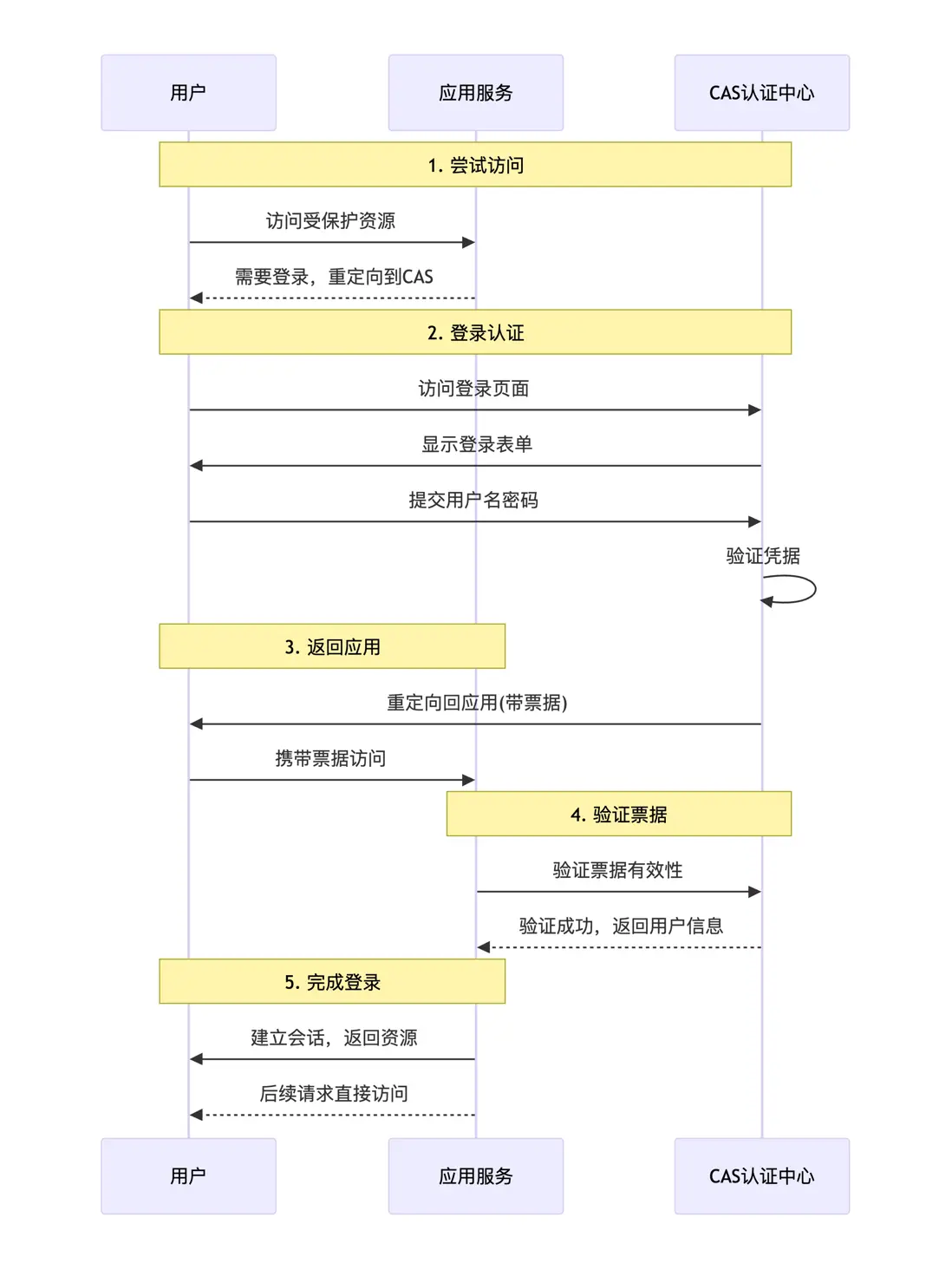
Spring Security 本地用户名密碼登錄流程
在正式集成流程之前,我們先要先簡單回顧一下項目中 原本使用SpringSeurity 的用户名密碼登錄流程 ,這樣就能更加清楚理解 CAS 是如何擴展到現有體系裏面的。
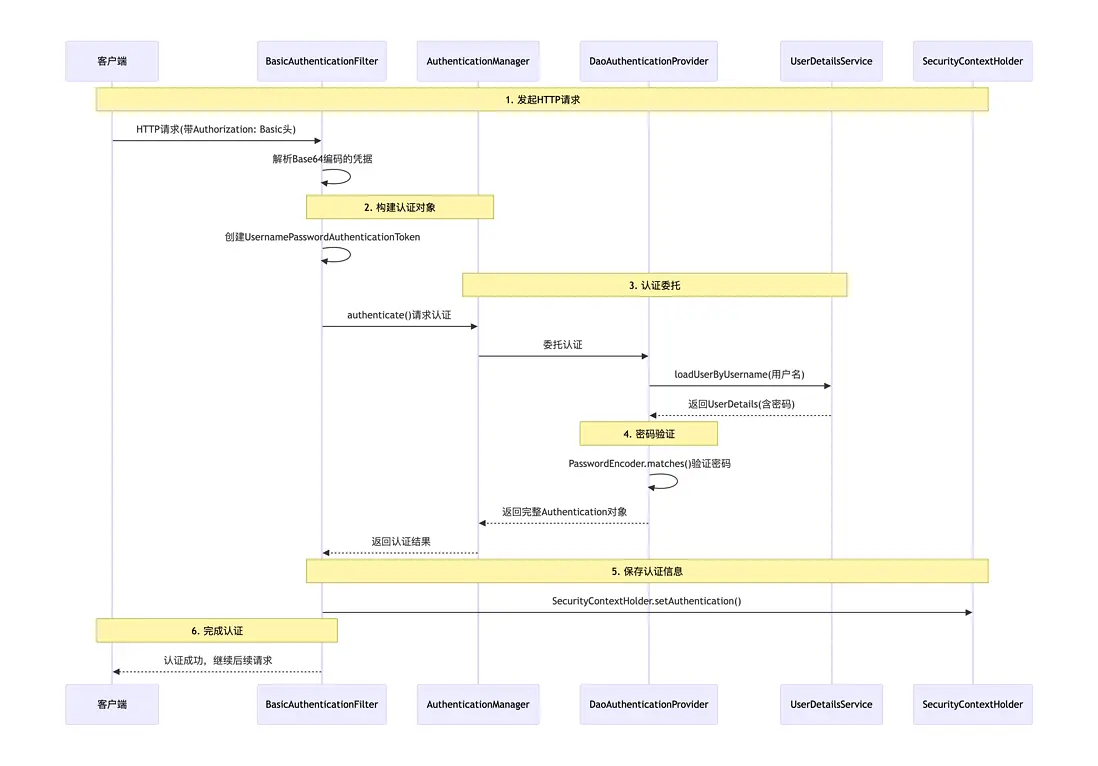
1. 請求進入過濾器鏈
當請求到達 Spring Security 時,會先進入過濾器鏈進行處理。如果請求中包含 HTTP Basic 認證信息(即請求頭 Authorization: Basic ...),BasicAuthenticationFilter 會攔截該請求。
它會從請求頭中解析出用户名和密碼,然後將憑證傳遞給認證管理器進行身份驗證。
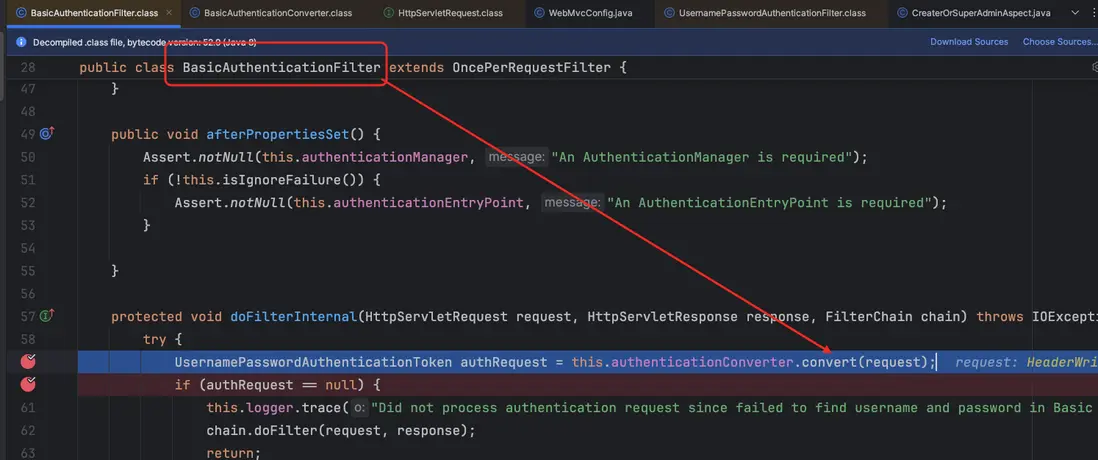
2. 提取用户名和密碼
BasicAuthenticationFilter 內部通過 convert(HttpServletRequest request) 方法獲取 Authorization 頭中的 Basic 信息,並對其進行解碼(decoder),從中提取出用户名和密碼。
接着,基於這些憑證構建一個 UsernamePasswordAuthenticationToken 對象,用於後續的認證流程。
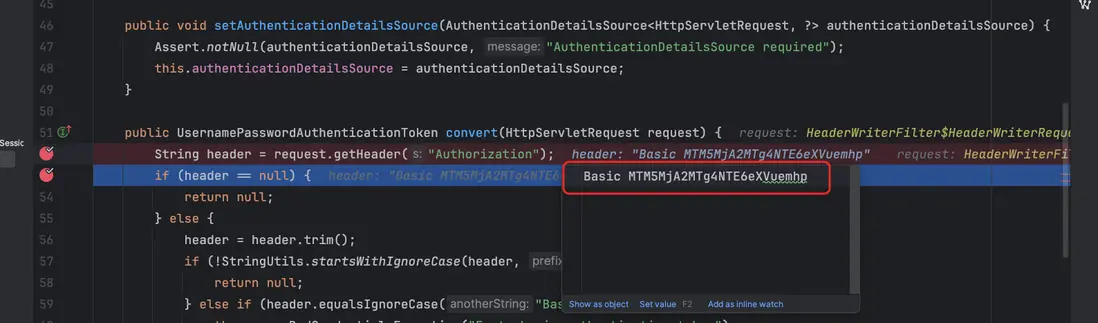
由於使用的是 Basic 認證,這裏會對 Authorization 頭中的信息進行解碼(decoder),從中提取出用户名和密碼,用於後續的身份驗證。
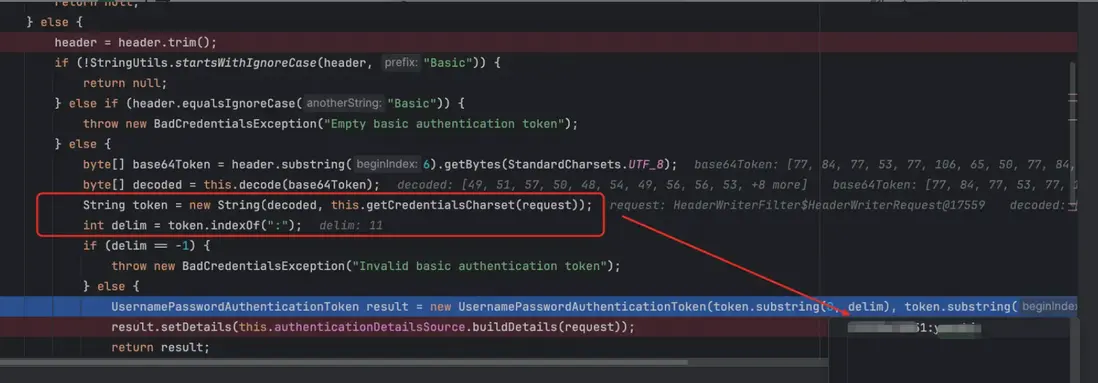
提取用户名和密碼。然後,基於這些憑證構建一個 UsernamePasswordAuthenticationToken,用於後續的身份驗證流程。
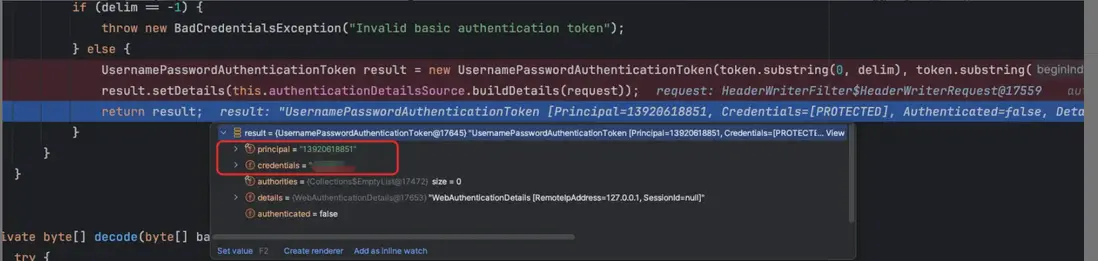
3. 調用認證管理器
構建好的 UsernamePasswordAuthenticationToken 會被傳遞給 AuthenticationManager。在 Spring Security 中,AuthenticationManager 的默認實現是 ProviderManager。
ProviderManager 會遍歷註冊的 AuthenticationProvider 列表,並調用與憑證類型匹配的 AuthenticationProvider 來進行認證。在本次流程中,實際調用的是 DaoAuthenticationProvider。
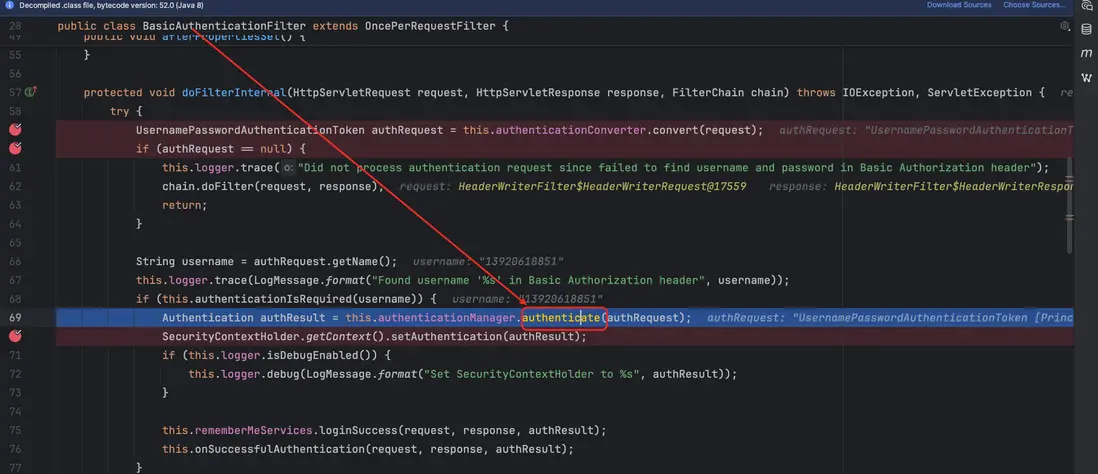
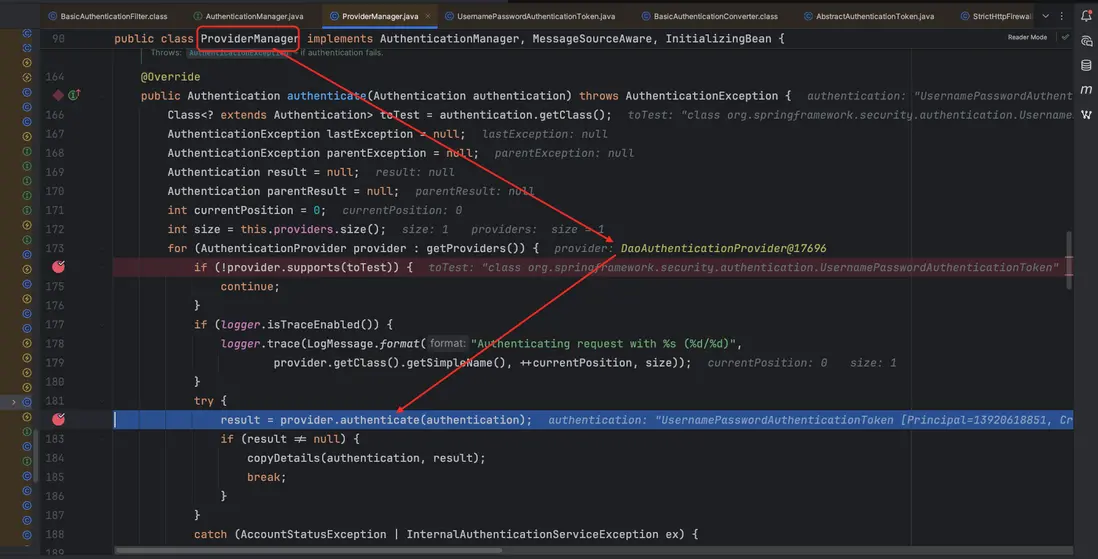
4. DaoAuthenticationProvider 核心流程
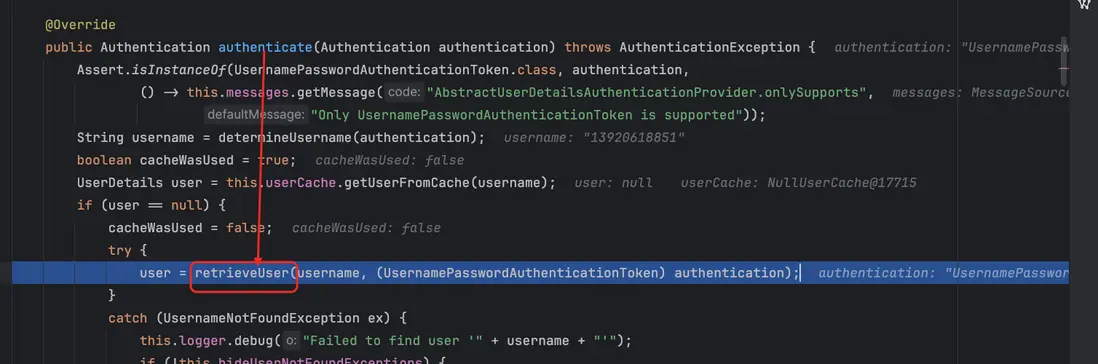
DaoAuthenticationProvider 的核心入口是 authenticate(Authentication authentication) 方法。流程如下:
- 獲取用户名:首先從認證對象中獲取用户名。
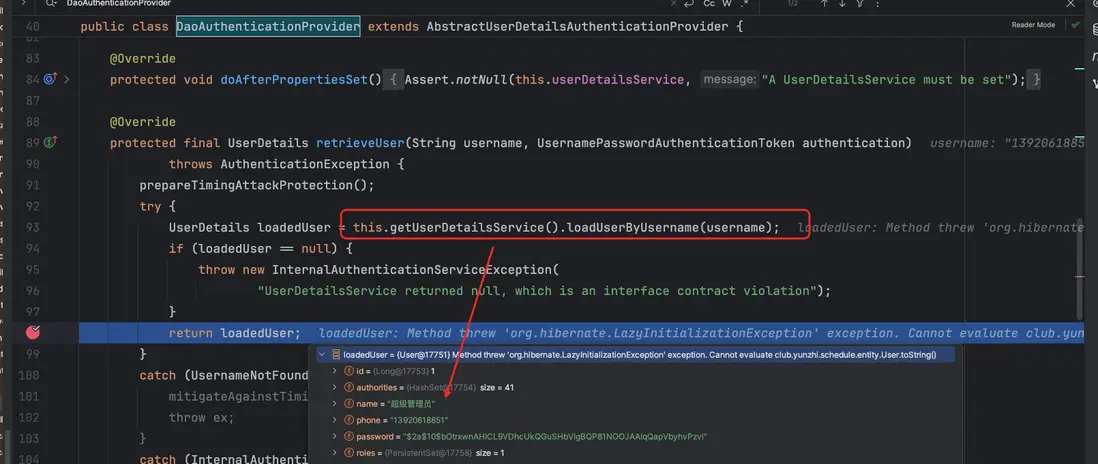
- 檢查緩存:判斷是否已有緩存的用户信息,如果沒有緩存,則調用
retrieveUser方法從UserDetailsService加載用户數據(包括密碼和權限)。
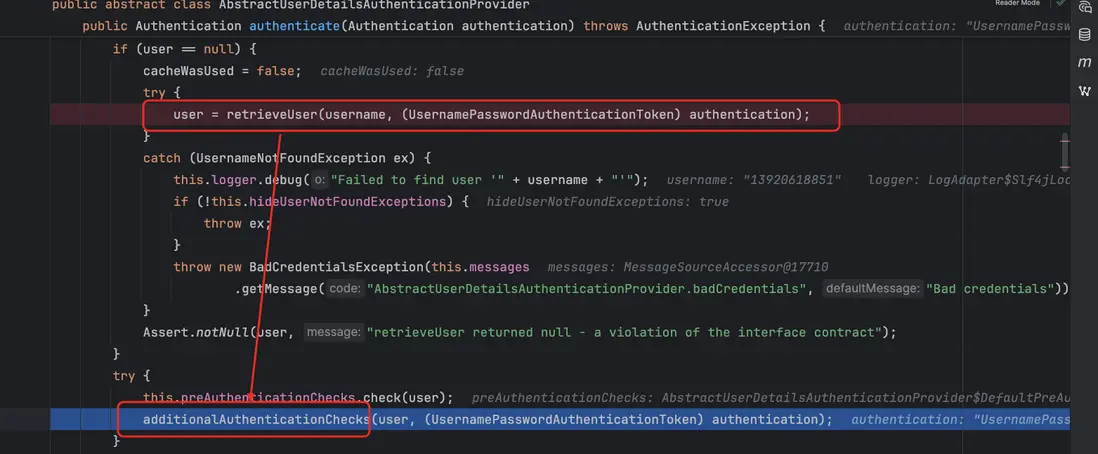
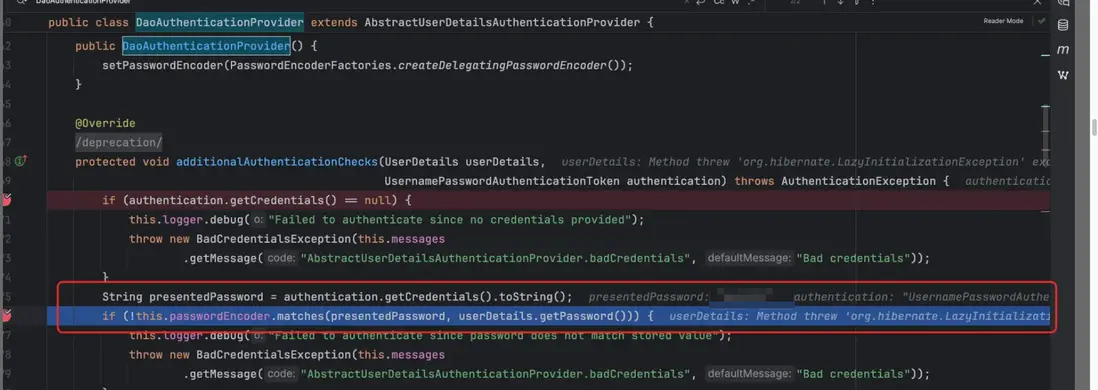
- 密碼校驗:獲取到
UserDetails後,調用additionalAuthenticationChecks方法,用配置的PasswordEncoder對提交的密碼和存儲的密碼進行比對,如果不匹配,則拋出BadCredentialsException。
- 生成認證對象:校驗通過後,調用
createSuccessAuthentication方法,基於加載到的用户信息和原始認證請求,創建一個已認證的UsernamePasswordAuthenticationToken。該對象隨後被返回給ProviderManager,最終存入SecurityContext。
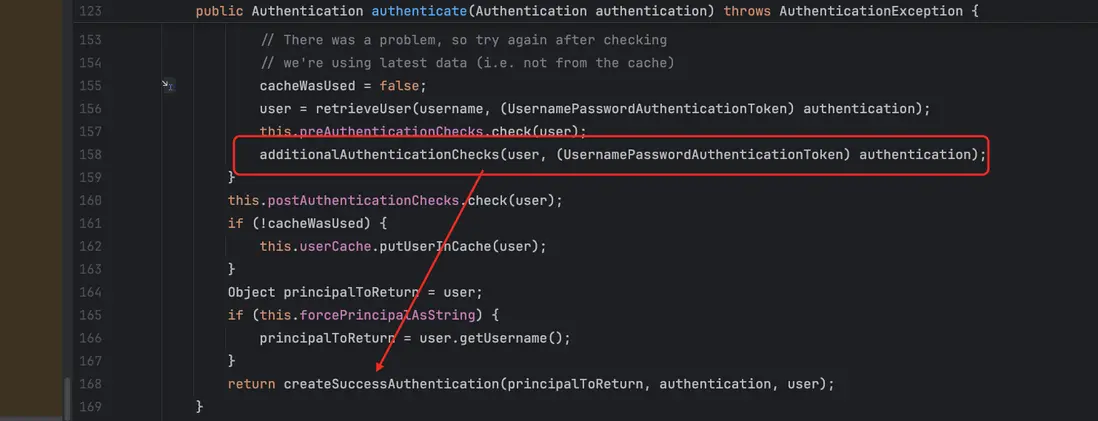
到這裏就完成基於整個 Basic 的 用户名密碼登錄認證流程就完成了
通過整個 Basic 登錄認證流程,我們可以看到 核心的兩個必要組件:
BasicAuthenticationFilter:負責攔截請求,解析Authorization頭中的用户名和密碼,並構建認證對象。DaoAuthenticationProvider:負責具體的身份驗證邏輯,包括從UserDetailsService加載用户信息和校驗密碼。
這兩個組件配合起來,就完成了完整的 Basic 認證流程。
此外,還需要進行配置 PasswordEncoder 用於處理密碼的加密與匹配,而自定義的 UserDetailsService 則負責根據用户名加載用户信息。
Spring Security 集成 CAS
在我們的項目中,是使用的 Spring Security 來做本地登錄驗證的,也就是通過用户名和密碼在系統內部進行認證,為了對接學校的統一認證身份認證平台,我們需要讓系統支持CAS登錄,好在 Spring Security 提供了 CAS 的支持,所以整個集成流程並不複雜,只需要按照規範 “拼接”起來即可。
整體來説,Spring Security 集成 CAS 可以分成三個主要步驟:登錄跳轉、票據驗證、統一退出。
CAS 認證序列圖
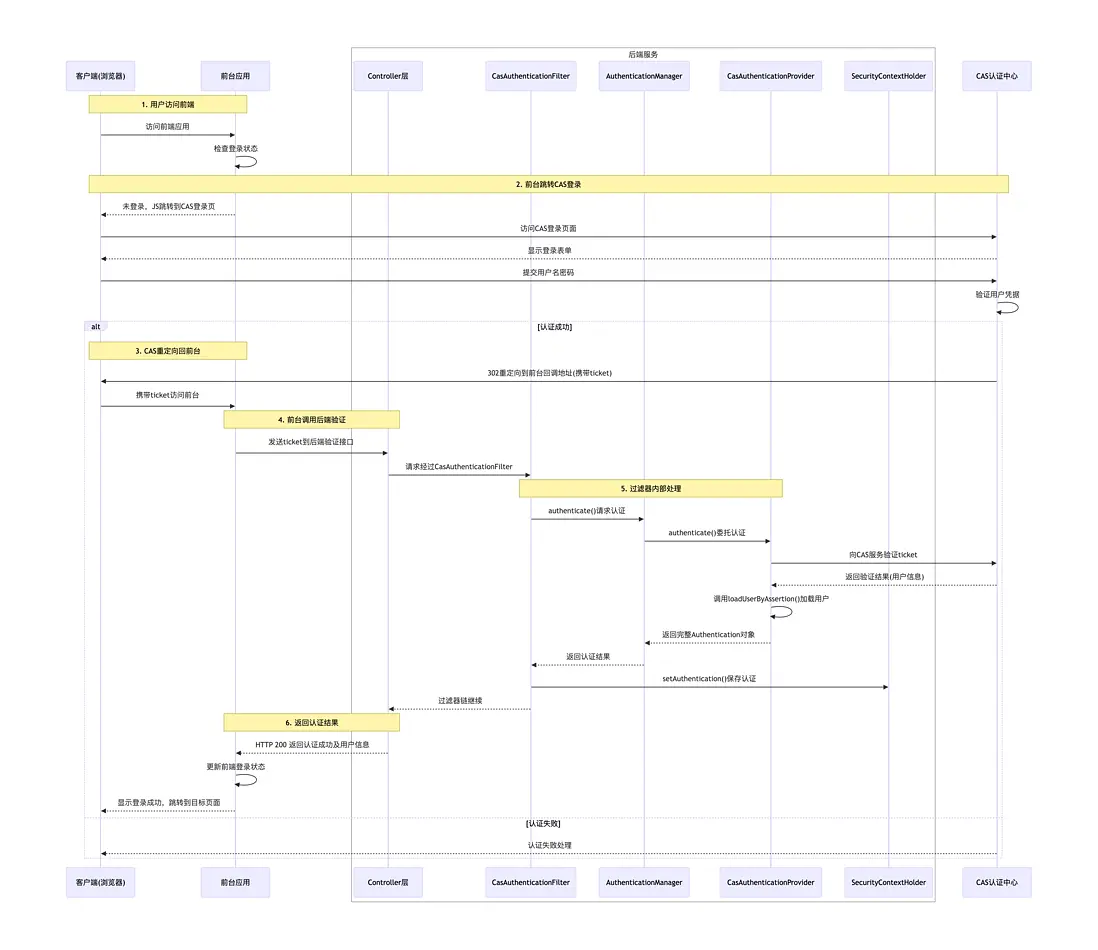
Spring Security CAS登錄認證流程
通過上面的CAS認證流程,我們猜測在CAS肯定也有核心的幾個必要組件:
CasAuthenticationFilter:負責攔截請求,判斷是否攜帶 CAS Ticket 或者是否已登錄,如果未登錄則重定向到 CAS Server 的登錄頁面。CasAuthenticationProvider:負責具體的身份驗證邏輯,包括驗證從 CAS Server 返回的 Ticket、解析用户信息,並構建已認證的Authentication對象。
1. 請求進入過濾器鏈
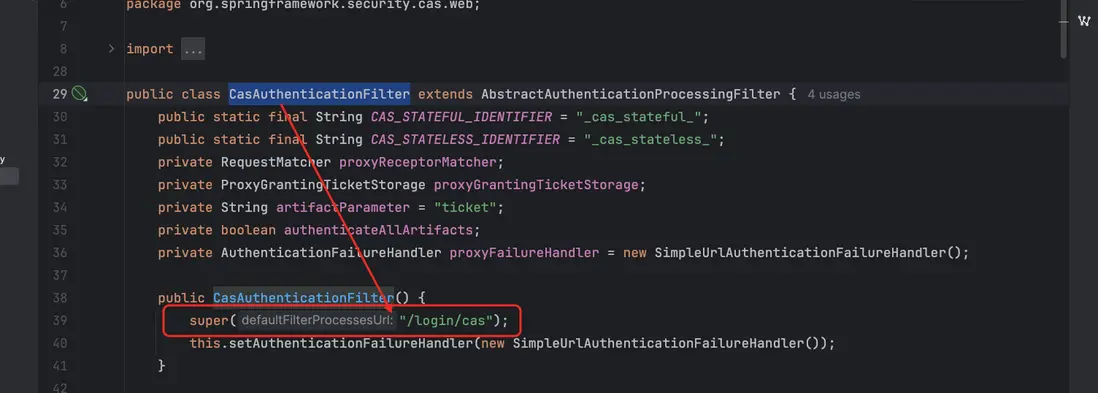
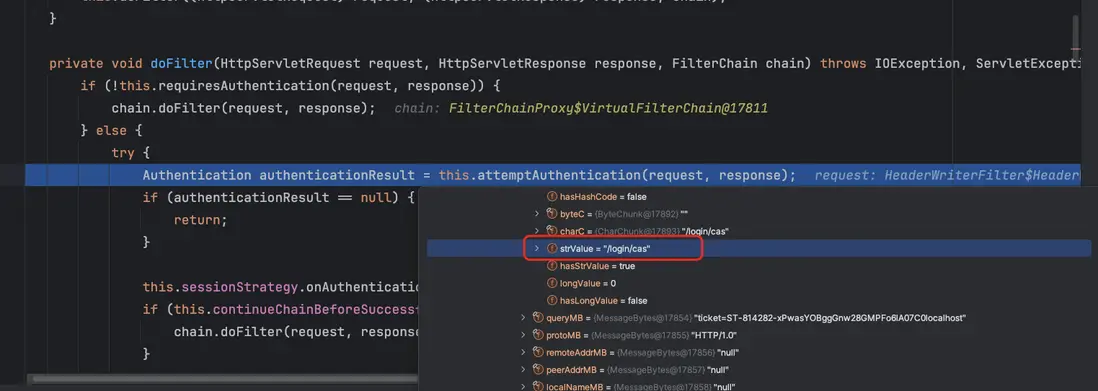
當請求到達 Spring Security 時,會先進入過濾器鏈進行處理。如果請求中包含 /login/cas 請求時候就會被 CasAuthenticationFilter 進行攔截並處理認證邏輯
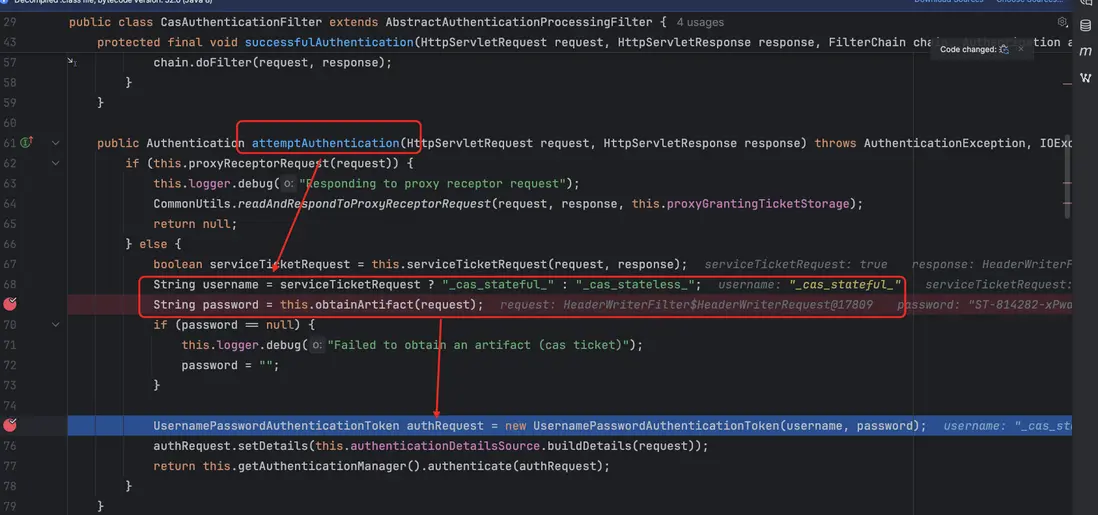
2. 提取 ticket
CasAuthenticationFilter 內部通過 attemptAuthentication(HttpServletRequest request, HttpServletResponse response) 方法獲取 CAS ticket
接着,基於這些憑證構建一個 UsernamePasswordAuthenticationToken 對象,用於後續的認證流程。
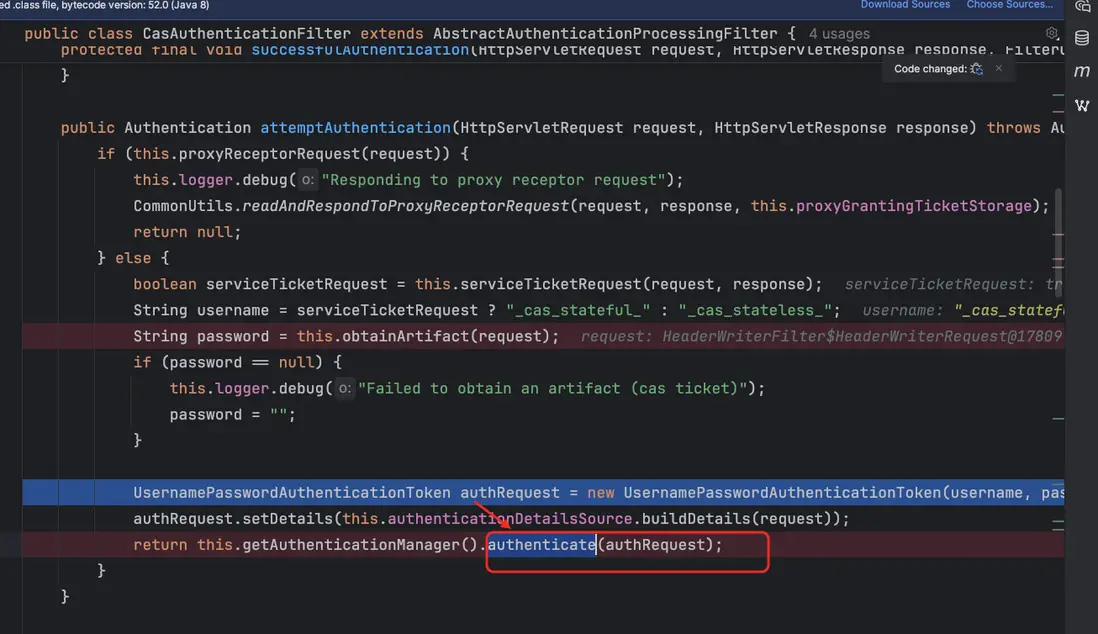
3. 調用認證管理器
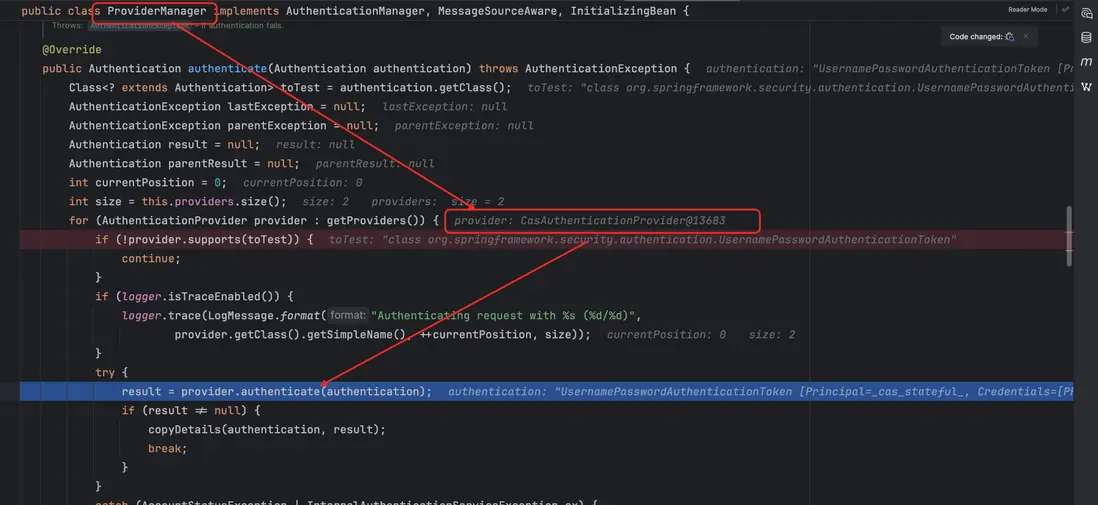
構建好的 UsernamePasswordAuthenticationToken 會被傳遞給 AuthenticationManager。在 Spring Security 中,AuthenticationManager 的默認實現是 ProviderManager。
ProviderManager 會遍歷註冊的 AuthenticationProvider 列表,並調用與憑證類型匹配的 AuthenticationProvider 來進行認證。在本次流程中,實際調用的是 CasAuthenticationProvider。
4. CasAuthenticationProvider 核心流程
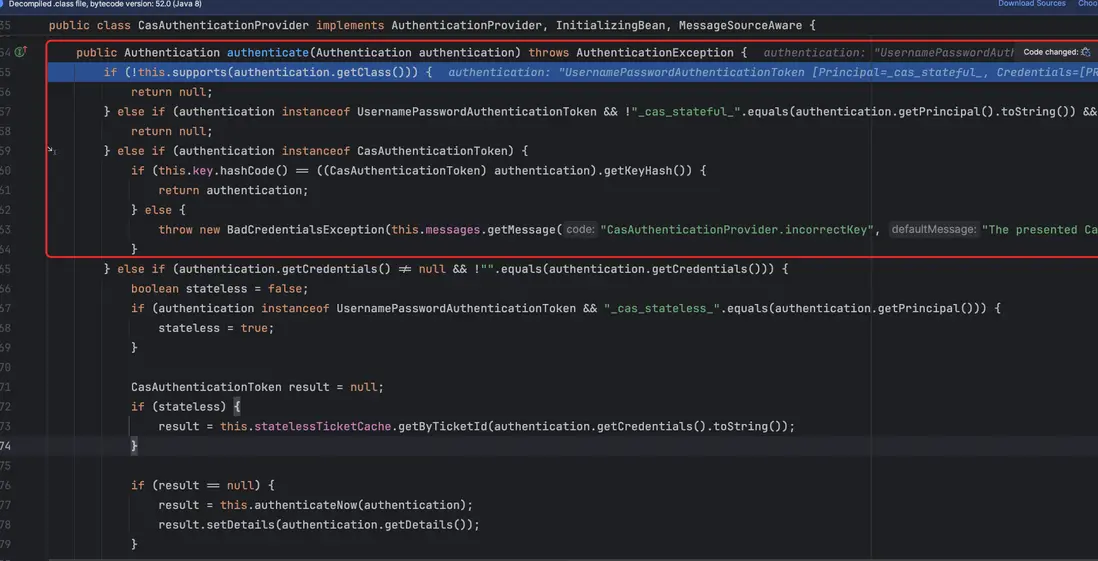
CasAuthenticationProvider 的核心入口是 authenticate(Authentication authentication) 方法,其整體流程如下:
- 在進入真正的票據校驗邏輯之前,Provider 會先執行一組基礎性的前置檢查,包括:是否支持當前認證對象類型、認證請求是否由 CAS 過濾器生成(例如
_cas_stateful_/_cas_stateless_),以及傳入的 Token 是否已經是一個合法的CasAuthenticationToken。這些判斷的作用僅在於過濾掉與 CAS 無關或已處理過的認證請求,不屬於核心認證流程,可以理解為“確保當前請求確實需要由 CAS Provider 來處理”。
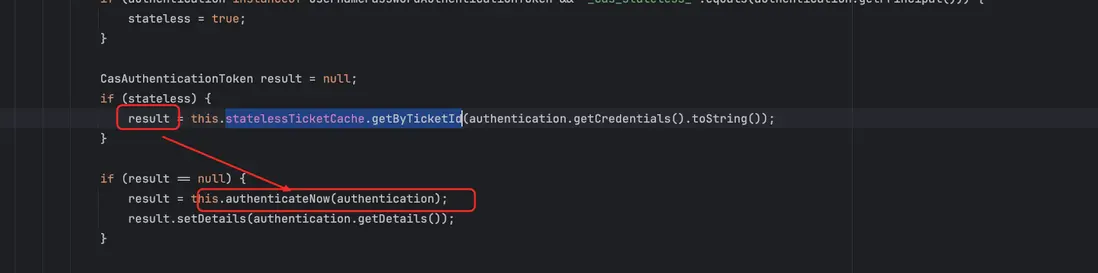
- 檢查緩存:判斷是否已有緩存的用户信息,如果沒有緩存,則調用
authenticateNow方法
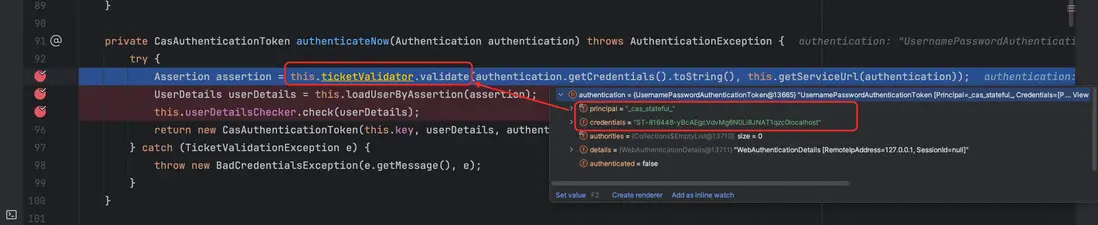
- 票據校驗與用户信息解析:通過
ticketValidator.validate(...)調用 CAS Server 對當前請求攜帶的 Service Ticket 進行驗證。
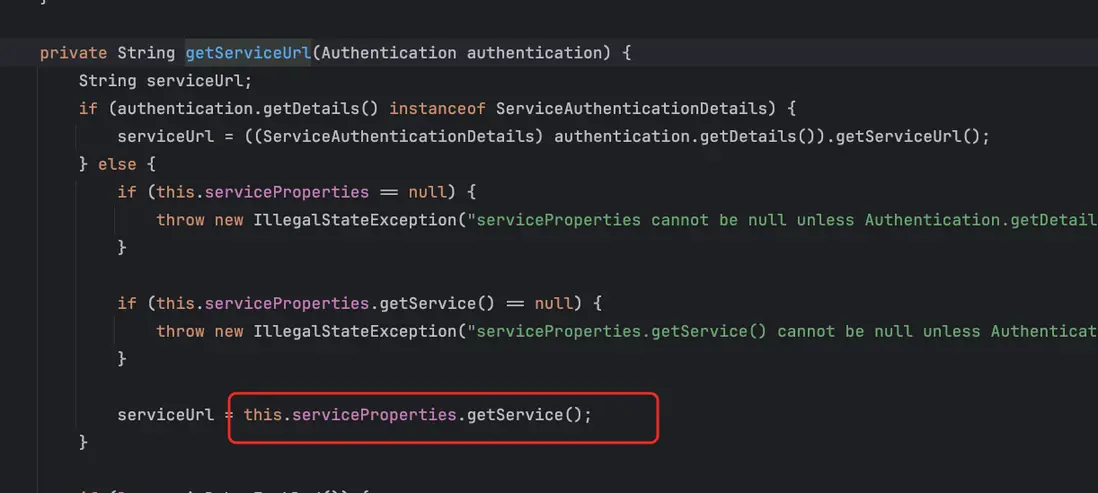
這裏我們可以看到 getServiceUrl 方法,這個是用來獲取前端最初跳轉到 CAS 登錄頁時攜帶的 service 地址,票據校驗時必須帶上這個地址才能通過驗證。

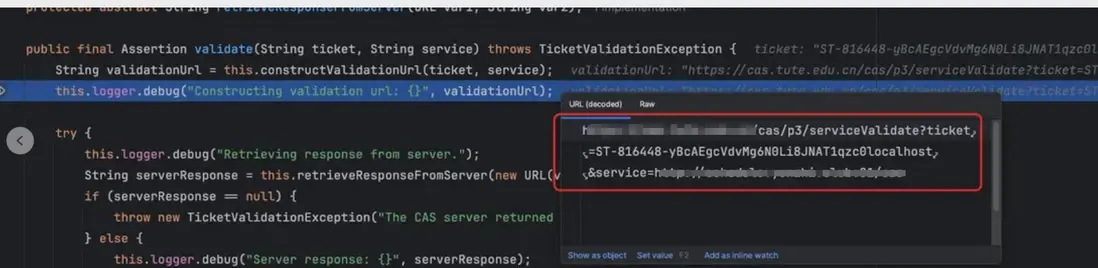
校驗成功後,會根據返回的 Assertion
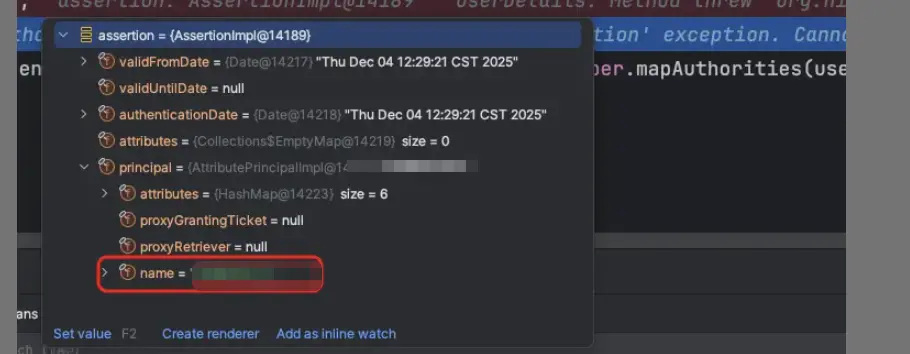
之後通過 調用 loadUserByAssertion 方法解析並加載用户的詳細信息;如果票據無效或無法加載用户信息,則會拋出 BadCredentialsException。

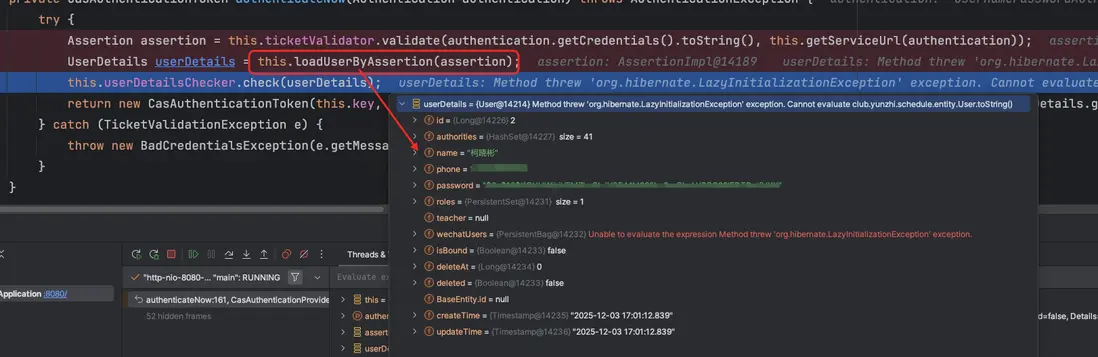
- 生成認證對象:校驗通過後,認證後的 Authentication 對象直接交給 ProviderManager,最終寫入 SecurityContext,最終存入
SecurityContext。
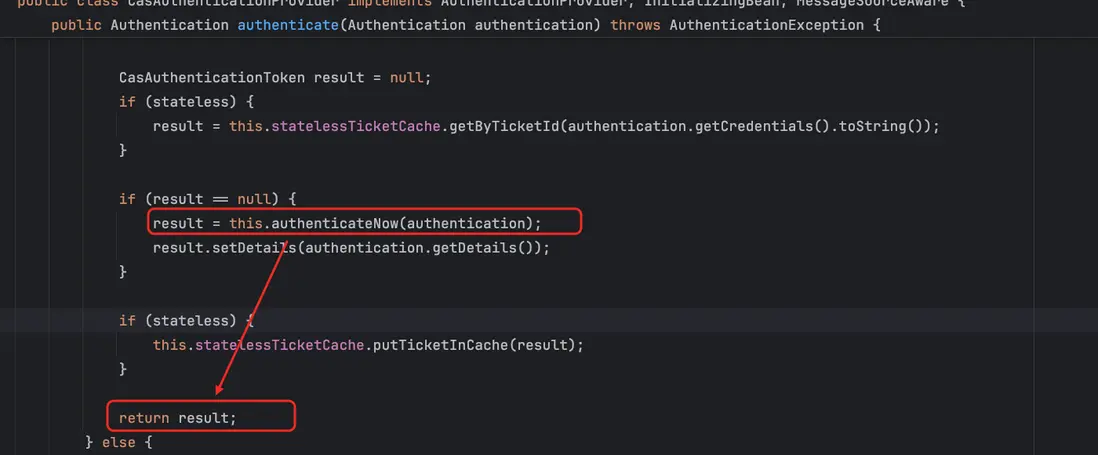
到這裏就完成基於整個 CAS 的 ticket 認證流程就完成了
所以我們的目的就很清楚了
整個流程中,核心組件和配合關係如下:
CasAuthenticationFilter:攔截請求,提取 CAS Ticket,並觸發認證流程。CasAuthenticationProvider:負責票據校驗和生成已認證的Authentication對象。ServiceProperties:提供業務系統的 Service URL,用於票據校驗時向 CAS Server 指定當前服務。AuthenticationUserDetailsService<T extends Authentication>:根據校驗成功的 Ticket 信息,加載對應的用户詳細信息(UserDetails),供後續權限和會話管理使用。
這幾個組件協同工作,就完成了從請求攔截、Ticket 校驗,到用户信息加載和認證對象生成的完整 CAS 登錄流程。
Spring Security CAS 配置説明(前後端分離情況)
在通過看源碼之後,我們看如何在 Spring Security 中 完成 CAS 的配置
1. 導入 Maven 依靠包
<dependency>
    <groupId>org.springframework.security</groupId>
    <artifactId>spring-security-cas</artifactId>
    <version>5.1.5.RELEASE</version>
</dependency>
2. 配置ServiceProperties
用户當前系統中在CAS註冊的 Service Url (也就是跳轉地址,校驗時候會攜帶)
@Bean
public ServiceProperties serviceProperties() {
    ServiceProperties sp = new ServiceProperties();
    // 前端的地址,校驗 Ticket 的時候會攜帶
    sp.setService("https://client-app.com/login/cas");
    sp.setSendRenew(false);
    return sp;
}
3 TicketValidator 配置
@Bean
public TicketValidator ticketValidator() {
    // 這裏以 CAS 3.0 協議為例, 認證 ticket 的請求地址
    return new Cas30ServiceTicketValidator("https://cas-server.com/cas");
}
4. 實現 AuthenticationUserDetailsService
根據 CAS 校驗成功後的 Assertion 信息加載用户詳情:
@Service
public class CasUserServiceImpl implements  AuthenticationUserDetailsService<CasAssertionAuthenticationToken> {

    @Override
    public UserDetails loadUserDetails(CasAssertionAuthenticationToken authenticationToken) throws UsernameNotFoundException {
          // 獲取 CAS 票據中的用户名
        String username = token.getAssertion().getPrincipal().getName();

        // 返回一個固定用户信息,用於測試
        return new User(
                username,
                "N/A", // 密碼不需要,CAS 已認證
                AuthorityUtils.commaSeparatedStringToAuthorityList("ROLE_USER")
        );
    }
}
5. 配置CasAuthenticationProvider
  @Bean
    public CasAuthenticationProvider casAuthenticationProvider() {
        CasAuthenticationProvider provider = new CasAuthenticationProvider();
        provider.setServiceProperties(serviceProperties());
        provider.setTicketValidator(ticketValidator());
        provider.setAuthenticationUserDetailsService(authenticationUserDetailsService);
        provider.setKey("casProviderKey");
        return provider;
    }
6. 配置CasAuthenticationFilter
    @Bean
    public CasAuthenticationFilter casAuthenticationFilter() {
        CasAuthenticationFilter filter = new CasAuthenticationFilter();
        filter.setAuthenticationManager(authenticationManager());
        filter.setAuthenticationSuccessHandler(casSuccessHandler);
        return filter;
    }
7. 整合到 Spring Security 過濾器鏈
將 CasAuthenticationFilter 和 CasAuthenticationProvider 註冊到 Spring Security
@Override
protected void configure(AuthenticationManagerBuilder auth) throws Exception {
    auth.authenticationProvider(casAuthenticationProvider())
}

@Override
protected void configure(HttpSecurity http) throws Exception {
    http.addFilterBefore(casAuthenticationFilter(),UsernamePasswordAuthenticationFilter.class)
        .authorizeRequests()
        .anyRequest().authenticated();
}
這樣整個 CAS 流程就完整了:
CasAuthenticationFilter攔截請求提取 TicketCasAuthenticationProvider調用ticketValidator校驗 Ticket- 成功後通過
AuthenticationUserDetailsService加載用户信息 - 生成認證對象並寫入
SecurityContext
問題描述
在配置完 CAS 認證之後,發現通過 Basic 認證方式登錄失敗,即使輸入的用户名和密碼正確,系統仍然報錯。
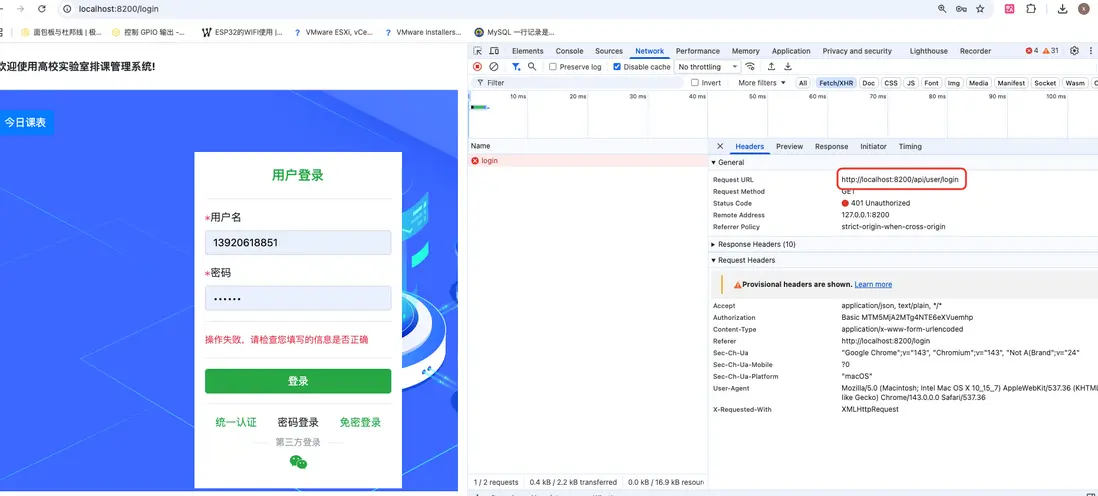
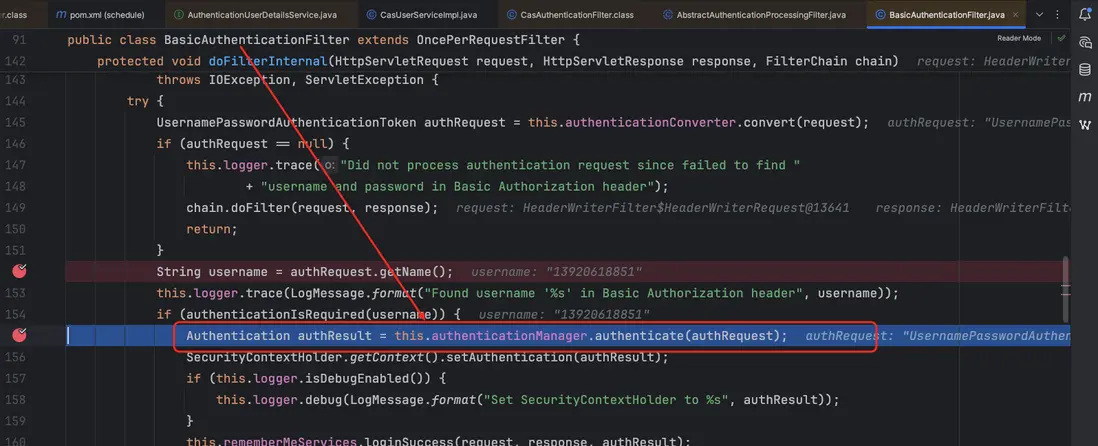
為排查問題,我們開啓調試並在 BasicAuthenticationFilter 上設置斷點。調試結果顯示,攔截器已成功觸發,並能夠正確獲取到用户提交的用户名和密碼。
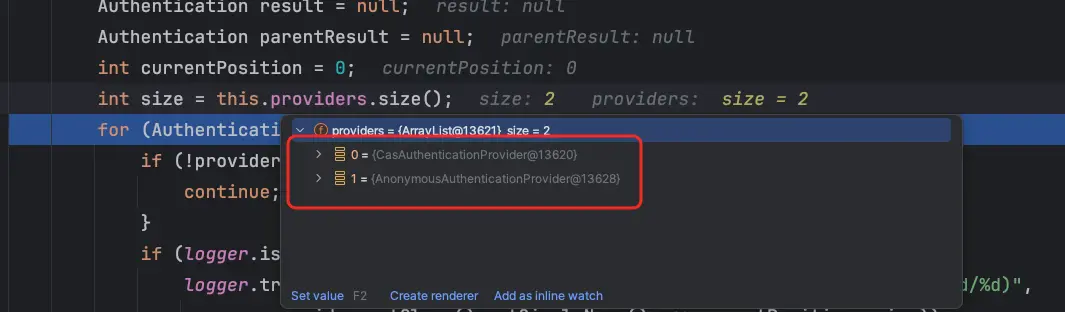
隨後,進入 ProviderManager 的 authenticate 方法分析認證流程。根據前面的講解,ProviderManager 會遍歷已註冊的 AuthenticationProvider 列表,並調用與憑證類型匹配的 AuthenticationProvider 執行認證。通過斷點調試發現,問題出在這裏:當前系統僅註冊了兩個 Provider——CasAuthenticationProvider 和 AnonymousAuthenticationProvider,並未包含 DaoAuthenticationProvider,因此基於用户名密碼的認證無法被正確處理。
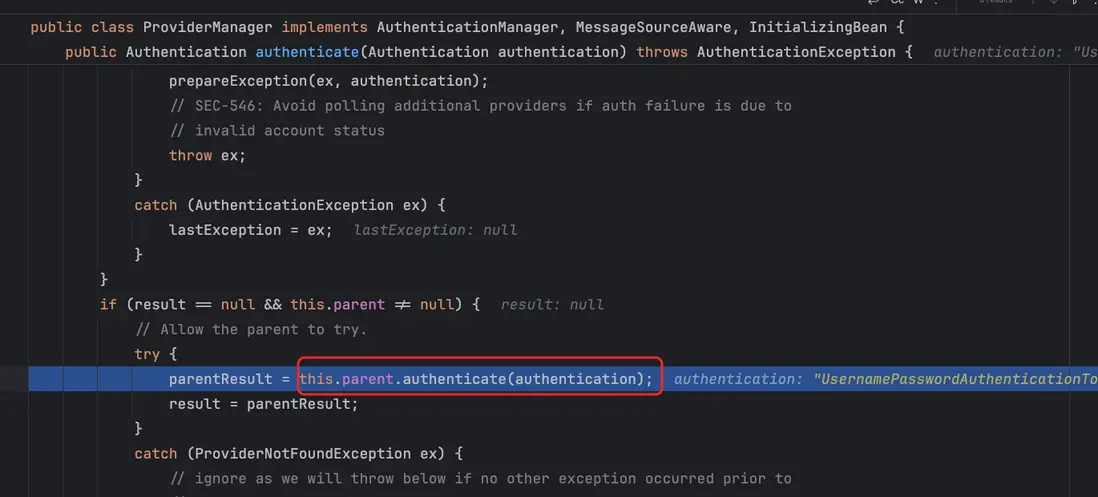
進入 ProviderManger 的 parent
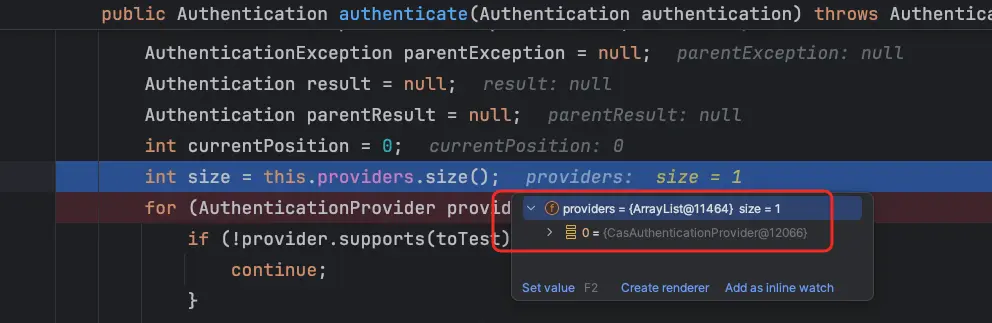
此時還是沒有發現 DaoAuthenticationProvider
這個時候就覺得奇怪了,以前沒有配置 DaoAuthenticationProvider,也是有的DaoAuthenticationProvider,此時我們先註釋掉 CasAuthenticationProvider的代碼
    @Override
    protected void configure(AuthenticationManagerBuilder auth) throws Exception {
        auth.authenticationProvider(casAuthenticationProvider());
   }

    @Bean
    public CasAuthenticationProvider casAuthenticationProvider() {
        CasAuthenticationProvider provider = new CasAuthenticationProvider();
        provider.setServiceProperties(serviceProperties());
        provider.setTicketValidator(ticketValidator());
        provider.setAuthenticationUserDetailsService(authenticationUserDetailsService);
        provider.setKey("casProviderKey");
        return provider;
    }
我們還是進入 進入 ProviderManager 的 authenticate 方法分析認證流程,發現在當前的 AuthenticationProvider 只有 AnonymousAuthenticationProvider,
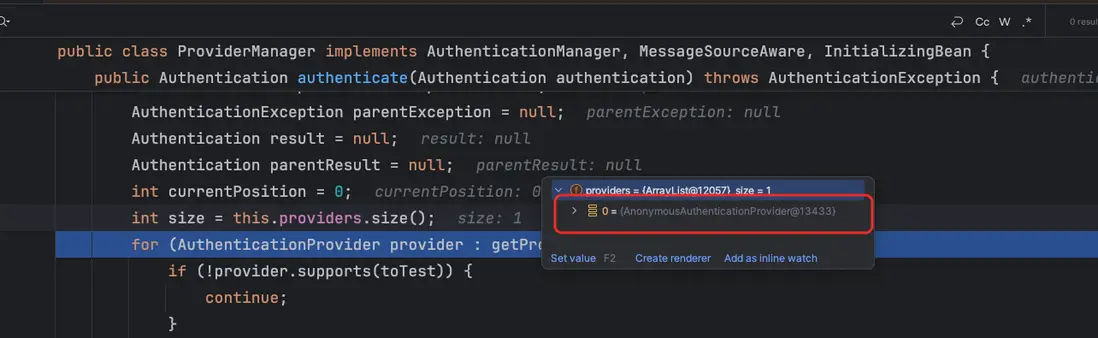
接着進行debug, 進入 ProviderManger 的 parent
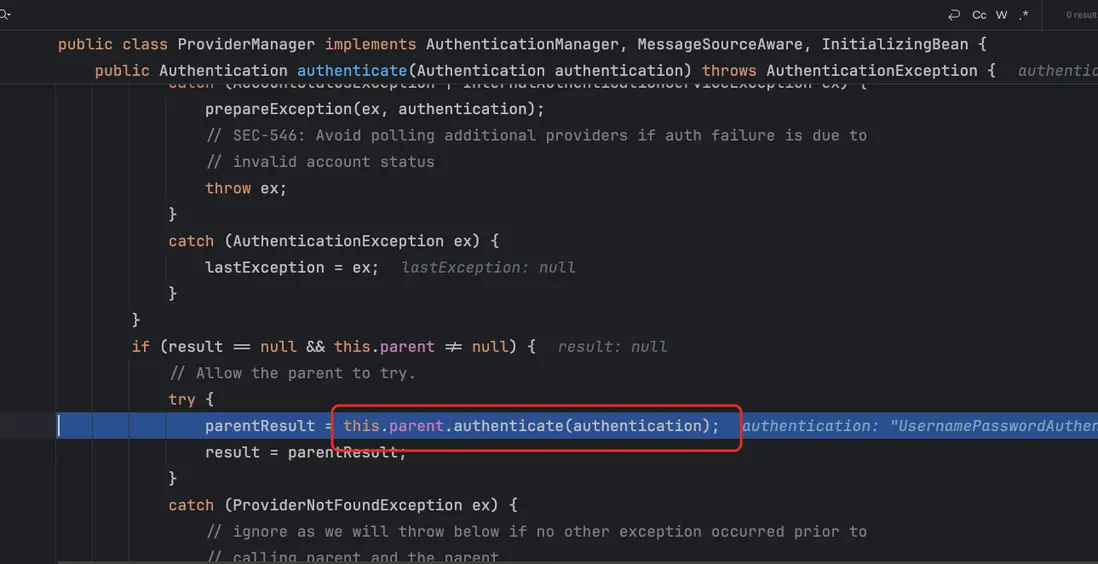
到這裏我們就可以發現有一個 provider 是 DaoAuthenticationProvider
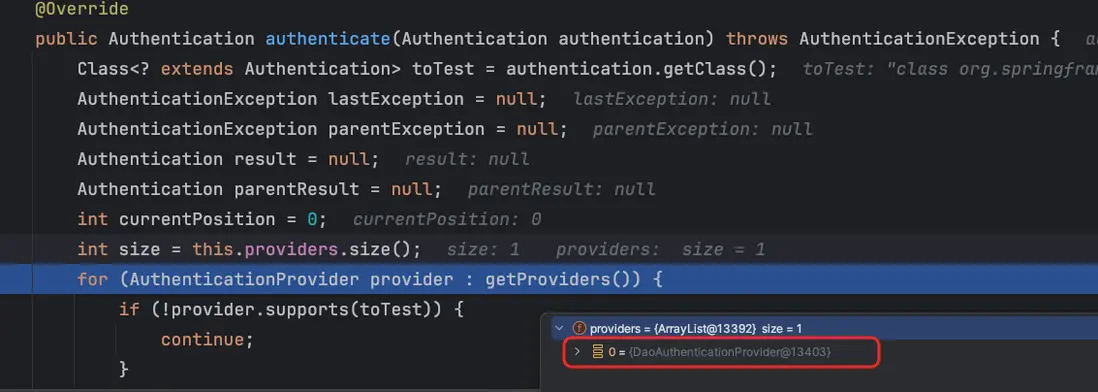
這時候就覺得奇怪了,為啥配置 CasAuthenticationProvider 會導致 DaoAuthenticationProvider 沒有呢
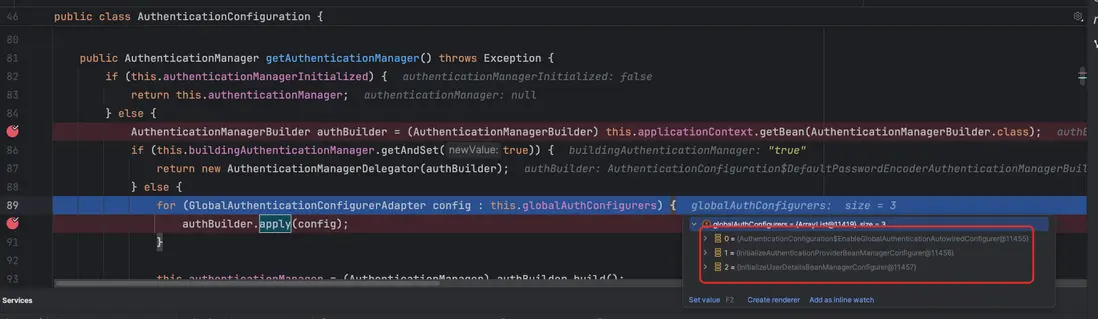
通過查找源碼,我們在發現進入了 getAuthenticationManager(), 我們之前在 MvcSecurityConfig 的配置了 authenticationManager(...) 這個方法調用了 authenticationConfiguration.getAuthenticationManager()
當我們調用 AuthenticationConfiguration.getAuthenticationManager() 時,Spring 會開始創建 AuthenticationManager。而在這個創建過程中,框架會依次執行所有註冊的 GlobalAuthenticationConfigurerAdapter,其中就包括 InitializeUserDetailsManagerConfigurer。
@Bean
public AuthenticationManager authenticationManager(AuthenticationConfiguration authenticationConfiguration) throws Exception {
    return  authenticationConfiguration.getAuthenticationManager();
}
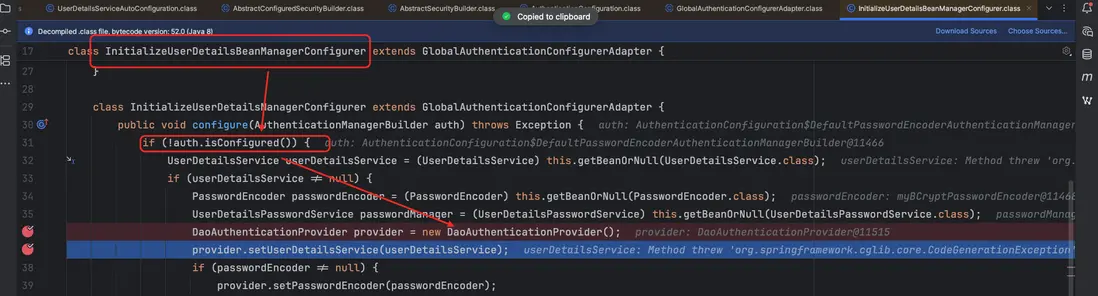
此時,如果我們 沒有顯式配置任何 AuthenticationProvider,並且 Spring 容器中 存在一個 UserDetailsService Bean,InitializeUserDetailsManagerConfigurer 就會介入,自動為我們創建並註冊一個 DaoAuthenticationProvider。
從調試過程中可以看到,Spring Security 會收集多個全局配置(總共有三個 configurer),並在構建 AuthenticationManager 時依次執行它們。當我們給 InitializeUserDetailsManagerConfigurer 打斷點時,也正是在這個階段被調用,説明自動配置機制已經開始生效。
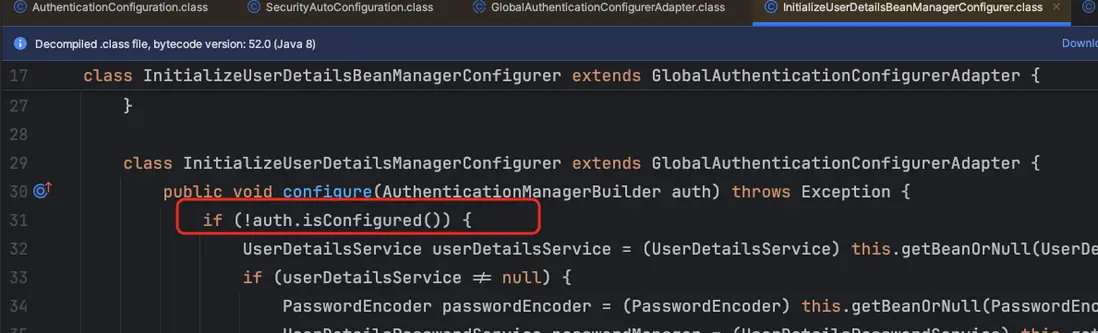
isConfigured() 用來判斷認證體系是否已經被手動配置過:只要存在任何 Provider 或父級 AuthenticationManager,就視為已配置,Spring 將不再自動添加默認的 DaoAuthenticationProvider。
在上文中配置了已下的代碼 CasAuthenticationProvider 後 isConfigured() 會返回 true,表示認證體系已手動配置,Spring 因此不會再自動添加默認的 DaoAuthenticationProvider。
@Override
protected void configure(AuthenticationManagerBuilder auth) throws Exception {
    auth.authenticationProvider(casAuthenticationProvider())
}
解決方法
- 顯性配置
DaoAuthenticationProvider
    @Bean
    public DaoAuthenticationProvider daoAuthenticationProvider() {
        DaoAuthenticationProvider daoProvider = new DaoAuthenticationProvider();
        daoProvider.setPasswordEncoder(passwordEncoder);
        daoProvider.setUserDetailsService(userDetailsService);
        return daoProvider;
}- DaoAuthenticationProvider 註冊到 Spring Security
    @Override
    protected void configure(AuthenticationManagerBuilder auth) throws Exception {
        auth.authenticationProvider(casAuthenticationProvider());
        auth.authenticationProvider(daoAuthenticationProvider());
    }
總結
問題的根本原因在於:配置了 CasAuthenticationProvider 後,Spring Security 認為認證體系已經“手動配置完成”,因此不再執行默認的 DaoAuthenticationProvider 自動註冊邏輯。
這與 Spring Security 內部的判斷機制 isConfigured() 直接相關——一旦檢測到存在自定義 Provider,框架就不會再注入默認的基於賬號密碼的 DaoAuthenticationProvider,導致 Basic 認證失效。
在調試過程中,我們可以看到:
- 未配置 CAS 時,DaoAuthenticationProvider 是通過
InitializeUserDetailsManagerConfigurer自動註冊到父級 AuthenticationManager 中的; - 配置 CAS 後,由於
isConfigured()返回 true,自動配置被跳過,導致 DaoAuthenticationProvider 不再出現,BasicAuthenticationFilter 雖然能捕獲用户名密碼,但認證鏈中沒有可用的 Provider 去執行校驗,最終認證失敗。
為恢復 Basic 認證,只需顯式創建 DaoAuthenticationProvider,並手動將其加入 AuthenticationManagerBuilder,讓 CAS 與 Dao 兩種認證方式同時存在即可。
