

通常我們mock數據都會安裝mockjs:yarn add mockjs
但是需要配置很多東西,還要攔截請求等等,對新手不友好,即使是老手也覺得麻煩。
推薦大家使用useMock 在線Mock助手,項目API數據模擬,聲稱比內部環境更貼心
- 支持團隊協作
- 靈活解耦
- 不局域
- 可反覆調試
- 自動生成文檔
官網:https://www.usemock.com/
React請求示例:
在線Demo: https://www.usemock.com/demo/...
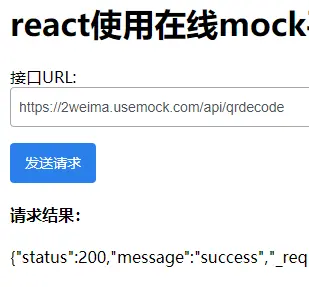
<div id="app"></div>

<script type="text/babel">


  const axiosDemo = React.createElement(() => {
    const { useState } = window.React;

    const [apiUrl, setApiUrl] = useState("https://2weima.usemock.com/api/qrdecode"); //input
    const [info, setInfo] = useState(null); // 請求結果

    const onReqApi = ()=> {

        // 使用axios發請求
        axios.post(apiUrl,{
          // 模擬請求信息
          qr_image:"https://img.2weima.com/qr_template/2021/6/26/8857784941a0f2d2a024044f414c69f9.jpg"
        })
        .then(response =>{
          // 響應信息
          setInfo(response.data)
          console.log('由於跨域請求,在Network中多一個 Request Method: OPTIONS 請求是正常的。')
          console.log('response data:',response.data)
        })
      }

    return <div>
      <div class="ui-input">接口URL:<input placeholder="useMock接口鏈接" value={apiUrl} onChange={(event)=>{ setApiUrl(event.target.value)}}  /></div>
        <p>
          <button class="ui-button" data-type="primary" onClick={()=>{ onReqApi() }}>發送請求</button>
        </p>
        {info && (
          <div>
          <h4>請求結果:</h4>
          <p>{JSON.stringify(info)}</p>
        </div>
        )}


      </div>

  });

  ReactDOM.render(
      <div>{axiosDemo}</div>,
      document.getElementById('app')
  );


</script>