

tklog是rust高性能結構化日誌庫,支持同步日誌,異步日誌,支持自定義日誌的輸出格式,支持按時間,按文件大小分割日誌文件,支持日誌文件壓縮備份,支持官方日誌庫標準API,支持mod獨立參數設置,支持日誌level獨立參數設置
- 簡介
- Github地址
- 倉庫地址
- 《rust日誌庫性能壓測 — log4rs + tracing + tklog》
v0.2.8 更新內容
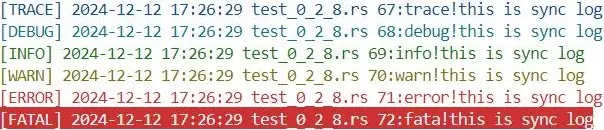
- 增加 控制枱日誌獨立格式化功能
- 通過
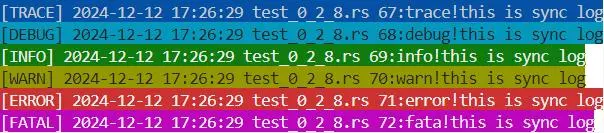
set_console_body_fmt可以設置日誌內容在控制枱的顯示格式,與set_body_fmt類似,不同的是set_body_fmt對控制枱信息與文件信息均有效。 - 測試程序地址: test_0_2_8.rs
示例:
fn testlog2() {
    LOG.set_console(true).set_cutmode_by_size("028test2.log", 1 << 20, 0, false).set_level(LEVEL::Trace).set_attr_format(|fmt| {
        fmt.set_console_body_fmt(|level, body| {
            //處理body的末尾換行符
            let trimmed_body = if body.ends_with('\n') { format!("{}{}", body.as_str()[..body.len() - 1].to_string(), "\x1b[0m\n") } else { format!("{}{}", body, "\x1b[0m\n") };

            match level {
                LEVEL::Trace => format!("{}{}", "\x1b[34m", trimmed_body), //藍色
                LEVEL::Debug => format!("{}{}", "\x1b[36m", trimmed_body), //青色
                LEVEL::Info => format!("{}{}", "\x1b[32m", trimmed_body),  //綠色
                LEVEL::Warn => format!("{}{}", "\x1b[33m", trimmed_body),  //黃色
                LEVEL::Error => format!("{}{}", "\x1b[31m", trimmed_body), //紅色
                LEVEL::Fatal => format!("{}{}", "\x1b[41m", trimmed_body), //背景紅
                LEVEL::Off => "".to_string(),
            }
        });

        fmt.set_body_fmt(|level, body| {
            //處理body的末尾換行符
            let trimmed_body = if body.ends_with('\n') { format!("{}{}", body.as_str()[..body.len() - 1].to_string(), "\x1b[0m\n") } else { format!("{}{}", body, "\x1b[0m\n") };
            match level {
                LEVEL::Trace => format!("{}{}", "\x1b[44m", trimmed_body), //背景藍色
                LEVEL::Debug => format!("{}{}", "\x1b[46m", trimmed_body), //背景青色
                LEVEL::Info => format!("{}{}", "\x1b[42m", trimmed_body),  //背景綠色
                LEVEL::Warn => format!("{}{}", "\x1b[43m", trimmed_body),  //背景黃色
                LEVEL::Error => format!("{}{}", "\x1b[41m", trimmed_body), //背景紅色
                LEVEL::Fatal => format!("{}{}", "\x1b[45m", trimmed_body), //背景紫色
                LEVEL::Off => "".to_string(),
            }
        });
    });

    trace!("trace!", "this is sync log");
    debug!("debug!", "this is sync log");
    info!("info!", "this is sync log");
    warn!("warn!", "this is sync log");
    error!("error!", "this is sync log");
    fatal!("fata!", "this is sync log");
    thread::sleep(Duration::from_secs(1))
}
説明:示例對控制枱日誌進行獨立設置
輸出結果
控制枱日誌輸出:
文件日誌輸出:
tklog 快速使用
安裝tklog
方法一:使用 cargo add 命令
cargo add tklog方法二:手動編輯 Cargo.toml
tklog = "0.2.8"測試用例
use tklog::{trace,debug, error, fatal, info,warn}
fn testlog() {
    trace!("trace>>>>", "aaaaaaaaa", 1, 2, 3, 4);
    debug!("debug>>>>", "bbbbbbbbb", 1, 2, 3, 5);
    info!("info>>>>", "ccccccccc", 1, 2, 3, 5);
    warn!("warn>>>>", "dddddddddd", 1, 2, 3, 6);
    error!("error>>>>", "eeeeeeee", 1, 2, 3, 7);
    fatal!("fatal>>>>", "ffffffff", 1, 2, 3, 8);
}
tklog性能
Tklog 有極高的性能,特別是在linux環境中,具體測試參考文章
- 《記錄tklog壓測結果》
- 《Rust日誌庫性能壓測 — log4rs + tracing + tklog》

