Halo博客的谷歌收錄自動提交
前言
- 在Halo博客的百度定時頁面提交一文中已經實現了向百度的主動頁面提交,而對於Google平台,實際上並不需要設計類似的功能,一方面Google的基於sitemap的抓取效果已經很好,另一方面,雖然Google也提供了indexing API以提供主動提交的服務,但是需要掛代理才能訪問
- 但是為了功能的完整性以及可以使用樹莓派直接掛代理訪問,於是決定基於Google indexing API實現谷歌收錄的自動提交
準備工作
- 實際上,谷歌SEO提供了豐富的文檔供站點管理者學習,但是本文僅摘取其中對於indexing API支持的部分,進行簡要的介紹
- 全程設置工作需要正常訪問谷歌
獲取訪問令牌
- indexing API使用了OAuth2.0的驗證方式,請求該API時需要提供訪問令牌,因此第一步,首先在Google Cloud Platform中執行相關設置
-
進入服務賬號頁面創建項目
-
點擊創建服務賬號
-
直接點擊完成即可,兩個可選部分不用管
-
創建私鑰,注意選擇JSON類型的私鑰
- 執行創建後,私鑰文件會下載到本地

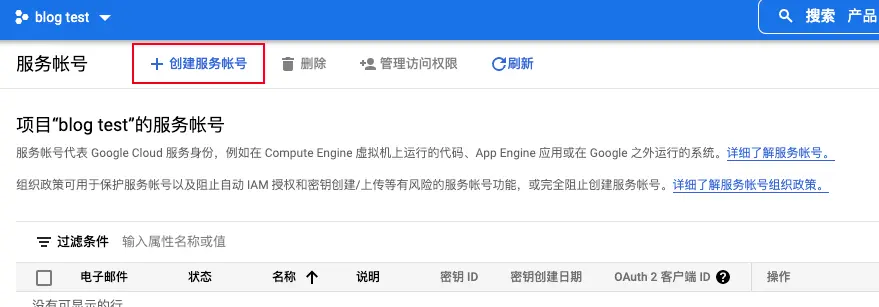
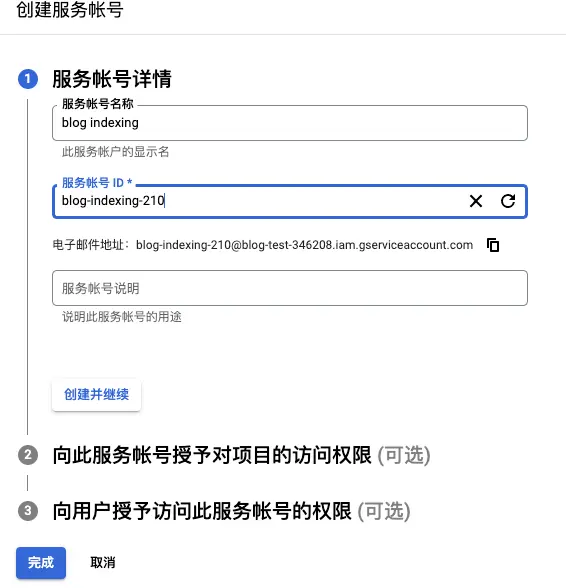
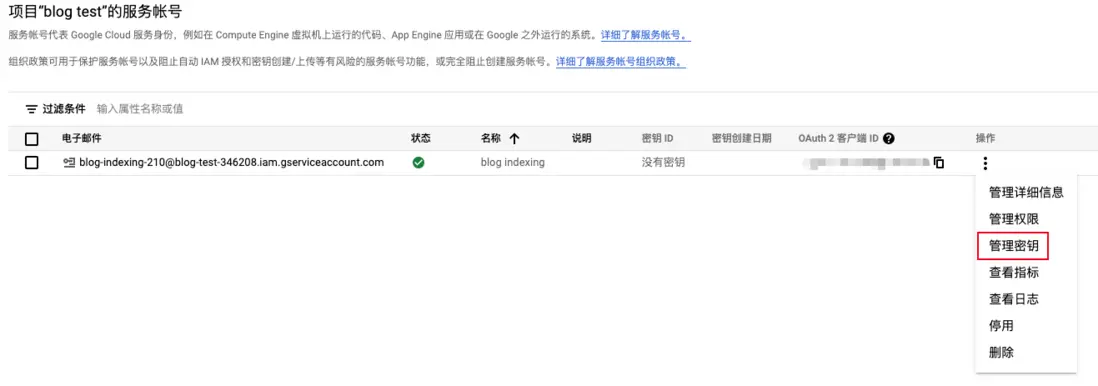
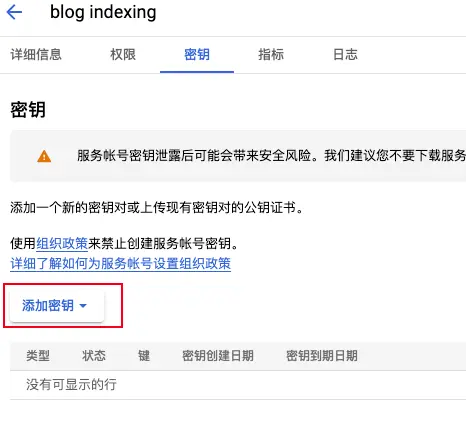
Search Console添加網站
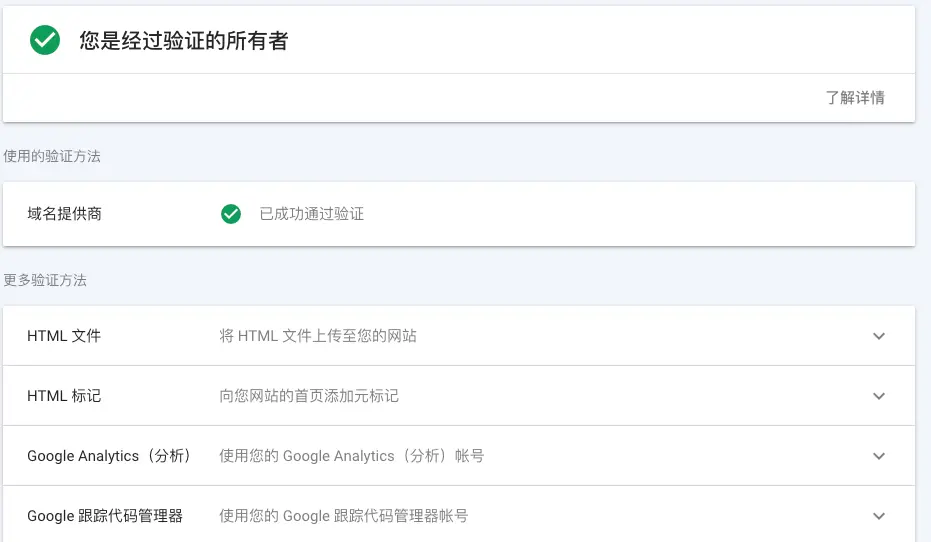
- 在Search Console添加網站實際上是驗證網站所有權,有多種方法,可參考驗證網站所有權
-
博主自己使用的是域名提供商的方式,比較簡單,如下圖所示就是驗證成功
賦予服務賬號所有者狀態
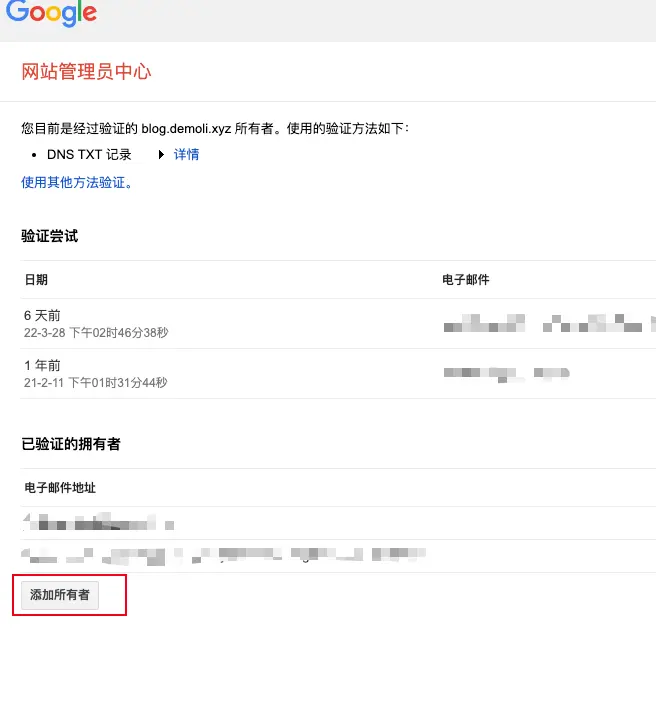
- 實際上是向第一步創建的服務賬號授予第二步添加的網站的所有權
-
訪問網站站長中心,計入到網站條目中,點擊添加所有者
- 要求輸入服務賬號電子郵件地址,此地址可以從第一步中下載到的私鑰中的
client_name字段中找到
項目構建
-
建立Gradle工程,配置文件如下所示
plugins {
    id 'java'
    id 'application'
}

group 'xyz.demoli'
version '1.0-SNAPSHOT'

sourceCompatibility = 1.11
mainClassName="xyz.demoli.Main"

repositories {
    mavenCentral()
}

application{
    applicationDefaultJvmArgs = ['-Duser.timezone=GMT+8']
}

dependencies {
    testImplementation 'org.junit.jupiter:junit-jupiter-api:5.8.1'
    testRuntimeOnly 'org.junit.jupiter:junit-jupiter-engine:5.8.1'
    compile 'com.google.api-client:google-api-client:1.33.0'
    implementation 'com.google.auth:google-auth-library-oauth2-http:1.3.0'
    compile 'com.google.apis:google-api-services-indexing:v3-rev20200804-1.32.1'
    // https://mvnrepository.com/artifact/com.squareup.okhttp3/okhttp
    implementation group: 'com.squareup.okhttp3', name: 'okhttp', version: '4.9.3'
    implementation 'com.google.code.gson:gson:2.9.0'
    // https://mvnrepository.com/artifact/org.apache.logging.log4j/log4j-api
    implementation group: 'org.apache.logging.log4j', name: 'log4j-api', version: '2.14.1'
    // https://mvnrepository.com/artifact/org.apache.logging.log4j/log4j-core
    implementation group: 'org.apache.logging.log4j', name: 'log4j-core', version: '2.14.1'
    // https://mvnrepository.com/artifact/org.projectlombok/lombok
    compileOnly group: 'org.projectlombok', name: 'lombok', version: '1.18.22'
    annotationProcessor group: 'org.projectlombok', name: 'lombok', version: '1.18.22'
}

test {
    useJUnitPlatform()
}
annotationProcessor group: 'org.projectlombok', name: 'lombok', version: '1.18.22'保證gradle項目中lombok的註解可以被正確解析applicationDefaultJvmArgs參數的設置是為了解決後續服務部署在容器中時日誌打印時間不是東八區時區的問題
-
配置文件
config.properties如下:prefix=https://blog.demoli.xyz postAPI=%s/api/content/posts?api_access_key=%s&page=%d apiAccessKey=*** proxyURL=192.168.0.137 proxyPort=7890-
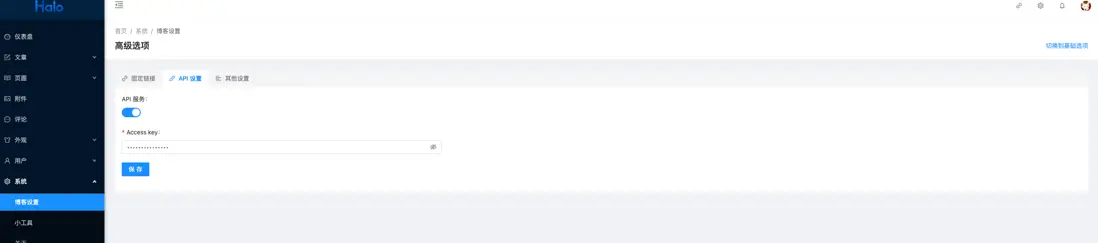
apiAccessKey是在Halo博客設置中設定的 prefix是Halo博客的首頁訪問URLproxy的兩個配置即是代理配置
-
-
日誌配置文件如下(粗糙的配置):
<?xml version="1.0" encoding="utf-8" ?> <configuration status="INFO"> <appenders> <console name="console" target="SYSTEM_OUT"> <PatternLayout pattern="%d{yyyy-MM-dd HH:mm:ss.SSS} [%t] %-5level %logger{36} - %msg%n"/> </console> </appenders> <loggers> <root level="INFO"> <appender-ref ref="console"/> </root> </loggers> </configuration> - 將準備工作中得到的私鑰放在項目的
resources目錄下,更名為cred.json -
整個工程只有兩個核心類
-
PostScrapimport com.google.gson.Gson; import com.google.gson.JsonArray; import com.google.gson.JsonElement; import com.google.gson.JsonObject; import java.io.IOException; import java.io.InputStream; import java.util.ArrayList; import java.util.HashSet; import java.util.List; import java.util.Properties; import java.util.Set; import java.util.stream.Collectors; import okhttp3.OkHttpClient; import okhttp3.Request; import okhttp3.Response; /** * 使用Halo API獲取文章鏈接 */ public class PostScrap { static private String postAPI; static private String apiAccessKey; static private String prefix; // 緩存 static private final Set<String> links = new HashSet<>(); // 注意properties配置文件中字符串不用加引號 static { try (InputStream stream = PostScrap.class.getResourceAsStream("/config.properties")) { Properties properties = new Properties(); properties.load(stream); apiAccessKey = properties.getProperty("apiAccessKey"); prefix = properties.getProperty("prefix"); postAPI = properties.getProperty("postAPI"); } catch (IOException e) { e.printStackTrace(); } } /** * 發起請求獲取全部文章鏈接 * @return */ public static List<String> getPosts() { List<String> res = new ArrayList<>(); OkHttpClient client = new OkHttpClient(); Request initialRequest = new Request.Builder().get().url(String.format(postAPI,prefix,apiAccessKey,0)).build(); try (Response response = client.newCall(initialRequest).execute()) { res = handlePage(response, client); } catch (IOException e) { e.printStackTrace(); } return res; } /** * 處理分頁 * @param initialResponse * @param client * @return * @throws IOException */ private static List<String> handlePage(Response initialResponse, OkHttpClient client) throws IOException { JsonObject jsonObject = new Gson().fromJson(initialResponse.body().string(), JsonObject.class); JsonArray array = jsonObject.get("data").getAsJsonObject().get("content").getAsJsonArray(); int pages = jsonObject.get("data").getAsJsonObject().get("pages").getAsInt(); // jsonArray轉為List List<String> posts = new ArrayList<>(); for (JsonElement element: array) { posts.add(element.getAsJsonObject().get("fullPath").getAsString()); } // 分頁查詢 for(int i = 1; i < pages; i++) { Request request = new Request.Builder().get().url(String.format(postAPI,prefix,apiAccessKey,i)).build(); try (Response response = client.newCall(request).execute()) { jsonObject = new Gson().fromJson(response.body().string(), JsonObject.class); array = jsonObject.get("data").getAsJsonObject().get("content").getAsJsonArray(); for (JsonElement element: array) { posts.add(element.getAsJsonObject().get("fullPath").getAsString()); } } catch (IOException e) { e.printStackTrace(); } } // 緩存過濾 return posts.stream().map(content -> prefix + content).filter(links::add).collect( Collectors.toList()); } } -
GoogleSubmitterimport com.google.api.client.googleapis.GoogleUtils; import com.google.api.client.http.HttpRequestInitializer; import com.google.api.client.http.HttpResponse; import com.google.api.client.http.HttpTransport; import com.google.api.client.http.javanet.NetHttpTransport; import com.google.api.client.json.JsonFactory; import com.google.api.client.json.gson.GsonFactory; import com.google.api.services.indexing.v3.Indexing; import com.google.api.services.indexing.v3.model.UrlNotification; import com.google.auth.http.HttpCredentialsAdapter; import com.google.auth.oauth2.GoogleCredentials; import java.io.IOException; import java.io.InputStream; import java.net.InetSocketAddress; import java.net.Proxy; import java.security.GeneralSecurityException; import java.util.List; import java.util.Properties; import lombok.extern.log4j.Log4j2; /** * 提交谷歌收錄 */ @Log4j2 public class GoogleSubmitter { private static GoogleCredentials googleCredentials; private static String proxyURL; private static Integer proxyPort; static { // 加載秘鑰 try (InputStream stream = PostScrap.class.getResourceAsStream("/cred.json")) { googleCredentials = GoogleCredentials.fromStream(stream); } catch (IOException e) { e.printStackTrace(); } // 加載配置文件 try (InputStream config = PostScrap.class.getResourceAsStream("/config.properties")) { Properties properties = new Properties(); properties.load(config); proxyURL = properties.getProperty("proxyURL"); proxyPort = Integer.parseInt(properties.getProperty("proxyPort")); } catch (IOException e) { e.printStackTrace(); } } /** * 設置本地代理 * * @return * @throws GeneralSecurityException * @throws IOException */ static HttpTransport newProxyTransport() throws GeneralSecurityException, IOException { NetHttpTransport.Builder builder = new NetHttpTransport.Builder(); builder.trustCertificates(GoogleUtils.getCertificateTrustStore()); builder.setProxy(new Proxy(Proxy.Type.HTTP, new InetSocketAddress(proxyURL, proxyPort))); return builder.build(); } /** * 提交鏈接 */ public static void submit() { // 獲取待提交鏈接 List<String> urls = PostScrap.getPosts(); if (urls.size() == 0) { log.info("無新增文章"); return; } try { // 構建indexing服務 // HttpTransport httpTransport = GoogleNetHttpTransport.newTrustedTransport(); HttpTransport httpTransport = newProxyTransport(); JsonFactory jsonFactory = GsonFactory.getDefaultInstance(); HttpRequestInitializer requestInitializer = new HttpCredentialsAdapter(googleCredentials); Indexing indexing = new Indexing(httpTransport, jsonFactory, requestInitializer); Indexing.UrlNotifications notifications = indexing.urlNotifications(); int count = 0; for (String url : urls) { UrlNotification notification = new UrlNotification(); notification.setUrl(url); // URL_REMOVED 或者 URL_UPDATED notification.setType("URL_UPDATED"); Indexing.UrlNotifications.Publish publish = notifications.publish(notification); HttpResponse response = publish.executeUnparsed(); if (response.getStatusCode() != 200) { log.error("提交失敗: {}", url); } else { log.info("提交成功: {}", url); count++; } } log.info("提交成功 {} 條鏈接", count); } catch (GeneralSecurityException | IOException e) { e.printStackTrace(); } } }
-
-
Main
import java.util.concurrent.Executors;
import java.util.concurrent.TimeUnit;

public class Main {

    public static void main(String[] args) {
        Executors.newScheduledThreadPool(1)
            .scheduleWithFixedDelay(GoogleSubmitter::submit, 0, 12, TimeUnit.HOURS);
    }
}
工程部署
- 項目根目錄執行
gradle build -x test -
將
build/distributions/GoogleSubmit-1.0-SNAPSHOT.tar拷貝到安裝有Java環境的服務器tar xf GoogleSubmit-1.0-SNAPSHOT.tar cd GoogleSubmit-1.0-SNAPSHOT nohup bin/GoogleSubmit > nohup.out & tail -f nohup.out查看日誌
補充
- 博主是一個Docker容器的究極愛好者,因為使用容器可以保證宿主機環境的”純淨“,所以這裏補充使用Docker容器部署服務的方式
-
首先將項目構建得到的軟件包
build/distributions/GoogleSubmit-1.0-SNAPSHOT.tar拷貝到服務器,解壓並重新命名,創建Dockerfiletar xf GoogleSubmit-1.0-SNAPSHOT.tar mkdir -p blogSubmitter/googleSubmitter mv GoogleSubmit-1.0-SNAPSHOT blogSubmitter/googleSubmitter/google cd blogSubmitter/googleSubmitter touch Dockerfile -
Dockerfile文件如下:
FROM openjdk:11 COPY . /submitter WORKDIR /submitter # 更改時區 RUN rm -rf /etc/localtime RUN ln -s /usr/share/zoneinfo/Asia/Shanghai /etc/localtime CMD ["nohup","google/bin/GoogleSubmitter"," &"] -
創建yaml配置文件,使用Docker Compose構建服務
cd blogSubmitter
touch submitter.yaml
version: '3.1' services: blog-google-submitter: build: ./googleSubmitter container_name: blogGoogleSubmitter restart: unless-stopped - 執行
docker-compose -f submitter.yaml up -d創建服務
注意事項
- 如果更改了源碼,需要重新構建鏡像,此時要把之前的鏡像刪除(應該有更好的解決辦法,有待改善,比如使用volume的方式執行掛載)
參考
- Indexing API
- Google Indexing API(Python)
- 谷歌搜索中心
- Indexing API錯誤
- Google API Java Client Services
- Google OAuth Java Client
- Google API Java Client
- 如何提高谷歌收錄
- Gradle Application Plugin
- 解決Docker容器和宿主機時間不一致的問題