

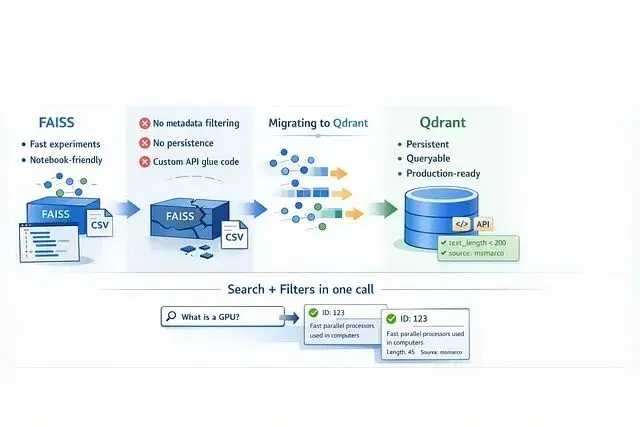
FAISS 在實驗階段確實好用,速度快、上手容易,notebook 裏跑起來很順手。但把它搬到生產環境還是有很多問題:
首先是元數據的問題,FAISS 索引只認向量,如果想按日期或其他條件篩選還需要自己另外搞一套查找系統。
其次它本質上是個庫而不是服務,讓如果想對外提供接口還得自己用 Flask 或 FastAPI 包一層。
最後最麻煩的是持久化,pod 一旦掛掉索引就沒了,除非提前手動存盤。
Qdrant 的出現解決了這些痛點,它更像是個真正的數據庫,提供開箱即用的 API、數據重啓後依然在、原生支持元數據過濾。更關鍵的是混合搜索(Dense + Sparse)和量化這些高級功能都是內置的。
MS MARCO Passages 數據集
數據集地址:
MS MARCO 官方頁面:https://microsoft.github.io/msmarco/
這次用的是 MS MARCO Passage Ranking 數據集,信息檢索領域的標準測試集。
數據是從網頁抓取的約880萬條短文本段落,選它的原因很簡單:段落短(平均50詞),不用處理複雜的文本分塊,可以把精力放在遷移工程本身。
實際測試時用了10萬條數據的子集,這樣速度會很快
嵌入模型用的是 sentence-transformers/all-MiniLM-L6-v2,輸出384維的稠密向量。
SentenceTransformers 模型地址:https://huggingface.co/sentence-transformers/all-MiniLM-L6-v2
FAISS 階段的初始配置
生成嵌入向量
加載原始數據,批量生成嵌入向量。這裏關鍵的一步是把結果存成 .npy 文件,避免後續重複計算。

 import pandas as pd
from sentence_transformers import SentenceTransformer
import numpy as np
import os
import csv

DATA_PATH = '../data'
TSV_FILE = f'{DATA_PATH}/collection.tsv'
SAMPLE_SIZE = 100000
MODEL_ID = 'all-MiniLM-L6-v2'

def prepare_data():
   print(f"Loading Model '{MODEL_ID}'...")
   model = SentenceTransformer(MODEL_ID)
   print(f"Reading first {SAMPLE_SIZE} lines from {TSV_FILE}...")
   ids = []
   passages = []
   # Efficiently read line-by-line without loading entire 8GB file to RAM
   try:
       with open(TSV_FILE, 'r', encoding='utf8') as f:
           reader = csv.reader(f, delimiter='\t')
           for i, row in enumerate(reader):
               if i >= SAMPLE_SIZE:
                   break
               # MS MARCO format is: [pid, text]
               if len(row) >= 2:
                   ids.append(int(row[0]))
                   passages.append(row[1])
   except FileNotFoundError:
       print(f"Error: Could not find {TSV_FILE}")
       return

   print(f"Loaded {len(passages)} passages.")

   # Save text metadata (for Qdrant payload)
   print("Saving metadata to CSV...")
   df = pd.DataFrame({'id': ids, 'text': passages})
   df.to_csv(f'{DATA_PATH}/passages.csv', index=False)
   # Generate Embeddings
   print("Encoding Embeddings (this may take a moment)...")
   embeddings = model.encode(passages, show_progress_bar=True)
   # Save binary files (for FAISS and Qdrant)
   print("5. Saving numpy arrays...")
   np.save(f'{DATA_PATH}/embeddings.npy', embeddings)
   np.save(f'{DATA_PATH}/ids.npy', np.array(ids))
   print(f"Success! Saved {embeddings.shape} embeddings to {DATA_PATH}")

if __name__ == "__main__":
   os.makedirs(DATA_PATH, exist_ok=True)
    prepare_data()
構建索引
用 IndexFlatL2 做精確搜索,對於百萬級別的數據量來説足夠了。
 import faiss
import numpy as np
import os

DATA_PATH = '../data'
INDEX_OUTPUT_PATH = './my_index.faiss'

def build_index():
   print("Loading embeddings...")
   # Load the vectors
   if not os.path.exists(f'{DATA_PATH}/embeddings.npy'):
       print(f"Error: {DATA_PATH}/embeddings.npy not found.")
       return
   embeddings = np.load(f'{DATA_PATH}/embeddings.npy')
   d = embeddings.shape[1]  # Dimension (should be 384 for MiniLM)
   print(f"Building Index (Dimension={d})...")
   # We use IndexFlatL2 for exact search (Simple & Accurate for <1M vectors).
   index = faiss.IndexFlatL2(d)
   index.add(embeddings)
   print(f"Saving index to {INDEX_OUTPUT_PATH}..")
   faiss.write_index(index, INDEX_OUTPUT_PATH)
   print(f"Success! Index contains {index.ntotal} vectors.")

if __name__ == "__main__":
   os.makedirs(os.path.dirname(INDEX_OUTPUT_PATH), exist_ok=True)
    build_index()
語義搜索測試
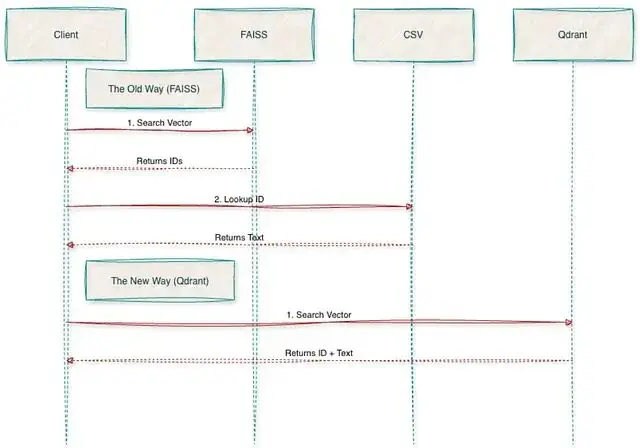
隨便跑一個查詢就能看出問題了。返回的是 [42, 105] 這種 ID,如果想拿到實際文本還得寫一堆代碼去 CSV 裏查,這種割裂感是遷移的主要原因。
 import faiss
import numpy as np
import pandas as pd
from sentence_transformers import SentenceTransformer

INDEX_PATH = './my_index.faiss'
DATA_PATH = '../data'
MODEL_NAME = 'all-MiniLM-L6-v2'

def search_faiss():
   print("Loading Index and Metadata...")
   index = faiss.read_index(INDEX_PATH)
   # LIMITATION: We must manually load the CSV to get text back.
   # FAISS only stores vectors, not the text itself.
   df = pd.read_csv(f'{DATA_PATH}/passages.csv')
   model = SentenceTransformer(MODEL_NAME)
   # userquery
   query_text = "What is the capital of France?"
   print(f"\nQuery: '{query_text}'")
   # Encode and Search
   query_vector = model.encode([query_text])
   D, I = index.search(query_vector, k=3) # Search for top 3 results

   print("\n--- Results ---")
   for rank, idx in enumerate(I[0]):
       # LIMITATION: If we wanted to filter by "text_length > 50",
       # we would have to fetch ALL results first, then filter in Python.
       # FAISS cannot filter during search.
       text = df.iloc[idx]['text'] # Manual lookup
       score = D[0][rank]
       print(f"[{rank+1}] ID: {idx} | Score: {score:.4f}")
       print(f"     Text: {text[:100]}...")

if __name__ == "__main__":
    search_faiss()
遷移步驟
從 FAISS 導出向量
前面步驟已經有 embeddings.npy 了,直接加載 numpy 數組就行,省去了導出環節。
本地啓動 Qdrant 很簡單:
docker run -p6333:6333 qdrant/qdrantCollection 配置文檔:https://qdrant.tech/documentation/concepts/collections/
 from qdrant_client import QdrantClient
from qdrant_client.models import VectorParams, Distance, HnswConfigDiff

QDRANT_URL = "http://localhost:6333"
COLLECTION_NAME = "ms_marco_passages"

def create_collection():
   client = QdrantClient(url=QDRANT_URL)
   print(f"Creating collection '{COLLECTION_NAME}'...")

   client.recreate_collection(
       collection_name=COLLECTION_NAME,
       vectors_config=VectorParams(
           size=384,# Dimension (MiniLM)- we should follow the existing dimension from FAISS
           distance=Distance.COSINE
       ),
       hnsw_config=HnswConfigDiff(
           m=16,                 # Links per node (default is 16)
           ef_construct=100      # Search depth during build (default is 100)
       )
   )

   print(f"Collection '{COLLECTION_NAME}' created with HNSW config.")

if __name__ == "__main__":
    create_collection()
批量上傳數據
Qdrant Python 客户端文檔:https://qdrant.tech/documentation/clients/python/
 import pandas as pd
import numpy as np
from qdrant_client import QdrantClient
from qdrant_client.models import PointStruct

QDRANT_URL = "http://localhost:6333"
COLLECTION_NAME = "ms_marco_passages"
DATA_PATH = '../data'
BATCH_SIZE = 500

def upload_data():
   client = QdrantClient(url=QDRANT_URL)
   print("Loading local data...")
   embeddings = np.load(f'{DATA_PATH}/embeddings.npy')
   df_meta = pd.read_csv(f'{DATA_PATH}/passages.csv')
   total = len(df_meta)
   print(f"Starting upload of {total} vectors...")
   points_batch = []

   for i, row in df_meta.iterrows():
       # Metadata to attach
       payload = {
           "passage_id": int(row['id']),
           "text": row['text'],
           "text_length": len(str(row['text'])),
           "dataset_source": "msmarco_passages"
       }
       points_batch.append(PointStruct(
           id=int(row['id']),
           vector=embeddings[i].tolist(),
           payload=payload
       ))
       # Upload batch
       if len(points_batch) >= BATCH_SIZE or i == total - 1:
           client.upsert(
               collection_name=COLLECTION_NAME,
               points=points_batch
           )
           points_batch = []
           if i % 1000 == 0:
               print(f"  Processed {i}/{total}...")
   print("Upload Complete.")

if __name__ == "__main__":
    upload_data()
驗證遷移結果
 from qdrant_client import QdrantClient
from qdrant_client.models import Filter, FieldCondition, Range, MatchValue
from sentence_transformers import SentenceTransformer

QDRANT_URL = "http://localhost:6333"
COLLECTION_NAME = "ms_marco_passages"
MODEL_NAME = 'all-MiniLM-L6-v2'

def validate_migration():
   client = QdrantClient(url=QDRANT_URL)
   model = SentenceTransformer(MODEL_NAME)
   # Verify total count
   count_result = client.count(COLLECTION_NAME)
   print(f"Total Vectors in Qdrant: {count_result.count}")

   # Query example
   query_text = "What is a GPU?"
   print(f"\n--- Query: '{query_text}' ---")
   query_vector = model.encode(query_text).tolist()

   # Filter Definition
   print("Applying filters (Length < 200 AND Source == msmarco)...")
   search_filter = Filter(
       must=[
           FieldCondition(
               key="text_length",
               range=Range(lt=200)  # can be changed as per the requirement
           ),
           FieldCondition(
               key="dataset_source",
               match=MatchValue(value="msmarco_passages")
           )
       ]
   )

   results = client.query_points(
       collection_name=COLLECTION_NAME,
       query=query_vector,
       query_filter=search_filter,
       limit=3
   ).points

   for hit in results:
       print(f"\nID: {hit.id} (Score: {hit.score:.3f})")
       print(f"Text: {hit.payload['text']}")
       print(f"Metadata: {hit.payload}")

if __name__ == "__main__":
    validate_migration()
性能對比
針對10個常見查詢做了對比測試。
FAISS(本地 CPU):約 0.5ms,純數學計算的速度
Qdrant(Docker):約 3ms,包含了網絡傳輸的開銷
對 Web 服務來説3ms 的延遲完全可以接受,何況換來的是一堆新功能。
 import time
import faiss
import numpy as np
from qdrant_client import QdrantClient
from sentence_transformers import SentenceTransformer

FAISS_INDEX_PATH = './faiss_index/my_index.faiss'
QDRANT_URL = "http://localhost:6333"
COLLECTION_NAME = "ms_marco_passages"
MODEL_NAME = 'all-MiniLM-L6-v2'

QUERIES = [
   "What is a GPU?",
   "Who is the president of France?",
   "How to bake a cake?",
   "Symptoms of the flu",
   "Python programming language",
   "Best places to visit in Italy",
   "Define quantum mechanics",
   "History of the Roman Empire",
   "What is machine learning?",
   "Healthy breakfast ideas"
]

def run_comparison():
   print("---Loading Resources ---")
   # Load Model
   model = SentenceTransformer(MODEL_NAME)
   # Load FAISS (The "Old Way")
   print("Loading FAISS index...")
   faiss_index = faiss.read_index(FAISS_INDEX_PATH)
   # Connect to Qdrant (The "New Way")
   print("Connecting to Qdrant...")
   client = QdrantClient(url=QDRANT_URL)
   print(f"\n---Running Race ({len(QUERIES)} queries) ---")
   print(f"{'Query':<30} | {'FAISS (ms)':<10} | {'Qdrant (ms)':<10}")
   print("-" * 60)

   faiss_times = []
   qdrant_times = []

   for query_text in QUERIES:
       # Encode once
       query_vector = model.encode(query_text).tolist()
       # --- MEASURE FAISS ---
       start_f = time.perf_counter()
       # FAISS expects a numpy array of shape (1, d)
       faiss_input = np.array([query_vector], dtype='float32')
       _, _ = faiss_index.search(faiss_input, k=3)
       end_f = time.perf_counter()
       faiss_ms = (end_f - start_f) * 1000
       faiss_times.append(faiss_ms)
       # --- MEASURE QDRANT ---
       start_q = time.perf_counter()
       _ = client.query_points(
           collection_name=COLLECTION_NAME,
           query=query_vector,
           limit=3
       )
       end_q = time.perf_counter()
       qdrant_ms = (end_q - start_q) * 1000
       qdrant_times.append(qdrant_ms)
       print(f"{query_text[:30]:<30} | {faiss_ms:>10.2f} | {qdrant_ms:>10.2f}")

   print("-" * 60)
   print(f"{'AVERAGE':<30} | {np.mean(faiss_times):>10.2f} | {np.mean(qdrant_times):>10.2f}")

if __name__ == "__main__":
    run_comparison()
測試結果:

最大的差異不在速度,在於省心。
用 FAISS 時有次跑了個索引腳本處理大批數據,耗時40分鐘,佔了12GB內存。快完成時 SSH 連接突然斷了,進程被殺,因為 FAISS 只是個跑在內存裏的庫一切都白費了。
換成 Qdrant 就不一樣了:它像真正的數據庫,數據推送後會持久化保存,即便突然斷開 docker 連接重啓後數據還在。
用過 FAISS 就知道為了把向量 ID 映射回文本,還需要額外維護一個 CSV 文件。遷移到 Qdrant 後這些查找邏輯都刪掉了,文本和向量存在一起,直接查詢 API 就能拿到完整結果,不再需要管理各種文件,就是在用一個微服務。
遷移總結
這次遷移斷斷續續做了一週但收穫很大。最爽的不是寫 Qdrant 腳本,是刪掉舊代碼——提交的 PR 幾乎全是紅色刪除行。CSV 加載工具、手動 ID 映射、各種"代碼"全刪了,代碼量減少了30%,可讀性明顯提升。
只用 FAISS 時,搜索有時像在碰運氣——語義上相似但事實錯誤的結果時常出現。遷移到 Qdrant拿到的不只是數據庫,更是對系統的掌控力。稠密向量配合關鍵詞過濾(混合搜索),終於能回答"顯示 GPU 相關的技術文檔,但只要官方手冊裏的"這種精確查詢,這在之前根本做不到。
信心的變化最明顯,以前不敢加載完整的880萬數據怕內存撐不住。現在架構解耦了可以把全部數據推給 Qdrant,它會在磁盤上處理存儲和索引,應用層保持輕量。終於有了個在生產環境和 notebook 裏都能跑得一樣好的系統。
總結
FAISS 適合離線研究和快速實驗,但要在生產環境跑起來Qdrant 提供了必需的基礎設施。如果還在用額外的 CSV 文件來理解向量含義該考慮遷移了。
https://avoid.overfit.cn/post/ce7c45d8373741f6b8af465bb06bc398
作者:Sai Bhargav Rallapalli
