

有效的信息傳達是演示文稿中的重點,而PowerPoint演示文稿作為最廣泛使用的演示工具之一,提供了豐富的功能來幫助演講者實現這一目標。其中,在演示文稿中插入表格可以幫助觀眾更直觀地理解數據和比較信息。通過使用Python這樣的強大編程語言,我們可以自動化創建表格,將表格插入到PowerPoint中,從而確保數據的準確性並簡化工作流程。本文將介紹如何利用Python來添加表格到PowerPoint演示文稿中。
- 用Python在PowerPoint演示文稿中創建表格
本文所使用的方法需要用到Spire.Presentation for Python,PyPI:pip install Spire.Presentation。
免費申請License
用Python在PowerPoint演示文稿中創建表格
ISlide.Shapes.AppendTable(x: float, y: float, widths: list[float], heights: list[float])方法可以直接在演示文稿的指定幻燈片中創建表格。使用這個方法時,我們需先確定表格的起始座標,並根據數據計算出各個行高和列寬。
以下步驟演示讀取CSV數據並根據數據在演示文稿中創建表格,以及進行簡單的表格格式設置:
- 導入所需模塊。
- 創建
Presentation對象。 - 讀取CSV文件數據為二維字符串列表。
- 使用
Presentation.SlideSize.Type方法設置幻燈片尺寸。 - 使用
Presentation.Slides.get_Item()方法獲取幻燈片。 - 計算表格座標和寬高。
- 使用
ISlide.Shapes.AppendTable()方法在幻燈片中創建指定大小和位置的表格。 - 進行單元格格式設置。
- 使用
ITable.StylePreset設置表格樣式。 - 使用
Presentation.SaveToFile()方法保存演示文稿。 - 釋放資源。
代碼示例
from spire.presentation import Presentation, TextAlignmentType, TableStylePreset, FileFormat, TextFont, SlideSizeType
import csv

# 創建Presentation對象
presentation = Presentation()

# 設置幻燈片大小
presentation.SlideSize.Type = SlideSizeType.Screen16x9

# 獲取默認幻燈片
slide = presentation.Slides.get_Item(0)

# 讀取CSV文件數據為二維字符串列表
with open("Sample.csv", "r", encoding="utf-8") as f:
    csv_reader = csv.reader(f)
    data = list(csv_reader)

# 計算表格座標和寬高
rows = len(data)
columns = len(data[0])
width = float((presentation.SlideSize.Size.Width - 100) / columns)
height = float((presentation.SlideSize.Size.Height - 300) / rows)
widths = [width for _ in range(columns)]
heights = [height for _ in range(rows)]

# 添加表格
table = slide.Shapes.AppendTable(50, 200, widths, heights)
for i in range(rows):
    for j in range(columns):
        table.get_Item(j, i).TextFrame.Text = data[i][j]
        table.get_Item(j, i).TextFrame.Paragraphs.get_Item(0).FirstTextRange.LatinFont = TextFont("微軟雅黑")
        table.get_Item(j, i).TextFrame.TextRange.FontHeight = 24

# 設置表頭對其居中
for i in range(columns):
    table.get_Item(i, 0).TextFrame.Paragraphs.get_Item(0).Alignment = TextAlignmentType.Center

# 設置表格樣式
table.StylePreset = TableStylePreset.ThemedStyle1Accent1

# 保存演示文稿
presentation.SaveToFile("output/插入CSV表格到演示文稿.pptx", FileFormat.Pptx2013)
presentation.Dispose()
添加的表格
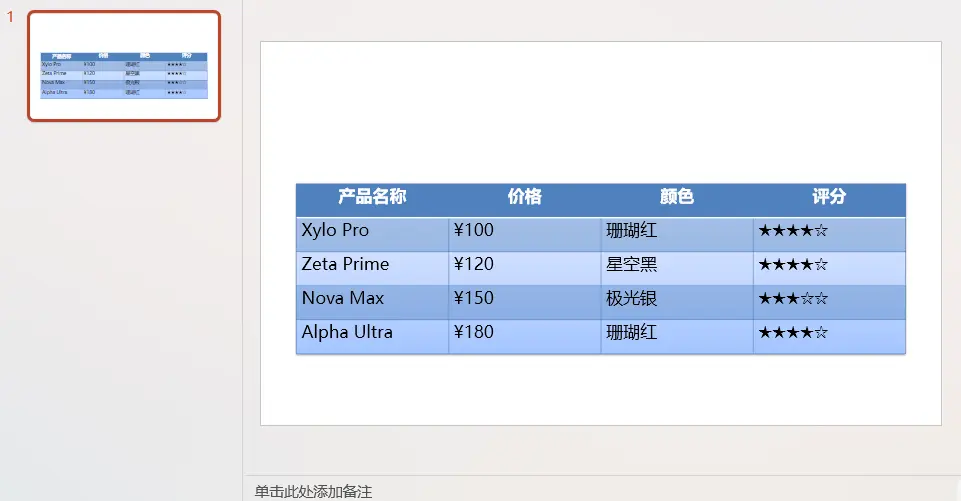
本文演示瞭如何在PowerPoint演示文稿中添加特定數據的表格。
更多PowerPoint演示文稿處理技巧請前往Spire.Presentation for Python教程查看。
