

前一段時間寫了有關登陸的功能。包括Springboot security的簡單使用,微信掃碼登陸,接入spring cloud 的微信登陸。本文就有關Springboot security的登陸做一些簡單記錄。
項目地址見文末
Springboot security登陸
關於登陸功能的實現採取的是Basic64傳輸登陸信息,token認證。本文以此為例。
用户登陸就是服務器接收到用户輸入的用户名和密碼然後與數據庫中的用户名和密碼比對
。成功,則頒發X-auth-token,失敗則返回401
而通過Springboot Security去實現登陸功能,可以實現登陸與認證的自動化。
實現流程
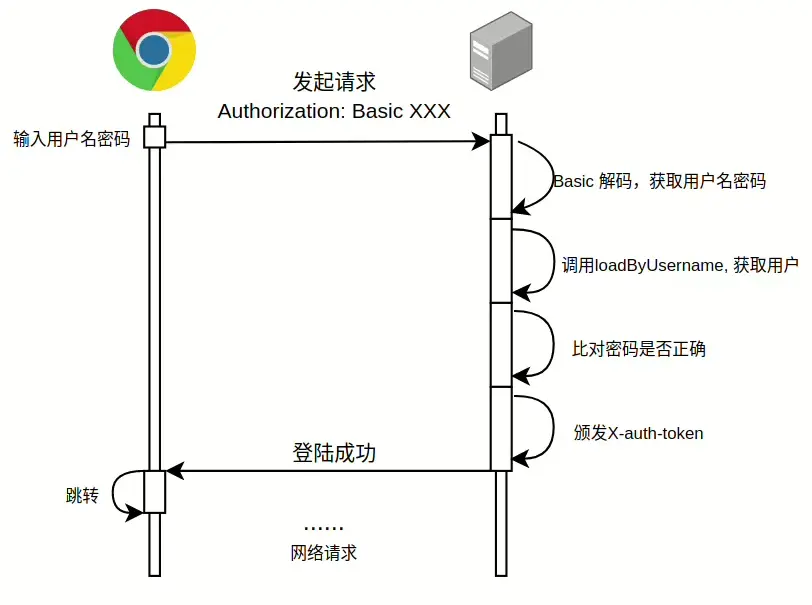
- 用户在瀏覽器中輸入用户名密碼進行登陸,該信息通過Base64編碼之後放到請求頭併發起請求。
- 後台接收到相關請求之後調用
Basic64的解碼方式進行解碼並獲取到用户名和密碼信息。 - 調用
loadUserByUsername()方法獲取相應用户實體。 - 獲取用户實體之後將該用户請求中的密碼和實體的密碼進行匹配。
- 匹配成功:頒發token,前台進行相關跳轉;匹配失敗:返回
401。
注:登錄流程的實現由過濾器完成
Springboot security配置項
通過圖示,可以看出我們需要告訴Springboot security解碼方式(Basic64),如何獲取用户信息,如何比對密碼(PasswordEncoder),後續通信如何進行身份認證(X-auth-token)
其中①解碼方式,②密碼比對方式,③身份認證方式 在項目中由配置類設定。④如何獲取用户信息則由實現接口方法完成。
配置文件
在config文件夾中創建一個配置類MvcSecurityConfig,內容如下。
@Configuration
@EnableWebSecurity
@EnableSpringHttpSession
public class MvcSecurityConfig extends WebSecurityConfigurerAdapter {

  private final BCryptPasswordEncoder passwordEncoder;

  public MvcSecurityConfig() {
    this.passwordEncoder = new BCryptPasswordEncoder();
    User.setPasswordEncoder(this.passwordEncoder);
  }

  /**
   * https://spring.io/guides/gs/securing-web/
   *
   * @param http http安全
   * @throws Exception 異常
   */
  @Override
  protected void configure(HttpSecurity http) throws Exception {
    http
        .authorizeRequests()
        // 開放端口
        .antMatchers("/h2-console/**").permitAll()
        .antMatchers("/wechat/**").permitAll()
        .antMatchers("/websocket/**").permitAll()
        .anyRequest().authenticated()
        .and()
        .httpBasic()
        .and().cors()
        .and().csrf().disable();
    http.headers().frameOptions().disable();
  }

  @Bean
  PasswordEncoder passwordEncoder() {
    return this.passwordEncoder;
  }

  @Bean
  public HttpSessionStrategy httpSessionStrategy() {
    return new HeaderAndParamHttpSessionStrategy();
  }

  @Bean
  public SessionRepository sessionRepository() {
    return new MapSessionRepository();
  }
}①解碼方式,②密碼比對方式,③身份認證方式分別對應其中的httpBasic(), passwordEncoder(), httpSessionStrategy()。
而 ④如何獲取用户信息 則在UserService中實現UserDetailsService接口來規定。
①解碼方式 即告訴後台前台發送請求時使用basic編碼,讓後台用basic解碼。
②密碼比對方式 定義瞭如何對傳來的明文密碼進行加密,加密後的密碼才可以存進數據庫,同時在配置類的構造方法中對跟用户相關的實體User的passwordEncoder進行了設置,在調用user實體的setPassword方法時會先對密碼進行加密之後再設置password屬性。
public void setPassword(String password) {
    if (User.passwordEncoder == null) {
        throw new RuntimeException("未設置User實體的passwordEncoder,請調用set方法設置");
    }
    this.password = User.passwordEncoder.encode(password);
}
③身份認證方式 由自定義類實現接口HttpSessionStrategy規定認證以x-auth-token作為關鍵字來發放憑證。
④如何獲取用户信息 即通過數據庫獲取,見UserService中loadUserByUsername()實現:
@Override
public UserDetails loadUserByUsername(String username) throws UsernameNotFoundException {
    User user = this.userRepository.findByUsername(username).orElseThrow(() -> new UsernameNotFoundException("用户不存在"));

    // 設置用户角色
    List<SimpleGrantedAuthority> authorities = new ArrayList<>();

    return new org.springframework.security.core.userdetails.User(username, user.getPassword(), authorities);
}
這樣一個簡單的登錄過程就實現了,
另外,該實踐中設置了MapSessionRepository來管理會話,實際上不自己設置也是可以的。
問題
實際上以上這種寫法存在一個問題,就是已登錄用户在未註銷的情況下返回到登錄頁面然後輸入一個錯誤的密碼,也能夠成功進入系統。
原因是已登錄用户本身有一個可以通過系統認證的x-auth-token,此時用户調用登錄接口,後端發現x-auth-token存在並且可以使用,便對接收到的登錄請求放行。而在後端的登錄接口並未驗證,最終登錄成功。
在login方法中添加認證檢查可以解決,具體可見代碼的login(),需要注意的是為了實現手動認證,需要在Spring Security的配置類中添加如下代碼在項目中來注入Bean
@Bean
@Lazy
public AuthenticationManager authenticationManager(AuthenticationConfiguration authenticationConfiguration) throws Exception {
    return authenticationConfiguration.getAuthenticationManager();
}
github
