

前言
在上一篇文章 中我們詳細講解了用Leancloud實現iOS消息推送的流程,今天本文將繼續講解實現Android的消息推送。
接入Leancloud
在接入Leancloud之前,還是推薦先閲讀Leancloud官方的 Android消息推送開發指南。
安裝Leancloud SDK
SDK有多種安裝方式,詳情請參考Android SDK安裝指南。我選擇用Gradle安裝,先在根目錄下的build.gradle中添加Leancloud的maven倉庫地址:
buildscript {
    repositories {
        jcenter()
        maven {
            url 'https://maven.google.com/'
            name 'Google'
        }

        maven {
            url "http://mvn.leancloud.cn/nexus/content/repositories/public"
        }
    }
    dependencies {
        classpath 'com.android.tools.build:gradle:2.3.3'
    }
}

allprojects {
    repositories {
        mavenLocal()
        jcenter()
        maven {
            url "$rootDir/../node_modules/react-native/android"
        }
        maven {
            url 'https://maven.google.com/'
            name 'Google'
        }
        maven {
            url "http://mvn.leancloud.cn/nexus/content/repositories/public"
        }
    }
}
然後打開 app 目錄下的 build.gradle 進行如下配置:
android {
    //為了解決部分第三方庫重複打包了META-INF的問題
    packagingOptions{
        exclude 'META-INF/LICENSE.txt'
        exclude 'META-INF/NOTICE.txt'
    }
    lintOptions {
        abortOnError false
    }
    ...
}

...

dependencies {
    ...

    // LeanCloud 基礎包
    compile ('cn.leancloud.android:avoscloud-sdk:v4.6.4')
    // 推送與實時聊天需要的包
    compile ('cn.leancloud.android:avoscloud-push:v4.6.4@aar'){transitive = true}
}
初始化Leancloud
我們需要在App創建後用Leancloud的AppId,AppKey進行初始化,修改MainApplication如下:
 @Override
  public void onCreate() {
    super.onCreate();
    ...
    //初始化leancloud
    AVOSCloud.initialize(this,"ppdriT1clcnRoda0okCPaB48-gzGzoHsz","Qzarq5cMdWzAMjwDW4umWpBL");
}接下來,在AndroidManifest.xml中配置Leancloud SDK所需的權限以及消息推送所需的service和receiver:
...

<!-- 基礎模塊(必須加入以下聲明)START -->
<uses-permission android:name="android.permission.WRITE_EXTERNAL_STORAGE" />
<uses-permission android:name="android.permission.INTERNET" />
<uses-permission android:name="android.permission.ACCESS_NETWORK_STATE" />
<uses-permission android:name="android.permission.READ_PHONE_STATE" />
<uses-permission android:name="android.permission.ACCESS_WIFI_STATE" />
<!-- 基礎模塊 END -->

<application
  ...
  android:name=".MainApplication" >
  ...

  <!-- 實時通信模塊、推送(均需要加入以下聲明) START -->
  <!-- 實時通信模塊、推送都要使用 PushService -->
  <service android:name="com.avos.avoscloud.PushService"/>
  <receiver android:name="com.avos.avoscloud.AVBroadcastReceiver">
    <intent-filter>
      <action android:name="android.intent.action.BOOT_COMPLETED"/>
      <action android:name="android.intent.action.USER_PRESENT"/>
      <action android:name="android.net.conn.CONNECTIVITY_CHANGE" />
    </intent-filter>
  </receiver>
  <!-- 實時通信模塊、推送 END -->
</application>
到此,Leancloud SDK的接入完成,我們需要測試一下SDK能不能正常使用。我們在MainActivity.java的onCreate方法中添加代碼看能不能保存數據到Leancloud數據庫:
@Override
protected void onCreate(Bundle savedInstanceState) {
    ...
    // 測試 SDK 是否正常工作的代碼
    AVObject testObject = new AVObject("TestObject");
    testObject.put("words","Hello World!");
    testObject.saveInBackground(new SaveCallback() {
        @Override
        public void done(AVException e) {
            if(e == null){
                Log.d("saved","success!");
            }
        }
    });

    ...
}
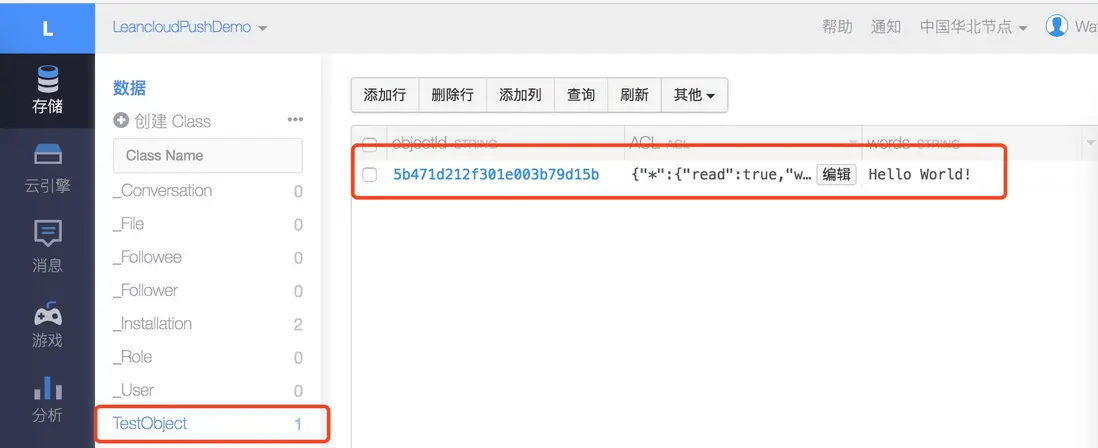
啓動App,前往Leancloud控制枱,查看數據庫中是否多了一條TestObject的記錄,如果有説明Leancloud SDK接入成功:
保存Installation
和iOS一樣,Android也需要保存installation才能讓Leancloud確定推送到哪些設備。但是比較坑的是:Leancloud官方提供的 leancloud-installation只能正確保存iOS設備的installation。 因此我們只能使用Android的SDK保存installation,而且我們最好把這個方法封裝成一個native模塊暴露給js調用,以方便在保存成功或失敗後執行相應操作。
在com.leancloudpushdemo文件夾中創建PushModule.java,PushDemo繼承於ReactContextBaseJavaModule並實現ActivityEventListener接口,添加如下代碼:
package com.leancloudpushdemo;

import android.app.Activity;
import android.content.Intent;
import com.avos.avoscloud.AVException;
import com.avos.avoscloud.AVInstallation;
import com.avos.avoscloud.SaveCallback;
import com.facebook.react.bridge.ActivityEventListener;
import com.facebook.react.bridge.Callback;
import com.facebook.react.bridge.ReactApplicationContext;
import com.facebook.react.bridge.ReactContextBaseJavaModule;
import com.facebook.react.bridge.ReactMethod;

public class PushModule extends ReactContextBaseJavaModule implements ActivityEventListener {

    public PushModule(ReactApplicationContext reactContext) {
        super(reactContext);
    }

    @Override
    public String getName() {
        return "androidPushModule";
    }

    @Override
    public void onNewIntent(Intent intent) {}

    @Override
    public void onActivityResult(Activity activity, int requestCode, int resultCode, Intent data) {}

    /**
     * 保存installation
     */
    @ReactMethod
    public void saveInstaillation(final Callback resultCallback) {
        AVInstallation.getCurrentInstallation().saveInBackground(new SaveCallback() {
            public void done(AVException e) {
                if (e == null) {
                    // 保存成功
                    String installationId = AVInstallation.getCurrentInstallation().getInstallationId();
                    resultCallback.invoke(installationId);
                } else {
                    resultCallback.invoke();
                }
            }
        });
    }
}
接着在同一目錄下面添加PushPackage.java用於註冊PushModule模塊,代碼如下:
package com.leancloudpushdemo;

import com.facebook.react.ReactPackage;
import com.facebook.react.bridge.NativeModule;
import com.facebook.react.bridge.ReactApplicationContext;
import com.facebook.react.uimanager.ViewManager;

import java.util.ArrayList;
import java.util.Collections;
import java.util.List;


public class PushPackage implements ReactPackage {

    @Override
    public List<NativeModule> createNativeModules(ReactApplicationContext reactContext) {
        List<NativeModule> modules = new ArrayList<>();
        modules.add(new PushModule(reactContext));
        return modules;
    }

    @Override
    public List<ViewManager> createViewManagers(ReactApplicationContext reactContext) {
        return Collections.emptyList();
    }
}
然後,在MainApplication.java中的getPackages方法中增加PushPackage:
@Override
protected List<ReactPackage> getPackages() {
    return Arrays.<ReactPackage>asList(
            ...
            new PushPackage()
    );
}接着,在我們的PushService.js中引入PushModule並保存installation:
...
import { NativeModules } from 'react-native';
const AndroidPush = NativeModules.androidPushModule;

...
class PushService {

    ...
    //Android
    _an_initPush = () => {
        this._an_saveInstallation();
    }

    _an_saveInstallation = () => {
        AndroidPush.saveInstaillation((installationId) => {
            if (installationId) {
                console.log('Android installation 保存成功!');
            }
        })
    }
    ...
}最後,在App.js中執行Android的初始化:
componentDidMount() {
    if (Platform.OS === 'ios') {
        PushService._iOS_initPush();
    } else {
        PushService._an_initPush();
    }
    MessageBarManager.registerMessageBar(this.refs.alert);
}
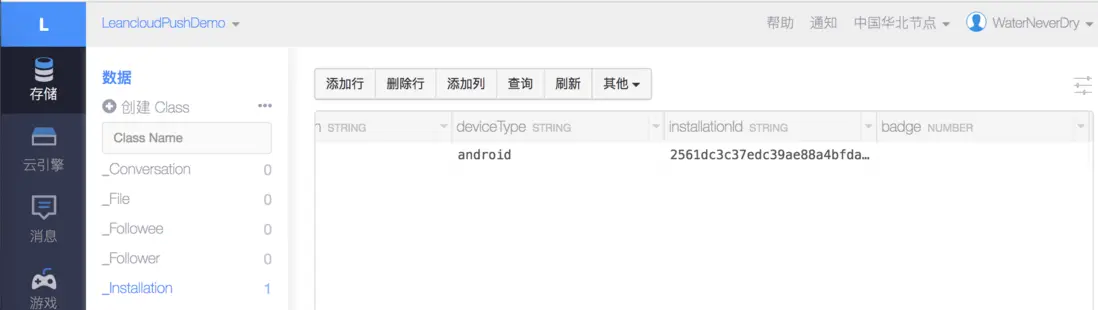
重啓App,前往Leancloud控制枱中查看數據庫中是否多了一條installation記錄,如果有説明保存成功:
如果確認代碼沒問題,但是還是保存不成功,我建議:
- 重啓Android Studio
- 重啓React Native Packager
- 重啓電腦、手機。。
- 如果還有問題,歡迎諮詢我
實現系統推送
啓動推送服務
首先調用Leancloud SDK啓動推送服務:
PushService.setDefaultPushCallback(getReactApplicationContext(), PushHandlerActivity.class);PushHandlerActivity為收到通知默認打開的activity,我們接下來實現。
PushHandlerActivity實現
該activity的定位為接收並初步解析通知數據。我們在com.leancloudpushdemo文件夾下添加PushHandlerActivity.java,內容如下:
package com.leancloudpushdemo;

import android.app.Activity;
import android.content.Intent;
import android.content.pm.PackageManager;
import android.os.Bundle;
import java.util.HashMap;
import java.util.Map;


public class PushHandlerActivity extends Activity {
    @Override
    protected void onCreate(Bundle savedInstanceState) {
        super.onCreate(savedInstanceState);
        processPush();
        finish();
        if (!PushModule.isActive()) {  //todo:判斷PushModule是否實例化
            relaunchActivity();
        }
    }

    private void processPush() {
        try {
            Intent intent = getIntent();
            String action = intent.getAction();
            String channel = intent.getExtras().getString("com.avos.avoscloud.Channel");
            String data = intent.getExtras().getString("com.avos.avoscloud.Data");
            Map<String, String> map = new HashMap<String, String>();
            map.put("action", action);
            map.put("channel", channel);
            map.put("data", data);
            PushModule.onReceive(map); //todo:處理通知
        } catch (Exception e) {
            PushModule.onError(e); // todo:處理錯誤
        }
    }

    private void relaunchActivity() {
        PackageManager pm = getPackageManager();
        Intent launchIntent = pm.getLaunchIntentForPackage(getApplicationContext().getPackageName());
        startActivity(launchIntent);
    }
}
別忘了在AndroidManifest.xml中加上該activity:
<activity android:name=".PushHandlerActivity"></activity>主要處理邏輯實現
PushHandlerActivity代碼中有三處todo是我們接下來要在PushModule中實現的邏輯。關於接收到通知後如何處理,我的思路是當native module收到通知時,通過RCTDeviceEventEmitter觸發相應的Event,在js中監聽這些Event並響應,修改PushModule如下:
public class PushModule extends ReactContextBaseJavaModule implements ActivityEventListener {

    private static PushModule singleton;
    private static String ON_RECEIVE = "leancloudPushOnReceive";
    private static String ON_ERROR = "leancloudPushOnError";

    public PushModule(ReactApplicationContext reactContext) {
        super(reactContext);
        singleton = this;
    }

    ...

    protected static boolean isActive() {
        return singleton != null;
    }

    private static WritableMap getWritableMap(Map<String, String> map) {
        WritableMap writableMap = Arguments.createMap();
        writableMap.putString("action", map.get("action"));
        writableMap.putString("channel", map.get("channel"));
        writableMap.putString("data", map.get("data"));
        return writableMap;
    }

    protected static void onReceive(Map<String, String> map) {
        if (singleton != null) {
            WritableMap pushNotification = getWritableMap(map);
            DeviceEventManagerModule.RCTDeviceEventEmitter emitter = singleton.getReactApplicationContext().getJSModule(DeviceEventManagerModule.RCTDeviceEventEmitter.class);
            emitter.emit(ON_RECEIVE, pushNotification);
        }
    }

    protected static void onError(Exception e) {
        if (singleton != null) {
            WritableMap error = Arguments.createMap();
            error.putString("message", e.getLocalizedMessage());
            DeviceEventManagerModule.RCTDeviceEventEmitter emitter = singleton.getReactApplicationContext().getJSModule(DeviceEventManagerModule.RCTDeviceEventEmitter.class);
            emitter.emit(ON_ERROR, error);
        }
    }

    @Override
    public Map<String, Object> getConstants() {
        final Map<String, Object> constants = new HashMap<>();
        constants.put("ON_RECEIVE", ON_RECEIVE);
        constants.put("ON_ERROR", ON_ERROR);
        return constants;
    }

...最後,我們在PushService.js增加對消息通知相關事件的監聽和處理的邏輯,我選擇在保存installation成功後增加監聽:
...

import { DeviceEventEmitter } from 'react-native';

...
class PushService {
    ...

    _an_saveInstallation = () => {
        AndroidPush.saveInstaillation((installationId, error) => {
            if (installationId) {
                DeviceEventEmitter.addListener(AndroidPush.ON_RECEIVE, (notification) => {
                    console.log('receive android notification');
                    this._an_onNotificationTapped(notification);
                });
                DeviceEventEmitter.addListener(AndroidPush.ON_ERROR, (res) => {
                    console.log('android notification error');
                    console.log(res);
                });
            } else {
                console.log(error);
            }
        })
    }

    _an_onNotificationTapped = (notification) => {
        Alert.alert('Android Notification Tapped');
    }
}
...
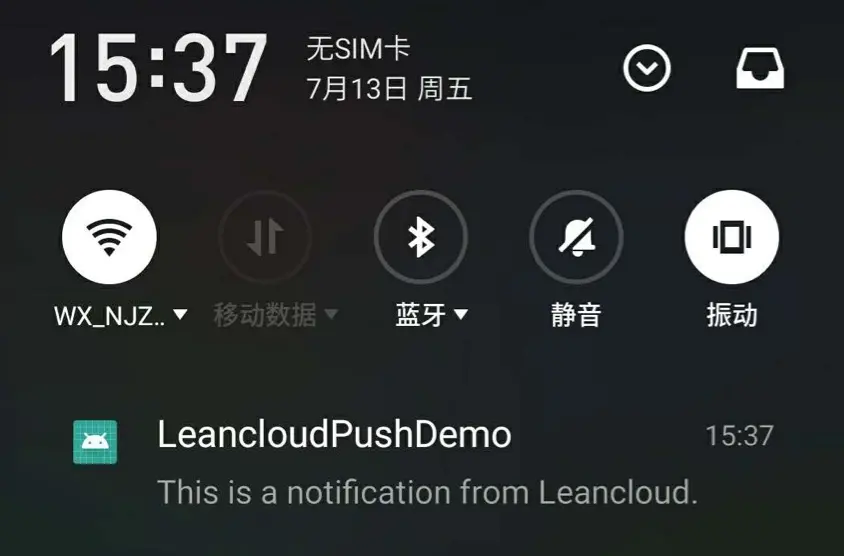
現在我們在Leancloud控制枱發送一條通知,手機應該能收到消息:
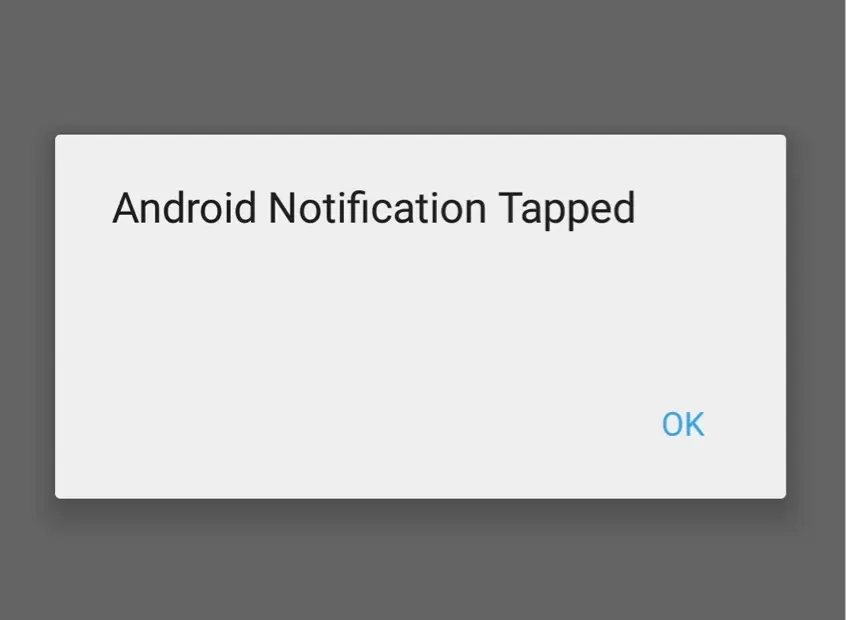
當點擊通知的時候,App打開並執行我們自定義的邏輯:
實現App打開狀態下的推送
到目前為止,我們已經實現了系統級的推送,和iOS一樣,我們希望Android App打開狀態下也能彈出通知提醒。Leancloud提供了這樣的可能,我們可以通過 自定義Receiver 來實現。
自定義Receiver
我們在com.leancloudpushdemo路徑下添加CustomPushReceiver.java,代碼如下:
package com.leancloudpushdemo;

import android.content.BroadcastReceiver;
import android.content.Context;
import android.content.Intent;
import com.alibaba.fastjson.JSON;
import com.alibaba.fastjson.JSONException;
import com.alibaba.fastjson.JSONObject;
import java.util.HashMap;
import java.util.Map;

public class CustomPushReceiver extends BroadcastReceiver {
    private static final String TAG = "CustomPushReceiver";
    private HandleMessage handleMessage;
    @Override
    public void onReceive(Context context, Intent intent) {
        try {
            String action = intent.getAction();
            String channel = intent.getExtras().getString("com.avos.avoscloud.Channel");
            //獲取消息內容
            String data = intent.getExtras().getString("com.avos.avoscloud.Data");
            JSONObject jsonObject = JSON.parseObject(data);
            if (jsonObject != null) {
                Map<String, String> map = new HashMap<String, String>();
                map.put("action", action);
                map.put("channel", channel);
                map.put("data", data);
                PushModule.onCustomReceive(map); //todo: 處理通知
                if (handleMessage!=null){
                    handleMessage.receiveMessage(jsonObject);
                }
            }
        } catch (JSONException e) {
            PushModule.onError(e);
        }
    }

    interface HandleMessage{
        public void receiveMessage(JSONObject jsonObject);
    }

    public void setHandleMessage(HandleMessage handleMessage) {
        this.handleMessage = handleMessage;
    }
}todo的方法待會兒在PushModule中實現。接着,在AndroidManifest.xml中添加custom receiver:
<receiver android:name="com.leancloudpushdemo.CustomPushReceiver">
    <intent-filter>
        <action android:name="com.cnuip.INNER_NOTI" />
    </intent-filter>
</receiver>
通知處理
然後修改PushModule如下:
public class PushModule extends ReactContextBaseJavaModule implements ActivityEventListener {
    ...
    private static String ON_CUSTOM_RECEIVE = "leancloudPushOnCustomReceive";

    ...

    protected static void onCustomReceive(Map<String, String> map) {
        if (singleton != null) {
            WritableMap pushNotification = getWritableMap(map);
            DeviceEventManagerModule.RCTDeviceEventEmitter emitter = singleton.getReactApplicationContext().getJSModule(DeviceEventManagerModule.RCTDeviceEventEmitter.class);
            emitter.emit(ON_CUSTOM_RECEIVE, pushNotification);
        }
    }

    ...

    @Override
    public Map<String, Object> getConstants() {
        final Map<String, Object> constants = new HashMap<>();
        constants.put("ON_RECEIVE", ON_RECEIVE);
        constants.put("ON_CUSTOM_RECEIVE", ON_CUSTOM_RECEIVE);
        constants.put("ON_ERROR", ON_ERROR);
        return constants;
    }
}最後,修改PushService.js,增加對ON_CUSTOM_RECEIVE事件的監聽:
...
_an_saveInstallation = () => {
    AndroidPush.saveInstaillation((installationId, error) => {
        if (installationId) {
            ...
            DeviceEventEmitter.addListener(AndroidPush.ON_CUSTOM_RECEIVE, (notification) => {
                console.log('receive custom android notification');
                this._showAlert(JSON.parse(notification.data).alert);
            });
            ...
        } else {
            ...
        }
    })
}
...
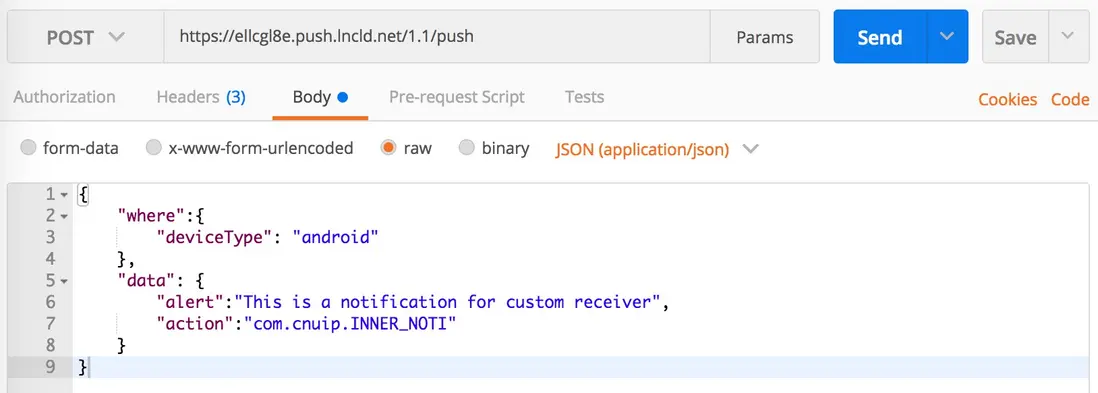
同時通知的消息提也需要做相應修改,才能讓custom receiver接收到,我們可以用Postman來發送消息:
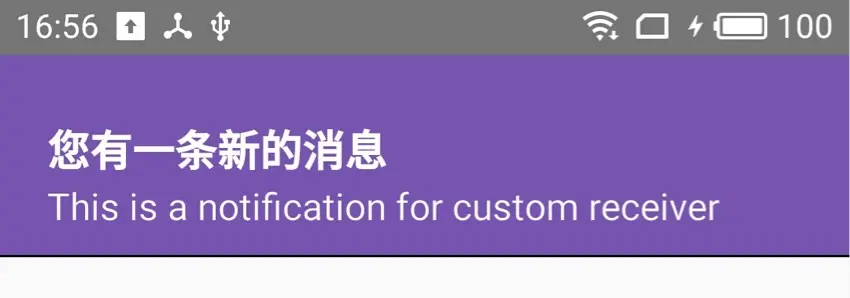
消息發出後,App中成功彈出消息提醒,完美。
結語
經過不懈的努力,我們已經成功使用Leancloud實現了iOS和Android上的消息通知,第一次寫這麼長的文章還是有點累的。。如果對你有幫助歡迎點贊!還有雖然功能都實現了,但是我想可能還會有更好的實現方式,歡迎找到的同學分享,謝謝!
相關鏈接
iOS篇地址:使用Leancloud實現React Native App的消息推送(Push Notification)- iOS篇
本文Demo Github地址:https://github.com/MudOnTire/LeancloudPushDemo)
