

前言
新版Chrome增加了一個功能 SameSite,可以禁止iframe設置cookies。
如果我們在iframe中需要登錄驗證,那就比較麻煩。可以通過禁用這個功能解決。
例子
瀏覽器控制枱提示:
A cookie associated with a cross-site resource at http://58.211.78.91/ was set without the `SameSite` attribute. It has been blocked, as Chrome now only delivers cookies with cross-site requests if they are set with `SameSite=None` and `Secure`. You can review cookies in developer tools under Application>Storage>Cookies and see more details at https://www.chromestatus.com/... and https://www.chromestatus.com/...
如果瀏覽器中提示以上內容,而且iframe中的請求中,出現以下情況:

基本可以確定是_SameSite的問題。_
解決
Chrome訪問 chrome://flags/ ,搜索_SameSite,找到SameSite by default cookies,這是為Disabled,即可:_
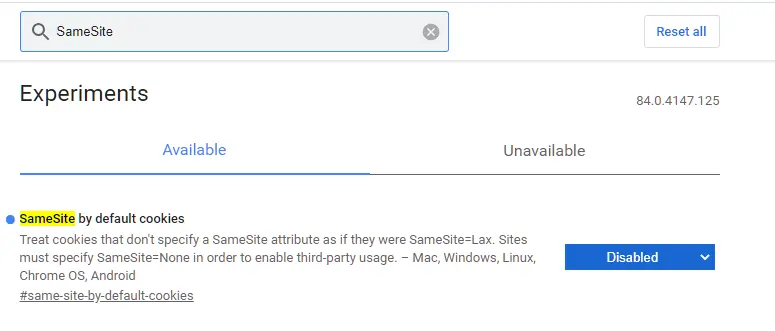
作用是,禁止瀏覽器的SameSite功能生效。
