

從jspang的《Webpack3.X版 成神之路》webpack入門(http://jspang.com/posts/2017/...)
如今升級到4x,菜鳥獨自踩坑一把辛酸淚,webpack4主要教程參考https://blog.51cto.com/140471...

1.安裝webpack
webpack 4x webpack和webpack-cli要分開安裝,不再一次安裝
只在本地項目安裝了webpack和webpack-cli
npm install webpack --save-dev
npm install webpack-cli --save-dev查看webpack版本時用npx webpack -v
想一步到位,最好再全局安裝一次
npm install webpack -g
npm install webpack-cli -g
2.Webpack打包命令更改
webpack 3x打包命令
webpack {entry file} {destination for bundled file}
{entery file}:入口文件的路徑,本文中就是src/entery.js的路徑;
{destination for bundled file}:填寫打包後存放的路徑。
webpack 4x打包命令更加嚴格
嚴格區分開發與生產環境,mode可以指定 production 或 development,不指定默認為 production。
webpack {entry file} --output-filename {destination for bundled file} --output-path --mode development
簡寫:webpack {entry file} -o {destination for bundled file} --mode development
同樣我們可以在package.json裏配置,簡化命令
"dev": "webpack --mode development",
"build": "webpack --mode production"
3.postcss-loader autoprefixer配置後不起作用
具體安裝過程看jspang的博客http://jspang.com/posts/2017/... 第十三節 自動處理CSS3屬性前綴
都配置之後發現不起作用
查了之後發現autoprefixer需要配置browsers參數兼容版本,但配置之後報錯
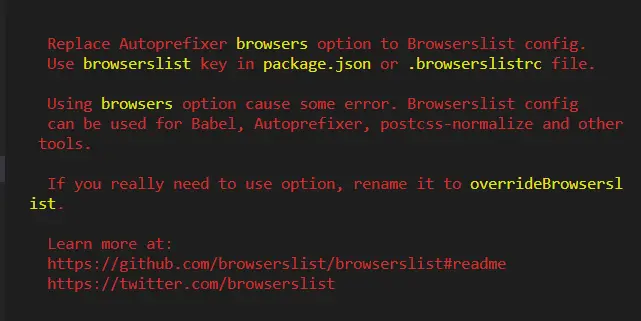
autoprefixer引用更改,語法改為overrideBrowserslist
更改前:
module.exports = {
    plugins: [
        require('autoprefixer')({ browsers: ["last 5 versions"]})
    ]
}

更改後:
module.exports = {
    plugins: [
        require('autoprefixer')({ overrideBrowserslist: ["last 5 versions"]})
    ]
}
詳細兼容見http://www.ydcss.com/archives/94,https://segmentfault.com/a/1190000008030425
