


目錄
- 背景
-
monorepo管理
- monorepo優勢
- monorepo劣勢
-
Lerna
- 全局安裝Lerna
- 初始化項目
- 創建Package
- 開啓Workspace
- LernaScript
- CreateReactApp架構
-
packages/create-react-app
- 準備工作
- 創建package.json
- 安裝依賴項
- 拷貝模板
- 查看效果
- packages/cra-template
- packages/cra-template--typescript
-
packages/react-scripts
- react-scripts build
- react-scripts start
- react-scripts小結
-
packages/react-dev-utils
- PnpWebpackPlugin
- ModuleScopePlugin
- InterpolateHtmlPlugin
- WatchMissingNodeModulesPlugin
- 總結
背景
文章首發於@careteen/create-react-app,轉載請註明來源即可。
Create React App是一個官方支持的創建React單頁應用程序的腳手架。它提供了一個零配置的現代化配置設置。
平時工作中一部分項目使用的React,使用之餘也需要了解其腳手架實現原理。
之前做的模板項目腳手架@careteen/cli,實現方式比較原始。後續準備通過lerna進行重構。
下面先做一些前備知識瞭解。
monorepo管理
如果對monorepo和lerna已經比較瞭解,可以直接移步CreateReactApp架構
Monorepo是管理項目代碼的一個方式,指在一個項目倉庫(repo)中管理多個模塊/包(package)。不同於常見的每個模塊都需要建一個repo。
babel的packages目錄下存放了多個包。
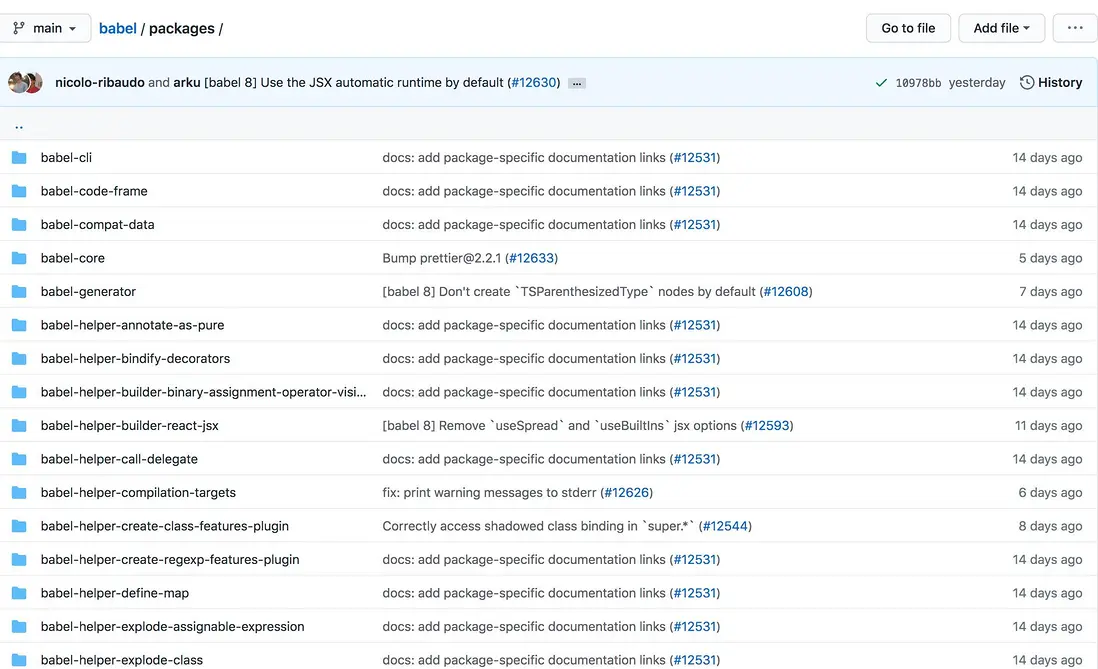
monorepo優勢
Monorepo最主要的好處是統一的工作流和代碼共享。
比如我在看babel-cli的源碼時,其中引用了其他庫,如果不使用Monorepo管理方式,而是對@babel/core新建一個倉庫,則需要打開另外一個倉庫。如果直接在當前倉庫中查看,甚至修改進行本地調試,那閲讀別人代碼會更加得心應手。
import { buildExternalHelpers } from "@babel/core";目前大多數開源庫都使用Monorepo進行管理,如react、vue-next、create-react-app。
monorepo劣勢
- 體積龐大。
babel倉庫下存放了所有相關代碼,clone到本地也需要耗費不少時間。 - 不適合用於公司項目。各個業務線倉庫代碼基本都是獨立的,如果堆放到一起,理解和維護成本將會相當大。
Lerna
如果對monorepo和lerna已經比較瞭解,可以直接移步CreateReactApp架構
Lerna是babel團隊對Monorepo的最佳實踐。是一個管理多個npm模塊的工具,有優化維護多個包的工作流,解決多個包互相依賴,且發佈需要手動維護多個包的問題。
前往lerna查看官方文檔,下面做一個簡易入門。
全局安裝Lerna
$ npm i -g lerna初始化項目
$ mkdir lerna-example && cd $_
$ lerna init
生成項目結構
|-- lerna.json
|-- package.json
`-- packages # 暫時為空文件夾packages.json文件中指定packages工作目錄為packages/*下所有目錄
{
  "packages": [
    "packages/*"
  ],
  "version": "0.0.0"
}
創建Package
# 一路回車即可
$ lerna create create-react-app
$ lerna create react-scripts
$ lerna create cra-template會在packages/目錄下生成三個子項目
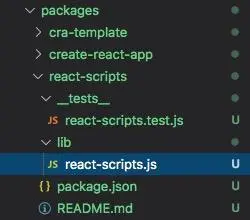
開啓Workspace
默認是npm,每個子package都有自己的node_modules。
新增如下配置,開啓workspace。目的是讓頂層統一管理node_modules,子package不管理。
// package.json
{
  "private": true,
  "workspaces": [
    "packages/*"
  ],
}
// lerna.json
{
"useWorkspaces": true,
"npmClient": "yarn"
}Lerna Script
前往Lerna查看各個command的詳細使用
- lerna add
- lerna bootstrap
- lerna list
- lerna link
- lerna publish
lerna add
# 語法
$ lerna add <package>[@version] [--dev] [--exact] [--peer]
# 示例
# 為所有子`package`都安裝`chalk`
$ lerna add chalk
# 為`create-react-app`安裝`commander`
$ lerna add commander --scope=create-react-app
# 如果安裝失敗,請檢查拼寫是否錯誤或者查看子包是否有命名空間
$ lerna list
# 由於我的包做了命名空間,所以需要加上前綴
$ lerna add commander --scope=@careteen/create-react-app如果想要在根目錄為所有子包添加統一依賴,並只在根目錄下package.josn,可以藉助yarn
yarn add chalk --ignore-workspace-root-check還能在根目錄為某個子package安裝依賴
# 子包有命名空間需要加上
yarn workspace create-react-app add commander
lerna bootstrap
默認是npm i,指定使用yarn後,就等價於yarn install
lerna list
列出所有的包
$ lerna list打印結果
info cli using local version of lerna
lerna notice cli v3.22.1
@careteen/cra-template
@careteen/create-react-app
@careteen/react-scripts
lerna success found 3 packages
lerna link
建立軟鏈,等價於npm link
lerna publish
$ lerna publish              # 發佈自上次發佈以來已經更改的包
$ lerna publish from-git     # 顯式發佈在當前提交中標記的包
$ lerna publish from-package # 顯式地發佈註冊表中沒有最新版本的包
第一次發佈報錯
- 原因
第一次leran publish發佈時會報錯lerna ERR! E402 You must sign up for private packages,原因可查看lerna #1821。
- 解決方案
以下操作需要保證將本地修改都git push,並且將npm registry設置為 https://registry.npmjs.org/ 且已經登錄後。
- 由於
npm限制,需要先在package.json中做如下設置
"publishConfig": {
  "access": "public"
},- 然後前往各個子包先通過
npm publish發佈一次
$ cd packages/create-react-app && npm publish --access=public- 修改代碼後下一次發佈再使用
lerna publish,可得到如下日誌
$ lerna publish
  Patch (0.0.1) # 選擇此項並回車
  Minor (0.1.0)
  Major (1.0.0)
  Prepatch (0.0.1-alpha.0)
  Preminor (0.1.0-alpha.0)
  Premajor (1.0.0-alpha.0)
  Custom Prerelease
  Custom Version

? Select a new version (currently 0.0.0) Patch (0.0.1)

Changes:
 - @careteen/cra-template: 0.0.1 => 0.0.1
 - @careteen/create-react-app: 0.0.1 => 0.0.1
 - @careteen/react-scripts: 0.0.1 => 0.0.1
? Are you sure you want to publish these packages? (ynH) # 輸入y並回車

Successfully published: # 發佈成功
 - @careteen/cra-template@0.0.2
 - @careteen/create-react-app@0.0.2
 - @careteen/react-scripts@0.0.2
lerna success published 3 packages如果此過程又失敗並報錯lerna ERR! fatal: tag 'v0.0.1' already exists,對應issues可查看lerna #1894。需要先將本地和遠程tag刪除,再發布。
# 刪除本地tag
git tag -d v0.0.1
# 刪除遠程tag
git push origin :refs/tags/v0.0.1
# 重新發布
lerna publish
CreateReactApp架構
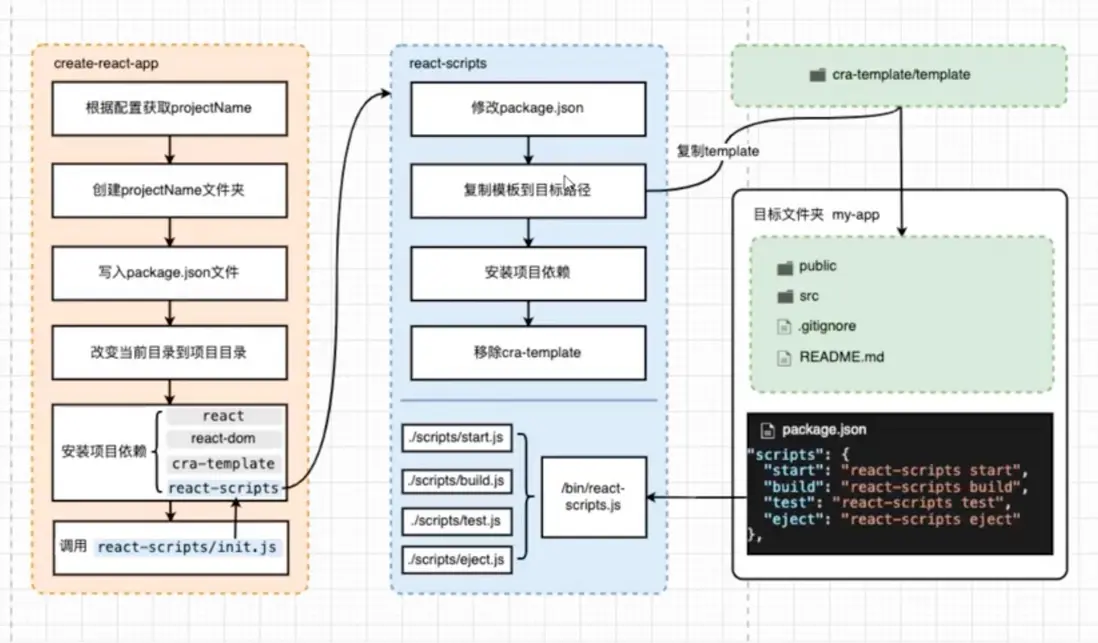
packages/create-react-app
準備工作
在項目根目錄package.json文件新增如下配置
"scripts": {
  "create": "node ./packages/create-react-app/index.js"
}然後在packages/create-react-app/package.json新增如下配置
"main": "./index.js",
"bin": {
  "careteen-cra": "./index.js"
},新增packages/create-react-app/index.js文件
#!/user/bin/env node
const { init } = require('./createReactApp')
init()新增packages/create-react-app/createReactApp.js文件
const chalk = require('chalk')
const { Command } = require('commander')
const packageJson = require('./package.json')

const init = async () => {
  let appName;
  new Command(packageJson.name)
    .version(packageJson.version)
    .arguments('<project-directory>')
    .usage(`${chalk.green('<project-directory>')} [options]`)
    .action(projectName => {
      appName = projectName
    })
    .parse(process.argv)
  console.log(appName, process.argv)
}
module.exports = {
  init,
}
在項目根目錄運行
# 查看包版本
npm run create -- --version
# 打印出`myProject`
npm run create -- myProject會打印myProject,`[
'/Users/apple/.nvm/versions/node/v14.8.0/bin/node',
'/Users/apple/Desktop/create-react-app/packages/create-react-app/index.js',
'myProject'
]`
創建package.json
先添加依賴
# cross-spawn 跨平台開啓子進程
# fs-extra fs增強版
yarn add cross-spawn fs-extra --ignore-workspace-root-check在當前工作環境創建myProject目錄,然後創建package.json文件寫入部分配置
const fse = require('fs-extra')
const init = async () => {
  // ...
  await createApp(appName)
}
const createApp = async (appName) => {
  const root = path.resolve(appName)
  fse.ensureDirSync(appName)
  console.log(`Creating a new React app in ${chalk.green(root)}.`)
  const packageJson = {
    name: appName,
    version: '0.1.0',
    private: true,
  }
  fse.writeFileSync(
    path.join(root, 'package.json'),
    JSON.stringify(packageJson, null, 2)
  )
  const originalDirectory = process.cwd()

  console.log('originalDirectory: ', originalDirectory)
  console.log('root: ', root)
}
安裝依賴項
然後改變工作目錄為新創建的myProject目錄,確保後續為此目錄安裝依賴react, react-dom, react-scripts, cra-template
const createApp = async (appName) => {
  // ...
  process.chdir(root)
  await run(root, appName, originalDirectory)
}
const run = async (root, appName, originalDirectory) => {
  const scriptName = 'react-scripts'
  const templateName = 'cra-template'
  const allDependencies = ['react', 'react-dom', scriptName, templateName]
  console.log(
    `Installing ${chalk.cyan('react')}, ${chalk.cyan(
      'react-dom'
    )}, and ${chalk.cyan(scriptName)}${
      ` with ${chalk.cyan(templateName)}`
    }...`
  )
}此時我們還沒有編寫react-scripts, cra-template這兩個包,先使用現有的。
後面實現後可改為@careteen/react-scripts, @careteen/cra-template
lerna add react-scripts cra-template --scope=@careteen/create-react-app藉助cross-spawn開啓子進程安裝依賴
const run = async (root, appName, originalDirectory) => {
  // ...
  await install(root, allDependencies)
}
const install = async (root, allDependencies) => {
  return new Promise((resolve) => {
    const command = 'yarnpkg'
    const args = ['add', '--exact', ...allDependencies, '--cwd', root]
    const child = spawn(command, args, {
      stdio: 'inherit',
    })
    child.on('close', resolve)
  })
}
拷貝模板
核心部分在於運行react-scripts/scripts/init.js做模板拷貝工作。
const run = async (root, appName, originalDirectory) => {
  // ...
  await install(root, allDependencies)
  const data = [root, appName, true, originalDirectory, templateName]
  const source = `
  var init = require('react-scripts/scripts/init.js');
  init.apply(null, JSON.parse(process.argv[1]));
  `
  await executeNodeScript(
    {
      cwd: process.cwd(),
    },
    data,
    source,
  )
  console.log('Done.')
  process.exit(0)
}
const executeNodeScript = async ({ cwd }, data, source) => {
  return new Promise((resolve) => {
    const child = spawn(
      process.execPath,
      ['-e', source, '--', JSON.stringify(data)],
      {
        cwd,
        stdio: 'inherit',
      }
    )
    child.on('close', resolve)
  })
}其中spawn(process.execPath, args, { cwd })類似於我們直接在terminal中直接使用node -e 'console.log(1 + 1)',可以直接運行js代碼。
查看效果
運行下面腳本
npm run create -- myProject可以在當前項目根目錄看到myProject的目錄結構。
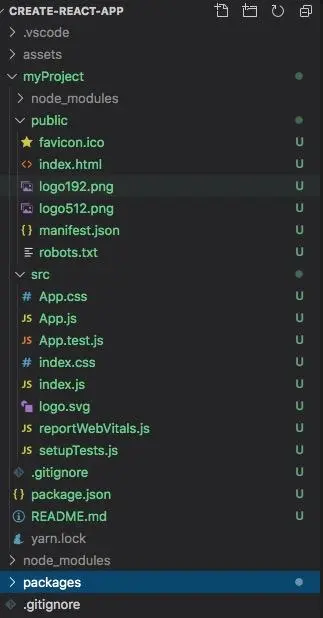
此時已經實現了create-react-app`package的核心功能。下面將進一步剖析cra-tempalte, react-scripts`。
packages/cra-tempalte
cra-tempalte可以從cra-tempalte拷貝,啓動一個簡易React單頁應用。
對React原理感興趣的可前往由淺入深React的Fiber架構查看。
packages/cra-tempalte--typescript
同上,不是本文討論重點。
packages/react-scripts
安裝依賴
# `lerna`給子包裝多個依賴時報警告`lerna WARN No packages found where webpack can be added.`
lerna add webpack webpack-dev-server babel-loader babel-preset-react-app html-webpack-plugin open --scope=@careteen/react-scripts
# 故使用`yarn`安裝
yarn workspace @careteen/react-scripts add webpack webpack-dev-server babel-loader babel-preset-react-app html-webpack-plugin open為package.json配置
"bin": {
  "careteen-react-scripts": "./bin/react-scripts.js"
},
"scripts": {
  "start": "node ./bin/react-scripts.js start",
  "build": "node ./bin/react-scripts.js build"
},創建bin/react-scripts.js文件
#!/usr/bin/env node
const spawn = require('cross-spawn')
const args = process.argv.slice(2)
const script = args[0]
spawn.sync(
  process.execPath,
  [require.resolve('../scripts/' + script)],
  { stdio: 'inherit' }
)
react-scripts build
對webpack原理感興趣的可前往@careteen/webpack查看簡易實現。
創建scripts/build.js文件,主要負責兩件事
- 拷貝模板項目的
public目錄下的所有靜態資源到build目錄下 - 配置為
production環境,使用webpack(config).run()編譯打包
process.env.NODE_ENV = 'production'
const chalk = require('chalk')
const fs = require('fs-extra')
const webpack = require('webpack')
const configFactory = require('../config/webpack.config')
const paths = require('../config/paths')
const config = configFactory('production')

fs.emptyDirSync(paths.appBuild)
copyPublicFolder()
build()

function build() {
  const compiler = webpack(config)
  compiler.run((err, stats) => {
    console.log(err)
    console.log(chalk.green('Compiled successfully.\n'))
  })
}
function copyPublicFolder() {
  fs.copySync(paths.appPublic, paths.appBuild, {
    filter: file => file !== paths.appHtml,
  })
}配置config/webpack.config.js文件
const paths = require('./paths')
const HtmlWebpackPlugin = require('html-webpack-plugin')
module.exports = function (webpackEnv) {
  const isEnvDevelopment = webpackEnv === 'development'
  const isEnvProduction = webpackEnv === 'production'
  return {
    mode: isEnvProduction ? 'production' : isEnvDevelopment && 'development',
    output: {
      path: paths.appBuild
    },
    module: {
      rules: [{
        test: /\.(js|jsx|ts|tsx)$/,
        include: paths.appSrc,
        loader: require.resolve('babel-loader'),
        options: {
          presets: [
            [
              require.resolve('babel-preset-react-app')
            ]
          ]
        }
      }, ]
    },
    plugins: [
      new HtmlWebpackPlugin({
        inject: true,
        template: paths.appHtml
      })
    ]
  }
}配置config/paths.js文件
const path = require('path')
const appDirectory = process.cwd()
const resolveApp = relativePath => path.resolve(appDirectory, relativePath)
module.exports = {
  appHtml: resolveApp('public/index.html'),
  appIndexJs: resolveApp('src/index.js'),
  appBuild: resolveApp('build'),
  appPublic: resolveApp('public')
}
npm run build後可查看build目錄下會生成編譯打包後的所有文件
react-scripts start
創建scripts/start.js文件,藉助webpack功能啓服務
process.env.NODE_ENV = 'development'
const configFactory = require('../config/webpack.config')
const createDevServerConfig = require('../config/webpackDevServer.config')
const WebpackDevServer = require('webpack-dev-server')
const DEFAULT_PORT = parseInt(process.env.PORT, 10) || 3000
const HOST = process.env.HOST || '0.0.0.0'
const config = configFactory('development')
const webpack = require('webpack')
const chalk = require('chalk')
const compiler = createCompiler({
  config,
  webpack
})
const serverConfig = createDevServerConfig()
const devServer = new WebpackDevServer(compiler, serverConfig)
devServer.listen(DEFAULT_PORT, HOST, err => {
  if (err) {
    return console.log(err)
  }
  console.log(chalk.cyan('Starting the development server...\n'))
})

function createCompiler({
  config,
  webpack
}) {
  let compiler = webpack(config)
  return compiler
}創建config\webpackDevServer.config.js文件提供本地服務設置
對webpack熱更新原理感興趣的可前往@careteen/webpack-hmr查看簡易實現。
module.exports = function () {
  return {
    hot: true
  }
}
npm run start後可在瀏覽器 http://localhost:8080/ 打開查看效果
react-scripts小結
上面兩節實現沒有源碼考慮的那麼完善。後面將針對源碼中使用到的一些較為巧妙的第三方庫和webpack-plugin做講解。
packages/react-dev-utils
此子package下存放了許多webpack-plugin輔助於react-scripts/config/webpack.config.js文件。在文件中搜索plugins字段查看。
此文先列舉一些我覺得好用的plugins
- PnpWebpackPlugin。提供一種更加高效的模塊查找機制,試圖取代
node_modules。 - ModuleScopePlugin。阻止用户從src/(或node_modules/)外部導入文件。
- InterpolateHtmlPlugin。使得
<link rel="icon" href="%PUBLIC_URL%/favicon.ico">中可以使用變量%PUBLIC_URL%。 - WatchMissingNodeModulesPlugin。使得安裝了新的依賴不再需要重新啓動項目也能正常運行。
return {
  // ...
  resolve: {
    plugins: [
      // 增加了對即插即用(Plug'n'Play)安裝的支持,提高了安裝速度,並增加了對遺忘依賴項等的保護。
      PnpWebpackPlugin,
      // 阻止用户從src/(或node_modules/)外部導入文件。
      // 這經常會引起混亂,因為我們只使用babel處理src/中的文件。
      // 為了解決這個問題,我們阻止你從src/導入文件——如果你願意,
      // 請將這些文件鏈接到node_modules/中,然後讓模塊解析開始。
      // 確保源文件已經編譯,因為它們不會以任何方式被處理。
      new ModuleScopePlugin(paths.appSrc, [
        paths.appPackageJson,
        reactRefreshOverlayEntry,
      ]),
    ],
  },
  plugins: [
    // ...
    // 使一些環境變量在index.html中可用。
    // public URL在index中以%PUBLIC_URL%的形式存在。html,例如:
    // <link rel="icon" href="%PUBLIC_URL%/favicon.ico">
    // 除非你指定"homepage"否則它將是一個空字符串
    // 在包中。在這種情況下,它將是該URL的路徑名。
    new InterpolateHtmlPlugin(HtmlWebpackPlugin, env.raw),
    // 如果你需要一個缺失的模塊,然後用' npm install '來安裝它,你仍然需要重啓開發服務器,webpack才能發現它。這個插件使發現自動,所以你不必重新啓動。
    // 參見https://github.com/facebook/create-react-app/issues/186
    isEnvDevelopment &&
        new WatchMissingNodeModulesPlugin(paths.appNodeModules),
  ]

}
PnpWebpackPlugin
增加了對即插即用(Plug'n'Play)安裝的支持,提高了安裝速度,並增加了對遺忘依賴項等的保護。試圖取代node_modules。
先來了解下使用node_modules模式的機制
- 將依賴包的版本區間解析為某個具體的版本號
- 下載對應版本依賴的
tar報到本地離線鏡像 - 將依賴從離線鏡像解壓到本地緩存
- 將依賴從緩存拷貝到當前目錄的
node_modules目錄
PnP工作原理是作為上述第四步驟的替代方案
PnP使用
示例存放在plugins-example/PnpWebpackPlugin
create-react-app已經集成了對PnP的支持。只需在創建項目時添加--use-pnp參數。
create-react-app myProject --use-pnp在已有項目中開啓可使用yarn提供的--pnp
yarn --pnp
yarn add uuid與此同時會自動在package.json中配置開啓pnp。而且不會生成node_modules目錄,取而代替生成.pnp.js文件。
{
  "installConfig": {
    "pnp": true
  }
}
由於在開啓了 PnP 的項目中不再有 node_modules 目錄,所有的依賴引用都必須由 .pnp.js 中的 resolver 處理
因此不論是執行 script 還是用 node 直接執行一個 JS 文件,都必須經由 Yarn 處理
{
  // 還需配置使用腳本
  "scripts": {
    "build": "node uuid.js"
  }
}
運行腳本查看效果
yarn run build
# 或者使用node
yarn node uuid.js
ModuleScopePlugin
阻止用户從src/(或node_modules/)外部導入文件。
這經常會引起混亂,因為我們只使用babel處理src/中的文件。
為了解決這個問題,我們阻止你從src/導入文件——如果你願意,
請將這些文件鏈接到node_modules/中,然後讓模塊解析開始。
確保源文件已經編譯,因為它們不會以任何方式被處理。
通過create-react-app生成的項目內部引用不了除src外的目錄,不然會報錯which falls outside of the project src/ directory. Relative imports outside of src/ are not supported.
通常解決方案是藉助react-app-rewired, customize-cra解決。
那接下來看看是如何實現這個功能。
示例存放在plugins-example/ModuleScopePlugin
實現步驟主要是
- 着手於resolver.hooks.file解析器讀取文件
request時。 - 解析的文件路徑如果包含
node_modules則放行。 - 解析的文件路徑如果包含使用此插件的傳參
appSrc則放行。 - 解析的文件路徑和
src做path.relative,結果如果是以../開頭,則認為在src路徑之外,會拋錯。
const chalk = require('chalk');
const path = require('path');
const os = require('os');

class ModuleScopePlugin {
  constructor(appSrc, allowedFiles = []) {
    this.appSrcs = Array.isArray(appSrc) ? appSrc : [appSrc];
    this.allowedFiles = new Set(allowedFiles);
  }

  apply(resolver) {
    const { appSrcs } = this;
    resolver.hooks.file.tapAsync(
      'ModuleScopePlugin',
      (request, contextResolver, callback) => {
        // Unknown issuer, probably webpack internals
        if (!request.context.issuer) {
          return callback();
        }
        if (
          // If this resolves to a node_module, we don't care what happens next
          request.descriptionFileRoot.indexOf('/node_modules/') !== -1 ||
          request.descriptionFileRoot.indexOf('\\node_modules\\') !== -1 ||
          // Make sure this request was manual
          !request.__innerRequest_request
        ) {
          return callback();
        }
        // Resolve the issuer from our appSrc and make sure it's one of our files
        // Maybe an indexOf === 0 would be better?
        if (
          appSrcs.every(appSrc => {
            const relative = path.relative(appSrc, request.context.issuer);
            // If it's not in one of our app src or a subdirectory, not our request!
            return relative.startsWith('../') || relative.startsWith('..\\');
          })
        ) {
          return callback();
        }
        const requestFullPath = path.resolve(
          path.dirname(request.context.issuer),
          request.__innerRequest_request
        );
        if (this.allowedFiles.has(requestFullPath)) {
          return callback();
        }
        // Find path from src to the requested file
        // Error if in a parent directory of all given appSrcs
        if (
          appSrcs.every(appSrc => {
            const requestRelative = path.relative(appSrc, requestFullPath);
            return (
              requestRelative.startsWith('../') ||
              requestRelative.startsWith('..\\')
            );
          })
        ) {
          const scopeError = new Error(
            `You attempted to import ${chalk.cyan(
              request.__innerRequest_request
            )} which falls outside of the project ${chalk.cyan(
              'src/'
            )} directory. ` +
              `Relative imports outside of ${chalk.cyan(
                'src/'
              )} are not supported.` +
              os.EOL +
              `You can either move it inside ${chalk.cyan(
                'src/'
              )}, or add a symlink to it from project's ${chalk.cyan(
                'node_modules/'
              )}.`
          );
          Object.defineProperty(scopeError, '__module_scope_plugin', {
            value: true,
            writable: false,
            enumerable: false,
          });
          callback(scopeError, request);
        } else {
          callback();
        }
      }
    );
  }
}
InterpolateHtmlPlugin
使一些環境變量在index.html中可用。
public URL在index中以%PUBLIC_URL%的形式存在。html,例如:
<link rel="icon" href="%PUBLIC_URL%/favicon.ico">
除非你指定"homepage"否則它將是一個空字符串
在包中。在這種情況下,它將是該URL的路徑名。示例存放在plugins-example/InterpolateHtmlPlugin
實現思路主要是對html-webpack-plugin/afterTemplateExecution模板執行後生成的html文件進行正則替換。
const escapeStringRegexp = require('escape-string-regexp');

class InterpolateHtmlPlugin {
  constructor(htmlWebpackPlugin, replacements) {
    this.htmlWebpackPlugin = htmlWebpackPlugin;
    this.replacements = replacements;
  }

  apply(compiler) {
    compiler.hooks.compilation.tap('InterpolateHtmlPlugin', compilation => {
      this.htmlWebpackPlugin
        .getHooks(compilation)
        .afterTemplateExecution.tap('InterpolateHtmlPlugin', data => {
          // Run HTML through a series of user-specified string replacements.
          Object.keys(this.replacements).forEach(key => {
            const value = this.replacements[key];
            data.html = data.html.replace(
              new RegExp('%' + escapeStringRegexp(key) + '%', 'g'),
              value
            );
          });
        });
    });
  }
}
WatchMissingNodeModulesPlugin
如果你需要一個缺失的模塊,然後用' npm install '來安裝它,你仍然需要重啓開發服務器,webpack才能發現它。這個插件使發現自動,所以你不必重新啓動。
參見https://github.com/facebook/c...示例存放在plugins-example/WatchMissingNodeModulesPlugin
實現思路是在生成資源到 output 目錄之前emit鈎子中藉助compilation的missingDependencies和contextDependencies.add兩個字段對丟失的依賴重新安裝。
class WatchMissingNodeModulesPlugin {
  constructor(nodeModulesPath) {
    this.nodeModulesPath = nodeModulesPath;
  }

  apply(compiler) {
    compiler.hooks.emit.tap('WatchMissingNodeModulesPlugin', compilation => {
      var missingDeps = Array.from(compilation.missingDependencies);
      var nodeModulesPath = this.nodeModulesPath;

      // If any missing files are expected to appear in node_modules...
      if (missingDeps.some(file => file.includes(nodeModulesPath))) {
        // ...tell webpack to watch node_modules recursively until they appear.
        compilation.contextDependencies.add(nodeModulesPath);
      }
    });
  }
}
總結
使用多個倉庫管理的優點
- 各模塊管理自由度較高,可自行選擇構建工具,依賴管理,單元測試等配套設施
- 各模塊倉庫體積一般不會太大
使用多個倉庫管理的缺點
- 倉庫分散不好找,當很多時,更加困難,分支管理混亂
- 版本更新繁瑣,如果公共模塊版本變化,需要對所有模塊進行依賴的更新
CHANGELOG梳理異常折騰,無法很好的自動關聯各個模塊的變動聯繫,基本靠口口相傳
使用monorepo管理的缺點
- 統一構建工具,對構建工具提出了更高要求,要能構建各種相關模塊
- 倉庫體積會變大
使用monorepo管理的優點
- 一個倉庫維護多個模塊,不用到處找倉庫
- 方便版本管理和依賴管理,模塊之間的引用、調試都非常方便,配合相應工具,可以一個命令搞定
- 方便統一生成
CHANGELOG,配合提交規範,可以在發佈時自動生成CHANGELOG,藉助Leran-changelog
