

背景
公司的郵箱服務器開啓MFA後,無法使用用户名、密碼登陸。需要使用其他身份認證方式。
https://docs.azure.cn/zh-cn/entra/identity-platform/v2-oauth-...
警告
Microsoft建議不要使用 ROPC 流;它與多重身份驗證 (MFA) 不兼容。 在大多數情況下,提供了更安全的替代方法,建議使用。 此流需要在應用程序中高度信任,並且存在在其他流中不存在的風險。 僅當更安全的流不可行時,才應使用此流。
基礎知識可以參考:https://segmentfault.com/a/1190000045134213
使用MS graph api進行身份認證
使用authorization code進行身份認證
生成authorization code
生成url地址。這裏我只填寫必填項,全部的選項可以參看官方:https://docs.azure.cn/zh-cn/entra/identity-platform/v2-oauth2...
authorize_url = f"https://login.partner.microsoftonline.cn/{tenant_id}/oauth2/v2.0/authorize?\
client_id={client_id}\
&response_type={response_type}\
&redirect_uri={redirect_uri}\
&response_mode={response_mode}\
&scope={scope}\
&state={state}"
在瀏覽器中打開上面的地址,地址會跳向在azure中配置好的地址:
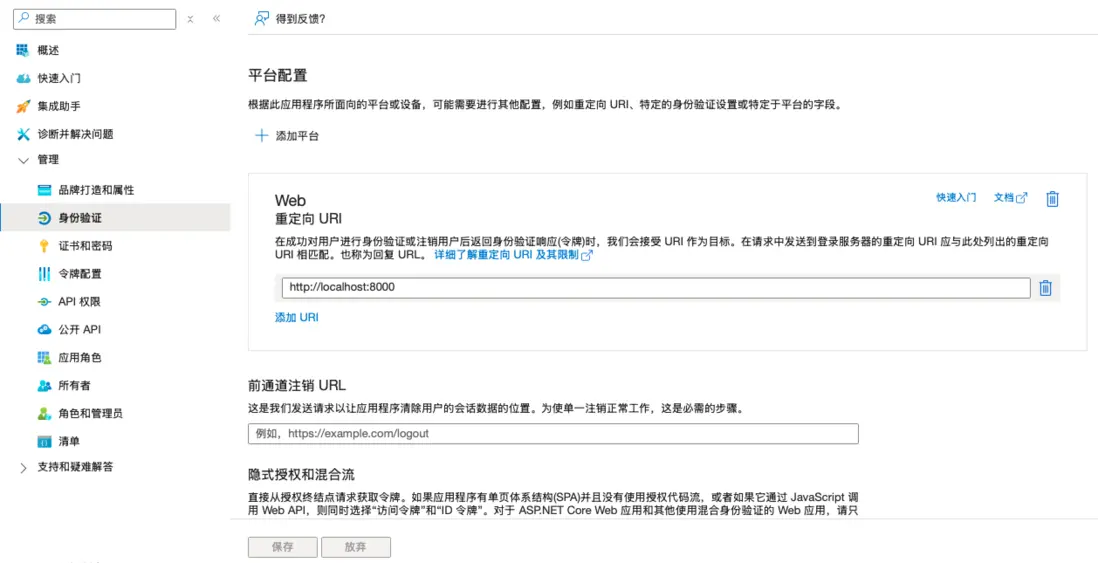
- 跳轉成功:頁面上會顯示一串字符串,從
code=開始到&state=之間的就是authorization code - 跳轉失敗:直接複製地址欄的地址,從中截取authotization code
生成access token
拿到authroization code後,調用api獲取access token。全選項參看:https://docs.azure.cn/zh-cn/entra/identity-platform/v2-oauth2...
def Authentication():
    tenant_id =
    client_id =
    code =
    redirect_uri = "http://localhost:8000"
    grant_type = "authorization_code"
    client_secret =


    url = f'https://login.partner.microsoftonline.cn/{tenant_id}/oauth2/v2.0/token'
    headers = {
        'Content-Type': 'application/x-www-form-urlencoded',
        'Host': 'login.partner.microsoftonline.cn',
    }
    datas = {
        "client_id": client_id,
        "scope": scope,
        "code": code,
        "redirect_uri": redirect_uri,
        "grant_type": grant_type,
        "client_secret": client_secret,
    }

    data = urllib.parse.urlencode(datas)
    Data = data.encode('ascii')
    # print(data)

    req = urllib.request.Request(url=url, data=Data, headers=headers, method="POST")
    # print(req)
    response = urllib.request.urlopen(req, context=context)
    # response = urllib.request.urlopen(req)
    responseJson = json.loads(response.read().decode("utf-8"))
    print(responseJson["access_token"])
    # print(responseJson["access_token"])
    return responseJson["access_token"]
# Authentication()
使用access token調用MS graph REST api
MS graph REST api可以做很多事情,包括所有的產品、所有的操作。這裏舉例列出郵件
列出郵件:https://learn.microsoft.com/zh-cn/graph/api/user-list-message...
-
找到郵件文件夾
https://learn.microsoft.com/zh-cn/graph/api/user-list-mailfol...
-
找到子文件夾
https://learn.microsoft.com/zh-cn/graph/api/mailfolder-list-c...
-
通過子文件夾id獲得郵件列表
https://learn.microsoft.com/zh-cn/graph/api/user-list-message...
- 在第3步中使用OData對結果進行篩選
使用SDK進行身份認證
https://learn.microsoft.com/zh-cn/graph/sdks/national-clouds?...
使用OData對MS graph REST api的結果進行過濾
格式
不同的參數用$標記,用&隔開
https://microsoftgraph.chinacloudapi.cn:443/v1.0/me/mailFolders/{folderID}/messages?$search="from:adelev OR from:alexw@163.com OR from: allanD"&$select=subject,createdDateTime,body&$top=100
參數可選項
https://learn.microsoft.com/zh-cn/graph/query-parameters?tabs...
可以對這些郵件的屬性進行過濾 和 支持的運算符
https://learn.microsoft.com/zh-cn/exchange/policy-and-complia...
注意
- 參數中對結果的過濾不一定想我們想的那樣,比如説
$filter不能對收件人進行篩選。然而我沒有找到官方整理的表格,所以只能自己試一試😂😂😂 -
在調用的時候可能需要對地址進行轉義。正常理解
$&=這些都需要轉義,但是實際操作中,python只需要對空格進行轉義- python中使用
urllib.parse.quote(),而不是urllib.parse.quote_plus()進行轉義 - 因為只需要對空格進行轉義,所以只需要將包括空格的一段用轉義函數包括起來。其他特殊字符不能包括起來,不然會是一個
bad request -
示例轉義代碼
select = "$select=subject,createdDateTime,body"
search = f'$search="{urllib.parse.quote(f"(received>={queryStartDate} AND received<={endDate}) AND from:{emailAddress1} AND (to:{emailAddress2} OR to:{emailAddress3})")}"'

api = f"/me/mailFolders/{folderID}/messages?{search}&{select}&$top=100"
url = 'https://microsoftgraph.chinacloudapi.cn:443/v1.0' + api
- 關於OData中字符的轉義,可以參看這篇:https://userapps.support.sap.com/sap/support/knowledge/en/281...
- python中使用
分頁
結果太多,可以使用OData(不同的參數支持的$top=數量不一樣)或者@odata.nextLink(在MS graph REST api中返回)
https://learn.microsoft.com/zh-cn/graph/paging?tabs=http#impl...
