
前言
Amazon Aurora 是亞馬遜雲科技自研的一項關係數據庫服務,它在提供和開源數據庫MySQL、PostgreSQL的完好兼容性同時,也能夠提供和商業數據庫媲美的性能和可用性。性能方面,Aurora MySQL能夠支持到與開源標準MySQL同等配置下五倍的吞吐量,Amazon Aurora PostgreSQL能夠支持與開源標準PostgreSQL同等配置下三倍的吞吐量的提升。在擴展性的角度,Amazon Aurora在存儲與計算、橫向與縱向方面都進行了功能的增強和創新。
Amazon Aurora的最大數據存儲量現在支持多達128TB,而且可以支持存儲的動態收縮。計算方面,Amazon Aurora提供多個讀副本的可擴展性配置支持一個區域內15個多達15個讀副本的擴展,提供多主的架構來支持同一個區域內4個寫節點的擴展,提供Serverless無服務器化的架構實例級別的秒級縱向擴展,提供全球數據庫來實現數據庫的低延遲跨區域擴展。
隨着用户數據量的增長,Amazon Aurora已經提供了很好的擴展性,那是否可以進一步增強更多的數據量、更多的併發訪問能力呢?您可以考慮利用分庫分表的方式,來支持底層多個Amazon Aurora集羣的配置。基於此,包含這篇博客在內的系列博客會進行相應的介紹,旨在為您進行分庫分表時代理選擇提供參考。
本篇博客會聚焦如何使用開源的Gaea proxy ,一個開源的分庫分表中間件工具,來進行數據庫集羣的構建。會涵蓋分庫分表、讀寫分離、分片表關聯查詢和failover自動識別等方面。
Gaea 介紹
Gaea 是某互聯網電商開源的基於mySQL協議的數據庫中間件,Gaea 支持分庫分表、SQL 路由、讀寫分離,配置熱加載,連接池,自定義SQL攔截與過濾等基本特性,並支持分片表和全局表的join、支持多個分片表但是路由規則相同的join。
更多功能介紹,請參閲 Github https://github.com/XiaoMi/Gaea 最新説明
1、設計架構圖
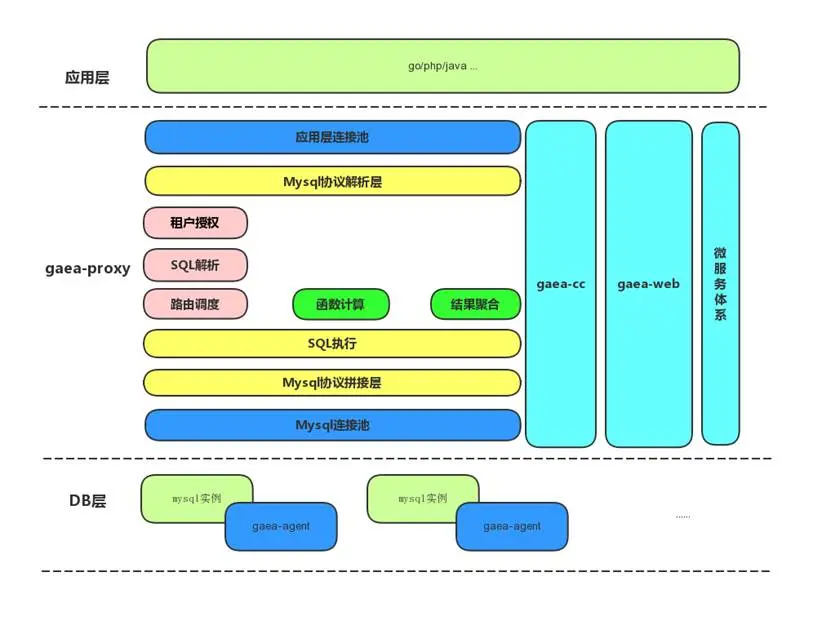
Gaea包含四個模塊,分別是Gaea-proxy、Gaea-cc、Gaea-agent、Gaea-web。Gaea-proxy為在線代理,負責承接SQL流量,Gaea-cc是中控模塊,負責Gaea-proxy的配置管理及一些後台任務,Gaea-agent部署在mysql所在的機器上,負責實例創建、管理、回收等工作,Gaea-web是Gaea的一個管理界面,使Gaea整體使用更加方便。
2、基本概念
cluster
集羣, 按照業務重要程度劃分集羣, 一個集羣內可包含多個Gaea-proxy實例, 通過指定Gaea-proxy啓動時依賴的配置文件中的cluster_name 確定該proxy所屬集羣。集羣內的proxy實例只為該集羣內的namespace提供服務, 起到物理隔離的作用。一套集羣可為多個namespace提供服務。
namespace
命名空間,每一個業務系統對應一個namespace,一個namespace對應多個database,業務方可以自由切換。每個namespace理論上只會屬於一個集羣。通過Gaea-cc配置管理接口, 指定namespace所屬集羣。
slice
分片,邏輯上的分組,一個分片包含mysql一主多從。
shard
分表規則,確定一個表如何分表,包括分表的類型、分佈的分片位置。
proxy
指代理本身,承接線上流量。
gaea_cc
代理控制模塊,主要負責配置下發、實例監控等。
3、部署架構圖
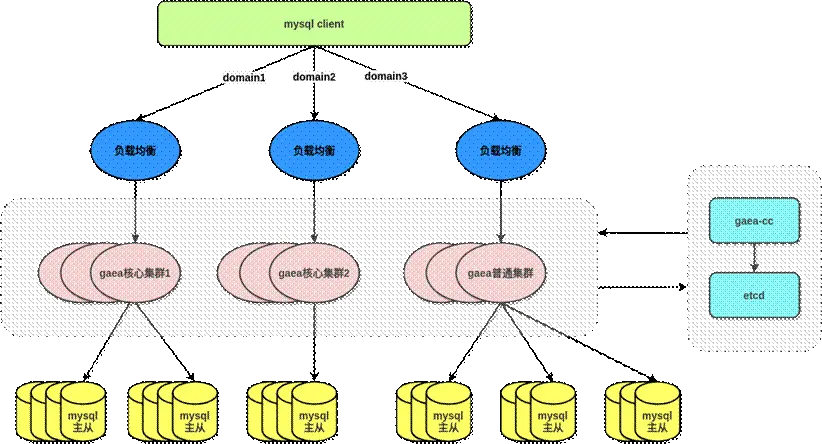
在生產環境中可以參考以下部署架構圖來實現多 mySQL 集羣的代理和集中式的配置管理,圖中Gaea核心集羣和普通集羣沒有區別。
環境構建
1、Amazon Aurora 集羣
首先創建三套 Aurora MySQL 集羣,機型為db.r5.2xlarge,每套集羣有一個寫節點一個讀節點。

2、Gaea proxy 搭建
1)安裝Go 語言環境
參考 https://go.dev/doc/install
2)下載源碼並編譯
git clone https://github.com/XiaoMi/Gae...
cd Gaea && make
完成後會在bin 目錄出現gaea and gaea-cc
[ec2-user@ip-172-31-29-68 bin]$ ls
gaea gaea-cc
3、Proxy 配置
Gaea配置由兩部分組成,本地配置為Gaea_proxy直接使用的配置內容,一般不需要在運行時改變。gaea為多租户模式,每個租户稱為一個namespace,namespace 的配置在運行時都可變,一般存放在etcd中,以下以json 文件替代etcd 做演示,配置的詳細説明請參考Github 的説明。
1)準備好本地基礎配置文件,該文件用於Gaea 的全局配置,該配置文件放在$Gaea_Home/etc,參考以下例子:
; 配置類型,目前支持file/etcd兩種方式,file方式不支持熱加載,但是可以快速體驗功能
; file 模式下讀取file_config_path下的namespace配置文件
; etcd 模式下讀取coordinator_addr/cluster_name下的namespace配置文件
config_type=file
;file config path, 具體配置放到file_config_path的namespace目錄下,該下級目錄為固定目錄
file_config_path=/data/gaea/Gaea/etc/file
;配置中心地址,目前只支持etcd
;coordinator_addr=http://127.0.0.1:2379
;配置中心用户名和密碼
;username=test
;password=test
;環境劃分、test、online
environ=test
;service name
service_name=gaea_proxy
;gaea_proxy 當前proxy所屬的集羣名稱
cluster_name=gaea_default_cluster
;日誌配置
log_path=/data/gaea/Gaea/log
log_level=Notice
log_filename=gaea
log_output=file
;管理地址
admin_addr=0.0.0.0:13399
;basic auth
admin_user=admin
admin_password=admin
;代理服務監聽地址
proto_type=tcp4
proxy_addr=0.0.0.0:13306
; 默認編碼
proxy_charset=utf8
;慢sql閾值,單位: 毫秒
slow_sql_time=100
;空閒會話超時時間,單位: 秒
session_timeout=3600
;打點統計配置
stats_enabled=true
stats_interval=10
;encrypt key, 用於對etcd中存儲的namespace配置加解密
encrypt_key=1234abcd5678efg*
;server_version 服務器版本號配置
server_version=5.7-gaea
;auth plugin mysql_native_password or caching_sha2_password or ''
;自定義認證插件,支持 5.x 和 8.x 版本認證,認證插件為 caching_sha2_password 時,不支持低版本客户端認證
auth_plugin=mysql_native_password
左滑查看更多
2)準備好sharding 的配置文件
Gaea 支持多租户,每個租户單獨一個namespace,每個namespace 一個配置文件
Gaea 支持kingshard 和mycat 兩種sharding 方式,本次測試使用kingshard 的hash方式分表,
namespace 配置文件必須位於 Gaea 編譯目錄 etc/file/namespace 目錄下,以下配置主要做這些事項:
- 同時開啓kingshard 和mycat 兩種分庫分表方式(測試只用kingshard 這種)
- 配置前端接受請求的用户(Gaea)和後端連接 Amazon Aurora 的用户(root)
- 啓用讀寫分離
- 數據分片規則如下:
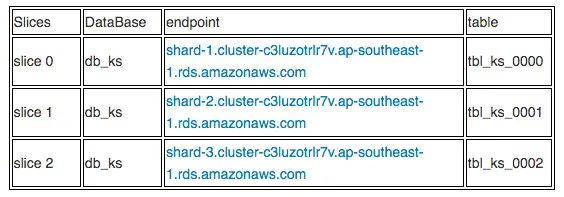
- 使用 kingshard 的hash 方式對tbl_ks 做了3個物理集羣(slice),分片key 配置的是id 字段
- 3個物理分片下都有一個分表(location 1,1,1)
- 把tbl_ks2表配置成tbl_ks 的關聯表(proxy自動會根據父表的分片規則把子表數據分佈到同slice中以方便做join和關聯查詢)
- 把tbl_global 配置成全局表(所有分片都有這個表的全量數據)
- 非分片查詢的 SQL 默認發送到slice 1(default_slice”: “slice-1)
{
    "name": "gaea_namespace_1",
    "online": true,
    "read_only": true,
    "allowed_dbs": {
        "db_ks": true,
        "db_mycat": true
    },
    "default_phy_dbs": {
        "db_ks": "db_ks",
        "db_mycat": "db_mycat"
    },
    "slow_sql_time": "1000",
    "black_sql": [
        ""
    ],
    "allowed_ip": null,
    "slices": [
        {
            "name": "slice-1",
            "user_name": "root",
            "password": "Pass1234",
            "master": "shard-1.cluster-c3luzotrlr7v.ap-southeast-1.rds.amazonaws.com:3306",
            "slaves": ["shard-1.cluster-ro-c3luzotrlr7v.ap-southeast-1.rds.amazonaws.com:3306"],
            "capacity": 32,
            "max_capacity": 1024,
            "idle_timeout": 3600
        },
        {
            "name": "slice-2",
            "user_name": "root",
            "password": "Pass1234",
            "master": "shard-2.cluster-c3luzotrlr7v.ap-southeast-1.rds.amazonaws.com:3306",
            "slaves": ["shard-2.cluster-ro-c3luzotrlr7v.ap-southeast-1.rds.amazonaws.com:3306"],
            "capacity": 32,
            "max_capacity": 1024,
            "idle_timeout": 3600
        },
        {
            "name": "slice-3",
            "user_name": "root",
            "password": "Pass1234",
            "master": "shard-3.cluster-c3luzotrlr7v.ap-southeast-1.rds.amazonaws.com:3306",
            "slaves": ["shard-3.cluster-ro-c3luzotrlr7v.ap-southeast-1.rds.amazonaws.com:3306"],
            "capacity": 32,
            "max_capacity": 1024,
            "idle_timeout": 3600
        }
    ],
    "shard_rules": [
        {
            "db": "db_ks",
            "table": "tbl_ks",
            "type": "hash",
            "key": "id",
            "locations": [
                1,
                1,
                1
            ],
            "slices": [
                "slice-1",
                "slice-2",
                "slice-3"
            ]
        },
        {
           "db": "db_ks",
           "table": "tbl_ks2",
           "type": "linked",
           "parent_table": "tbl_ks",
           "key": "id"
        },
        {
            "db": "db_ks",
            "table": "tbl_global",
            "type": "global",
            "locations": [
                1,
                1,
                1
            ],
    "slices": [
        "slice-1",
        "slice-2",
        "slice-3"
              ]

        }

    ],
    "global_sequences": [

    ],
    "users": [
        {
            "user_name": "gaea",
            "password": "gaea_password",
            "namespace": "gaea_namespace_1",
            "rw_flag": 2,
            "rw_split": 1
        }
    ],
    "default_slice": "slice-1",
    "open_general_log": false,
    "max_sql_execute_time": 5000,
    "max_sql_result_size": 100000
}
左滑查看更多
4、啓動 Proxy
使用 bin 目錄下的 Gaea 二進制文件啓動,指定好靜態配置文件路徑
[root@ip-172-31-29-68 etc]# ../bin/gaea -config ./test.ini
Build Version Information:Version: fbac80acdd922a3d563bc703994f7f9145c2d41b
GitRevision: fbac80acdd922a3d563bc703994f7f9145c2d41b
User: root@ip-172-31-29-68.ap-southeast-1.compute.internal
GolangVersion: go1.17.6
BuildStatus: Clean
BuildTime: 2022-02-09--07:13:01
BuildBranch: master
BuildGitDirty: 0
[GIN-debug] [WARNING] Running in "debug" mode. Switch to "release" mode in production.
using env: export GIN_MODE=release
using code: gin.SetMode(gin.ReleaseMode)
[GIN-debug] GET /api/proxy/ping --> github.com/XiaoMi/Gaea/proxy/server.(AdminServer).ping-fm (2 handlers)
[GIN-debug] PUT /api/proxy/config/prepare/:name --> github.com/XiaoMi/Gaea/proxy/server.(AdminServer).prepareConfig-fm (2 handlers)
[GIN-debug] PUT /api/proxy/config/commit/:name --> github.com/XiaoMi/Gaea/proxy/server.(AdminServer).commitConfig-fm (2 handlers)
[GIN-debug] PUT /api/proxy/namespace/delete/:name --> github.com/XiaoMi/Gaea/proxy/server.(AdminServer).deleteNamespace-fm (2 handlers)
[GIN-debug] GET /api/proxy/config/fingerprint --> github.com/XiaoMi/Gaea/proxy/server.(AdminServer).configFingerprint-fm (2 handlers)
[GIN-debug] GET /api/proxy/stats/sessionsqlfingerprint/:namespace --> github.com/XiaoMi/Gaea/proxy/server.(AdminServer).getNamespaceSessionSQLFingerprint-fm (2 handlers)
[GIN-debug] GET /api/proxy/stats/backendsqlfingerprint/:namespace --> github.com/XiaoMi/Gaea/proxy/server.(AdminServer).getNamespaceBackendSQLFingerprint-fm (2 handlers)
[GIN-debug] DELETE /api/proxy/stats/sessionsqlfingerprint/:namespace --> github.com/XiaoMi/Gaea/proxy/server.(AdminServer).clearNamespaceSessionSQLFingerprint-fm (2 handlers)
[GIN-debug] DELETE /api/proxy/stats/backendsqlfingerprint/:namespace --> github.com/XiaoMi/Gaea/proxy/server.(*AdminServer).clearNamespaceBackendSQLFingerprint-fm (2 handlers)
[GIN-debug] GET /api/metric/metrics --> github.com/gin-gonic/gin.WrapH.func1 (2 handlers)
[GIN-debug] GET /debug/pprof/ --> github.com/gin-gonic/gin.WrapF.func1 (2 handlers)
[GIN-debug] GET /debug/pprof/cmdline --> github.com/gin-gonic/gin.WrapF.func1 (2 handlers)
[GIN-debug] GET /debug/pprof/profile --> github.com/gin-gonic/gin.WrapF.func1 (2 handlers)
[GIN-debug] POST /debug/pprof/symbol --> github.com/gin-gonic/gin.WrapF.func1 (2 handlers)
[GIN-debug] GET /debug/pprof/symbol --> github.com/gin-gonic/gin.WrapF.func1 (2 handlers)
[GIN-debug] GET /debug/pprof/trace --> github.com/gin-gonic/gin.WrapF.func1 (2 handlers)
[GIN-debug] GET /debug/pprof/block --> github.com/gin-gonic/gin.WrapF.func1 (2 handlers)
[GIN-debug] GET /debug/pprof/goroutine --> github.com/gin-gonic/gin.WrapF.func1 (2 handlers)
[GIN-debug] GET /debug/pprof/heap --> github.com/gin-gonic/gin.WrapF.func1 (2 handlers)
[GIN-debug] GET /debug/pprof/mutex --> github.com/gin-gonic/gin.WrapF.func1 (2 handlers)
[GIN-debug] GET /debug/pprof/threadcreate --> github.com/gin-gonic/gin.WrapF.func1
左滑查看更多
5、驗證連接
使用動態配置文件中指定的用户名和密碼連接 proxy,因為上面的動態配置文件開啓了kingshard 和mycat 兩種分庫分表方式,所以登陸後默認看到兩個預先配置好的proxy裏的database:
[root@ip-172-31-29-68 namespace]# mysql -ugaea -pgaea_password -P13306 -h172.31.29.68
Welcome to the MariaDB monitor. Commands end with ; or \g.
Your MySQL connection id is 10001
Server version: 5.6.20-gaea MySQL Community Server (GPL)
Copyright (c) 2000, 2018, Oracle, MariaDB Corporation Ab and others.
Type 'help;' or '\h' for help. Type '\c' to clear the current input statement.
MySQL [(none)]> show databases;
+----------+
| Database |
+----------+
| db_ks |
| db_mycat |
+----------+
2 rows in set (0.00 sec)
左滑查看更多
功能測試
1、分庫分表驗證
Gaea 因為對DDL兼容性一般,官網建議預先在後端數據庫創建好對應的數據庫然後再在proxy應用規則。因為我們使用kingshard 的hash 規則分表,我們預先在每個 Amazon Aurora 建好相應的數據庫和表,注意:table 必須是從0000 開始
CREATE TABLE IF NOT EXISTS tbl_ks_0000(
id INT UNSIGNED AUTO_INCREMENT,
col1 VARCHAR(100) NOT NULL,
col2 VARCHAR(40) NOT NULL,
col_date DATE,
PRIMARY KEY ( id )
)ENGINE=InnoDB DEFAULT CHARSET=utf8;
左滑查看更多
- 插入數據並查看

MySQL [db_ks]> select * from tbl_ks;
+----+-------+-------+------------+
| id | col1 | col2 | col_date |
+----+-------+-------+------------+
| 3 | name3 | addr3 | 2022-02-11 |
| 1 | name1 | addr1 | 2022-02-11 |
| 4 | name4 | addr4 | 2022-02-11 |
| 2 | name2 | addr2 | 2022-02-11 |
+----+-------+-------+------------+
4 rows in set (0.03 sec)
左滑查看更多
- 分別登陸3個 Amazon Aurora 檢查數據,驗證按id 做了hash 分佈
[root@ip-172-31-29-68 ec2-user]# mysql -uroot -pPass1234 -hshard-1.cluster-c3luzotrlr7v.ap-southeast-1.rds.amazonaws.com -P3306 -e "select * from db_ks.tbl_ks_0000"
+----+-------+-------+------------+
| id | col1 | col2 | col_date |
+----+-------+-------+------------+
| 3 | name3 | addr3 | 2022-02-11 |
+----+-------+-------+------------+
[root@ip-172-31-29-68 ec2-user]# mysql -uroot -pPass1234 -hshard-2.cluster-c3luzotrlr7v.ap-southeast-1.rds.amazonaws.com -P3306 -e "select * from db_ks.tbl_ks_0001"
+----+-------+-------+------------+
| id | col1 | col2 | col_date |
+----+-------+-------+------------+
| 1 | name1 | addr1 | 2022-02-11 |
| 4 | name4 | addr4 | 2022-02-11 |
+----+-------+-------+------------+
[root@ip-172-31-29-68 ec2-user]# mysql -uroot -pPass1234 -hshard-3.cluster-c3luzotrlr7v.ap-southeast-1.rds.amazonaws.com -P3306 -e "select * from db_ks.tbl_ks_0002"
+----+-------+-------+------------+
| id | col1 | col2 | col_date |
+----+-------+-------+------------+
| 2 | name2 | addr2 | 2022-02-11 |
左滑查看更多
2、全局表測試
全局表是在各個slice上 (準確的説是各個slice的各個DB上) 數據完全一致的表,方便執行一些跨分片查詢,如果是小表和分片表做join推薦使用全局表這種方式,對應在shard_rules 的配置如下這段:
 {
            "db": "db_ks",
            "table": "tbl_global",
            "type": "global",
            "locations": [
                1,
                1,
                1
            ],
    "slices": [
        "slice-1",
        "slice-2",
        "slice-3"
    ]
左滑查看更多
測試過程如下:
- 在 Amazon Aurora 後端數據庫建表
同樣的,因為Gaea 不支持DDL,需要先在所有後端數據庫建好表,再應用規則
CREATE TABLE IF NOT EXISTS tbl_global(
   id INT UNSIGNED AUTO_INCREMENT,
   PRIMARY KEY ( id )
   )ENGINE=InnoDB DEFAULT CHARSET=utf8;
左滑查看更多
- 連接proxy並 插入數據
插入一行會提示3 rows affected
MySQL [db_ks]> insert into tbl_global (id) values (1);
Query OK, 3 rows affected (0.02 sec)
MySQL [db_ks]> insert into tbl_global (id) values (2);
Query OK, 3 rows affected (0.02 sec)
MySQL [db_ks]> insert into tbl_global (id) values (3);
Query OK, 3 rows affected (0.02 sec)
左滑查看更多
- 登陸每一個 Amazon Aurora 看是否插入了3行數據
[ec2-user@ip-172-31-29-68 ~]$ mysql -uroot -pPass1234 -hshard-1.cluster-c3luzotrlr7v.ap-southeast-1.rds.amazonaws.com -e "select * from db_ks.tbl_global"
+----+
| id |
+----+
|  1 |
|  2 |
|  3 |
+----+
左滑查看更多
- 做全局表和分片表join的測試
MySQL [db_ks]> select * from tbl_global,tbl_ks where tbl_ks.id=tbl_global.id;
+----+----+-------+-------+------------+
| id | id | col1  | col2  | col_date   |
+----+----+-------+-------+------------+
|  2 |  2 | name2 | addr2 | 2022-02-11 |
|  3 |  3 | name3 | addr3 | 2022-02-11 |
|  1 |  1 | name1 | addr1 | 2022-02-11 |
+----+----+-------+-------+------------+
3 rows in set (0.05 sec)
左滑查看更多
- 通過執行計劃來驗證
MySQL [db_ks]> explain select * from tbl_global,tbl_ks where tbl_ks.id=tbl_global.id;
+-------+---------+-------+--------------------------------------------------------------------------------------------+
| type  | slice   | db    | sql                                                                                        |
+-------+---------+-------+--------------------------------------------------------------------------------------------+
| shard | slice-1 | db_ks | SELECT * FROM (`tbl_global`) JOIN `tbl_ks_0000` WHERE `tbl_ks_0000`.`id`=`tbl_global`.`id` |
| shard | slice-2 | db_ks | SELECT * FROM (`tbl_global`) JOIN `tbl_ks_0001` WHERE `tbl_ks_0001`.`id`=`tbl_global`.`id` |
| shard | slice-3 | db_ks | SELECT * FROM (`tbl_global`) JOIN `tbl_ks_0002` WHERE `tbl_ks_0002`.`id`=`tbl_global`.`id` |
+-------+---------+-------+--------------------------------------------------------------------------------------------+
3 rows in set (0.00 sec)
左滑查看更多
3、全局表數據一致性測試
先説結論,通過proxy寫全局表的時候,這個事務不是原子性的。
假如分片1的全局表存在了id=1,其他兩個分片沒有這條數據,這時候從proxy insert id=1會報錯但是分片2 和3 都可以成功寫入本地, 所以需要定期檢查全局表是否數據一致。
# 在分片1 手動插入id=4 製造不一致
mysql -uroot -pPass1234 -hshard-1.cluster-c3luzotrlr7v.ap-southeast-1.rds.amazonaws.com -e "insert into db_ks.tbl_global values (4)"
# 在proxy insert id=4 會報錯
MySQL [db_ks]>  insert into tbl_global (id) values (4);
ERROR 1105 (HY000): unknown error: execute in InsertPlan error: ERROR 1062 (23000): Duplicate entry '4' for key 'PRIMARY'
# 在分片2 和3 查看全局表能發現id=4 這條數據
[ec2-user@ip-172-31-29-68 ~]$ mysql -uroot -pPass1234 -hshard-2.cluster-c3luzotrlr7v.ap-southeast-1.rds.amazonaws.com -e "select * from db_ks.tbl_global"
+----+
| id |
+----+
|  1 |
|  2 |
|  3 |
|  4 |
+----+
左滑查看更多
4、父表和子表做 join 查詢
1) 驗證子表的數據分佈
# 連接proxy手動插入3條數據到
MySQL [db_ks]> insert into tbl_ks2 (id) values (1);
Query OK, 1 row affected (0.01 sec)
MySQL [db_ks]>
MySQL [db_ks]> insert into tbl_ks2 (id) values (2);
Query OK, 1 row affected (0.01 sec)
MySQL [db_ks]> insert into tbl_ks2 (id) values (3);
Query OK, 1 row affected (0.01 sec)

MySQL [db_ks]> explain select * from tbl_ks2;
+-------+---------+-------+------------------------------+
| type  | slice   | db    | sql                          |
+-------+---------+-------+------------------------------+
| shard | slice-1 | db_ks | SELECT * FROM `tbl_ks2_0000` |
| shard | slice-2 | db_ks | SELECT * FROM `tbl_ks2_0001` |
| shard | slice-3 | db_ks | SELECT * FROM `tbl_ks2_0002` |
+-------+---------+-------+------------------------------+
3 rows in set (0.00 sec)
左滑查看更多
從上面的執行結果確認子表也是按照父表的規則做了分片,並且 id 字段hash後和父表在同分片
2)驗證父表和子表做 join 查詢
# 先看看父表的數據
MySQL [db_ks]> select * from tbl_ks;
+----+----------+-------+------------+
| id | col1     | col2  | col_date   |
+----+----------+-------+------------+
|  2 | name2    | addr2 | 2022-02-11 |
|  3 | name3    | addr3 | 2022-02-11 |
|  1 | failover | addr1 | 2022-02-11 |
|  4 | name4    | addr4 | 2022-02-11 |
+----+----------+-------+------------+
4 rows in set (0.04 sec)
左滑查看更多
join 測試
MySQL [db_ks]> select * from tbl_ks,tbl_ks2 where tbl_ks.id=tbl_ks2.id;
+----+----------+-------+------------+----+
| id | col1     | col2  | col_date   | id |
+----+----------+-------+------------+----+
|  3 | name3    | addr3 | 2022-02-11 |  3 |
|  1 | failover | addr1 | 2022-02-11 |  1 |
|  2 | name2    | addr2 | 2022-02-11 |  2 |
+----+----------+-------+------------+----+
MySQL [db_ks]> explain select * from tbl_ks,tbl_ks2 where tbl_ks.id=tbl_ks2.id;
+-------+---------+-------+------------------------------------------------------------------------------------------------+
| type  | slice   | db    | sql                                                                                            |
+-------+---------+-------+------------------------------------------------------------------------------------------------+
| shard | slice-2 | db_ks | SELECT * FROM (`tbl_ks_0001`) JOIN `tbl_ks2_0001` WHERE `tbl_ks_0001`.`id`=`tbl_ks2_0001`.`id` |
| shard | slice-3 | db_ks | SELECT * FROM (`tbl_ks_0002`) JOIN `tbl_ks2_0002` WHERE `tbl_ks_0002`.`id`=`tbl_ks2_0002`.`id` |
| shard | slice-1 | db_ks | SELECT * FROM (`tbl_ks_0000`) JOIN `tbl_ks2_0000` WHERE `tbl_ks_0000`.`id`=`tbl_ks2_0000`.`id` |
+-------+---------+-------+------------------------------------------------------------------------------------------------+
3 rows in set (0.00 sec)
左滑查看更多
從上面執行結果看,父表和子表可以通過sharding key 做關聯做join 查詢。
5、檢查讀寫分離是否實現
編寫腳本驗證讀請求是否都發往從庫執行
#!/bin/bash
while true;do
mysql -ugaea -pgaea_password -P13306 -h172.31.29.68 -e "use db_ks;select  * from tbl_ks;"
sleep 0.1
done
左滑查看更多
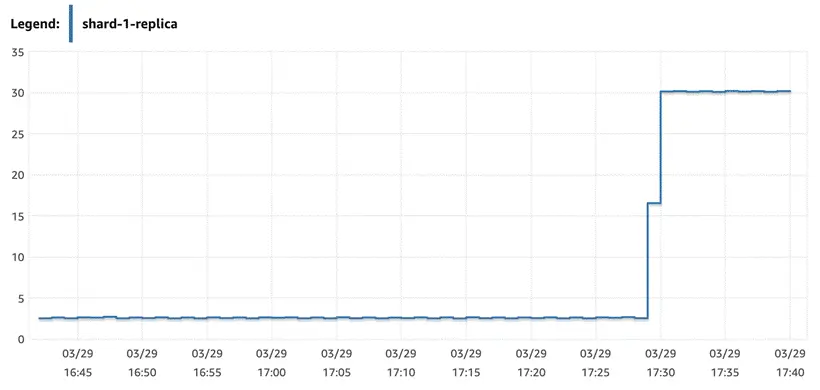
結果如下圖所示,所有的讀請求都發往了replica 節點執行,主節點沒有收到查詢請求
6、故障恢復驗證
此測試在於驗證當 Aurora failover 的時候驗證 proxy 是否能在不改變配置的情況下自動識別 failover 的發生並自動恢復。
測試腳本如下:
[root@ip-172-31-29-68 ec2-user]# cat test_failover.sh
#!/bin/bash
while true
do
     mysql -ugaea -pgaea_password -P13306 -h172.31.29.68 -e "use db_ks; update  tbl_ks set col1='failover' where id = 1;"
    now=$(date +"%T")
    echo "update done: $now"
    sleep 1

done
左滑查看更多
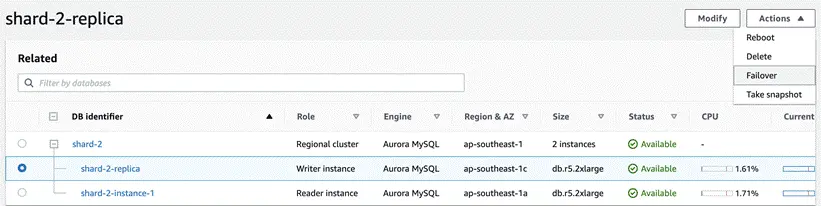
運行腳本,然後在Amazon Aurora集羣的寫節點上點擊Action→Failover。會啓動Amazon Aurora寫節點和讀節點的自動切換。在切換過程中,整個集羣的讀/寫endpoint和只讀endpoint維持不變,只是底層映射的節點發生變化。
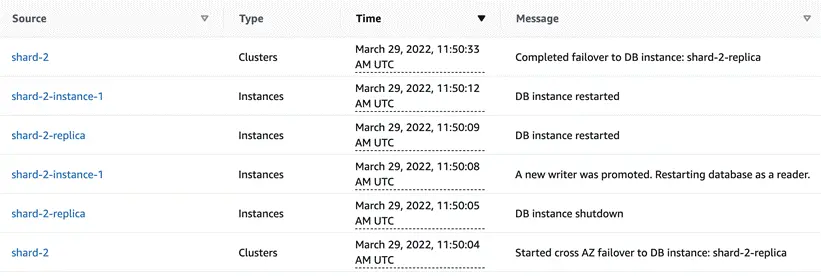
從 Event 看 Amazon Aurora 30 秒內完成 failover
但是從腳本輸出看,proxy 一直在報錯,不能自動發現 failover 事件
ERROR 1105 (HY000) at line 1: unknown error: execute in UpdatePlan error: ERROR 1290 (HY000): The MySQL server is running with the --read-only option so it cannot execute this statement
update done: 11:52:09
ERROR 1105 (HY000) at line 1: unknown error: execute in UpdatePlan error: ERROR 1290 (HY000): The MySQL server is running with the --read-only option so it cannot execute this statement
左滑查看更多
需要重啓 proxy 才能恢復正常的寫入
結語
本篇文章通過數據庫中間件的方法來拓展了 Amazon Aurora 的分庫分表能力和讀寫分離的能力。通過Gaea,這個方案能夠實現連接池、SQL的兼容性、跨分片路由、讀寫分離、分片表和全局表 join 以及父表和子表做關聯查詢的能力。不足之處在於 Gaea 在 Aurora failover 發生後不能識別和自動恢復,需要重啓或者手動刷新配置等方式才能恢復。
後續我們會繼續推出對其他中間件的拓展和研究系列博客。
本篇作者

張振威
亞馬遜雲科技APN解決方案架構師
主要負責合作伙伴架構諮詢和方案設計,同時致力於亞馬遜雲科技雲服務在國內的應用及推廣,擅長數據遷移,數據庫調優和數據分析相關。