

背景
使用 watchman 檢測文件變化通知非常的好用, 但有些時候會出現 watchman 佔用內存和 CPU 特別瘋狂, 通過 watch-del 也無濟與事, 由於 watchman 的版本 2021.09.13 比較老, 於是就想着升級一下版本.
正常來説, 在 mac 下使用 brew upgrade 升級非常的簡單, 但是我的 OS 系統版本比較老, 一直使用的是 10.14 的 Mojave ( 之前也升級過 Bigsur, 後面因為休眠問題又退回了) . 眾所周知, 官方已經不維護這個系統版本了, 所以 brew 上安裝和更新軟件也特別麻煩, 不能使用 bottle 安裝已編譯好的二進制, 必須要自己編譯安裝, 不光編譯時間是個問題, 而且編譯失敗的概率也很高.
趁着週末的時間, 於是就準備通過 brew upgrade 升級 watchman, 但是杯具也是從這裏開始了.
升級 watchman
-
首先更新 brew 的 formula 倉庫, 把相關軟件的版本和依賴數據庫更新.
brew update -
更新 watchman
brew upgrade watchman

# output
==> Would upgrade 1 outdated package:
watchman 2021.09.13.00 -> 2022.12.12.00
==> Would install xx dependencies for watchman:
folly 2021.09.13.00 -> 2022.12.12.00 edencommon 2022.12.12.00 fizz 2021.09.13.00 -> 2022.12.12.00 wangle 2021.09.13.00 -> 2022.12.12.00 fbthrift 2021.09.13.00 -> 2022.12.12.00 fb303 2022.12.12.00

...
結果就是漫長的等待, 一堆一堆的依賴軟件編譯和安裝, 包含 rust 和 llvm 這些大型軟件, 結果整整編譯了半天才編譯完這些大型軟件, 到最後編譯 folly 時候居然失敗了.
"std::__1::__fs::filesystem::path::__filename() const", referenced from:
std::__1::__fs::filesystem::path::operator/=[abi:v15006](std::__1::__fs::filesystem::path const&) in AsyncBase.cpp.o
"std::__1::__fs::filesystem::path::__root_directory() const", referenced from:
std::__1::__fs::filesystem::path::operator/=[abi:v15006](std::__1::__fs::filesystem::path const&) in AsyncBase.cpp.o
"std::__1::__fs::filesystem::path::lexically_normal() const", referenced from:
folly::fs::lexically_normal_fn::operator()(std::__1::__fs::filesystem::path const&) const in Filesystem.cpp.o
"std::__1::__fs::filesystem::__read_symlink(std::__1::__fs::filesystem::path const&, std::__1::error_code*)", referenced from:
folly::AsyncBaseOp::fd2name(int) in AsyncBase.cpp.o
通過分析 debug 的編譯日誌, 編譯應該都是成功的, 但在最後鏈接的時候失敗了. 通過查詢相關的資料得知, filesystem 相關的函數是定義在 <filesystem.h> 頭文件中的, 這個頭文件在 Xocde 11.x 版本有定義, 但是系統的支持應該是在 10.15 的版本才能支持1. 而我的 Xocde 版本確實是 11.3.1, 所以在編譯時沒出錯, 但在鏈接的階段失敗了 .
# 查看當前的 xocde 版本
➜  xcodebuild -version

# output
Xcode 11.3.1
Build version 11C505
嘗試方案
基於其它版本的 folly 編譯
既然 2022.12.12.00 版本編譯安裝失敗, 那就嘗試指定其它的版本編譯, 可以通過 https://formulae.brew.sh/ 找到 folly 其它版本的 formula 文件. 具體步驟如下:
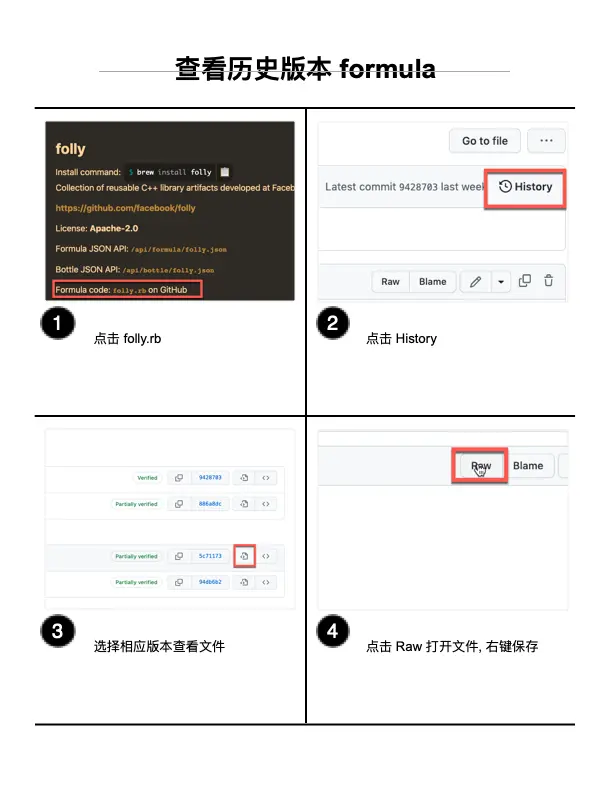
把指定版本 watchman.rb 下載後, 通過 brew 指定 rb 文件編譯.
brew install -s -v -d watchman.rb
但是不幸的是, 還是編譯錯誤. 換了多個版本折騰了半天, 還是會出現各種各樣的編譯錯誤, 沒法了, 這條路是行不通了.
還原版本也不容易
既然無法成功更新 watchman 版本, 那打算接着使用原始的版本吧, 但問題又是一堆一堆的, 不讓人安心了.
但當我執行 watchman 命令, 系統居然提示找不到這個命令了. 查看 /usr/local/bin/ 目錄, 確實沒有 watchman 的鏈接文件了, 應該是執行 brew upgrade 時, 會取消掉原來版本的鏈接.
那就通過 brew link 重新鏈接吧.
brew link watchman
重新鏈接後命令是回來了, 但是執行後系統會提示如下錯誤:
➜  Cellar watchman -h

# output
dyld: Library not loaded: /usr/local/opt/glog/lib/libglog.0.dylib
  Referenced from: /usr/local/bin/watchman
  Reason: image not found
[1]    11397 abort      watchman -h
應該是之前更新依賴時, 把依賴庫的版本升級了, 而原來版本的 watchman 無法找到老版本的依賴庫了. 但當時更新了那麼多的依賴庫, 誰也不知道哪些庫會不兼容, 看來只能走一步算一步, 人肉把出錯的依賴庫鏈接一個一個還原了.
# 查詢鏈接的版本
➜  ls -l /usr/local/opt/ | grep glog
lrwxr-xr-x 20 guoxiangxun 19 Dec 16:13 glog -> ../Cellar/glog/0.6.0

# 刪除連接版本
➜  cd /usr/local/opt
➜  rm glog

# 重新連接版本
➜ ln  -s ../Cellar/glog/0.5.0 glog
其它還包含依賴庫 llvm, fmt, icu4c, boost 等, 全部都要重新連接到原始版本. 如:
ln  -s ../Cellar/llvm/13.0.1_1 llvm
ln  -s ../Cellar/fmt/8.1.1_1 fmt
ln  -s ../Cellar/icu4c/70.1 icu4c
ln  -s ../Cellar/boost/1.78.0_1 boost
最終 watchman 版本終於還原成功, 能正常執行了. 但問題應該還沒有結束, 後面看其它軟件有哪些升級的依賴還需要還原吧, 因為 watchman 依賴庫太多了. 可以通過 brew deps 看看, 具體的就不列出來了.
➜ brew deps --tree --installed watchman

# output
watchman
├── boost
│   ├── icu4c
│   ├── xz
│   └── zstd
│       ├── lz4
│       └── xz
├── edencommon
│   ├── folly
│   │   ├── boost
│   │   │   ├── icu4c
│   │   │   ├── xz
│   │   │   └── zstd
│   │   │       ├── lz4
│   │   │       └── xz
│   │   ├── double-conversion
│   │   ├── fmt

... more and more
... more and more
總結
針對系統不維護的系統版本, 儘量還是不要通過 brew upgrade 升級吧, 花費的編譯時間長不説, 而且編譯問題也是一堆一堆的, 到最後還原版本也不容易, 最好的方式還是升級系統或者將就着使用吧.
實在要更新的話, 先要先看下要更新軟件所依賴的庫的數量再決定, 如果要更新的依賴庫太多的話, 風險可能更大. 可以 upgrade 時加上-n 參數測試下, 更新時把相關的日誌記錄下來, 究竟更新了哪些庫的哪些版本, 以便於搞不定時還原.
References
- https://stackoverflow.com/a/58668083/2538322 ↩
