

在 SVG 中,如果我們想實現一個動畫效果,可以使用 CSS,JS,或者直接使用 SVG 中自帶的 animate 元素(SMIL)。
這裏我們主要探討SVG與CSS結合實現的一些常見動畫效果。
(下面要使用到的SVG基礎知識,在 SVG從入門到圖標繪製和組件封裝 和 SVG中的Transform詳解---平移、旋轉和縮放 中都有詳細的介紹,這裏就不重複了,有需要的朋友可以前往查看哦。 )
SVG + CSS 動畫實現的基礎
HTML5 支持內聯 SVG,我們可以將SVG元素作為html標籤的一種,直接在頁面結構中使用,成為 DOM 的一部分,這也使得我們可以用 CSS 對其做樣式開發,這也是SVG + CSS 動畫實現的基礎。
<svg>
   <rect width="100" height="100" fill="gold" />
</svg>
上面的代碼片段在頁面繪製一個寬高100px的金色正方形。這裏使用標籤屬性的方式描述它的寬度、高度和填充色,其實我們也可以在CSS中寫這些樣式。
<svg>
   <rect />
</svg>
rect{
width: 100px;
height: 100px;
fill: gold;
}既然能用CSS對SVG做樣式開發,那麼結合animation、transition、transform,使SVG元素的樣式進行動態變換,就可以達到我們想要的動畫效果。
rect{
   width: 100px;
   height: 100px;
   fill: gold;
   transition: fill 1s linear;
}
rect:hover{
   fill: greenyellow;
}
基於transform的形狀變換動畫
和普通的HTML元素一樣,SVG元素可以通過transform進行平移、旋轉和縮放等形狀變換。
但兩者的變換參考點不同。對於普通的HTML元素,變換的參考點,默認值是元素自身在x、y方向的中心位置50% 50%(這裏僅考慮二維平面),也就是元素的旋轉、移位、縮放等操作都是以元素自身在x、y方向的中心位置進行的。
而SVG元素,變換的參考點,是在SVG畫布的0 0的位置(默認是<svg>元素的左上角)。
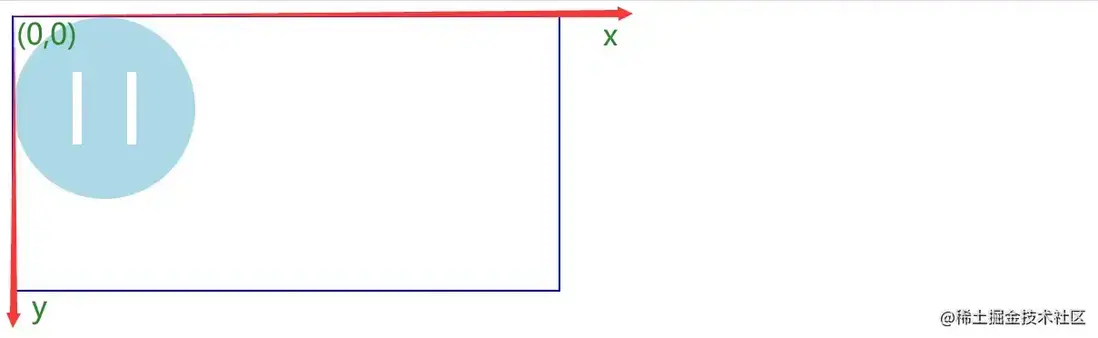
理解這一點對於理解SVG元素的transform變換非常重要,我們在前面的兩篇文章中進行了非常詳盡的講解:
SVG從入門到圖標繪製和組件封裝
SVG中的Transform詳解---平移、旋轉和縮放
仿B站直播圖標
動畫實現
<svg height="100" width="100" viewBox="0 0 100 100">
    <line class="beat" x1="15" y1="40" x2="15" y2="100" stroke="lightblue" stroke-width="10" stroke-linecap="round"></line>
    <line class="beat" x1="50" y1="40" x2="50" y2="100" stroke="lightblue" stroke-width="10"  stroke-linecap="round"></line>
    <line class="beat" x1="85" y1="40" x2="85" y2="100" stroke="lightblue" stroke-width="10"  stroke-linecap="round"></line>
</svg>使用<line>標籤繪製三條豎直的線條,(x1,y1)是線條起始點的座標,(x2,y2)是線條終點的座標。

(為了方便觀察,我們給svg設置一個藍色邊框。)
接着,通過keyframes動畫,不斷改變scaleY,讓線條在Y方向進行縮放。
.beat{
    transform-origin: bottom;   //將變換參考點設置成`<svg>元素`的底部
    animation: beat-scale 1.4s linear infinite;
}

@keyframes beat-scale{
    25%{
         transform: scaleY(0.3);
    }
    50%{
         transform: scaleY(1);
    }
    75%{
         transform: scaleY(0.3);
    }
}
最後,通過設置animation-delay,讓三段線條交錯運動。
.beat:nth-child(1){
    animation-delay: 0.4s;
}
.beat:nth-child(2){
    animation-delay: 0.2s;
}
組件封裝
實現了動畫,接下來就是把圖標進行組件封裝,以便一次定義,多處引用。
參考:SVG組件封裝
兩個改造點:
- 1、將
<line>標籤都放到<symbol>中,<symbol>標籤設置viewBox="0 0 100 100"; -
2、將
stroke="lightblue"改成stroke="currentColor",在使用svg圖標時,顏色就會從父元素的color屬性繼承。<svg height="0" width="0"> <symbol id="beats" viewBox="0 0 100 100" > <line class="beat" x1="15" y1="40" x2="15" y2="100" stroke="currentColor" stroke-width="10" stroke-linecap="round"></line> <line class="beat" x1="50" y1="40" x2="50" y2="100" stroke="currentColor" stroke-width="10" stroke-linecap="round"></line> <line class="beat" x1="85" y1="40" x2="85" y2="100" stroke="currentColor" stroke-width="10" stroke-linecap="round"></line> </symbol> </svg>使用:
<span style="color:#ff6699; border: 1px solid #ff6699;border-radius: 5px; padding-left: 5px; font-size: 24px;">
  <svg height="30" width="30">
       <use href="#beats"></use>   <!--href="#beats"所指向的就是上面<symbol>標籤的id-->
  </svg>
  <span>直播中</span>
</span>
加載時鐘
<svg height="100" width="100" viewBox="-52 -52 104 104"> <circle fill="none" stroke="#DE3E35" stroke-width="6" stroke-miterlimit="10" cx="0" cy="0" r="48"/> <line class="fast-hand" fill="none" stroke-linecap="round" stroke="#DE3E35" stroke-width="6" stroke-miterlimit="10" x1="0" y1="0" x2="35" y2="0.5"></line> <line class="slow-hand" fill="none" stroke-linecap="round" stroke="#DE3E35" stroke-width="6" stroke-miterlimit="10" x1="0" y1="0" x2="-0.5" y2="-24"></line> </svg><circle>標籤繪製時鐘輪廓,兩個<line>繪製長針和短針。


長短針的旋轉,我們希望繞圖標自身中心點進行。
我們知道,SVG元素變換的參考點,是在SVG畫布的0 0的位置。那麼如果圖標的中心點與SVG畫布0 0的位置重疊,那圖標豈不就繞自身中心點進行旋轉。
因此,我們將<circle>標籤圓心座標設為(0,0)(cx="0" cy="0"),同時長短針的起點座標也設為(0,0)。為了圖形顯示完全,設置<svg>元素的viewBox屬性為"-52 -52 104 104"

動畫的實現就是通過keyframes動畫,不斷改變長短針的rotate角度,由於兩者旋轉速度不同,所以動畫時間設置不同。
.fast-hand{
   animation: clock-rotate 2s linear infinite;  /*動畫時間設置不同*/
}
.slow-hand{
   animation: clock-rotate 15s linear infinite;  /*動畫時間設置不同*/
}
@keyframes clock-rotate{
   0%{
        transform: rotate(0deg);
   }
   100%{
        transform: rotate(360deg);
   }
}
封裝成組件的代碼和使用案例如下:
<svg height="0" width="0">
   <symbol id="clock" viewBox="-52 -52 104 104">
       <circle fill="none" stroke="currentColor" stroke-width="6" stroke-miterlimit="10" cx="0" cy="0" r="48"/>
       <line class="fast-hand" fill="none" stroke-linecap="round" stroke="currentColor" stroke-width="6" stroke-miterlimit="10" x1="0" y1="0" x2="35" y2="0.5"></line>
       <line class="slow-hand" fill="none" stroke-linecap="round" stroke="currentColor" stroke-width="6" stroke-miterlimit="10" x1="0" y1="0" x2="-0.5" y2="-24"></line>
   </symbol>
</svg>
<div style="color:#fa8919; font-size: 16px;" >
    <svg height="26" width="26" style="vertical-align: top; margin-top: -2px;margin-right:3px;">
        <use href="#clock"></use>
    </svg>
    <span>等待中</span>
</div>
描邊動畫
常用 SVG + CSS 來實現的,除了transform + animation/transition這種組合實現圖標的形狀變換動畫,另一種用處非常廣泛的就是描邊動畫。
stroke-dasharray & stroke-dashoffset
描邊動畫的核心是 SVG 的兩個顯示屬性,分別是 stroke-dasharray和stroke-dashoffset。
stroke-dasharray用於創建虛線。它的值是一個序列,可以傳入多個值,分別指定虛線中線段和間隔的長度。
stroke-dasharray = '10, 20' 表示:線段10,間距20,然後重複 線段10,間距20。。。
該參數序列可以是一到多個數值,當數值的個數為奇數時,會自動複製一份,再生效。
比如stroke-dasharray = '10'相當於stroke-dasharray = '10, 10';
stroke-dasharray = '10, 20, 30'相當於stroke-dasharray = '10, 20, 30, 10, 20, 30',此時的繪製規則是:線段10,間距20,線段30,間距10,線段20,間距30,然後重複。。。
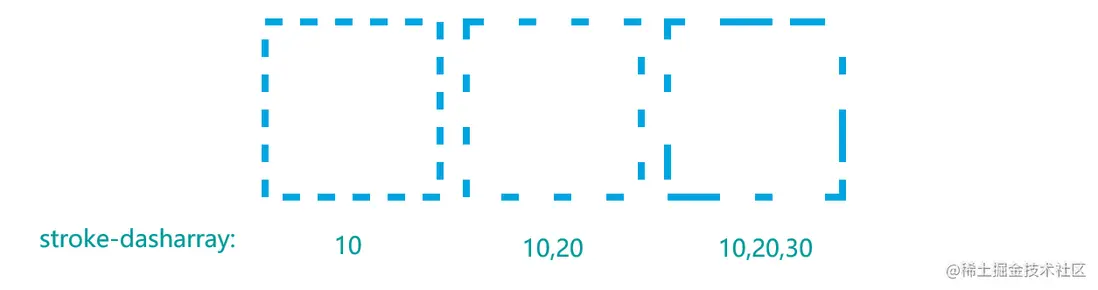
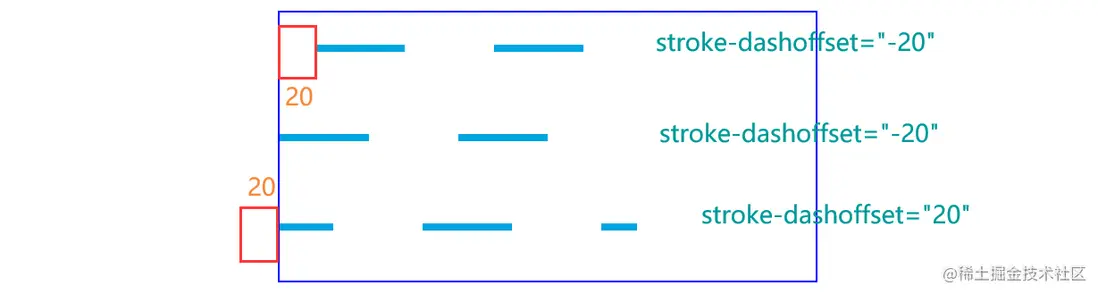
stroke-dashoffset: 描述相對於起始點的偏移。它的值是一個數值X,X>0時,相當於往左移動了X個長度單位; X<0時,相當於往右移動了X個長度單位。
stroke-dashoffset只有在設置了stroke-dasharray的情況下,才生效,非虛線的話,是無法看出偏移的。
對於一條線l,如果設置stroke-dasharray = 'l.length',那麼顯示出來的就只有線段,沒有間隔,相當於實線效果。而此時如果stroke-dashoffset='l.length',那線l就往左移動了l.length個長度單位,顯示出來的就只有間隔,沒有線段,相當於空白的效果。
如果stroke-dashoffset的值從l.length-->0,線段就會逐漸顯示出來。從而產生描邊的效果。

描邊效果的動畫在開發中有很多應用場景,比如各種形狀的進度條,圖標或文字的描邊,以及一些酷炫的按鈕邊框動畫等。
案例實現
環形進度條
首先,我們將stroke-dasharray和stroke-dashoffset都設為圓環的周長;然後根據進度progress計算動態計算出新的stroke-dashoffset,即(1-progress) * 圓環的周長。

計算圓環周長的方法:
- 1、在已知半徑的情況下,可以根據公式
2*Pi*r求得周長。 -
2、SVG的形狀元素都有一個
getTotalLength的方法,可以獲取該形狀的路徑總長度,對於規則和不規則的形狀都適用。//頁面結構 <div data-name="loading" data-percent="26%" class="progress"> <svg height="200" width="200" viewBox="0 0 100 100"> <!--灰色的背景圓環--> <circle cx="50" cy="50" r="40" stroke-width="5" stroke="#d1d3d7" fill="none"></circle> <!--藍色的動態圓環--> <circle class="process-circle" cx="50" cy="50" r="40" transform="rotate(-90 50 50)" stroke-width="5" stroke="#00a5e0" fill="none" stroke-linecap="round" stroke-dasharray="251"></circle> </svg> </div> <div class="adjust"> 調整進度:<input value="26" type="range" min="0" max="100" id="range" /> </div>//js代碼,獲取圓環周長,並在調整進度後改變藍色圓環的stroke-dashoffset <script> const progressDom = document.querySelector('.progress') const percent = progressDom.dataset.percent const circleDom = document.querySelector('.process-circle') //通過getTotalLength方法獲取圓環周長 const circleLen = circleDom.getTotalLength() console.log(circleLen) circleDom.style.strokeDashoffset = circleLen * ( 1 - parseInt(percent) / 100 ) //監聽進度改變的事件,實際開發中的數據可能通過ajax獲取 document.querySelector('#range').addEventListener('change', (e) => { circleDom.style.strokeDashoffset = circleLen * ( 1 - parseInt(e.target.value) / 100 ) progressDom.dataset.percent = e.target.value + '%' }) </script>//css代碼 .progress{ display: inline-block; position: relative; } .progress::before{ content: attr(data-percent); position: absolute; width: 100%; top: 50%; left: 0; transform: translateY(-50%); font-size: 20px; text-align: center; } .progress::after{ content: attr(data-name); position: absolute; width: 100%; top: 100%; left: 0; font-size: 25px; text-align: center; } .process-circle{ stroke-dashoffset:251; transition: stroke-dashoffset 3s; } .adjust{ margin-top: 50px; }環形加載動畫
stroke-dashoffset和animation結合還可以實現環形的加載動畫,這是一種非常常見的加載動畫。
<svg class="container" height="100" width="100" viewBox="-50 -50 100 100">
  <!--灰色的背景圓環-->
  <circle cx="0" cy="0" r="40" stroke-width="5" fill="none" stroke="rgba(209, 211, 215, 0.5)"/>
  <!--藍色的動態圓環-->
  <circle class="progress" cx="0" cy="0" r="40" stroke-width="5" stroke-linecap="round" stroke-dasharray="251" fill="none"/>
</svg>
.progress{ stroke: #F7C223; animation: move 2s linear infinite; } .container{ animation: container 2s linear infinite; } //給外框也加上旋轉動畫,兩個旋轉疊加,效果更自然 @keyframes container { 0% { transform: rotate(0deg); } 100% { transform: rotate(270deg); } } @keyframes move{ //在改變stroke-dashoffset的同時也讓圓環旋轉 0%{ stroke-dashoffset: 251px; } 50%{ stroke-dashoffset: calc(251px * 0.2); transform:rotate(135deg); } 100%{ stroke-dashoffset: 251px; transform:rotate(450deg); } }還可以再加上變色的動畫,效果更絢麗。


.progress{
    stroke: #F7C223;
    animation:
         move 2s linear infinite,
         color-change 2s linear infinite;
}
@keyframes color-change {
    0% { stroke: #4285F4; }
    25% { stroke: #DE3E35; }
    50% { stroke: #F7C223; }
    75% { stroke: #1B9A59; }
    100% { stroke: #4285F4; }
}
文字描邊
以描邊動畫的方式出場可以使人對logo或者文字的印象更加深刻。

<body>
    <svg width="500" height="106" viewBox="0 0 249 53" fill="none">
        <path d="M35.9334 13.232C35.9334 13.552 35.4854 13.712 34.5894 13.712C33.6934 13.712 33.2454 13.52 33.2454 13.136C32.3494 10.192 31.4854 8.528 30.6534 8.144C27.9654 7.184 23.9974 6.70399 18.7494 6.70399C17.8534 6.768 17.2454 7.024 16.9254 7.472C16.6054 7.92 16.4454 8.72 16.4454 9.872V25.616C24.3174 25.36 28.6374 25.008 29.4054 24.56L30.0774 20.528C30.2054 20.208 30.6534 20.048 31.4214 20.048C32.2534 20.048 32.6694 20.272 32.6694 20.72C32.4134 22.576 32.2854 24.656 32.2854 26.96C32.2854 29.2 32.4134 31.248 32.6694 33.104C32.6694 33.488 32.2214 33.68 31.3254 33.68C30.4934 33.68 30.0774 33.552 30.0774 33.296L29.3094 29.168C28.5414 28.72 24.2534 28.368 16.4454 28.112V39.728C16.4454 44.592 17.0854 47.024 18.3654 47.024H23.1654C23.6774 47.024 23.9334 47.536 23.9334 48.56C23.9334 49.52 23.7414 50 23.3574 50L12.2214 49.904L2.62137 50.192C2.17337 50.192 1.94937 49.712 1.94937 48.752C1.94937 47.792 2.14137 47.312 2.52537 47.312H6.84537C7.54937 47.312 7.96537 47.184 8.09337 46.928C8.22137 46.608 8.28537 45.808 8.28537 44.528V14.288C8.28537 9.168 7.64537 6.608 6.36537 6.608H2.90937C2.14137 6.608 1.75737 6.128 1.75737 5.168C1.75737 4.144 2.10937 3.632 2.81337 3.632L12.6054 3.824H32.6694V2.288C32.6694 1.904 33.0854 1.712 33.9174 1.712C34.8134 1.712 35.2614 1.904 35.2614 2.288L35.9334 13.232Z"/>
        <path d="M43.5031 50L35.9191 50.192C35.4711 50.192 35.2471 49.776 35.2471 48.944C35.2471 48.112 35.4711 47.696 35.9191 47.696H38.9911C39.6951 47.696 40.2071 47.408 40.5271 46.832C41.9991 44.4 44.9431 37.936 49.3591 27.44C53.7751 16.88 56.9431 8.88 58.8631 3.44C59.1191 2.864 59.7271 2.576 60.6871 2.576C61.7111 2.576 62.3511 2.896 62.6071 3.536C63.3751 6.736 65.6151 12.784 69.3271 21.68C73.1031 30.576 76.3991 38 79.2151 43.952C79.9831 45.488 80.6871 46.48 81.3271 46.928C81.9671 47.376 82.9591 47.6 84.3031 47.6C84.6871 47.6 84.8791 48.048 84.8791 48.944C84.8791 49.776 84.7191 50.192 84.3991 50.192L75.1831 50L64.8151 50.192C64.4311 50.192 64.2391 49.776 64.2391 48.944C64.2391 48.112 64.4311 47.696 64.8151 47.696H69.4231C70.1271 47.696 70.4791 47.408 70.4791 46.832C70.4791 46.768 68.6871 41.84 65.1031 32.048H51.7591C48.6231 39.792 47.0551 44.336 47.0551 45.68C47.0551 46.96 47.4391 47.6 48.2071 47.6H52.1431C52.6551 47.6 52.9111 48.048 52.9111 48.944C52.9111 49.776 52.7191 50.192 52.3351 50.192L43.5031 50ZM63.8551 28.784C63.6631 28.208 61.9991 23.344 58.8631 14.192H58.5751C57.0391 18.608 55.2151 23.472 53.1031 28.784H63.8551Z"/>
        <path d="M132.826 3.824L141.658 3.632C142.042 3.632 142.234 4.112 142.234 5.072C142.234 5.968 142.042 6.416 141.658 6.416H138.298C137.402 6.416 136.826 6.64 136.57 7.088C135.418 9.072 134.842 23.472 134.842 50.288C134.842 50.928 134.298 51.248 133.21 51.248C132.186 51.248 131.45 51.024 131.002 50.576C118.202 35.344 107.898 22.992 100.09 13.52H99.8019C99.9939 24.848 100.186 34.32 100.378 41.936C100.378 45.264 100.858 46.928 101.818 46.928H105.658C106.042 46.928 106.234 47.44 106.234 48.464C106.234 49.424 106.042 49.904 105.658 49.904H97.6899L88.9539 50.096C88.6339 50.096 88.4739 49.648 88.4739 48.752C88.4739 47.792 88.6339 47.312 88.9539 47.312H91.2579C93.2419 47.312 94.2659 46.672 94.3299 45.392C95.2899 35.024 95.7699 22.896 95.7699 9.008C94.7459 7.792 93.8819 7.088 93.1779 6.896C92.4739 6.704 91.1619 6.608 89.2419 6.608C88.8579 6.608 88.6659 6.128 88.6659 5.168C88.6659 4.144 88.8579 3.632 89.2419 3.632L102.778 3.824C118.33 23.536 127.482 35.216 130.234 38.864H130.426C130.17 22.096 129.946 12.528 129.754 10.16C129.562 7.792 129.05 6.608 128.218 6.608H124.858C124.41 6.608 124.186 6.128 124.186 5.168C124.186 4.144 124.41 3.632 124.858 3.632L132.826 3.824Z" />
        <path d="M174.709 51.248C166.901 51.248 160.437 49.168 155.317 45.008C150.197 40.848 147.637 35.152 147.637 27.92C147.637 20.624 150.389 14.576 155.893 9.776C161.397 4.976 167.957 2.576 175.573 2.576C179.285 2.576 182.933 3.504 186.517 5.36V3.728C186.517 3.28 186.901 3.056 187.669 3.056C188.501 3.056 188.917 3.28 188.917 3.728C188.917 7.76 189.237 11.952 189.877 16.304C189.941 16.496 189.813 16.688 189.493 16.88C189.237 17.008 188.821 17.072 188.245 17.072C187.669 17.072 187.317 16.816 187.189 16.304L186.421 11.216C182.837 7.824 178.709 6.128 174.037 6.128C169.429 6.128 165.461 8.112 162.133 12.08C158.869 16.048 157.237 21.008 157.237 26.96C157.237 32.912 158.965 37.872 162.421 41.84C165.877 45.744 169.941 47.696 174.613 47.696C179.285 47.696 183.701 46.32 187.861 43.568L188.341 38.096C188.341 37.584 188.789 37.328 189.685 37.328C190.581 37.328 191.029 37.552 191.029 38L190.453 50.192C190.453 50.576 190.005 50.768 189.109 50.768C188.277 50.768 187.861 50.576 187.861 50.192V48.56C183.445 50.352 179.061 51.248 174.709 51.248Z"/>
        <path d="M219.962 49.904L210.362 50.192C209.914 50.192 209.69 49.712 209.69 48.752C209.69 47.792 209.882 47.312 210.266 47.312H214.586C215.29 47.312 215.706 47.184 215.834 46.928C215.962 46.608 216.026 45.808 216.026 44.528V29.264H215.93C215.994 27.344 211.482 21.168 202.394 10.736C199.898 7.792 197.978 6.32 196.634 6.32H194.426C193.914 6.32 193.658 5.904 193.658 5.072C193.658 4.176 193.85 3.728 194.234 3.728L203.354 3.824L213.338 3.728C213.722 3.728 213.914 4.144 213.914 4.976C213.914 5.808 213.754 6.224 213.434 6.224H208.634C208.634 6.352 209.434 7.376 211.034 9.296C216.346 15.632 219.802 20.432 221.402 23.696H221.69C222.65 22.096 224.602 19.44 227.546 15.728C230.49 12.016 232.154 9.776 232.538 9.008C232.986 8.176 233.21 7.536 233.21 7.088C233.21 6.576 232.954 6.32 232.442 6.32H229.754C229.434 6.32 229.274 5.904 229.274 5.072C229.274 4.176 229.498 3.728 229.946 3.728L238.874 3.824L246.458 3.728C246.906 3.728 247.13 4.144 247.13 4.976C247.13 5.808 246.874 6.224 246.362 6.224H244.634C243.482 6.224 242.49 6.576 241.658 7.28C238.522 9.904 234.938 13.488 230.906 18.032C226.938 22.512 224.698 25.648 224.186 27.44V39.728C224.186 44.592 224.826 47.024 226.106 47.024H230.906C231.418 47.024 231.674 47.536 231.674 48.56C231.674 49.52 231.482 50 231.098 50L219.962 49.904Z"/>
    </svg>
</body>這裏每個字母都是由path元素繪製的圖標,這種比較複雜的圖形一般是由設計軟件繪製,然後生成svg代碼,我們這裏使用的是figma。
對於這種不規則圖形,只能用getTotalLength方法可以獲取該形狀的路徑總長度,然後設置stroke-dasharray和stroke-dashoffset的值。
const words = document.querySelectorAll('path')
for(let i=0; i<words.length; i++){
    console.log(words[i].getTotalLength())
}
body{
    background: #2e4057;
    display: flex;
    justify-content: center;
    align-items: center;
}
svg{
    stroke: hsl(189, 68%, 75%);
    stroke-width:1px;
    fill:hsl(189, 68%, 75%, 0%);
    animation: color-change 1s ease-in forwards 3.8s;
}
//每個字母的描邊動畫執行時間和開始時間不同
path:nth-child(1){
    stroke-dasharray: 246;
    stroke-dashoffset: 246;
    animation: show 1s linear forwards;
}
path:nth-child(2){
    stroke-dasharray: 253;
    stroke-dashoffset: 253;
    animation: show 1.2s linear forwards .5s;
}
path:nth-child(3){
    stroke-dasharray: 334;
    stroke-dashoffset: 334;
    animation: show 1.4s linear forwards 1s;
}
path:nth-child(4){
    stroke-dasharray: 246;
    stroke-dashoffset: 246;
    animation: show 1.6s linear forwards 1.5s;
}
path:nth-child(5){
    stroke-dasharray: 240;
    stroke-dashoffset: 240;
    animation: show 1.8s linear forwards 2s;
}
@keyframes show{
     to{
           stroke-dashoffset: 0;
     }
}
@keyframes color-change{
     to{
           stroke: transparent;
           fill:hsl(189, 68%, 75%)
     }
}
按鈕hover效果

非hover狀態:stroke-dasharray: 170 540,線段和間隔分別為170和540;stroke-dashoffset: -459表示相對於起始點(矩形左上角)向右偏移(順時針偏移)459,此時線段繪製在文字的正下方。
hover狀態:stroke-dasharray: 760,760為矩形的周長,此時stroke-dashoffset: 0不偏移,繪製效果為一個完整的矩形。
<body>
    <div class="wrapper">
        <svg height="60" width="320">
            <rect class="border-rect" height="60" width="320" />
        </svg>
        <div class="text">Check it!</div>
    </div>
</body>
html, body {
background: #333;
height: 100%;
overflow: hidden;
text-align: center;
}
.wrapper {
height: 60px;
margin: 0 auto;
position: relative;
top: 50%;
transform: translateY(-50%);
width: 320px;
}
.border-rect {
fill: transparent;
stroke-dasharray: 170 540;
stroke-dashoffset: -459;
stroke-width: 8px;
stroke: #d20be4;
transition: all linear 0.5s;
}
.text {
color: #fff;
font-family: 'Roboto Condensed';
font-size: 22px;
letter-spacing: 8px;
line-height: 32px;
position: relative;
top: -48px;
}
.wrapper:hover .border-rect {
stroke-dasharray: 760;
stroke-dashoffset: 0;
stroke-width: 2px;
}總結
本文主要探討了SVG結合CSS實現動畫的基礎,以及一些常見動畫的實現方式。隨着瀏覽器對web標準支持的越來越好,SVG的使用也越來越方便,在做網站交互的時候,可以適當使用SVG動畫提升你的網站表現力。
