

前端仔整理的基於 v8 定製 javascript runtime 教程,這 part 先複習一下相關前置知識。
1 source file
// demo.c
#include<stdio.h>
int main() {
    printf("hello\n");
}-
範例:
- C/C++
.c.cpp - Rust
.rs - Go
.go
- C/C++
2 object file
經過編譯步驟,把 source file 編譯為 object file,object file 內包含二進制機器碼,以及一些元信息:
gcc -c demo.c-c 指定 gcc 只編譯,不鏈接,結果是每個 source file 會產生一個對應的 binary object file。object file 中的內容已經是二進制了,但還不一定能被執行。
部份操作系統中,object file 和 executable file 使用相同的格式,比如 linux 中都是 ELF 格式。而 windows 中,object file 使用 COFF 格式,而 executable file 使用 PE 格式
可以用 objdump 解析生成的 demo.o object file,後面會給例子
-
範例:
- ELF
- COFF
- Mach-O
-
擴展閲讀:
- https://refspecs.linuxbase.org/elf/gabi4+/ch4.intro.html
2.1 header file
額外插播一個 c/c++ 中的概念 header file,比如前面 demo.c 中的 #include<stdio.h> 中的 stdio.h 就是一個 header file。
在我們編譯 c/c++ 時,如果要用到外部的東西,比如 demo 中要用到 printf,這是 c 標準庫中的接口,就需要引入對應的頭文件。頭文件的作用就是告訴編譯器,在我的 demo.c 代碼中用到的 printf 函數的定義長什麼樣子,編譯器才能正確生成 object file。
但此時編譯出來的 object file 的符號表中,printf 還沒有具體定義,還需要下一個連接步驟。以下文 static library 章節中 demo2.o 這個例子,使用 nm 工具我們可以直觀看到這一點:
nm - list symbols from object files 列出 object file 的符號表
$ nm demo2.o
                 U _add
0000000000000000 T _main
                 U _printf
_add 和 _printf 這兩個符號前面的 U 就是指它們還沒有定義。而如果查看最終連接後的 demo2 executable file,結果會是:
$ nm demo2
0000000100000000 T __mh_execute_header
0000000100003f80 T _add
0000000100003f50 T _main
                 U _printf
_add 符號有定義了,但 _printf 還是沒有定義,但此時 demo2 是可以正常運行的,因為 _printf 是動態鏈接的。在運行起來之後,libSystem library 會動態鏈接到我們的 demo2 中。
2.2 stdio.h 並不神秘
前面説過我們引入 stdio.h header file 只是為了告訴編譯器,我們要用到一個叫做 printf 的函數,以及這個函數的定義,讓它有足夠的信息可以完成編譯工作。所以如果我們知道 printf 的定義是什麼,完全可以不 include stdio.h:
1 自行編寫 header file
// mystdio.h
int printf(const char *format, ...);
2 代碼中換成 include 我們自己的 header file
// #include <stdio.h>
// #include <...> 是用於引入在系統查找路徑中的 header file
// #include "..." 是用於引入本項目內的 header file
// https://gcc.gnu.org/onlinedocs/cpp/Include-Syntax.html
#include "mystdio.h"
3 編譯、連接、執行
$ gcc -o demo demo.c
# 生成 demo
$ ./demo
hello
2.3 object file 和源代碼語言無關
有一個有趣的點有些人可能沒意識到,前面的 c 語言的 demo 編譯出的 object file,其實和 c 已經沒有關係了,object file 中 c 代碼已經變成了機器碼。所以這意味着我們完全可以把不同的語言編譯出的 object file 連接到一起。比如 c 和 rust、go 等。比如:
-
在 rust 中調用 c 生成的 object file
- https://docs.rust-embedded.org/book/interoperability/c-with-r...
-
在 c 中調用 rust 編譯的 object file
- https://docs.rust-embedded.org/book/interoperability/rust-wit...
當然實際上沒有這麼簡單,不同高級語言編譯出的二進制,大概率不能互相理解(擴展閲讀“Application binary interface”)。所以實際上如果要實現這種操作,可能還需要一些額外的膠水工作,比如 https://www.swig.org/
3 executable file
linker 連接器的功能是連接一組 obejct file 或 archive file,重定位他們的數據,綁定符號引用,生成 executable file。
經過連接步驟,把 object file 連接為 executable file:
gcc -o demo demo.o或者一條命令完成編譯連接過程:
gcc -o demo demo.c這裏演示連接過程中,使用了 gcc 而不直接使用 ld 工具,是因為 gcc 有一些默認配置可以簡化我們的工作。比如你可以嘗試一下直接使用 ld,大概率會出錯:
$ ld demo.o
ld: Undefined symbols:
  _printf, referenced from:
      _main in demo2.o
這是因為 demo.c 中用到了 stdio 的 printf 函數,但 ld 嘗試生成 execute file 時沒有把 stdio 庫和我們的 demo.o object file 連接到一起,導致連接完成後,發現 _printf 這個符號未定義。
增加 -lstdio 參數可以要求 ld 把 stdio library 連接進生成的 execute file 中:
$ ld demo.o -lSystem
ld: library 'System' not found
又錯了,ld 不知道去哪裏找 System library(macOS 中 stdio 是 libSystem 庫提供的),所以還得提供查找路徑:
$ ld demo.o -L/Library/Developer/CommandLineTools/SDKs/MacOSX.sdk/usr/lib -lSystem4 static library
靜態連接庫
-
後綴名
-
linux/macos 下
.aarchive
-
windows 下
.liblibrary
-
我們這裏針對 archive 説明,如名字所示,一個 .a 靜態鏈接庫文件,其實就是一組 object file 打包到一起,可以用下面的 demo 體驗:
1 編寫 library 源碼:
// mylib.h
int add(int x, int y);

// mylib.c
int add(int x, int y) {
  return x + y;
}
2 構建出 .a 靜態鏈接庫
gcc -c mylib.c
# 編譯出了一個 object file 叫 mylib.o
ar cr libmylib.a mylib.o
# 使用 ar(archive)工具的 cr(create)子命令
# 創建出一個名為 libmylib.a 的 archive 文件
# 其中包含了 mylib.o 這個 object file
3 編寫要使用 mylib library 的應用程序
// demo2.c
#include<stdio.h>
#include "mylib.h"

int main() {
  printf("%d\n", add(1,2));
}
4 編譯、連接
gcc -c demo2.c
# 生成 demo2.o
gcc -o demo2 demo2.o -L. -lmylib
# -L<xxx> 告訴 linker 可以在哪裏查找庫文件,因為我們的 libmylib.a 不在標準的查找路徑中,所以需要明確指定
# -lmylib 告訴 linker 要把 mylib 這個 library 連接到產物中
5 執行連接後生成的 demo2 excutable 文件
$ ./demo2
3
5 shared library
動態連接庫
-
後綴名
-
linux 下
.soshared object
-
macos 下
.dylibdynamic library
-
windows 下
.dlldynamic-link library
-
和 static library 不同,依賴 shared library 並不會導致 linker 把 library 的內容合併進最終的 excutable file 中,而只會記錄一些元信息,供操作系統在運行時動態查找到依賴的 shared library 並和我們的 excutable file 連接起來。
我們這裏針對 .so 進行説明,與 .a 不同,shared object 並不是簡單的一組 object file 的集合,它其實是由 linker 連接多個 object 後的產物。我們繼續在 static library 章節的基礎上,演示 shared library 的使用:
1 library 源碼和 demo 源碼都一樣,不用調整
2 構建出 .so shared library
gcc -shared -o libmylib.so mylib.o
# 從 mylib.o 編譯出了一個 shared library 叫 libmylib.so
3 編譯、連接
gcc -o demo3 demo2.o -L. -lmylib
# 生成名為 demo3 的可執行文件
# 注意我們除了生成的 executable file 文件名從 demo2 變成 demo3,其他的和 static library 部份完全一樣!
4 執行連接後生成的 demo3 excutable 文件
# ./demo3
3
其中第三步可能會有疑惑,為什麼用完全一樣的命令,這次 linker 就使用了 shared library 而不是 static library 呢?
因為 linker 默認行為就是用 shared library,所以如果先找到了 .so shared library,就會使用它而不是 .a static library。
怎麼能確認我們的 demo2、demo3 確實是採用了不同的方式連接的 mylib library 呢?一個辦法是對比文件大小,通常來説動態連接的產物要比靜態連接的小。但我們的例子中 mylib 實在太小了,所以這樣對比不會很明顯。所以可以使用一些工具來直觀查看 executable file 依賴的庫,mac 中可以用 otool:
$ otool -L demo2
demo2:
        /usr/lib/libSystem.B.dylib (compatibility version 1.0.0, current version 1336.0.0)

$ otool -L demo3
demo3:
        libmylib.so (compatibility version 0.0.0, current version 0.0.0)
        /usr/lib/libSystem.B.dylib (compatibility version 1.0.0, current version 1336.0.0)
可以看到 demo2 依賴了 libSystem.B.dylib,前面説過這個庫是提供 printf 的。這裏可以看到它也是動態連接到我們的 demo2 中的。
demo3 則多依賴了一個 libmylib.so 的 shared library,demo2 中沒有這一條是因為 libmylib.a 的內容直接被合併進了 demo2 的文件裏。
6 object file/shared object/excutable file 裏有什麼
按我自己的經驗,如果能在底層理解這些產物,會對主題有更直觀深入的理解。不用很深入只要有個直觀的印象就好。使用 objdump 工具我們可以解析這些產物。
首先看一個比較簡單的 mylib.o 這個 object file 的內容:
1 編譯 mylib.o
gcc -c -fno-asynchronous-unwind-tables mylib.c
# -fno-asynchronous-unwind-tables 這個參數可以避免 object file 中混進我們不關注的東西,讓我們的例子儘可能簡單
2 使用 objdump 解析 mylib.o
$ objdump -s -d mylib.o
# -s 顯示所有非空 sections
# -d 反彙編文件中的機器碼

mylib.o:        file format mach-o 64-bit x86-64
# mach-o 是 macOS 使用的靜態鏈接庫文件格式,同時也用在可執行文件、動態連接庫等其他場景
# 64-bit x86-64 略
# 這部分內容是從我們的 object file 中的一些元信息中獲取的
Contents of section __TEXT,__text:
# 編譯後的機器碼通常存在 text 段
 0000 554889e5 897dfc89 75f88b45 fc0345f8  UH...}..u..E..E.
 0010 5dc3                                 ].

Disassembly of section __TEXT,__text:
# 前面説編譯後的機器碼通常存在 text 段,這裏是那段機器碼的反彙編結果

0000000000000000 <_add>:
# 我們 mylib 裏的 add 函數編譯後的機器碼
#    地址: 機器碼                        對應的彙編代碼
       0: 55                            pushq   %rbp
       1: 48 89 e5                      movq    %rsp, %rbp
       4: 89 7d fc                      movl    %edi, -4(%rbp)
       7: 89 75 f8                      movl    %esi, -8(%rbp)
       a: 8b 45 fc                      movl    -4(%rbp), %eax
       d: 03 45 f8                      addl    -8(%rbp), %eax
      10: 5d                            popq    %rbp
      11: c3                            retq
3 編譯 demo2.o
$ gcc -c -fno-asynchronous-unwind-tables mylib.c4 使用 objdump 解析 demo2.o
$ objdump -s -d demo2.o

demo2.o:        file format mach-o 64-bit x86-64
Contents of section __TEXT,__text:
 0000 554889e5 bf010000 00be0200 0000e800  UH..............
 0010 00000089 c6488d3d 0b000000 b000e800  .....H.=........
 0020 00000031 c05dc3                      ...1.].
Contents of section __TEXT,__cstring:
# 代碼中的文本內容
 0027 25640a00                             %d..
# 25:%
# 64:d
# 0a:\n
# 00:\0  c 語言課上的知識還沒忘吧🐶,c語言的字符串以 \0 結尾,讀到 \0 就知道字符串結束了

Disassembly of section __TEXT,__text:

0000000000000000 <_main>:
# 我們的 main 函數編譯出的機器碼
       0: 55                            pushq   %rbp
       1: 48 89 e5                      movq    %rsp, %rbp
       4: bf 01 00 00 00                movl    $1, %edi
       9: be 02 00 00 00                movl    $2, %esi
       e: e8 00 00 00 00                callq   0x13 <_main+0x13>
      13: 89 c6                         movl    %eax, %esi
      15: 48 8d 3d 0b 00 00 00          leaq    11(%rip), %rdi          ## 0x27 <_main+0x27>
      1c: b0 00                         movb    $0, %al
      1e: e8 00 00 00 00                callq   0x23 <_main+0x23>
      23: 31 c0                         xorl    %eax, %eax
      25: 5d                            popq    %rbp
      26: c3                            retq
5 最後看看連接後的 demo2 executable file
$ objdump -s -d demo2

demo2:  file format mach-o 64-bit x86-64
Contents of section __TEXT,__text:
# add 函數
 100003f40 554889e5 897dfc89 75f88b45 fc0345f8  UH...}..u..E..E.
 100003f50 5dc30000 00000000 00000000 00000000  ]...............
# main 函數
 100003f60 554889e5 bf010000 00be0200 0000e8cd  UH..............
 100003f70 ffffff89 c6488d3d 11000000 b000e804  .....H.=........
 100003f80 00000031 c05dc3                      ...1.].
Contents of section __TEXT,__stubs:
 100003f87 ff257300 0000                        .%s...
Contents of section __TEXT,__cstring:
 100003f8d 25640a00                             %d..
Contents of section __TEXT,__unwind_info:
# 無關,略
 100003f94 01000000 1c000000 00000000 1c000000  ................
 100003fa4 00000000 1c000000 02000000 403f0000  ............@?..
 100003fb4 40000000 40000000 873f0000 00000000  @...@....?......
 100003fc4 40000000 00000000 00000000 00000000  @...............
 100003fd4 03000000 0c000200 14000200 00000000  ................
 100003fe4 20000001 00000000 00000001 00000000   ...............
Contents of section __DATA_CONST,__got:
# 無關,略
 100004000 00000000 00000080                    ........

Disassembly of section __TEXT,__text:

# 記住 add 函數的地址 0x100003f40
0000000100003f40 <_add>:
100003f40: 55                           pushq   %rbp
100003f41: 48 89 e5                     movq    %rsp, %rbp
100003f44: 89 7d fc                     movl    %edi, -4(%rbp)
100003f47: 89 75 f8                     movl    %esi, -8(%rbp)
100003f4a: 8b 45 fc                     movl    -4(%rbp), %eax
100003f4d: 03 45 f8                     addl    -8(%rbp), %eax
100003f50: 5d                           popq    %rbp
100003f51: c3                           retq
                ...
100003f5e: 00 00                        addb    %al, (%rax)

0000000100003f60 <_main>:
100003f60: 55                           pushq   %rbp
100003f61: 48 89 e5                     movq    %rsp, %rbp
100003f64: bf 01 00 00 00               movl    $1, %edi
100003f69: be 02 00 00 00               movl    $2, %esi
# 調用 add 函數,前面説的 add 函數的地址            0x100003f40
100003f6e: e8 cd ff ff ff               callq   0x100003f40 <_add>
100003f73: 89 c6                        movl    %eax, %esi
100003f75: 48 8d 3d 11 00 00 00         leaq    17(%rip), %rdi          ## 0x100003f8d <_printf+0x100003f8d>
100003f7c: b0 00                        movb    $0, %al
# 調用 printf,0x100003f87 這個地址在後面
100003f7e: e8 04 00 00 00               callq   0x100003f87 <_printf+0x100003f87>
100003f83: 31 c0                        xorl    %eax, %eax
100003f85: 5d                           popq    %rbp
100003f86: c3                           retq

Disassembly of section __TEXT,__stubs:

0000000100003f87 <__stubs>:
# 在這裏,printf 所在的 libSystem 是動態鏈接的,情況又不一樣
100003f87: ff 25 73 00 00 00            jmpq    *115(%rip)              ## 0x100004000 <_printf+0x100004000>
6 既然要理解,不用 objdump 這種工具行不行?
如果你用 hex editor 打開 demo2,能直接看到其中 ascii 碼的內容:

objdump 不是什麼魔法,它不過是懂得 mach-o 文件格式,按規範去解讀而已:
https://github.com/aidansteele/osx-abi-macho-file-format-reference
想了解更多可以參考這個文章:https://yurylapitsky.com/exploring_mach-o_binaries
ELF 格式 wiki 上有一個非常直觀的示意圖:
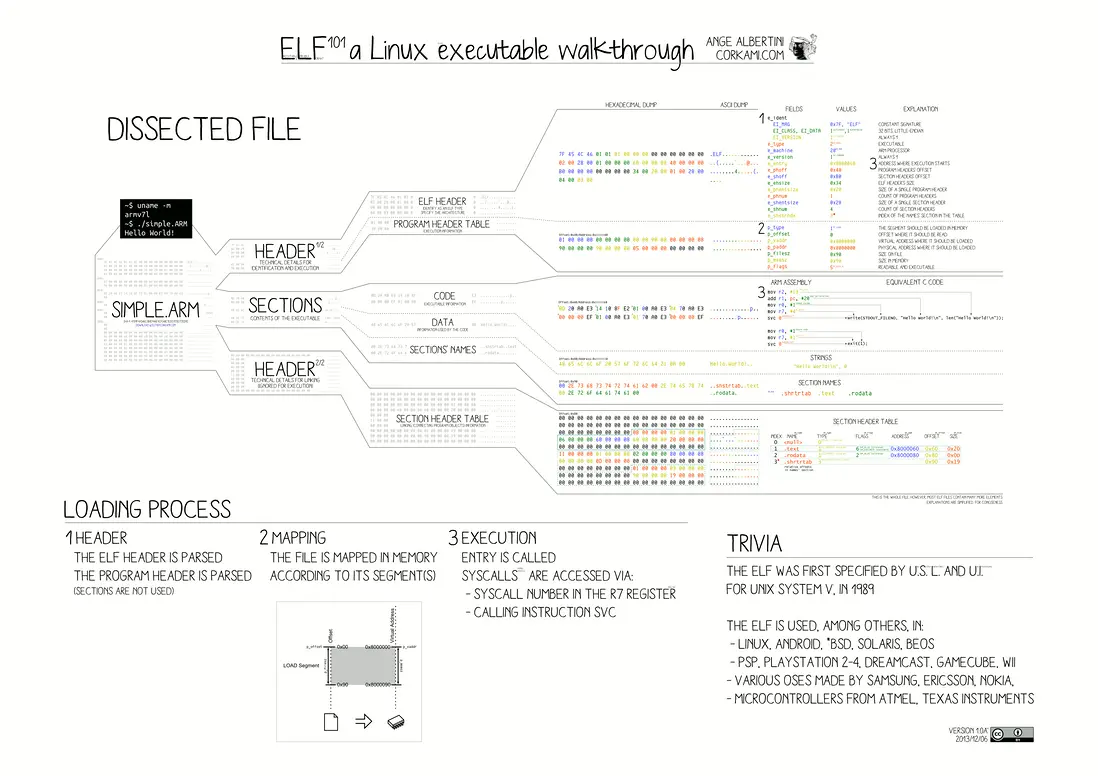
https://en.m.wikipedia.org/wiki/Executable_and_Linkable_Format
參考
- https://access.redhat.com/documentation/en-us/red_hat_enterpr...
- https://docs.rust-embedded.org/book/intro/index.html
- https://www.cprogramming.com/tutorial/shared-libraries-linux-...
- https://en.wikipedia.org/wiki/Shared_library
