

前言
ErgateForm 是配置化的 antd form(react) 組件。通過配置化生成表單。實現了表單聯動、動態表等單功能,表單屬性仍沿用 antd form 各個組件的屬性。
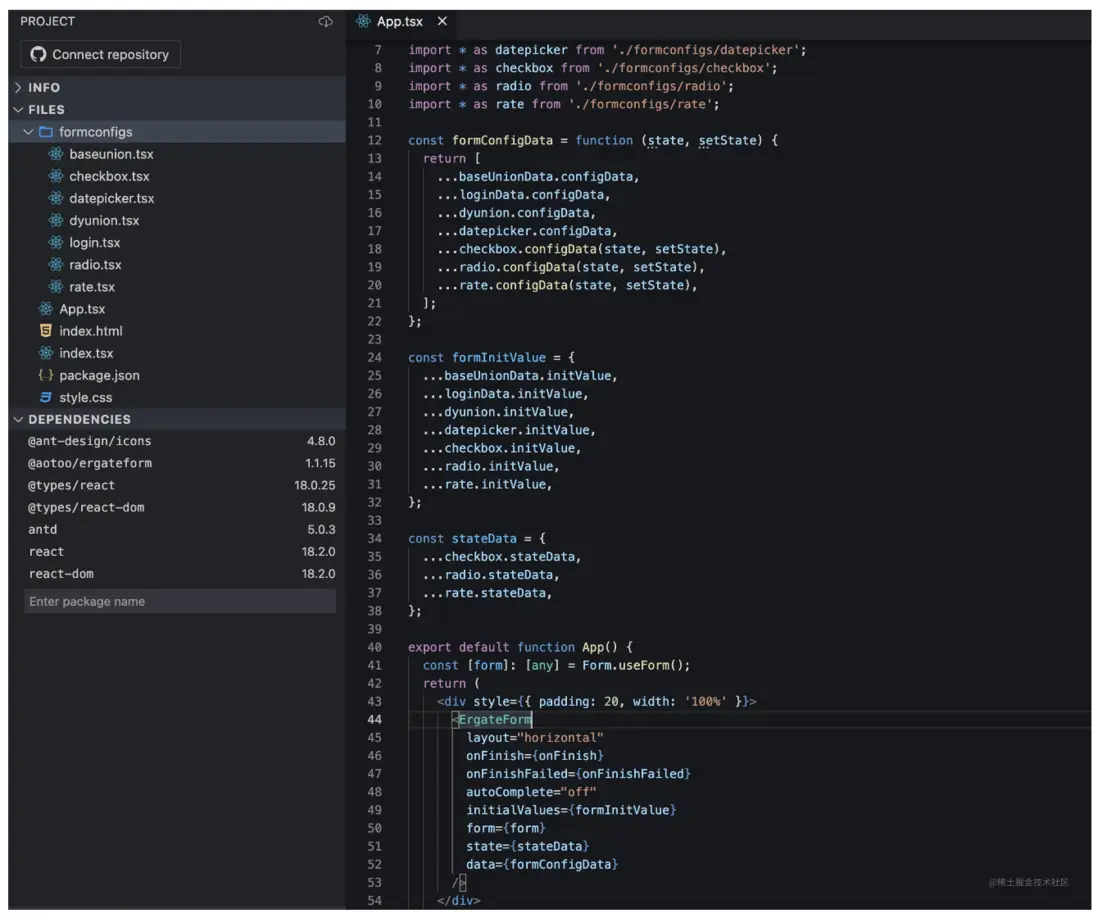
我自己在做ToB類項目時,比較頭疼大量的表單業務。會將表單等組件重新封裝一下,使用JSON來配置化自動生成表單。即方便CV,也方便各種抽離,對於模塊化也比較友好,下圖是我做的DEMO,可以很方便的組合成各種表單
基礎使用
安裝
npm install @aotoo/ergateform

# or

yarn add @aotoo/ergateform
基礎表單
import ErgateForm from '@aotoo/ergateform'
import {Form}  from 'antd'

function App(){
  const form = Form.useForm()
  const formConfig = {
    labelCol:{ span: 8 }
    wrapperCol: { span: 16 }
    layout: "horizontal"
    initialValues: {textbox: 'hello world'}
    form: form  // antd的form實例
    data: [
      {
        label: '文本框',
        name: 'textbox',
        $input: {
          type: 'text',  // antd Input
        },
      },
    ]
  }

  return (
    <ErgateForm {...formConfig}/>
  )
}
聯動表單
import ErgateForm from '@aotoo/ergateform'
import {Form}  from 'antd'

function App(){
  const form = Form.useForm()  // antd的form實例
  const formConfig = {
    labelCol:{ span: 8 }
    wrapperCol: { span: 16 }
    layout: "horizontal"
    initialValues: {textbox: 'hello world'}
    form: form
    data: [
      {
        label: '目標文本框',
        name: 'target-input',
        $input: { type: 'text'},
      },
      {
        label: '響應文本框',
        name: 'response-input',
        $input: { type: 'text' },
        union: {
          target: 'target-input',
          event: 'onChange',
          callback(e){
            console.log(e.target.value)
            form.setFieldValue('response-input', e.target.value)
          }
        }
      },
    ]
  }

  return (
    <ErgateForm {...formConfig}/>
  )
}
聯動結構
import ErgateForm from '@aotoo/ergateform'
import {Form}  from 'antd'

function App(){
  const form = Form.useForm()
  const formConfig = {
    labelCol:{ span: 8 }
    wrapperCol: { span: 16 }
    layout: "horizontal"
    initialValues: {textbox: 'hello world'}
    form: form  // antd的form實例
    data: [
      {
        label: '文本框',
        name: 'select-box',
        $input: {
          type: 'select',
          options: [
            {label: '選項一', value: 'option-1'},
            {label: '選項二', value: 'option-2'},
            {label: '選項三', value: 'option-3'},
          ]
        },
      },

      union('select-box', function(value){
        if (value === 'option-2') {
          return JSX
        }
      })
    ]
  }

  return (
    <ErgateForm {...formConfig}/>
  )
}
聯動狀態
import ErgateForm from '@aotoo/ergateform'
import {Form}  from 'antd'

function App(){
  const form = Form.useForm()
  const formConfig = {
    labelCol:{ span: 8 }
    wrapperCol: { span: 16 }
    layout: "horizontal"
    initialValues: {textbox: 'hello world'}
    form: form  // antd的form實例
    state: { visible: false },
    data: function(state, setState){
      return [
        <button onClick={function(){
          setState({
            visible: true
          })
        }}>按鈕 </button>,

        union('state.visible', function(value){
          if (value) {
            return JSX
          }
        })
      ]
    }
  }


  return (
    <ErgateForm {...formConfig}/>
  )
}
支持的表單類型
{
  $input: { type: '???', }  // type 用來設置表單類型
}- button => Button
- text => Input 表單的別名
- textarea => Input.TextArea 別名
- search => Input.Search
- password => Input.Password
- cascader => Cascader
- select => Select
- autocomplete => AutoComplete
- inputnumber => InputNumber
- rate => Rate
- slider => Slider
- switch => Switch
- timepicker => TimePicker
- timerange => TimePicker.RangePicker 別名
- treeselect => TreeSelect
- datepicker => DatePicker
- daterange => DatePicker.RangePicker 別名
- checkbox => Checkbox
- checkboxGroup => Checkbox.Group
- radio => Radio
- radioGroup => Radio.Group
- transfer => Transfer
- upload => Upload
配置
Form配置
在ErgateForm中使用最外層的非data屬性來配置Form屬性
Form.state
這是ErgateForm的屬性,原生antd Form表單無此屬性,該屬性作用是用來方便模塊化時能夠方便設置狀態值得變更,使用React的useState實現
ergateform的寫法
const formConfig = {
  labelCol:{ span: 8 }
  wrapperCol: { span: 16 }
  layout: "horizontal"
  ...
  data: [...]  // data用來配置 Form.Item 集合
}

return <ErgateForm {...formConfig}/>

// 或者

return <ErgateForm
  labelCol= {{span: 8}}
  wrapperCol={{span: 16}}
  layout={'horizontal'}
  ...
  data: [...]
/>
antd form 原生寫法
<Form
  labelCol={{ span: 8 }}
  wraperCol={{ span: 16 }}
  layout="horizontal"
  ...
>
  ...
</Form>
FormItem配置
Form.Item 是antd表單的基礎結構。ErgateForm使用data的數據項來配置Form.Item屬性及表單屬性
ergateform的寫法
-
data為數組
// 配置 { data: [ { label: '標題名', // 對應 Form.Item 的label屬性 name: 'uniq-name' // 對應 Form.Item 的name屬性 $input: { ... } // 配置表單屬性 }, JSX, union(...) ] } - data為方法
可以將data設置為方法,只要返回數組項配置即可。該方法接收state, setState兩個參數,這樣我們可以在配置中靈活設置一些狀態
data: function(state, setState){
  return [
    ...
  ]
}
數據項可以是JSX,或者union方法返回的結構,union方法後面會講到
antd form 原生寫法
<Form.Item
  label="標題名"
  name="uniq-name"
>
  <input {...$input} />
</Form.Input>
橫向排列
ErgateForm 默認使用Space組件來橫向排列表單,只需要將$input配置成數組即可,來看配置
{
  data: [
    {
      ...,  // 此時這裏的屬性會自動添加到Space組件中
      $input: [
        {
          label: 'UserName',
          name: 'username',
          $input: {  // 嵌套表單仍然使用`$input`屬性
            type: 'text',
          }
        },
        {
          label: 'Password',
          name: 'password',
          $input: {
            type: 'password'
          }
        }
      ]
    }
  ]
}
radio / checkbox 的子項默認是橫向排列,如果需要豎向排列時,官網是使用Space組件包裹子項,在這裏直接配置$input.direction就好了
特殊屬性
ErgateFome加入的屬性,用來控制配置結構和聯動
- $input
- union
$input
$input用來配置具體的表單/表單組,如 Input, Select等支持的表單元件,api 屬性與官網一致
$input.type
該屬性用來標識使用那個表單組件,
antd的Button組件包含type屬性,請使用 buttonType 替換
union
用來設置表單聯動,union的實現思路有點類似於監視者的角色,當目標值變更時及時做出響應。union屬性包含三個必須設置的參數 target、event、callback
union.target
描述對齊的目標name
union.event
表單組件一般都有幾個事件方法,例如 Search 表單組件有onSearch和onChange等事件,我們只想關注onChange事件時將union.event設置為onChange即可
union.callback
事件響應方法,當對齊目標表單狀態發生改變時,觸發該方法
多聯動
一個表單需要關注多個狀態變更時設置,將union設置為數組即可實現多聯動
示例 code
[
  {
    label: '我是目標表單',
    name: 'name-target',
    $input: {type: 'select', ...}
  },

  // 單聯動
  {
    label: '單聯動響應表單',
    name: 'name-response',
    union: {
      target: 'name-target',
      event: 'onChange',
      callback(value, option){
        /** do something */
      }
    }
  },

  // 多聯動
  {
    label: '多聯動響應表單',
    name: 'mul-response',
    union: [
      {target: 'name-target', event: 'onChange', callback: ...},
      {target: 'name-target', event: 'onSearch', callback: ...},
    ]
  }
]
union方法
在設計表單時,有些結構需要根據狀態來顯示,此時可以引入union方法來實現這種類型的需求。
三種用法
union有三種設置方法
- 表單值響應
原理是通過antd的form.useWatch對觀測表單的狀態改變做出響應。需要注意,如果表單組件不包含value屬性,會提示報錯。例如 Checkbox 組件就不包含 value 屬性,需要通過state來控制Checkbox的狀態。幸運的是其他所有表單都有value屬性 - state值響應
- 靜默響應,但會在表單完成時反饋出結構(useEffect實現)
// 聯動組件
union('target-name', function(value){
  return JSX
});
// 聯動state
union('state.xxx', function(value){
return JSX
})// 無響應
union('任意字串描述,不可以和組件name/state[name]重名即可', function(value){
return JSX
})union方法中也可以設置其他表單組件的屬性,但一定要加上延遲,否則會造成渲染衝突,這一點後面會講到
示例CODE
注意下面的union方法的使用的位置
import ErgateForm {union} from '@aotoo/ergateform'
import {Form} from 'antd'

function App(){
  const form = Form.useForm()
  const formConfig = {
    ... // Form配置項
    data: function(state, setState){
      return [
        {
          $input: [ // 表單組
            {
              label: '文本框',
              name: 'target-select',
              $input: {
                type: 'select',
                options: [
                  {label: '選項一', value: '1'},
                  ...
                ]
              }
            },
            // 組內union
            union('target-select', function(value){
              if (value === '3'){
                return <div>response vlaue 3</div>
              }
            })
          ],
        },

        <button>按鈕</button>,  // 支持直接插入JSX

        // 組外union
        union('target-input', function(value){
          if (value === '1') {
            return <div>response value 1</div>
          }
          if (value === '2') {
            return <div>response value 2</div>
          }
        }),

        // state聯動
        union('state.xxx', function(value){
          return JSX
        })
      ]
    }
  }

  return <ErgateForm {...formConfig}/>
}

return <App />
union 方法不需要設置 event 參數,內部使用了 antd 的 Form.useWatch 實現值變更追蹤
暫時不支持 async await promise 的使用
複雜使用
formItem方法
引入formItem方法,它用來創建單獨的Form.Item結構,也可以用來創建聯動表單結構
import {formItem, union} from '@aotoo/ergateform';

<ErgateForm
  ...
  data={[
    {..., name: 'select-box', $input: {type: 'select', options: [...]}},
    union('select-box', function(value){
      if (value === '???' ) {
        return formItem({
          label: '新表單',
          ...,
          $input: { type: 'text'}
        })
      }
    })
  ]}
/>
formList方法
引入formList方法,它用於創建一組動態增、刪的表單組,formList可以參考antd官方的原版例子,並未做更多的修改
import {formItem, union, formList} from '@aotoo/ergateform';

<ErgateForm
  ...
  data={[
    {..., name: 'select-box', $input: {type: 'select', options: [...]}},
    union('select-box', function(value){
      if (value === '???' ) {
        return formList({...}).render((fields, {add, remove}, {errolist}) => {
          return (
            <>
              {
                fields.map((field)=>{
                  return <input {...field}/>
                })
              }
              <button onClick={add()} >新增</button>
            </>
          )
        })
      }
    })
  ]}
/>
getForm方法
Ergate使用的是antd的最新版本(5),可以使用form的實例來做很多事情,getForm方法是為了模塊化時能方便取到form實例,ErgateForm會攔截每個表單事件的回調方法,重構後並還原成原來的使用方式
 data = [
   {
     label: 'title',
     name: 'name',
     $input: {
       type: 'button',
       buttonType: '...',  // 注意button組件是沒有value的,不能夠使用union來追蹤
       onClick(){
         const form = this.getForm()  // 獲取form的實例
         form.setFieldValue('xxx-name', value)
       }
     }
   }
 ]
setOptions方法
setOptions這個方法是ergateform的擴展方法,可以動態設置Form中各個Select組件的下拉選項
data = [
   {
     label: 'title',
     name: 'select-name',
     $input: {
       type: 'select',
       options: []
     }
   },

   {
     $input: {
       type: 'button',
       onClick(){
         const form = this.getForm()
         form.setOptions('select-name', [
           {label: '選項一', value: '1'},
           {label: '選項二', value: '2'},
           ...
         ])
       }
     }
   }
 ]
union 方法中設置其他表單屬性
不建議在 union 的回調方法中設置其他表單的屬性,如果非要設置請加上延遲方法,否則會造成渲染衝突
示例 code
{
  data: [
    ...,

    {
      label: '選擇框',
      name: 'select-box',
      $input: {
        options: [
          {lable: 'a', value: 'a'},
          {lable: 'b', value: 'b'},
        ]
      }
    },

    union('select-box', function(value){
      const form = this.getForm()
      if (value === 'b') {
        setTimeout(()=>{
          form.setOptions('select-box', [...])
        }, 100)
      }
      return JSX || null
    })
  ]
}
使用state
const stateData = {
  checked: false
}

const ergateFomrConfig = {
  layout: "horizontal"
  onFinish: onFinish,
  ...
  state: stateData,
  data: function(state, setState){
    return [
      {
        name: 'check-box',
        $input: {
          type: 'checkbox',
          checked: state.checked,
          onChange(){
            setState({
              checked: !state.checked
            })
          }
        }
      },

      union('state.checked', function(value){
        console.log(value)
      })
    ]
  }
}