

作者:姚嵩
愛可生南區交付服務部經理,愛好音樂,動漫,電影,遊戲,人文,美食,旅遊,還有其他。雖然都很菜,但畢竟是愛好。
本文來源:原創投稿
*愛可生開源社區出品,原創內容未經授權不得隨意使用,轉載請聯繫小編並註明來源。
摘抄: https://dev.mysql.com/doc/ref...
説明:
MySQL 8.0.22開始,新增了 optimizer_switch 參數,新增了 derived_condition_pushdown 變量,
啓⽤用該變量後,可能會導致最外層 where 條件中使⽤了⽤户變量的 SQL 語句得到⾮預期的結果;
簡單介紹:
derived_condition_pushdown 按字⾯意思就是派⽣條件下推;
MySQL8.0.22 開始對⽀持符合條件的子查詢‘’進⾏派⽣條件下推,derived_condition_pushdown=ON 後,
對於查詢:
SELECT * FROM (SELECT i, j FROM t1) AS dt WHERE i > constant在許多情況下可能將外部的 where 條件下推到派⽣表,這會導致語句優化為:
SELECT * FROM (SELECT i, j FROM t1 WHERE i > constant) AS dt這減少了派⽣表返回的⾏數,從⽽加快查詢的速度。
測試語句:
select * from (select @r := 603014203924416,@i := 0) vars where @r<>0 ;變更 optimizer_switch 的語句(值可選OFF或ON):
set optimizer_switch='derived_condition_pushdown=on'; -- 設置當前會話
set global optimizer_switch='derived_condition_pushdown=on'; -- 設置全局值(影響後續新建的會話)
set persist optimizer_switch='derived_condition_pushdown=on'; -- 設置全局值,並固化到配置⽂件mysqld-auto.cnf;
測試 MySQL 版本:
MySQL8.0.23
當derived_condition_pushdown=ON時:
測試語句1:
set optimizer_switch='derived_condition_pushdown=on';
set @r=0;
select * from (select @r := 603014203924416,@i := 0) vars where @r<>0 ;
explain select * from (select @r := 603014203924416,@i := 0) vars where @r<>0 ;
set @r=1;
select * from (select @r := 603014203924416,@i := 0) vars where @r<>0 ;
explain select * from (select @r := 603014203924416,@i := 0) vars where @r<>0 ;
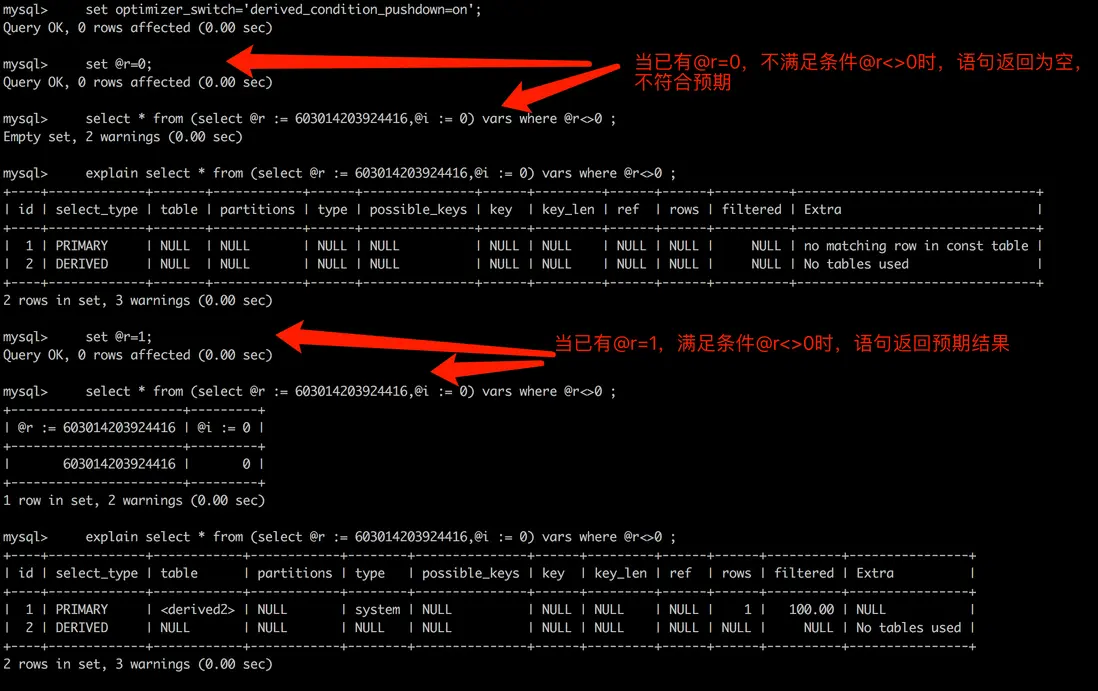
測試結果1:
測試語句2:
set @r=0;
select @r := 603014203924416,@i := 0 where @r<>0 ;
explain select @r := 603014203924416,@i := 0 where @r<>0 ;
set @r=1;
select @r := 603014203924416,@i := 0 where @r<>0 ;
explain select @r := 603014203924416,@i := 0 where @r<>0 ;
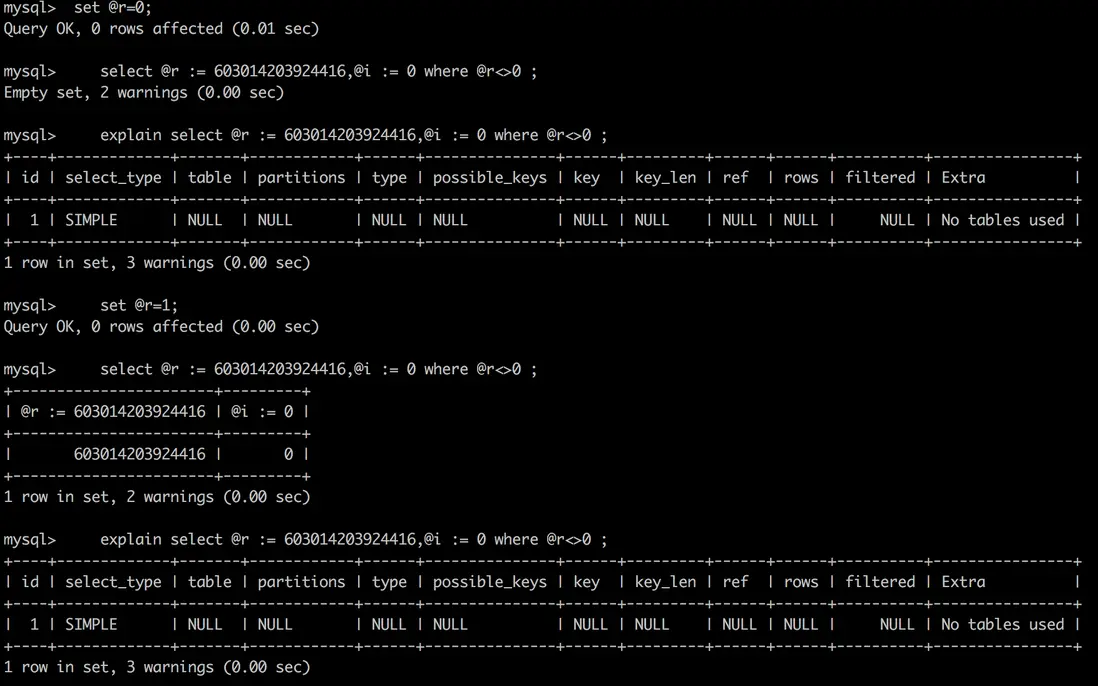
測試結果2:
測試結果説明:
當設置了 derived_condition_pushdown=ON 時: MySQL 執⾏了派⽣條件下推的優化,
將語句1
select * from (select @r := 603014203924416,@i := 0) vars where @r<>0 ;變更為語句2:
select @r := 603014203924416,@i := 0 where @r<>0 ;⽽語句2中,是先篩選 where @r<>0 條件,然後再展示 @r := 603014203924416,@i := 0 的結果,
所以會利⽤ sesson 已有的@r的值進⾏ where 條件匹配,結果不符合預期。
當 derived_condition_pushdown=OFF 時:
測試語句1:
set optimizer_switch='derived_condition_pushdown=off';
set @r=0;
select * from (select @r := 603014203924416,@i := 0) vars where @r<>0 ;
explain select * from (select @r := 603014203924416,@i := 0) vars where @r<>0 ;
set @r=1;
select * from (select @r := 603014203924416,@i := 0) vars where @r<>0 ;
explain select * from (select @r := 603014203924416,@i := 0) vars where @r<>0 ;
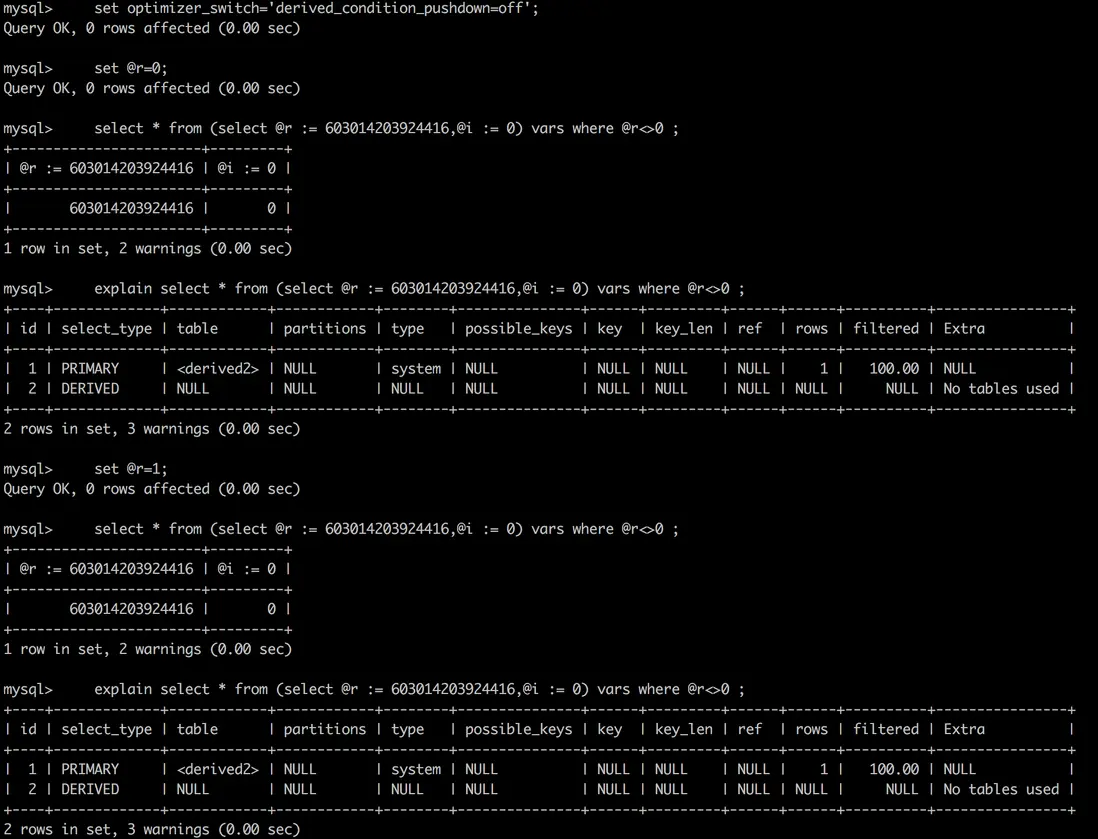
測試結果1:
測試結果説明:
當設置了 derived_condition_pushdown=OFF 時:MySQL 執⾏語句1:
select * from (select @r := 603014203924416,@i := 0) vars where @r<>0 ;的步驟為:
- 先執⾏派⽣表: select @r := 603014203924416,@i := 0,此時@r為603014203924416 ;
- 再對結果集進⾏篩選 @r <> 0,得出結果,結果正確。
注意:
在 MySQL8.0.21 版本及之前版本,還沒有參數 optimizer_switch,還沒有derived_condition_pushdown變量,等價於 derived_condition_pushdown=off。
在 MySQL8.0.22 版本及之後版本,參數 optimizer_switch 引⼊了 derived_condition_pushdown 變量,在開啓的時候,會導致下⾯的 SQL 語句及類似語句得到⾮預期的結果:
select * from (select @r := 603014203924416,@i := 0) vars where @r<>0 ;解決⽅法:
⽅法1:
set persist optimizer_switch='derived_condition_pushdown=off';當然,也可以在執⾏ SQL 語句前,執⾏ session 級別的更改,隻影響執⾏參數變更的 session :
set optimizer_switch='derived_condition_pushdown=on';⽅法2:
改寫 SQL ,讓最外層的 where 條件不包含⽤户變量:
原語句:
select * from (select @r := 603014203924416,@i := 0) vars where @r<>0 ;改寫後的語句:
select * from (select @r id,@i num from (select @r := 603014203924416,@i := 0) vars ) a where
id<>0 ;
⽅法3:
提前設置@r的值:
select @r := 603014203924416,@i := 0 ;
select * from (select @r := 603014203924416,@i := 0) vars where @r<>0 ;