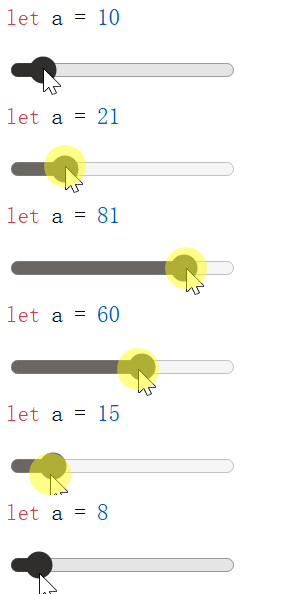
利用自定義html元素實現支持實時修改的高亮代碼塊
代碼塊高亮是前端開發中常見的需求,尤其是在展示代碼片段的博客、文檔等場景中。市面上有很多成熟的代碼高亮庫,比如Highlight.js、Prism.js等,它們都能很好地實現代碼高亮功能。
通常的高亮代碼塊是“靜態”的,修改代碼內容後需要對DOM元素重新應用高亮樣式。由於涉及DOM操作,在Vue等前端框架中使用必須謹慎處理,否則會出現DOM樹和虛擬DOM不一致的問題,造成很多麻煩。
那麼有沒有辦法讓代碼高亮不改變DOM結構呢?答案是有的,我們可以利用自定義HTML元素和Shadow DOM來實現這一點。
Shadow DOM和自定義HTML元素
Shadow DOM允許我們創建封閉的DOM樹,Shadow DOM內可以使用自己的樣式,並封裝複雜的邏輯,而不會影響到外部的DOM結構。現代瀏覽器的<input>(特別是<input type="range">、<input type="date">等複雜控件)元素就是利用Shadow DOM實現的。
要想使用Shadow DOM,我們需要創建一個自定義HTML元素,並在其中通過attachShadow方法創建Shadow DOM。
class MyElement extends HTMLElement {
    constructor() {
        super()
        const shadow = this.attachShadow({ mode: 'open' })
        shadow.innerHTML = `<p>Hello, Shadow DOM!</p>`
    }
}
customElements.define('my-element', MyElement)
之後,我們就可以在HTML中使用<my-element></my-element>來插入這個自定義元素。
<my-element></my-element>
在DevTools中,我們可以看到<my-element>的渲染結果,其中包括元素內部的Shadow DOM:
<my-element>
  #shadow-root (open)
    <p>Hello, Shadow DOM!</p>
</my-element>
在自定義元素中獲取內容
我們希望在自定義元素中獲取標籤之間的內容。這可以通過插槽(slot)機制實現。插槽機制允許我們在自定義元素中定義佔位符,外部傳入的內容會被插入到這些佔位符中。
為了使用插槽,我們需要在Shadow DOM中添加一個<slot>元素:
class MyElement extends HTMLElement {
    constructor() {
        super()
        const shadow = this.attachShadow({ mode: 'open' })
        shadow.innerHTML = `<slot></slot>`
        const slot = shadow.querySelector('slot')
        slot.addEventListener('slotchange', this.handleSlotChange.bind(this))
    }
    handleSlotChange(event) {
        const slot = event.target
        console.log('Slot content changed:', slot.assignedNodes({ flatten: true }))
    }
}
customElements.define('my-element', MyElement)
對於HTML片段
<my-element id="my-el"><p>This is slotted content.</p></my-element>
當頁面第一次加載時,控制枱會顯示
Slot content changed: [p]
其中p就是元素內部的<p>節點。
如果我們動態修改<my-element>內的內容,比如通過JavaScript:
document.getElementById('my-el').innerHTML = '<pre>New slotted content1.</pre><pre>New slotted content2.</pre>'
控制枱會顯示
Slot content changed: (2) [pre, pre]
兩個pre節點就是我們新修改的內容。
通過這種方法,我們可以在自定義元素中實時獲取內容的變化。
利用自定義元素實現高亮代碼塊
結合前面的內容,我們可以創建一個自定義元素<pre-highlight>,用於實現高亮代碼塊的功能。只需要監聽插槽內容的變化,將內容傳遞給高亮庫進行處理,然後將處理後的結果顯示出來即可。
class PreHighlightElement extends HTMLElement {
    constructor() {
        super()
        const shadow = this.attachShadow({ mode: 'open' })
        shadow.innerHTML = `
<link rel="stylesheet" href="https://unpkg.com/@highlightjs/cdn-assets/styles/github.min.css">
<pre id="code"></pre>
<pre hidden><slot></slot></pre>
`
        this.__code = this.shadowRoot.querySelector('#code')
        this.__slot = this.shadowRoot.querySelector('slot')
        this.__slot.addEventListener('slotchange', this.highlightContent.bind(this))
    }

    highlightContent() {
        if (typeof hljs === 'undefined') return

        let text = this.__slot.assignedNodes({ flatten: true }).map(n => n.textContent).join("")
        const code = document.createElement('code')

        const result = hljs.highlightAuto(text)
        code.innerHTML = result.value
        if (result.language) code.classList.add(`language-${result.language}`)
        this.__code.replaceChildren(code)
    }
}

customElements.define('pre-highlight', PreHighlightElement)
使用方法:
<pre-highlight id="my-el">
function helloWorld() {
    console.log("Hello, world!")
}
</pre-highlight>
渲染結果為
<pre-highlight id="my-el">
  #shadow-root (open)
    <link rel="stylesheet" href="https://unpkg.com/@highlightjs/cdn-assets/styles/github.min.css">
    <pre id="code">
      <code class="language-javascript">
        <span class="hljs-keyword">function</span>
        <span class="hljs-title function_">helloWorld</span>
        "("
        <span class="hljs-params"></span>)
        "{"
        <span class="hljs-variable language_">console</span>
        "."
        <span class="hljs-title function_">log</span>
        "("
        <span class="hljs-string">"Hello, world!"</span>
        ") }"
      </code>
    </pre>
    <pre hidden="">
      <slot>
        #text
      </slot>
    </pre>
  " function helloWorld() { console.log("Hello, world!") } "
</pre-highlight>
修改<pre-highlight>內的內容後,高亮效果會自動更新。
document.getElementById('my-el').textContent = `void helloWorld(void) {
    printf("Hello, World!");
}`
渲染結果為
<pre-highlight id="my-el">
  #shadow-root (open)
    <link rel="stylesheet" href="https://unpkg.com/@highlightjs/cdn-assets/styles/github.min.css">
    <pre id="code">
      <code class="language-cpp">
        <span class="hljs-function">
          <span class="hljs-type">void</span>
          <span class="hljs-title">helloWorld</span>
          <span class="hljs-params">
            "("
            <span class="hljs-type">void</span>
            ")"
          </span>
        </span>
        "{"
        <span class="hljs-built_in">printf</span>
        "("
        <span class="hljs-string">"Hello, World!"</span>
        "); }"
      </code>
    </pre>
    <pre hidden="">
      <slot>
        #text
      </slot>
    </pre>
  "void helloWorld(void) { printf("Hello, World!"); }"
</pre-highlight>
一些改進
為了避免高亮庫加載和高亮處理過程中的閃爍,我們可以在Shadow DOM中使用兩個<pre>元素:一個用於顯示原始內容,另一個用於顯示高亮後的內容。初始時只顯示原始內容,高亮處理完成後再切換顯示。
此外,我們還可以添加一個lang屬性,允許用户指定代碼語言,以提高高亮的準確性。
最終結果如下:
class PreHighlightElement extends HTMLElement {
    constructor() {
        super()
        const shadow = this.attachShadow({ mode: 'open' })
        shadow.innerHTML = `
<link rel="stylesheet" href="https://unpkg.com/@highlightjs/cdn-assets/styles/github.min.css">
<pre id="raw"><slot></slot></pre>
<pre id="cooked" hidden></pre>
`
        this.__raw = this.shadowRoot.querySelector('#raw')
        this.__cooked = this.shadowRoot.querySelector('#cooked')
        this.__slot = this.shadowRoot.querySelector('slot')
        this.__slot.addEventListener('slotchange', this.highlightContent.bind(this))
    }

    highlightContent() {
        this.__raw.hidden = false
        this.__cooked.hidden = true
        if (typeof hljs === 'undefined') return

        let text = this.__slot.assignedNodes({ flatten: true }).map(n => n.textContent).join("")
        const lang = this.getAttribute('lang')
        const code = document.createElement('code')

        if (lang) {
            const result = hljs.highlight(text, { language: lang, ignoreIllegals: true })
            code.innerHTML = result.value
            code.classList.add(`language-${lang}`)
        } else {
            const result = hljs.highlightAuto(text)
            code.innerHTML = result.value
            if (result.language) code.classList.add(`language-${result.language}`)
        }
        this.__cooked.replaceChildren(code)
        this.__raw.hidden = true
        this.__cooked.hidden = false
    }
}

customElements.define('pre-highlight', PreHighlightElement)
用例:
<pre-highlight id="code" lang="html"></pre-highlight>
<input type="range" id="input" value="10" />
<script>
    const input = document.getElementById('input')
    const preHighlight = document.getElementById('code')

    input.oninput = function(e) {
        preHighlight.textContent = `<textarea rows="${this.value}" cols="50">
    Hello, world!
</textarea>`
    }
    input.oninput()
</script>
在這個例子中,我們創建了一個滑動條,可以動態修改<pre-highlight>內的代碼內容,內容修改後會實時顯示高亮效果。
在Vue中使用<pre-highlight>
通過自定義元素的方法,我們可以輕鬆地在Vue項目中使用高亮代碼塊,而無需擔心DOM和虛擬DOM的不一致問題。
為了避免自定義元素和Vue組件名衝突,我們需要在配置中制定isCustomElement選項:
// vite.config.js
export default defineConfig({
  plugins: [
    vue({
      template: {
        compilerOptions: {
          // 將所有含"-"的標籤視為自定義元素
          // Vue3中通常使用帕斯卡命名法(單詞首字母大寫)作為組件標籤
          isCustomElement: (tag) => tag.includes('-')
        }
      }
    })
  ]
})
之後就可以在組件或頁面中直接使用<pre-highlight>元素,內部可以使用Vue的數據綁定而不用擔心虛擬DOM衝突的問題:
<template>
    <pre-highlight lang="javascript">
function greet({{arg}}) {
    console.log("Hello, " + {{arg}} + "!")
}
    </pre-highlight>
</template>
附:完整的單頁html演示代碼
原生html
<html>

<head>
    <script src="https://unpkg.com/@highlightjs/cdn-assets/highlight.min.js"></script>
    <script>
        class PreHighlightElement extends HTMLElement {
            constructor() {
                super()
                const shadow = this.attachShadow({ mode: 'open' })
                shadow.innerHTML = `
<link rel="stylesheet" href="https://unpkg.com/@highlightjs/cdn-assets/styles/github.min.css">
<pre id="raw"><slot></slot></pre>
<pre id="cooked" hidden></pre>
`
                this.__raw = this.shadowRoot.querySelector('#raw')
                this.__cooked = this.shadowRoot.querySelector('#cooked')
                this.__slot = this.shadowRoot.querySelector('slot')
                this.__slot.addEventListener('slotchange', this.highlightContent.bind(this))
            }

            highlightContent() {
                this.__raw.hidden = false
                this.__cooked.hidden = true
                if (typeof hljs === 'undefined') return

                let text = this.__slot.assignedNodes({ flatten: true }).map(n => n.textContent).join("")
                const lang = this.getAttribute('lang')
                const code = document.createElement('code')

                if (lang) {
                    const result = hljs.highlight(text, { language: lang, ignoreIllegals: true })
                    code.innerHTML = result.value
                    code.classList.add(`language-${lang}`)
                } else {
                    const result = hljs.highlightAuto(text)
                    code.innerHTML = result.value
                    if (result.language) code.classList.add(`language-${result.language}`)
                }
                this.__cooked.replaceChildren(code)
                this.__raw.hidden = true
                this.__cooked.hidden = false
            }
        }

        customElements.define('pre-highlight', PreHighlightElement)
    </script>
</head>

<body>
    <pre-highlight id="code" lang="html"></pre-highlight>
    <input type="range" id="input" value="10" />
    <script>
        const input = document.getElementById('input')
        const preHighlight = document.getElementById('code')

        input.oninput = function (e) {
            preHighlight.textContent = `<textarea rows="${this.value}" cols="50">
    Hello, world!
</textarea>`
        }
        input.oninput()
    </script>
</body>

</html>
使用Vue
<html>

<head>
    <script src="https://unpkg.com/vue@3/dist/vue.global.js"></script>
    <script src="https://unpkg.com/@highlightjs/cdn-assets/highlight.min.js"></script>
    <script>
        class PreHighlightElement extends HTMLElement {
            constructor() {
                super()
                const shadow = this.attachShadow({ mode: 'open' })
                shadow.innerHTML = `
<link rel="stylesheet" href="https://unpkg.com/@highlightjs/cdn-assets/styles/github.min.css">
<pre id="raw"><slot></slot></pre>
<pre id="cooked" hidden></pre>
`
                this.__raw = this.shadowRoot.querySelector('#raw')
                this.__cooked = this.shadowRoot.querySelector('#cooked')
                this.__slot = this.shadowRoot.querySelector('slot')
                this.__slot.addEventListener('slotchange', this.highlightContent.bind(this))
            }

            highlightContent() {
                this.__raw.hidden = false
                this.__cooked.hidden = true
                if (typeof hljs === 'undefined') return

                let text = this.__slot.assignedNodes({ flatten: true }).map(n => n.textContent).join("")
                const lang = this.getAttribute('lang')
                const code = document.createElement('code')

                if (lang) {
                    const result = hljs.highlight(text, { language: lang, ignoreIllegals: true })
                    code.innerHTML = result.value
                    code.classList.add(`language-${lang}`)
                } else {
                    const result = hljs.highlightAuto(text)
                    code.innerHTML = result.value
                    if (result.language) code.classList.add(`language-${result.language}`)
                }
                this.__cooked.replaceChildren(code)
                this.__raw.hidden = true
                this.__cooked.hidden = false
            }
        }

        customElements.define('pre-highlight', PreHighlightElement)
    </script>
</head>

<body>
    <div id="app"></div>
    <script>
        const { createApp, ref } = Vue
        let app = createApp({
            data() {
                return { a: ref(10) }
            },
            template: `<pre-highlight id="code" lang="javascript">let a = \{\{a\}\}</pre-highlight>
            <input type="range" v-model="a" />`
        })
        app.config.compilerOptions.isCustomElement = (tag) => tag.includes('-')
        app.mount('#app')
    </script>
</body>

</html>
渲染效果: