

對於公眾號開發,這已經是很老的話題的,之前倒是也做過些許,不過寫的都是後端的接口,對於前端操作的一些流程還不是很清楚,比如很重要的一個入口功能,授權的流程。
戳我👉 快速註冊認證小程序,公眾號開發版上線了,授權登錄流程代碼説明
説到授權登錄,微信小程序也有授權登錄,兩者授權登錄過程大同小異,都是先拿code換取openid(用户對當前公眾號或小程序的唯一標識)和access_token。注意,此處access_token與基礎支持中的access_token不同,此處的access_token是根據每個用户的不同生成的,每個用户都不一樣,而基礎access_token是對接口調用的標識。然後小程序的話前端可以直接拿到用户信息(微信頭像、暱稱、地區和性別信息) ,而公眾號號就需要通過openid和access_token調用接口來獲取用户基本信息。
公眾號用户授權基於授權作用域(scope參數)的不同,分為靜默授權(scope為snsapi_base)和非靜默授權(scope為snsapi_userinfo)。靜默授權就是用户無感知的就授權了,但只能不彈出授權頁面,直接跳轉,只能獲取用户openid,非靜默授權會彈出授權頁面,可通過openid拿到頭像、暱稱、性別、所在地。並且, 即使在未關注的情況下,只要用户授權,也能獲取其信息 。
公眾號授權登錄的效果大概都像下面這樣,就是一進入首頁就彈出讓用户授權的彈窗(非靜默授權)。
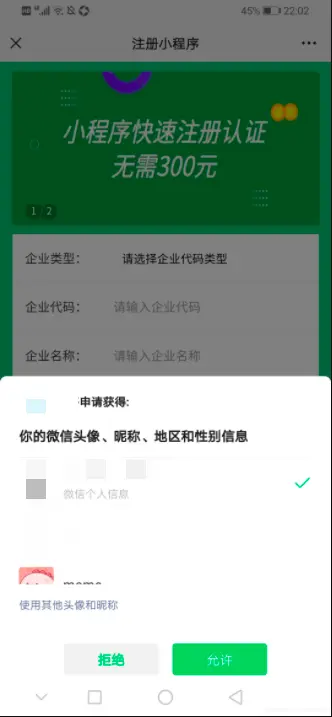
前端主要網頁授權步驟如下
// 授權獲取code
  toRedirect() {
    let redirect_uri = encodeURIComponent(this.$redirect_uri);
    let url = this.$auth_url.replace('REDIRECT_URI',redirect_uri);
    if (this.wechatCode == null || this.wechatCode === '') {
      window.location.href = url;
    } else {
      this.saveOpenID();
    }
  },

  // 截取url中的code方法
  getUrlCode() {
    var url = location.search
    var theRequest = new Object()
    if (url.indexOf("?") != -1) {
      var str = url.substr(1)
      var strs = str.split("&")
      for (var i = 0; i < strs.length; i++) {
        theRequest[strs[i].split("=")[0]] = (strs[i].split("=")[1])
      }
    }
    return theRequest
  },

  // 拿code換取accessToken和openid最後獲取用户信息
  saveOpenID() {
    if(this.wechatCode) {
      this.getOpenId();
    }
  },
  getOpenId() {
    let url = this.$api_url + this.$access_token_uri + '/' + this.wechatCode;
    uni.request({
      async: false,
      url: url,
      method: 'GET',
      success: (res) => {
        console.log('getOpenId:',res);
        this.userOpenid = res.data.data.openid;
        this.accessToken = res.data.data.access_token;
        uni.setStorage({
          key: 'user_openid',
          data: this.userOpenid
        });
        this.login();
      }
    })
  },
  // 獲取登錄用户信息
  login() {
    let url = this.$api_url + this.$user_info_uri + '/' + this.accessToken + '/' + this.userOpenid;
    uni.request({
      async: false,
      url: url,
      method: 'GET',
      success: (res) => {
        console.log('login:',res);
        uni.setStorage({
          key: 'user_info',
          data: res.data.data
        })
      }
    })
  },

  onLoad() {
    if (!this.userOpenid) {
      this.wechatCode = '';
      this.wechatCode = this.getUrlCode().code;
      this.toRedirect();
        };
  },
上一篇:快速註冊認證小程序,免300元認證費
