
1. 引言
OpenAPI 規範(前身為 Swagger 規範)標準化了 REST API 文檔語言,並且具有平台無關性。 我們可以創建 OpenAPI 文檔,格式為 YAML 或 JSON。
另一方面,Swagger 是一個用於實施和使用該標準的工具集合。 其中一些是免費的,一些是開源的,一些是商業的。 這些工具幫助我們設計、文檔和消費 REST API。
在本文中,我們將學習如何格式化 OpenAPI 文檔中的文本描述。
2. OpenAPI 編輯器
有多種工具可以幫助我們創建 OpenAPI 文檔。以下是一些流行的工具:
還有許多其他編輯器可以幫助創建 OpenAPI 文檔。然而,Swagger Editor 是最受歡迎和廣泛使用的編輯器。 因此,我們將學習如何使用 Swagger Editor 格式化我們的 OpenAPI 文檔。
3. YAML 與 JSON 格式化
OpenAPI 文檔以 JSON 或 YAML 格式表示。 但是,使用 YAML 時,格式化文檔非常簡單。
例如,要將一個單詞或句子標記為標題,我們在 YAML 中使用以下片段:
 description: |
    # This is a heading in *italics*
    This is in the next line

    This is in **bold**
YAML 表示中使用管道符 | (pipe) 來表示標量字面量,這些字面量可以多行。
現在,我們用 JSON 定義相同的概念:
{
    "description": "# This is a heading in *italics*\nThis is in the next line\n\nThis is in **bold**
}
相對而言,在JSON表示中,轉義序列使得格式化變得直觀上不明確。因此,我們將只關注OpenAPI規範文檔中以YAML編寫的格式化技術。
最後,OpenAPI規範允許在所有級別格式化描述 字段。因此,根據規範,只要描述 字段允許格式化,我們就可以對其進行格式化,並且描述 字段符合CommonMark格式風格。
現在,讓我們通過格式化API文檔來增強它們。
4. 標題
正如我們在 HTML 中使用 <h1> 到 <h6> 標籤來創建標題一樣,我們也可以使用 Markdown 標題來突出顯示文本。<#> 代表一個標題。我們可以使用最多六個 <#> 來強調文本。數字越多,文本的強調程度就越低。
一段跟隨 <#> 的文本會更醒目、更大。
例如,考慮以下 YAML:
openapi: 3.0.1
info:
  title: Petstore
  description: |
    # Pet Store APIs
    ## This is a sample Petstore server
    ### Contains APIs to manage the pet store
    #### Note that the APIs support Basic Authentication and OAUTH
    ##### The samples contain Request and Response models
    ###### There are status codes defined as well
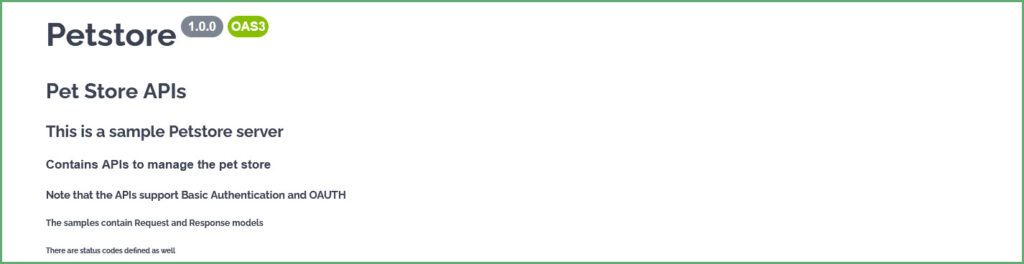
Swagger 渲染文本如下:
5. 文本強調
為了提高描述文本的可讀性,我們可以通過將其設置為粗體或斜體來突出顯示它。
將文本放在和之間,或在和之間,將使文本變為粗體。 同樣,將文本放在和之間,或_和_之間,將使文本變為斜體。 例如,對於 YAML:
openapi: 3.0.1
info:
  title: Petstore
  description: |
    ## This document contains

    **Pet Store APIs** *Note: All the APIs return application/json*.
    __User APIs__  _Note: These APIs contain attachments and only support image/jpeg as the content type_
Swagger 將 YAML 渲染為:

6. 表格
接下來,讓我們看看如何將表格添加到我們的 OpenAPI 文檔中。
有一定規則需要遵循來渲染表格。**首先,表格中的每一列都應以和以 | (豎線) 符號開頭和結尾。其次,用至少一個 – (短橫線) 符號分隔表格的標題。但是,– (短橫線) 的最大數量沒有限制。
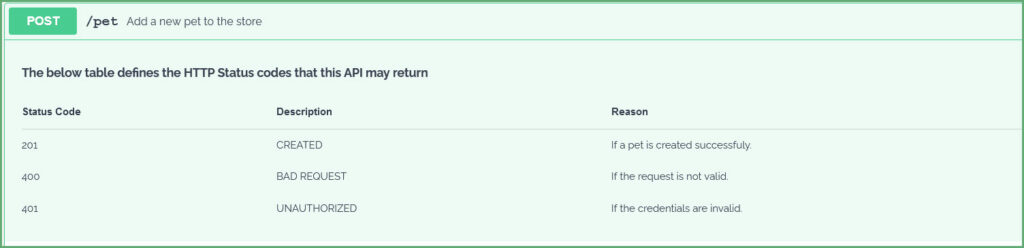
例如,讓我們為我們的 POST API 添加一個表格來定義 HTTP 狀態碼:
paths:
  /pet:
    post:
      tags:
      - pet
      description: |

        **The below table defines the HTTP Status codes that this API may return**

        | Status Code      | Description | Reason                             |
        | ---------------- | ------------| -----------------------------------|
        | 201              | CREATED     | If a pet is created successfuly.   |
        | 400              | BAD REQUEST | If the request is not valid.       |
        | 401              | UNAUTHORIZED| If the credentials are invalid.    |
Swagger 生成:
7. 列表
現在,讓我們看看如何將描述文本格式化為包含列表。
7.1. 有序列表
描述文本項目應以數字開頭,後跟一個 點號
但是,項目編號的順序並不重要。例如,以下片段:
description: |
  1. Available
  3. Pending
  1. Sold
description: |
1. Available
200. Pending
30. Solddescription: |
1. Available
100. Pending
50. Sold生成相同輸出:
1. Available
2. Pending
3. Sold項目編號的確定取決於起始項目編號。例如,如果我們將項目編號從 10 開始,後續項目將按 11, 12, 13 等順序編號。 下面的 YAML:
description: |
  10. Available
  120. Pending
  50. Sold
生成:
10. Available
11. Pending
12. Sold
同樣,有序子列表也適用相同的規則。將子列表縮進到其父項。例如,請考慮以下 YAML:
description: |
  1. Available
  2. Pending
     1. Pending in Store
     200. Pending in Cart
  3. Sold
生成:
1. Available
2. Pending
    1. Pending in Store
    2. Pending in Cart
3. Sold
7.2. 無序列表
使用 * (星號) 、+ (加號) 或 – (短橫線) 來創建無序列表。 也就是説,列表中的每個項目都應以這些符號之一開頭。 例如:
description: |
  * Available
  * Pending
  * Sold

description: |
  + Available
  + Pending
  + Sold

description: |
  - Available
  - Pending
  - Sold
所有以上代碼片段都會生成一個無序列表。
同樣,要生成無序子列表,請使用縮進,將項目與其父項目對齊,並以星號(*)、加號(+)或短橫線(–)開頭。例如,YAML:
- Available
- Pending
   * Pending in Store
   + Pending in Cart
- Sold生成一個無序列表,包含一個子列表。請注意分隔符的混合使用。分隔符的混合使用會產生相同的結果。
最後,我們將所有內容組合成 YAML:
/pet/findByStatus:
   get:
     summary: Finds Pets by status
     description: |
       __Below is the list of valid status of the Pet__

       1. Available
       2. Pending
          1. Pending in the cart
          2. Pending in the store
       3. Sold

       **Below is the list of HTTP Status code this API may return**
       * 200 - OK
       * 400 - Bad Request. The API returns below status codes related to content-type and accept headers
         + 415 - Unsupported Media Type
         - 406 - Not Acceptable
       * 401 - Unauthorized
       * 405 - Method not supported
此 YAML 生成:

8. 雜項
8.1. 行換和段落
接下來,要插入行換,請輸入兩個空格和回車鍵。請注意,僅僅提供回車鍵並不能將文本對齊到下一行。 同樣,要插入段落,請插入一個空行。
現在,讓我們在 描述 中添加一些行換和段落。
description: |
  Returns a single pet.
  *Note: The API may throw a HTTP 404 if there are no pets found with a given id.*

  The API returns a 200 OK if there is a pet with given Id. Also, this API returns the status of the pet
<div>
 <div>
  <p>此 YAML 生成:</p>
  <img src="/file/story/attachments/image/l/7389446e-1c51-4449-b7be-138b176cefa3">
 </div>
</div>
8.2. 代碼
接下來,讓我們為我們的 OpenAPI 文檔添加一些代碼。 代碼塊以和結束於 “`。例如,請考慮以下 YAML:
description: |
  The API returns user details for a given username.
  The API can be invoked using *curl* like below:
  ```
  curl --header accept: application/json -u username:password http://localhost:8080/api/v2/user/jhondoe
  ```
  **Sample Output**
  ```
  {
    "id": 2,
    "username": "jhondoe"
    "email": "[email protected]"
  }
  ```
<div>
<div>
<div>上述 YAML 生成:</div>
<div>
<img src="/file/story/attachments/image/l/dee0bddb-7fea-4a52-936f-3c4fad61e86c">
</div>
<div></div>
</div>
<div>
<div>
<div>
</div>
</div>
</div>
</a>
8.3. 圖片
要將圖片添加到文檔中,圖片必須添加到描述文本中,格式如下:
description: |
# Pet Store APIs
<div> Swagger 生成:</div>
<div>
 <div>
  <div>
   <div> Swagger 生成:</div>
  </div>
 </div>
 <div>
  <img src="/file/story/attachments/image/l/bc5bc3ad-e106-4f8b-8cc6-9e521c24023e">
 </div>
</div>
9. 結論
在本文中,我們學習瞭如何格式化 OpenAPI 文檔中的 描述 字段。 YAML 標量字面量允許我們在文檔中格式化 描述 。 因此,一個 OpenAPI 文檔可以包含任何或全部受支持的構造,例如列表、表格和圖像。
因此,對 API 進行文檔記錄可以提高易用性。畢竟,經過良好記錄和格式化的 API 是我們都想要的,以便於集成和消費。

