
1. 概述
當我們向 Spring 應用注入運行時屬性時,我們可能會定義一組自定義屬性的 Bean 類。
IntelliJ 提供了內置屬性 Bean 的幫助和自動補全功能。但是,它需要一些幫助來提供自定義屬性的幫助。
在本簡短教程中,我們將探討如何將這些屬性暴露給 IntelliJ,以簡化開發過程。
2. 自定義屬性
讓我們來查看 IntelliJ 可以提供的關於我們應用程序屬性的屏幕幫助:
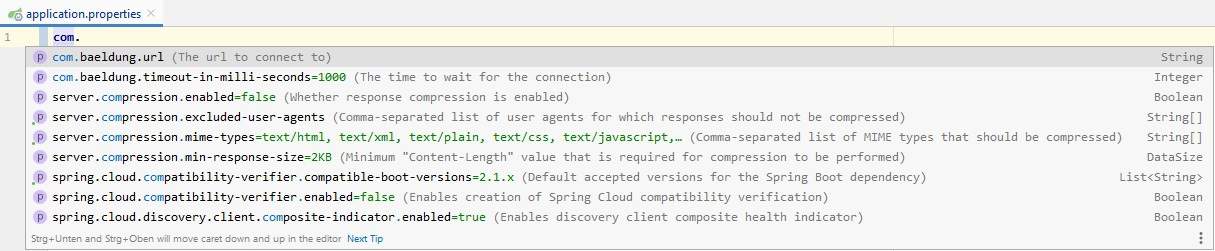
在這裏,屬性 url 和 timeout-in-milliseconds 是自定義屬性。我們可以看到描述、類型和可選的默認值。
但是,如果屬性未被識別,IntelliJ 將會顯示警告:

這是因為,缺少元數據,IntelliJ 無法幫助我們。
3. 依賴項
首先,我們需要將 <a href="https://mvnrepository.com/artifact/org.springframework.boot/spring-boot-configuration-processor">spring-boot-configuration-processor</a> 依賴項添加到我們的 <em>pom.xml</em> 文件中:
<dependency>
    <groupId>org.springframework.boot</groupId>
    <artifactId>spring-boot-configuration-processor</artifactId>
    <optional>true</optional>
</dependency>
每次構建我們的項目時,都會調用 spring-boot-configuration-processor。它會在 target/classes/META-INF 目錄下創建元數據文件。
該依賴項標記為可選的,這意味着當有人將我們的項目用作依賴項時,它不會被繼承。
接下來,我們將看到 spring-boot-configuration-processor 如何獲取用於創建元數據的相關信息。
4. 使用 @ConfigurationProperties 的配置元數據
我們通過註解類定義我們的屬性,該類使用了 @ConfigurationProperties 標註:
@Configuration
@ConfigurationProperties(prefix = "com.baeldung")
public class CustomProperties {

    /**
     * The url to connect to.
     */
    String url;

    /**
     * The time to wait for the connection.
     */
    private int timeoutInMilliSeconds = 1000;

    // Getters and Setters

}
此處,類包含屬性名稱、類型以及初始化列表提供的任何默認值。Javadoc還提供了每個屬性的描述。
在構建過程中,註解處理器會搜索所有帶有註解的類@ConfigurationProperties。它為每個實例變量生成自定義屬性元數據。
5. 配置元數據文件
This section describes the configuration metadata file, which is used to define the parameters and settings for the system. The metadata file is a plain text file with a specific format.
File Format:
The metadata file is structured as a series of key-value pairs, separated by a newline character. Each key-value pair represents a configuration setting.
Example:
# Database Connection Settings
database.host = localhost
database.port = 3306
database.user = admin
database.password = password123
Key-Value Pair Structure:
- Key: A string that identifies the configuration setting (e.g.,
database.host). Keys are case-sensitive. - Value: The value associated with the key. Values can be strings, numbers, or boolean values.
Supported Data Types:
- String: Textual values enclosed in double quotes (e.g.,
"localhost"). - Integer: Whole numbers (e.g.,
100). - Boolean:
trueorfalse.
Comments:
Comments are denoted by the # character. Comments are ignored by the system and can be used to provide additional information or explanations.
5.1. 元數據文件的格式
該元數據文件描述了自定義屬性,驅動了 IntelliJ 的上下文幫助,例如:
{
  "groups": [
    {
      "name": "com.baeldung",
      "type": "com.baeldung.configuration.processor.CustomProperties",
      "sourceType": "com.baeldung.configuration.processor.CustomProperties"
    }
  ],
  "properties": [
    {
      "name": "com.baeldung.url",
      "type": "java.lang.String",
      "description": "The url to connect to.",
      "sourceType": "com.baeldung.configuration.processor.CustomProperties"
    },
    {
      "name": "com.baeldung.timeout-in-milli-seconds",
      "type": "java.lang.Integer",
      "description": "The time to wait for the connection.",
      "sourceType": "com.baeldung.configuration.processor.CustomProperties",
      "defaultValue": 1000
    }
  ],
  "hints": []
}由於標註處理器根據我們的代碼生成此文件,因此無需直接查看或編輯此文件。
5.2. 不帶 ConfigurationProperties Bean 的元數據
如果現有屬性沒有通過 @ConfigurationProperties 引入,但仍然需要元數據文件,IntelliJ 可以提供幫助。
讓我們更詳細地查看之前出現的警告信息:

這裏我們看到一個 定義配置鍵 選項,我們可以使用它來創建 additional-spring-configuration-metadata.json 文件。 創建的文件將如下所示:
{
  "properties": [
    {
      "name": "com.baeldung.timeoutInMilliSeconds",
      "type": "java.lang.String",
      "description": "Description for com.baeldung.timeoutInMilliSeconds."
    }
  ]
}由於其他地方沒有關於該房產的信息,我們需要手動編輯其內部的元數據。默認類型始終是String。
讓我們將一些額外信息添加到文件中:
{
  "properties": [
    {
      "name": "com.baeldung.timeout-in-milli-seconds",
      "type": "java.lang.Integer",
      "description": "The time to wait for the connection.",
      "sourceType": "com.baeldung.configuration.processor.CustomProperties",
      "defaultValue": 1000
    }
  ]
}請注意,為了查看新屬性在自動補全中出現,我們需要重建項目。
此外,我們還應注意,通過 IntelliJ 的 Alt+ENTER 快捷鍵在未知的屬性上生成此元數據文件也是可用的。
6. 結論
在本文中,我們探討了 IntelliJ 如何利用配置屬性元數據來提供對我們屬性文件的幫助。
我們看到了如何使用 Spring 的註解處理器生成自定義類中的元數據。然後,我們看到了如何在 IntelliJ 中使用快捷方式創建元數據文件以便手動編輯。

