知識庫 / Spring RSS 訂閱

Kafka 死信隊列與 Spring

Spring
HongKong
2
11:19 AM · Dec 06 ,2025
<div>
</div>

1. 引言

在本教程中,我們將學習如何使用 Spring 配置 Apache Kafka 的死信隊列(Dead Letter Queue)機制。

2. 死信隊列 (Dead Letter Queues)

死信隊列 (DLQ) 用於存儲由於各種原因無法正確處理的消息,例如間歇性系統故障、無效的消息模式或內容損壞。 這些消息稍後可以從 DLQ 中移除進行分析或重新處理。
下圖展示了 DLQ 機制的簡化流程:
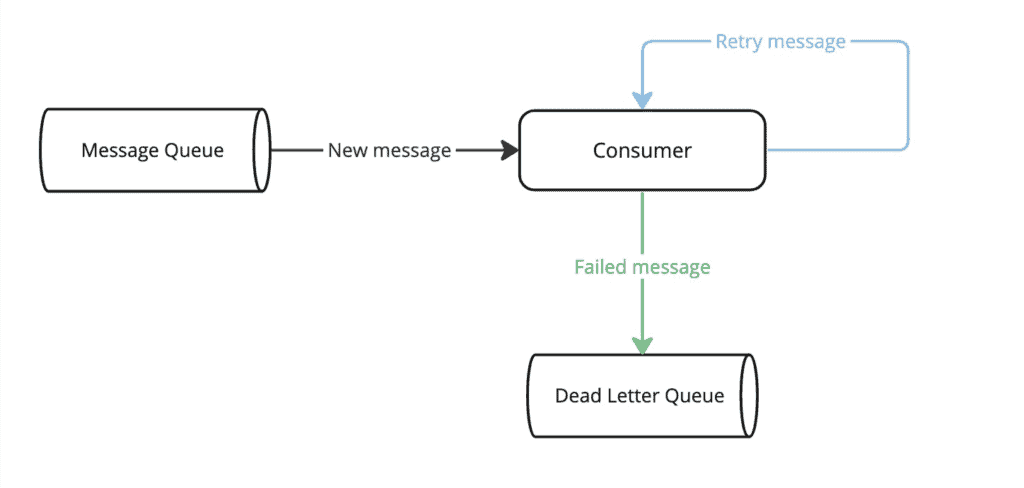
使用 DLQ 通常是一個好主意,但也有一些情況應該避免。 例如,不建議將 DLQ 用於消息順序至關重要的隊列,因為重新處理 DLQ 消息會破壞消息的到達順序。

3. Spring Kafka 中的死信隊列

在 Spring Kafka 中,死信隊列 (DLT) 是 Dead Letter Queue (DLQ) 概念的對應實現。 在後續章節中,我們將通過一個簡單的支付系統來觀察 DLT 機制的工作原理。

3.1. 模型類

讓我們從模型類開始:

public class Payment {
    private String reference;
    private BigDecimal amount;
    private Currency currency;

    // standard getters and setters
}

讓我們也實現一個用於創建事件的實用方法:

static Payment createPayment(String reference) {
    Payment payment = new Payment();
    payment.setAmount(BigDecimal.valueOf(71));
    payment.setCurrency(Currency.getInstance("GBP"));
    payment.setReference(reference);
    return payment;
}
<div>
  <h1>Introduction</h1>
  <p>This document provides an overview of the new API. It covers key features, usage examples, and troubleshooting tips.</p>
  <h2>Key Features</h2>
  <ul>
    <li><strong>Data Validation:</strong> Ensures data integrity by validating input against predefined schemas.</li>
    <li><strong>Asynchronous Operations:</strong>  Supports asynchronous operations for improved performance and responsiveness.</li>
    <li><strong>Error Handling:</strong>  Provides robust error handling mechanisms with detailed error codes and messages.</li>
  </ul>
  <h2>Usage Examples</h2>
  <pre><code>
function fetchData(url) {
  return fetch(url)
    .then(response => response.json())
    .then(data => {
      console.log(data);
      return data;
    })
    .catch(error => {
      console.error("Error fetching data:", error);
      return null;
    });
}

// Example usage:
// fetchData("https://example.com/api/data");
</code></pre>
  <p>The code above demonstrates how to fetch data from a remote API endpoint.</p>
  <h2>Troubleshooting</h2>
  <p>If you encounter any issues, please refer to the following troubleshooting steps:</p>
  <ul>
    <li><strong>Check Network Connectivity:</strong> Ensure you have a stable internet connection.</li>
    <li><strong>Verify API Endpoint:</strong>  Confirm the API endpoint URL is correct.</li>
    <li><strong>Inspect Response Headers:</strong> Examine the response headers for any error codes or messages.</li>
  </ul>
</div>

3.2. 環境搭建

接下來,我們需要添加所需的依賴項:spring-kafkajackson-databind

<dependency>
    <groupId>org.springframework.kafka</groupId>
    <artifactId>spring-kafka</artifactId>
    <version>3.1.2</version> </dependency>
<dependency>
    <groupId>com.fasterxml.jackson.core</groupId>
    <artifactId>jackson-databind</artifactId>
    <version>2.14.3</version>
</dependency>

我們現在可以創建 ConsumerFactoryConcurrentKafkaListenerContainerFactory 兩個 Bean:

@Bean
public ConsumerFactory<String, Payment> consumerFactory() {
    Map<String, Object> config = new HashMap<>();
    config.put(ConsumerConfig.BOOTSTRAP_SERVERS_CONFIG, bootstrapServers);
    return new DefaultKafkaConsumerFactory<>(
      config, new StringDeserializer(), new JsonDeserializer<>(Payment.class));
}

@Bean
public ConcurrentKafkaListenerContainerFactory<String, Payment> containerFactory() {
    ConcurrentKafkaListenerContainerFactory<String, Payment> factory = 
      new ConcurrentKafkaListenerContainerFactory<>();
    factory.setConsumerFactory(consumerFactory());
    return factory;
}
<p>最後,我們來實施主要主題的消費者:</p>
@KafkaListener(topics = { "payments" }, groupId = "payments")
public void handlePayment(
  Payment payment, @Header(KafkaHeaders.RECEIVED_TOPIC) String topic) {
    log.info("Event on main topic={}, payload={}", topic, payment);
}

在繼續討論DLT示例之前,我們先討論一下重試配置。

3.3. 關閉重試

在實際項目中,在發生錯誤時重試處理事件並將其發送到 DLT 是一種常見做法。 這可以通過 Spring Kafka 提供的非阻塞重試機制輕鬆實現。

然而,在本文中,我們將關閉重試功能,以突出顯示 DLT 機制。 當主主題的消費者無法處理事件時,事件將直接發佈到 DLT。

首先,我們需要定義 producerFactoryretryableTopicKafkaTemplate Bean:

@Bean
public ProducerFactory<String, Payment> producerFactory() {
    Map<String, Object> config = new HashMap<>();
    config.put(ProducerConfig.BOOTSTRAP_SERVERS_CONFIG, bootstrapServers);
    return new DefaultKafkaProducerFactory<>(
      config, new StringSerializer(), new JsonSerializer<>());
}

@Bean
public KafkaTemplate<String, Payment> retryableTopicKafkaTemplate() {
    return new KafkaTemplate<>(producerFactory());
}

現在我們可以定義主話題的消費者,無需額外的重試,正如之前所述:

@RetryableTopic(attempts = "1", kafkaTemplate = "retryableTopicKafkaTemplate")
@KafkaListener(topics = { "payments"}, groupId = "payments")
public void handlePayment(
  Payment payment, @Header(KafkaHeaders.RECEIVED_TOPIC) String topic) {
    log.info("Event on main topic={}, payload={}", topic, payment);
}
<div>
 <p><strong>在 <em title="@RetryableTopic">@RetryableTopic</em> 註解中,<em title="attempts">attempts</em> 屬性表示在將消息發送到 DLT 之前嘗試的次數。</strong></p>

4. 配置死信主題

現在我們準備好實施 DL 消費者:

@DltHandler
public void handleDltPayment(
  Payment payment, @Header(KafkaHeaders.RECEIVED_TOPIC) String topic) {
    log.info("Event on dlt topic={}, payload={}", topic, payment);
}
<div>
 <strong>標註了&lt;em&gt;@DltHandler&lt;/em&gt;註解的方法必須位於與標註了&lt;em&gt;@KafkaListener&lt;/em&gt;註解的方法相同的類中。</strong>
</div>
<div>
 使用以下三個 DLT 配置方案:Spring Kafka 中提供的三個 DLT 配置方案將在後續部分進行探索。為了使每個示例易於單獨理解,我們將為每種策略使用一個專用主題和消費者。
</div>

4.1. 使用錯誤時失敗 (Fail on Error)

使用 <em>FAIL_ON_ERROR</em> 策略,可以配置 DLT 消費者在 DLT 處理失敗時,無需重試而結束執行:

@RetryableTopic(
  attempts = "1", 
  kafkaTemplate = "retryableTopicKafkaTemplate", 
  dltStrategy = DltStrategy.FAIL_ON_ERROR)
@KafkaListener(topics = { "payments-fail-on-error-dlt"}, groupId = "payments")
public void handlePayment(
  Payment payment, @Header(KafkaHeaders.RECEIVED_TOPIC) String topic) {
    log.info("Event on main topic={}, payload={}", topic, payment);
}

@DltHandler
public void handleDltPayment(
  Payment payment, @Header(KafkaHeaders.RECEIVED_TOPIC) String topic) {
    log.info("Event on dlt topic={}, payload={}", topic, payment);
}
<div>
 <strong>特別值得注意的是,<em data-language="en">@KafkaListener</em> 消費者從 <em data-language="en">payments-fail-on-error-dlt</em> 主題中讀取消息。</strong>
</div>
<div></div>
<div>讓我們驗證當主消費者成功時,事件是否未發佈到 DLT:</strong>
</div>
@Test
public void whenMainConsumerSucceeds_thenNoDltMessage() throws Exception {
    CountDownLatch mainTopicCountDownLatch = new CountDownLatch(1);

    doAnswer(invocation -> {
        mainTopicCountDownLatch.countDown();
        return null;
    }).when(paymentsConsumer)
        .handlePayment(any(), any());

    kafkaProducer.send(TOPIC, createPayment("dlt-fail-main"));

    assertThat(mainTopicCountDownLatch.await(5, TimeUnit.SECONDS)).isTrue();
    verify(paymentsConsumer, never()).handleDltPayment(any(), any());
}

讓我們看看當主流程和DLT消費者都無法處理事件時會發生什麼:

@Test
public void whenDltConsumerFails_thenDltProcessingStops() throws Exception {
    CountDownLatch mainTopicCountDownLatch = new CountDownLatch(1);
    CountDownLatch dlTTopicCountDownLatch = new CountDownLatch(2);

    doAnswer(invocation -> {
        mainTopicCountDownLatch.countDown();
        throw new Exception("Simulating error in main consumer");
    }).when(paymentsConsumer)
        .handlePayment(any(), any());

    doAnswer(invocation -> {
        dlTTopicCountDownLatch.countDown();
        throw new Exception("Simulating error in dlt consumer");
    }).when(paymentsConsumer)
        .handleDltPayment(any(), any());

    kafkaProducer.send(TOPIC, createPayment("dlt-fail"));

    assertThat(mainTopicCountDownLatch.await(5, TimeUnit.SECONDS)).isTrue();
    assertThat(dlTTopicCountDownLatch.await(5, TimeUnit.SECONDS)).isFalse();
    assertThat(dlTTopicCountDownLatch.getCount()).isEqualTo(1);
}
<div>
 <p>在上述測試中,事件由主消費者處理了一次,僅由 DLT 消費者處理了一次。</p>
</div>

4.2. DLT 重試

我們可以配置 DLT 消費者,在 DLT 處理失敗時嘗試重新處理事件,使用 <em >ALWAYS_RETRY_ON_ERROR</em > 策略。 此策略為默認策略:

@RetryableTopic(
  attempts = "1", 
  kafkaTemplate = "retryableTopicKafkaTemplate", 
  dltStrategy = DltStrategy.ALWAYS_RETRY_ON_ERROR)
@KafkaListener(topics = { "payments-retry-on-error-dlt"}, groupId = "payments")
public void handlePayment(
  Payment payment, @Header(KafkaHeaders.RECEIVED_TOPIC) String topic) {
    log.info("Event on main topic={}, payload={}", topic, payment);
}

@DltHandler
public void handleDltPayment(
  Payment payment, @Header(KafkaHeaders.RECEIVED_TOPIC) String topic) {
    log.info("Event on dlt topic={}, payload={}", topic, payment);
}
<div>
 <strong>特別值得注意的是,<em data-translation-key="KafkaListener">@KafkaListener</em>消費者從<em data-translation-key="payments-retry-on-error-dlt">payments-retry-on-error-dlt</em>主題讀取消息。</strong>
</div>
<div></div>
<div>接下來,讓我們測試當主消費者和DLT消費者未能處理事件時發生的情況:</div>
@Test
public void whenDltConsumerFails_thenDltConsumerRetriesMessage() throws Exception {
    CountDownLatch mainTopicCountDownLatch = new CountDownLatch(1);
    CountDownLatch dlTTopicCountDownLatch = new CountDownLatch(3);

    doAnswer(invocation -> {
        mainTopicCountDownLatch.countDown();
        throw new Exception("Simulating error in main consumer");
    }).when(paymentsConsumer)
        .handlePayment(any(), any());

    doAnswer(invocation -> {
        dlTTopicCountDownLatch.countDown();
        throw new Exception("Simulating error in dlt consumer");
    }).when(paymentsConsumer)
        .handleDltPayment(any(), any());

    kafkaProducer.send(TOPIC, createPayment("dlt-retry"));

    assertThat(mainTopicCountDownLatch.await(5, TimeUnit.SECONDS)).isTrue();
    assertThat(dlTTopicCountDownLatch.await(5, TimeUnit.SECONDS)).isTrue();
    assertThat(dlTTopicCountDownLatch.getCount()).isEqualTo(0);
}

正如預期的那樣,DLT消費者嘗試重新處理該事件。

4.3. 關閉 DLT

可以使用 NO_DLT 策略關閉 DLT 機制:

@RetryableTopic(
  attempts = "1", 
  kafkaTemplate = "retryableTopicKafkaTemplate", 
  dltStrategy = DltStrategy.NO_DLT)
@KafkaListener(topics = { "payments-no-dlt" }, groupId = "payments")
public void handlePayment(
  Payment payment, @Header(KafkaHeaders.RECEIVED_TOPIC) String topic) {
    log.info("Event on main topic={}, payload={}", topic, payment);
}

@DltHandler
public void handleDltPayment(
  Payment payment, @Header(KafkaHeaders.RECEIVED_TOPIC) String topic) {
    log.info("Event on dlt topic={}, payload={}", topic, payment);
}
<div>
 <strong>特別地,<em data-translation="KafkaListener">@KafkaListener</em>消費者從<em data-translation="payments-no-dlt">payments-no-dlt</em>主題讀取消息。</strong>
</div>
<div></div>
<div>讓我們檢查當主主題的消費者未能處理消息時,事件是否未轉發到DLT:</strong>
</div>
@Test
public void whenMainConsumerFails_thenDltConsumerDoesNotReceiveMessage() throws Exception {
    CountDownLatch mainTopicCountDownLatch = new CountDownLatch(1);
    CountDownLatch dlTTopicCountDownLatch = new CountDownLatch(1);

    doAnswer(invocation -> {
        mainTopicCountDownLatch.countDown();
        throw new Exception("Simulating error in main consumer");
    }).when(paymentsConsumer)
        .handlePayment(any(), any());

    doAnswer(invocation -> {
        dlTTopicCountDownLatch.countDown();
        return null;
    }).when(paymentsConsumer)
        .handleDltPayment(any(), any());

    kafkaProducer.send(TOPIC, createPayment("no-dlt"));

    assertThat(mainTopicCountDownLatch.await(5, TimeUnit.SECONDS)).isTrue();
    assertThat(dlTTopicCountDownLatch.await(5, TimeUnit.SECONDS)).isFalse();
    assertThat(dlTTopicCountDownLatch.getCount()).isEqualTo(1);
}
<div>
 <strong>正如預期的那樣,該事件並未轉發到DLT,儘管我們已經實施了一個帶有<em >@DltHandler</em>註解的消費者。</strong>
</div

5. 結論

在本文中,我們學習了三種不同的DLT策略。第一種策略是FAIL_ON_ERROR策略,當DLT消費者在發生錯誤時不會嘗試重新處理事件。與此相反,ALWAYS_RETRY_ON_ERROR策略確保DLT消費者在發生錯誤時會嘗試重新處理事件。這是在沒有明確設置其他策略時所使用的默認值。最後一種策略是NO_DLT策略,它完全關閉DLT機制。

user avatar
0 位用戶收藏了這個故事!
收藏

發佈 評論

Some HTML is okay.